Introdução
Thank you for choosing the VTech ES2051 Digital Cordless Phone. This manual provides comprehensive instructions for setting up, operating, and maintaining your new phone system. The ES2051 is designed for ease of use, featuring a digital answering machine, call blocking capabilities, volume amplification, and an antibacterial plastic construction for enhanced hygiene.
Please read this manual thoroughly before using your phone to ensure proper operation and to take full advantage de suas características.
Informações de segurança
Sempre siga as precauções básicas de segurança ao usar este produto para reduzir o risco de incêndio, choque elétrico e ferimentos.
- Não use este produto próximo à água ou quando você estiver molhado.
- Avoid using the phone during a thunderstorm. There may be a remote risk of electric shock from lightning.
- Não use este produto para relatar um vazamento de gás nas proximidades do vazamento.
- Use only the power adapter and batteries provided with this product.
- Do not dispose of batteries in a fire. They may explode. Check with local codes for special disposal instructions.
- Desligue este produto da tomada antes de limpá-lo. Não use limpadores líquidos ou em aerossol. Use adamp pano para limpeza.
Conteúdo da embalagem
Verifique se todos os itens estão presentes em sua embalagem:
- Main Base Unit with Digital Answering Machine
- Cordless Handset(s) (typically two for this model)
- Handset Charger(s) (for additional handsets)
- Adaptador(es) de energia
- Cabo de linha telefônica
- NiMH AAA Rechargeable Batteries (4 included)
- Manual do usuário (este documento)
Configurar
1. Conectando a unidade base
- Conecte a extremidade menor do adaptador de energia à entrada de energia na parte traseira da unidade base.
- Conecte a extremidade maior do adaptador de energia a uma tomada de parede que não seja controlada por um interruptor.
- Conecte uma extremidade do cabo da linha telefônica na tomada telefônica na parte traseira da unidade base.
- Conecte a outra extremidade do cabo da linha telefônica a uma tomada telefônica de parede.
2. Installing and Charging Batteries
- Abra a tampa do compartimento da bateria na parte traseira do aparelho.
- Insert the supplied NiMH AAA batteries, observing the correct polarity (+ and -).
- Feche a tampa do compartimento da bateria.
- Place the handset in the base unit or charger to charge. The handset will beep, indicating it is charging.
- Deixe o aparelho carregar por pelo menos 16 horas antes do primeiro uso. Para um desempenho ideal da bateria, mantenha o aparelho no carregador quando não estiver em uso.

Image: The VTech ES2051 Digital Cordless Phone system, showing the main base with one handset and a charging cradle for the second handset, ready for setup.
Instruções de operação
Fazendo e recebendo chamadas
- Fazer uma ligação: Imprensa TALK / FLASH or PALESTRANTEEm seguida, disque o número de telefone.
- Para atender uma chamada: Imprensa TALK / FLASH or PALESTRANTE quando o telefone toca.
- Para encerrar uma chamada: Imprensa DESLIGADO/LIMPAR ou coloque o aparelho de volta na base/carregador.
Secretária eletrônica digital
The integrated digital answering machine can record up to 30 minutes of messages. It automatically answers calls when you are unavailable.
- Mensagens de reprodução: Imprensa REPRODUZIR/PARAR na unidade básica.
- Excluindo mensagens: Imprensa EXCLUIR durante a reprodução da mensagem.
- Gravação de um anúncio: Follow the instructions in the full manual for custom outgoing message recording.

Image: A woman interacting with the VTech ES2051 phone, highlighting the digital message counter on the base unit, which indicates the number of new messages.
Bloqueador de chamadas
The selective call blocking feature allows you to block up to 100 unwanted numbers, preventing them from ringing your phone.
- Para bloquear um número: Durante uma chamada ou no registro de identificação de chamadas, pressione o BLOCO DE CHAMADA button (often represented by a specific icon) and follow the on-screen prompts to add the number to the blacklist.
- Gerenciando números bloqueados: Access the call block list through the handset menu to review or remove blocked numbers.

Image: A visual representation of the call blocker feature, showing a family in a kitchen setting with an icon indicating unwanted calls are being blocked.
Volume Ampmais vivo
O volume amplification feature enhances incoming sounds and voices, improving clarity and volume in the handset earpiece. This is particularly useful for users with hearing impairments or those who prefer a louder audio experience.
- Activating/Adjusting: Durante uma chamada, pressione o botão dedicado. AUMENTO DE VOLUME button (often indicated by a speaker icon with a plus sign) or use the volume up/down keys to increase the earpiece volume.
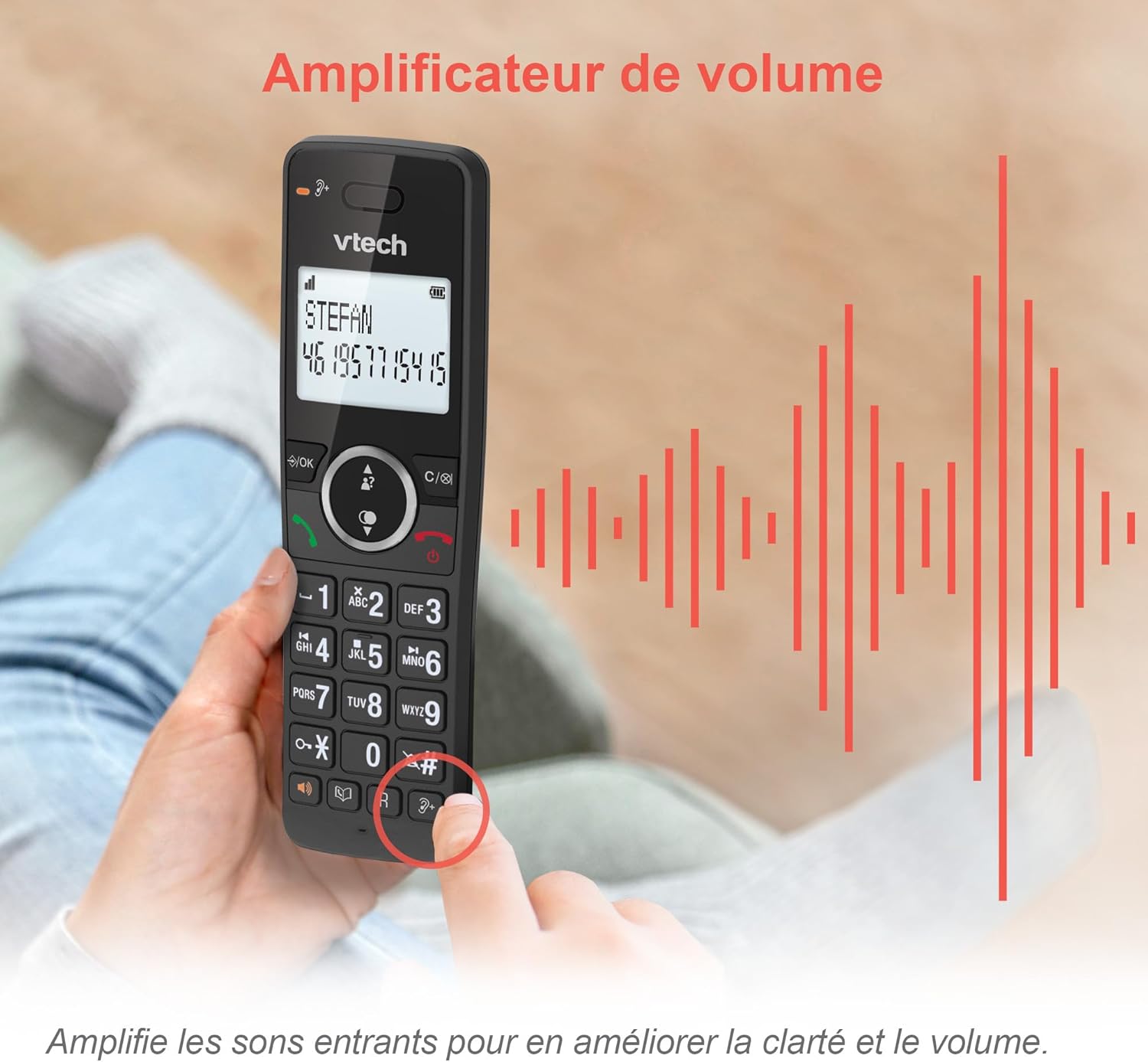
Image: A hand holding the VTech ES2051 handset, with graphic sound waves emanating from the earpiece, illustrating the volume amplification feature.
Conference Function
The conference function allows multiple users to participate in a single conversation. You can set up a three-way conference call with two internal callers (handsets) and one external caller.
- Iniciando uma teleconferência: Refer to the detailed instructions in the full manual for specific steps on how to add a third party to an ongoing call.

Image: Three people engaged in a conversation, visually representing the three-way conference call capability of the VTech ES2051 phone system.
Função Intercomunicador
The intercom feature allows you to communicate between handsets within your home without using the landline. This is useful for calling family members in different rooms.
- Usando o intercomunicador: Pressione o INTERFONE button (if available) or access the intercom function through the handset menu, then select the desired handset to call.
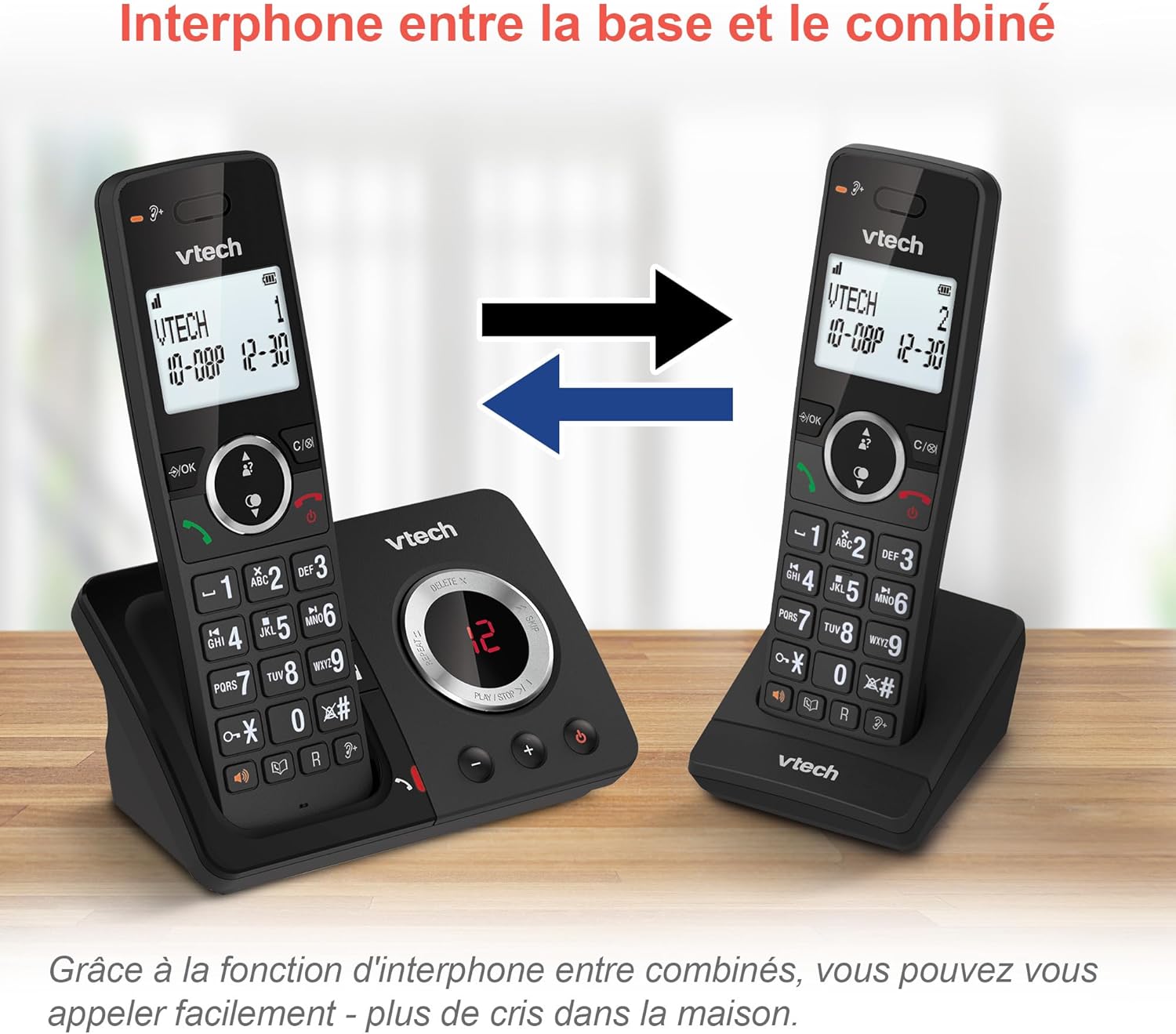
Image: A diagram showing two VTech ES2051 handsets with arrows indicating communication between them, illustrating the intercom feature.
Phonebook and Call Features
The phone includes a 100-name and number phonebook, 8 speed dial keys, and a backlit screen and keypad for easy visibility.
- Armazenando contatos: Navigate to the phonebook menu to add, edit, or delete contacts.
- Discagem rápida: Assign frequently called numbers to the 8 speed dial keys for quick access.
- Registro de identificação de chamadas: Review the last 20 incoming calls with Caller ID information.
- Remarcação: Access the list of the last 10 dialed numbers for quick redialing.

Imagem: Uma colagem de imagens mostrandoasing various VTech ES2051 phone features, including the 100-entry phonebook, call display, redial function, and an 18-hour talk time battery life indicator.
Modo Eco
The ECO mode automatically adjusts and minimizes the radio frequency power based on the distance between the handset and the base unit. This feature helps conserve energy and reduce power consumption.
Manutenção
Limpando o telefone
The VTech ES2051 is made with antibacterial plastic and features a seamless, easy-to-clean design. To clean your phone:
- Unplug the base unit from the wall outlet and telephone line.
- Limpe as superfícies do telefone com um pano macio e seco.amp pano. Não use produtos de limpeza líquidos ou aerosóis.
- Ensure the phone is completely dry before plugging it back in.
Cuidados com a bateria
- Use only the supplied rechargeable NiMH AAA batteries.
- Não descarte as pilhas no fogo.
- Se o telefone não for usado por um longo período, remova as baterias para evitar vazamentos.
Solução de problemas
If you experience any issues with your VTech ES2051 phone, try the following troubleshooting steps:
| Problema | Solução |
|---|---|
| Sem tom de discagem | Certifique-se de que o cabo da linha telefônica esteja firmemente conectado tanto à unidade base quanto à tomada de parede. Verifique se outros telefones na mesma linha estão funcionando. |
| Não consigo fazer nem receber chamadas. | Check the power connection to the base unit. Ensure the handset batteries are charged. If using a DSL service, you may need a DSL filter. |
| Handset displays "Out of Range" or "No Power at Base" | Move the handset closer to the base unit. Ensure the base unit's power adapter is securely plugged in. |
| A secretária eletrônica não está gravando mensagens. | Check if the answering machine is turned ON. Ensure there is enough recording time available (max 30 minutes). |
| Qualidade de áudio ruim ou estática | Aproxime o aparelho da base. Evite colocar a base perto de outros dispositivos eletrônicos (por exemplo, micro-ondas, roteadores Wi-Fi) que possam causar interferência. |
If the problem persists after trying these steps, please refer to the VTech support webPara obter mais assistência, visite o site ou entre em contato com o serviço de atendimento ao cliente.
Especificações
| Recurso | Detalhe |
|---|---|
| Marca | VTech |
| Número do modelo | ES2051 |
| Cor | preto |
| Tipo de telefone | Sem fio |
| Tipo de sistema de atendimento | Digital |
| Tempo de gravação da secretária eletrônica | Até 30 minutos |
| Dispositivos compatíveis | Landlines, Answering Machine |
| Baterias | 4 AAA - included |
| Composição da Bateria | NiMH |
| Fonte de energia | Alimentado por bateria |
| Material | Plástico (antibacteriano) |
| Tipo de discador | Teclado simples |
| Dimensões do item (C x L x A) | 18.3 x 13.5 x 11 centímetros |
| País de origem | China |
Garantia e Suporte
Os produtos VTech são fabricados de acordo com altos padrões de qualidade. Para obter informações sobre a cobertura da garantia, consulte o certificado de garantia incluído com o seu produto ou visite o site oficial da VTech. website da sua região.
For technical support, frequently asked questions, or to download the full user manual, please visit the VTech support section online or contact their customer service helpline. Contact details can typically be found on the VTech website ou na embalagem do produto.


