1. Terminadoview
1.1 Descrição do produto
The PNI GreenHouse SC1800C PRO Solar Inverter is a central component for small off-grid solar systems, suitable for areas with or without grid electricity. It provides a continuous output of 3000W with a pure sine wave, making it suitable for various household lighting installations and other small electronic motors, including refrigerators, pumps, tools, and charging devices for phones, laptops, and TVs.
1.2 Principais Características
- Maximum photovoltaic panel input power: 2000 W.
- Vol máximo de entrada DCtage from photovoltaic panels: 30 - 120 VDC (Vmp).
- Maximum solar charge current: 30 A input from panels, 60 A output to batteries.
- Solar charging efficiency: 98%.
- MPPT solar charger type.
- Vol. Nominal de saídatage: 230 V.
- Rated output power: 3000 W (under ideal conditions with proportional battery count and 100% charged batteries).
- Maximum apparent power: 6000 VA (peak, 0.5 seconds under ideal conditions).
- Volume de saídatage waveform: Pure sine wave.
- Output signal frequency: 50, 60 Hz.
- Vol de entradatage: 230 V CA.
- Grid connection for backup.
- Compatible with 24V batteries: AGM, lead-acid, gel, flooded lithium-ion.
- Minimum battery start voltage: 23 V (cold start voltage)
- Integrated high-frequency inverter type (switching).
- Inverter efficiency: 90% ~ 93% (100% charged battery).
- Typical transfer time: 10 ms (UPS, VDE) 20 ms (APL).
- Line mode efficiency: > 95% (rated R load, fully charged battery).
- Hybrid operating modes: SBU – Solar/Battery/Utility, Solar Utility (UPS).
- AC charge voltage: 230 V.
- Maximum AC charge current: 30 A.
- Automatic switching: Solar - Batteries - Grid.
- Função de economia de energia.
- Multiple protections.
- Visor multifuncional.
- Dedicated menu for advanced settings.
- Monitoring with PC software (USB cable included).
- Remote monitoring from mobile/PC (with optional WiFi USB dongle).
1.3 Conteúdo da embalagem
- PNI GreenHouse SC1800C PRO Solar Inverter
- Cabo USB
- Manual do usuário
- PNI Smart Dongle-WLAN (for WiFi monitoring)
2. Informações de segurança
Leia atentamente todas as instruções e avisos antes da instalação e operação. O não cumprimento destas instruções pode resultar em choque elétrico, incêndio ou ferimentos graves.
- Pessoal qualificado: A instalação e manutenção devem ser realizadas por pessoal qualificado.
- Risco de choque elétrico: Este dispositivo opera com alta tensão.tagNão abra o casing unless specifically instructed.
- Segurança da bateria: Batteries can produce explosive gases. Ensure proper ventilation. Do not smoke or allow sparks or flames near batteries. Wear eye protection.
- Ventilação adequada: Install the inverter in a well-ventilated area to prevent overheating.
- Condições ambientais: Avoid exposure to rain, snow, spray, or any liquids. Operate within the specified temperature range (-26 °C to 80 °C).
- Aterramento: Certifique-se de que o inversor esteja devidamente aterrado de acordo com as normas elétricas locais.
- Desconecte a energia: Always disconnect all power sources (solar, battery, AC grid) before performing any wiring or maintenance.
3. Componentes do produto
3.1 PNI GreenHouse SC1800C PRO Solar Inverter

Figura 3.1: Frente view of the PNI GreenHouse SC1800C PRO Solar Inverter, showing the display and control buttons.

Figura 3.2: Traseira view of the PNI GreenHouse SC1800C PRO Solar Inverter, illustrating the various connection ports for solar panels, batteries, AC input, and AC output.
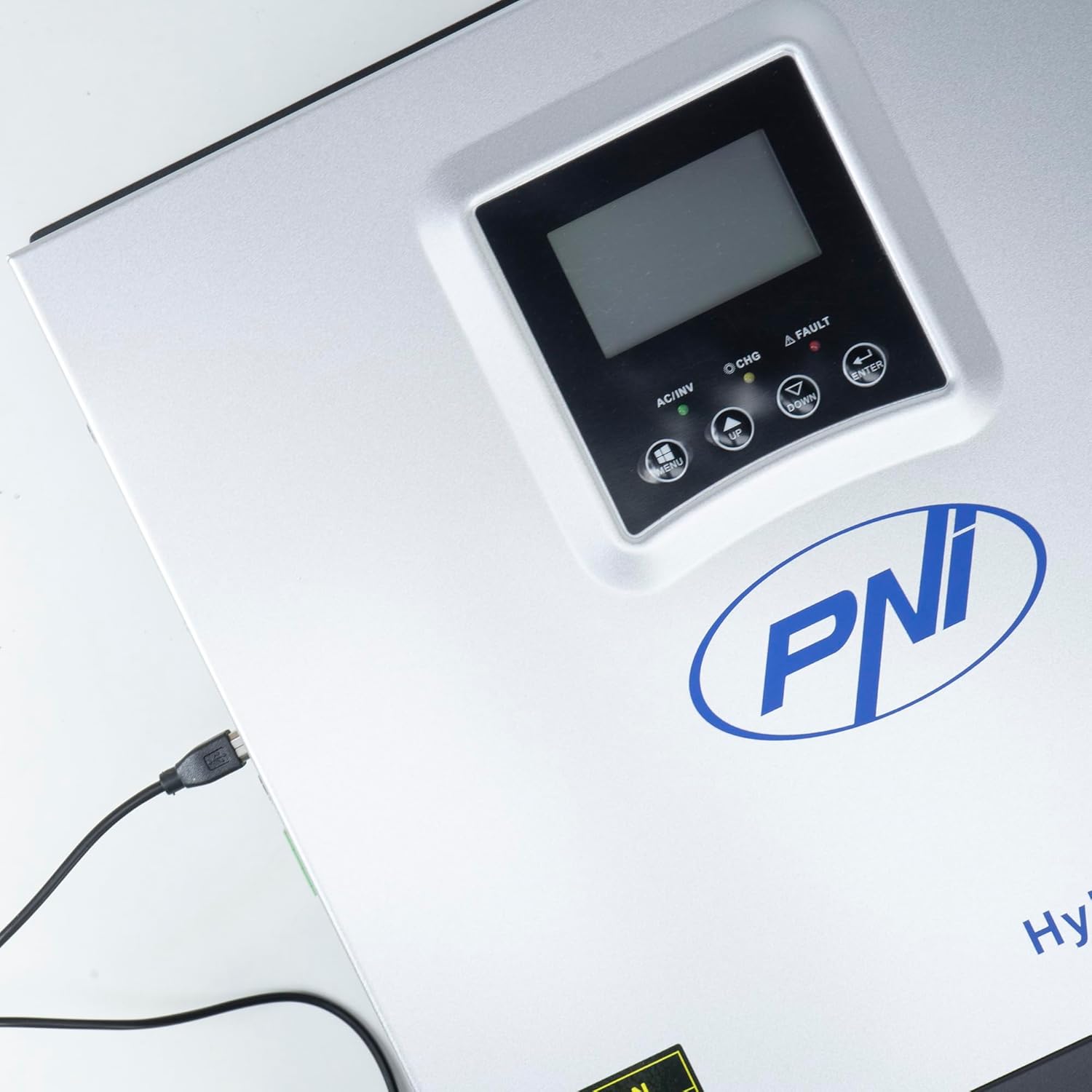
Figure 3.3: Close-up of the USB connection port on the inverter, used for PC monitoring.
3.2 PNI Smart Dongle-WLAN (Optional)

Figure 3.4: The PNI Smart Dongle-WLAN, an optional accessory for remote WiFi monitoring of the inverter.

Figure 3.5: The PNI Smart Dongle-WLAN connected to the inverter's dedicated port for WiFi communication.
4. Instalação e configuração
4.1 Montagem na parede
The inverter is designed for wall mounting. Choose a location that is dry, well-ventilated, and protected from direct sunlight and moisture. Ensure sufficient clearance around the unit for proper airflow and heat dissipation. Use appropriate mounting hardware for your wall type.
4.2 Diagrama de Conexão do Sistema

Figure 4.1: Basic application diagram showing the connections between solar panels, utility grid, generator, inverter, battery, and home loads. Note: Generator, PV modules, WiFi module, and battery are not included with the inverter unless specified.
4.3 Conexões de Fiação
Follow the diagram above and the labels on the inverter for correct wiring. Ensure all connections are secure and properly insulated. It is highly recommended that a qualified electrician performs all wiring.
- Conexão do painel solar: Connect your solar panels to the designated PV input terminals. Observe correct polarity (positive to positive, negative to negative). The maximum DC input voltage é 120 VDC.
- Conexão da bateria: Connect the 24V battery bank to the battery terminals. Ensure correct polarity. The inverter supports AGM, lead-acid, gel, and flooded lithium-ion batteries.
- Entrada CA (Rede/Gerador): Connect the AC utility grid or a generator to the AC input terminals. This provides backup power and can charge batteries.
- AC Output (Loads): Conecte os aparelhos elétricos da sua casa aos terminais de saída CA.
4.4 Inicialização
After all connections are made and verified:
- Ligue o disjuntor da bateria.
- Turn on the solar panel breaker (if applicable).
- Ligue o disjuntor de entrada CA (se estiver conectado à rede elétrica/gerador).
- Turn on the inverter's power switch.
- Observe the display for status indicators and initial readings.
5. Modos de operação
The PNI GreenHouse SC1800C PRO offers intelligent energy management with several configurable operating modes:
- Solar Priority Mode (SBU): In this mode, the inverter prioritizes power consumption from solar energy. If solar power is insufficient, it will draw from batteries. The utility grid acts as a backup.
- Modo de prioridade da bateria: The inverter prioritizes drawing power from the batteries. Solar energy will charge the batteries. The utility grid is used only when battery voltage cai abaixo de um limite predefinido.
- Utility Priority Mode (UPS): This mode prioritizes power from the utility grid. Solar energy will charge the batteries. The inverter switches to battery power only when the grid is unavailable, functioning as an Uninterruptible Power Supply (UPS).
These modes can be configured via the inverter's multifunction display and dedicated menu for advanced settings.
5.1 Monitoramento
The inverter supports monitoring through:
- PC Software (USB): Connect the inverter to a PC using the provided USB cable and dedicated software for detailed monitoring and analysis of parameters.
- Remote Monitoring (WiFi - Optional): With the optional PNI Smart Dongle-WLAN, you can monitor the inverter remotely via a mobile application or web interface.
6. Manutenção
Regular maintenance ensures optimal performance and longevity of your inverter. Always disconnect all power sources before performing any maintenance.
- Limpeza: Limpe periodicamente a parte externa do inversor com um pano seco. Certifique-se de que as aberturas de ventilação estejam livres de poeira e detritos. Não utilize produtos de limpeza líquidos.
- Verificações de conexão: Annually inspect all wiring connections (solar, battery, AC input/output) for tightness and signs of corrosion. Tighten any loose connections.
- Inspeção da bateria: Se estiver usando baterias de chumbo-ácido, verifique os níveis de eletrólito e a condição dos terminais conforme as instruções do fabricante da bateria.
- Verificação ambiental: Assegure-se de que o ambiente de instalação permaneça dentro das faixas de temperatura e umidade especificadas.
7. Solução De Problemas
Esta seção fornece orientações para problemas comuns. Para problemas complexos, entre em contato com pessoal de serviço qualificado.
| Problema/Alarme | Possível causa | Solução |
|---|---|---|
| Alarme de bateria fraca | Vol da bateriatage está abaixo do baixo-voltage warning threshold. | Check battery charge level. Ensure solar panels are producing power or AC input is connected for charging. Reduce load. |
| Battery Disconnected Alarm | Battery cables are loose or disconnected. | Safely disconnect all power sources and check battery connections. Reconnect securely. |
| Sobrevoltage Alarme | Vol de entradatage (PV or AC) exceeds safe limits. | Verify solar panel array voltage or AC input voltage. Ensure it is within the inverter's specifications. |
| Proteção contra sobrecarga CA | Connected loads exceed the inverter's output capacity. | Reduce the total load connected to the inverter. Check individual appliance power consumption. |
| Sem Potência de Saída | Inverter off, low battery, overload, or fault. | Check if the inverter is powered on. Verify battery voltage. Check for overload or fault codes on the display. |
8. Especificações
| Recurso | Especificação |
|---|---|
| Marca | PNI |
| Número do modelo | PNI-SC1800P-DG |
| Potência nominal | 3000 W |
| Potência de pico | 6000 VA (0.5 seconds) |
| Bateria Voltage | 24 V |
| Potência máxima de entrada PV | 2000 W |
| Máx. PV Input Voltage (Vmp) | 30 - 120 VCC |
| MPPT Solar Charge Current | 60 A (output to batteries) |
| Vol de entrada ACtage | 230 V |
| Vol de saída ACtage | 230 V |
| Forma de onda de saída | Pure Sine Wave |
| Frequência de saída | 50/60 Hz |
| Corrente máxima de carga CA | 30 UMA |
| Eficiência do inversor | 90% ~ 93% |
| Temperatura de operação | -26 °C a 80 °C |
| Dimensões (C x L x A) | 29 x 12 x 35 cm |
| Peso | 6.9 kg |
| Consumo em espera | ≈ 25 W (Energy saving mode ≈ 12.5 W) |
| Comunicação | USB, Optional WiFi Dongle |
9. Garantia e Suporte
Para informações sobre garantia e suporte técnico, consulte a documentação fornecida com sua compra ou entre em contato com o revendedor. Guarde o comprovante de compra para eventuais solicitações de garantia.


