BRAZE-6 Portable Bluetooth Speaker User Manual
Model: BRAZE-6-BK | Brand: TOPTECH
1. Introdução
The TOPTECH BRAZE-6 is a portable wireless Bluetooth speaker system designed to deliver powerful sound with an integrated LED light show. Featuring dual 3-inch woofers, this rechargeable speaker is suitable for various indoor and outdoor settings, including parties, gatherings, and personal listening.
It supports multiple audio input sources, including Bluetooth, USB, TF card, FM radio, and AUX, and offers True Wireless Stereo (TWS) functionality for enhanced audio experience. The built-in rechargeable battery provides extended standby time, ensuring your music accompanies you for longer durations.

Imagem 1.1: Frente view of the BRAZE-6 Portable Bluetooth Speaker, showcasing its dual woofers and multi-color LED lighting.
2. Conteúdo da embalagem
Verifique se todos os itens listados abaixo estão incluídos no seu pacote:
- BRAZE-6 Portable Bluetooth Speaker
- Controle remoto
- Microfone com fio
- Adaptador de energia
- Manual do usuário (este documento)
- Cartão de garantia
3. Produto acabadoview
Familiarize yourself with the main components and controls of your BRAZE-6 speaker.

Imagem 3.1: Lateral view of the BRAZE-6 speaker, highlighting the top-mounted control buttons.
Painel de controle (superior)
- Botão de energia: Liga/desliga o alto-falante.
- Botão de modo: Switches between Bluetooth, FM Radio, AUX, USB, and TF card modes.
- Botão Reproduzir/Pausar: Reproduz ou pausa a reprodução de áudio.
- Botões de faixa anterior/próxima: Navega pelas faixas ou estações de rádio FM.
- Controle de volume: Ajusta o volume principal.
- Botão de luz LED: Activates or changes the LED light patterns.
Input Ports (Rear/Side)
- Porta USB: Para pen drives USB.
- Slot para cartão TF: Para cartões TF (MicroSD).
- Entrada AUX: Para conectar dispositivos de áudio externos através de um cabo de áudio de 3.5 mm.
- Entrada de microfone: Para conectar o microfone com fio.
- DC 5V Entrada: Para carregar o alto-falante.
4. Introdução
4.1 Carregando o alto-falante
Before first use, fully charge the speaker for optimal battery life.
- Connect the provided power adapter to the DC 5V input port on the speaker.
- Conecte o adaptador a uma tomada de parede padrão.
- A luz indicadora de carregamento acenderá (a cor pode variar) para mostrar que o carregamento está em andamento.
- Once fully charged, the indicator light will change or turn off. Disconnect the adapter.
Note: The speaker can be used while charging, but it is recommended to fully charge it before initial use.
4.2 Ligar/Desligar
- Para ligar, pressione e segure o Botão de energia until the speaker activates and you hear an audible prompt.
- Para desligar, pressione e segure o Botão de energia novamente até que o alto-falante desligue.
5. Instruções de operação
5.1 Conectividade Bluetooth
Pair your BRAZE-6 speaker with a Bluetooth-enabled device (e.g., smartphone, tablet, computer).
- Certifique-se de que a caixa de som esteja ligada e no modo Bluetooth. Caso contrário, pressione o botão. Botão de modo until you hear the "Bluetooth mode" prompt. The LED lights may flash to indicate pairing mode.
- No seu dispositivo, ative o Bluetooth e procure por dispositivos disponíveis.
- Select "BRAZE-6" from the list of found devices.
- Once paired, you will hear a confirmation sound, and the LED lights may change their pattern.
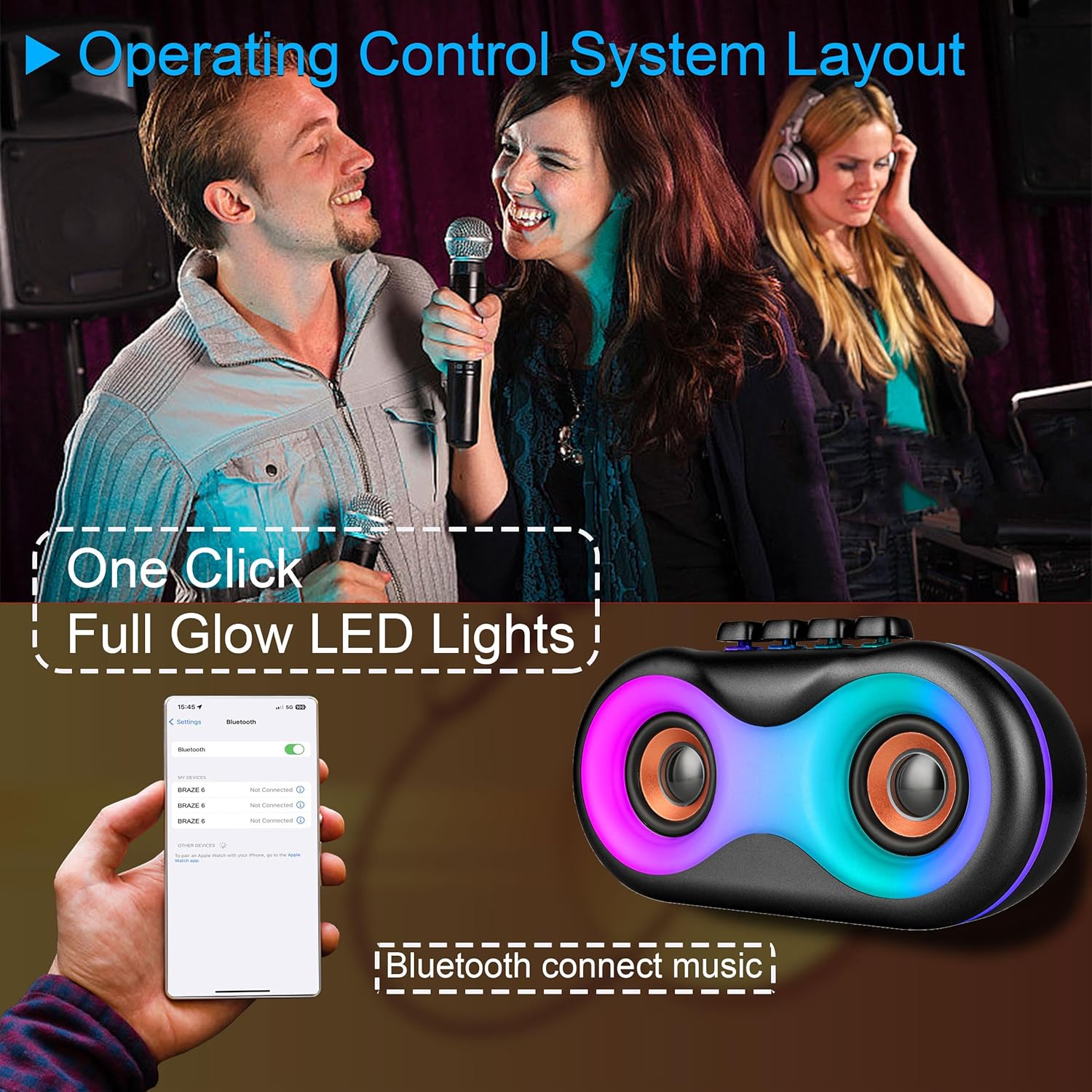
Image 5.1: Illustration of Bluetooth pairing process with a smartphone, showing the speaker's LED lights active.
Note: The speaker supports BLE agreements for stable wireless audio streaming up to 10 meters (33 feet).
5.2 Playing Audio from Various Sources
The BRAZE-6 speaker supports multiple input methods:

Image 5.2: Visual representation of supported input types: USB, Bluetooth, FM Radio, TWS, AUX, and TF Card.
- USB/Cartão TF: Insert a USB flash drive or TF card into the respective port. The speaker will automatically switch to the correct mode and begin playing audio files.
- Entrada AUX: Connect an external audio device (e.g., MP3 player, laptop) to the AUX port using a 3.5mm audio cable. Press the Botão de modo para selecionar o modo AUX.
- Rádio FM: Pressione o Botão de modo to switch to FM Radio mode. Use the Previous/Next Track buttons to scan for stations.
5.3 LED Light Show
The BRAZE-6 features dynamic multi-color LED lights that enhance your listening experience.
- Pressione o Botão de luz LED on the control panel to activate the light show.
- Press the button again to cycle through different light patterns or turn the lights off.

Image 5.3: The BRAZE-6 speaker with its powerful stereo sound output and integrated lighting effects.
5.4 Wired Microphone Usage
Connect the included wired microphone for karaoke or public address functions.
- Plug the microphone cable into the dedicated Microphone Input port on the speaker.
- Adjust the microphone volume using the speaker's controls or the microphone's built-in controls if available.
5.5 Função True Wireless Stereo (TWS)
The TWS function allows you to pair two BRAZE-6 speakers together for a true stereo sound experience.
- Ensure both BRAZE-6 speakers are powered on and in Bluetooth pairing mode (not connected to any device).
- Em uma das caixas de som (esta será a caixa de som principal), pressione e segure o botão Botão TWS (if available, or a combination of buttons as per specific model instructions, typically the Play/Pause button).
- The speakers will attempt to connect to each other. Once connected, you will hear a confirmation sound.
- Now, connect your Bluetooth device to the primary speaker. Audio will play through both speakers in stereo.
6. Cuidados e Manutenção
6.1 Limpeza
- Wipe the speaker's exterior with a soft, dry, or slightly damp pano.
- Do not use abrasive cleaners, alcohol, benzene, or other volatile solvents, as they may damage the surface.
- Ensure no liquid enters the speaker's ports or openings.
6.2 Armazenamento
- Guarde a caixa de som em local fresco e seco, longe da luz solar direta e de temperaturas extremas.
- Evite armazenar em ambientes empoeirados ou úmidos.
6.3 Cuidados com a bateria
- Para prolongar a vida útil da bateria, evite descarregá-la completamente com frequência.
- If the speaker will not be used for an extended period, charge it to approximately 50% every 3-6 months.
- Não exponha a bateria a calor excessivo, como luz solar direta ou fogo.
7. Solução De Problemas
If you encounter issues with your BRAZE-6 speaker, refer to the following common problems and solutions:
| Problema | Possível causa | Solução |
|---|---|---|
| A caixa de som não liga. | Bateria fraca; Botão liga/desliga não pressionado corretamente. | Charge the speaker; Press and hold the Power button for a few seconds. |
| Nenhum som. | Volume muito baixo; Modo incorreto selecionado; Dispositivo não conectado corretamente. | Increase volume; Press Mode button to select correct input; Reconnect device. |
| O emparelhamento Bluetooth falha. | O alto-falante não está em modo de emparelhamento; Bluetooth do dispositivo desligado; Muito longe do alto-falante. | Ensure speaker is in Bluetooth mode; Turn on device Bluetooth; Move device closer (within 10m). |
| As luzes LED não estão funcionando. | LED light feature turned off. | Press the LED Light Button to activate. |
| Recepção de rádio FM ruim. | Sinal fraco; Interferência. | Adjust speaker position; Extend antenna if available. |
8. Especificações técnicas
Detailed specifications for the BRAZE-6 Portable Bluetooth Speaker:

Image 8.1: Product dimensions of the BRAZE-6 speaker.
| Recurso | Especificação |
|---|---|
| Nome do modelo | BRAZE-6-BK |
| Marca | TOPTECH |
| Tipo de alto-falante | Woofer (Duplo de 3 polegadas) |
| Tecnologia de Conectividade | Bluetooth, Auxiliar, USB, Sem fio |
| Protocolo de conectividade | Bluetooth |
| Recurso especial | Luz LED |
| Fonte de energia | Alimentado por bateria |
| Dimensões do produto (P x L x A) | 18.9" x 13.2" x 22.83" |
| Cor | Preto |
| Tipo de controlador | Botão |
| Usos recomendados | Para smartphones ou tablets |
| Dispositivos compatíveis | Smartphone |
| É à prova d'água | verdadeiro |
| Número de itens | 1 |
| UPC | 755824425996 |
| Fabricante | Áudio de alta tecnologia |
9. Garantia e Suporte
Your BRAZE-6 Portable Bluetooth Speaker comes with a warranty. Please refer to the included warranty card for specific terms and conditions, including coverage period and claim procedures.
For technical support, troubleshooting assistance beyond this manual, or warranty inquiries, please contact TOPTECH customer service through the following channels:
- Suporte online: Visit the official TOPTECH website or Amazon store page for contact information.
- Suporte por e-mail: Consulte o seu cartão de garantia ou a embalagem do produto para obter o endereço de e-mail do serviço de atendimento ao cliente.
For more information about TOPTECH products, you can visit the Loja TOPTECH na Amazon.