1. Introdução
This manual provides essential information for the proper use and maintenance of your Realme 12 Plus 5G RMX3867 smartphone. Please read this guide thoroughly before operating your device to ensure optimal performance and longevity. Keep this manual for future reference.
2. Lista de embalagens
Upon opening the package, verify that all items listed below are present and in good condition. If any items are missing or damaged, please contact your retailer.

Image: Contents of the Realme 12 Plus 5G RMX3867 retail box. Includes the phone, phone case, quick guide, detachable camera decoration replacement guide, safety guide, screwdriver, two screws, USB cable, and SIM card ejector.
- Realme 12 Plus 5G RMX3867 Smartphone
- Capa de telefone
- Guia rápido
- Detachable Camera Decoration Replacement Guide
- Guia de Segurança
- Chave de fenda
- Parafusos (x2)
- Cabo USB
- Ejetor de cartão SIM
Note: Some accessories, such as the detachable camera decoration, may come in a separate package or require assembly. Refer to the specific guides provided.

Image: Contents of the Detachable Camera Decoration Protective Cover Set. Includes a packaging box, detachable deco case (x1), two screws, and a phone case (x1).
3. Configuração
3.1. Instalação do cartão SIM
- Localize a bandeja do cartão SIM na lateral do seu dispositivo.
- Insert the provided SIM card ejector tool into the small hole next to the tray.
- Empurre delicadamente até que a bandeja se solte.
- Place your Nano-SIM card(s) into the tray with the gold contacts facing down. Ensure the card is correctly oriented according to the tray's diagram.
- Reinsira cuidadosamente a bandeja no telefone até que ela se encaixe no lugar.

Imagem: Parte inferior view of the Realme 12 Plus 5G RMX3867, showing the USB-C port, speaker grille, microphone, and SIM card tray slot.
3.2. Ligar / desligar
- Para ligar: Press and hold the Power button (located on the right side of the device) until the realme logo appears.
- Para desligar: Mantenha pressionado o botão Liga/Desliga até que o menu de opções de energia apareça. Toque em "Desligar" e confirme.
- Reiniciar: Press and hold the Power button until the power options menu appears. Tap "Restart" and confirm.

Imagem: Lado view of the Realme 12 Plus 5G RMX3867, highlighting the power button and volume rocker on the right edge of the device.
3.3. Configuração inicial
The first time you power on your device, you will be guided through the initial setup process. This includes:
- Selecione o seu idioma.
- Conectando-se a uma rede Wi-Fi.
- Configurando sua conta do Google.
- Configuring screen lock (PIN, pattern, password, fingerprint, face unlock).
- Transferência de dados de um dispositivo antigo (opcional).
4. Operando seu dispositivo
4.1. Navegação Básica
- Gestos de toque: Your device supports various touch gestures for navigation, including tap, swipe, pinch-to-zoom, and long press.
- Tela inicial: O centro de controle para seus aplicativos e widgets. Deslize para a esquerda ou para a direita para acessar telas adicionais.
- Painel de Notificação: Deslize o dedo de cima para baixo na tela para acessar as notificações e as configurações rápidas.
- Gaveta de aplicativos: Deslize de baixo para cima na tela para view todos os aplicativos instalados.

Imagem: Frente view of the Realme 12 Plus 5G RMX3867, displaying its large screen with a punch-hole camera cutout at the top center.
4.2. Funções da câmera
The Realme 12 Plus 5G RMX3867 features a powerful 200MP main camera. To access the camera, tap the Camera icon on your home screen or app drawer.
- Modos de foto: Switch between various modes like Photo, Portrait, Night, Pro, and more.
- Gravação de vídeo: Grave vídeos de alta qualidade. Ajuste a resolução e a taxa de quadros nas configurações.
- Configurações: Access camera settings to customize features such as HDR, AI enhancements, and grid lines.
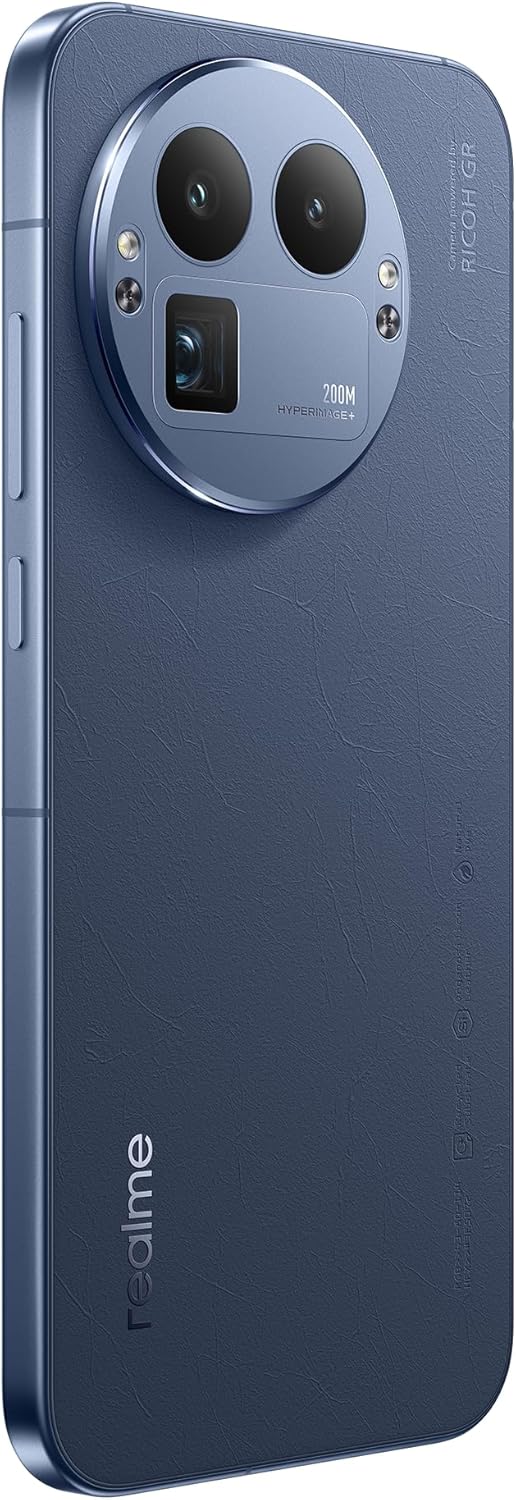
Imagem: Traseira view of the Realme 12 Plus 5G RMX3867, showcasing the prominent circular camera module with multiple lenses and a "200M HYPERIMAGE+" label.
4.3. Conectividade
- Rede 5G: Your device supports 5G connectivity for faster mobile data speeds. Ensure your SIM card and plan support 5G.
- Wi-fi: Connect to wireless networks for internet access. Go to Settings > Wi-Fi to manage connections.
- Bluetooth: Pair with Bluetooth devices like headphones, speakers, or car systems. Go to Settings > Bluetooth.
- USB-C: Utilize a porta USB-C para carregar e transferir dados.
4.4. Recursos de segurança
- Sensor de impressão digital: Unlock your device quickly and securely using the in-display fingerprint sensor. Register your fingerprints in Settings > Security & Privacy > Fingerprint.
- Desbloqueio facial: Use facial recognition to unlock your phone. Set up Face Unlock in Settings > Security & Privacy > Face.
- Bloqueio de tela: Choose from PIN, pattern, or password for basic screen security.
5. Manutenção
5.1. Limpando seu dispositivo
- Use um pano macio e sem fiapos para limpar a tela e a carcaça do telefone.
- Evite usar produtos químicos agressivos, materiais abrasivos ou sprays aerossóis.
- Para manchas persistentes, aplique ligeiramenteampLimpe o pano com água ou um produto de limpeza específico para telas eletrônicas.
5.2. Atualizações de software
Verifique e instale regularmente as atualizações de software para garantir que seu dispositivo tenha os recursos mais recentes, patches de segurança e melhorias de desempenho. Acesse Configurações > Sobre o dispositivo > Atualizado para verificar se há atualizações.
5.3. Cuidados com a bateria
- Evite temperaturas extremas, pois elas podem reduzir a vida útil da bateria.
- Use only the original charger and cable or certified compatible accessories.
- Do not let the battery drain completely frequently. It is generally recommended to keep the battery level between 20% and 80%.
6. Solução De Problemas
6.1. Problemas e soluções comuns
| Emitir | Solução |
|---|---|
| Dispositivo não liga | Certifique-se de que a bateria esteja carregada. Pressione e segure o botão Liga/Desliga por pelo menos 10 a 15 segundos. |
| Aplicativos travando ou congelando | Feche o aplicativo e abra-o novamente. Limpe o cache do aplicativo (Configurações > Aplicativos > [Nome do aplicativo] > Armazenamento > Limpar cache). Reinicie o dispositivo. |
| Baixa duração da bateria | Check background app usage. Reduce screen brightness. Disable unnecessary features like GPS or Bluetooth when not in use. |
| Não é possível conectar ao Wi-Fi | Restart your router and phone. Forget the network and reconnect. Ensure Wi-Fi is enabled on your device. |
6.2. Redefinição de fábrica
Se você continuar enfrentando problemas persistentes, uma restauração de fábrica pode resolvê-los. Aviso: A restauração de fábrica apagará todos os dados do seu telefone. Faça backup dos seus dados importantes antes de prosseguir.
- Acesse Configurações > Sistema > Opções de redefinição.
- Toque em "Apagar todos os dados (restaurar para as configurações de fábrica)".
- Confirme sua decisão e digite seu PIN/senha, se solicitado.
- O dispositivo será reiniciado e o processo de reinicialização começará.
7. Especificações
Below are the key technical specifications for the Realme 12 Plus 5G RMX3867:
| Recurso | Detalhe |
|---|---|
| Marca | eu de verdade |
| Nome do modelo | Realme 12 Plus 5G (RMX3867) |
| Sistema operacional | Andróide |
| Capacidade de armazenamento de memória | 256 GB |
| Tamanho da memória RAM instalada | 12 GB |
| Modelo de CPU | Boca-de-leão |
| Velocidade da CPU | 1200 MHz |
| Tamanho da tela | 6.4 polegadas |
| Tipo de exibição | AMOLED |
| Resolução | 1440 x 2560 |
| Resolução de vídeo eficaz | 200 MP |
| Tecnologia Celular | 5G |
| Capacidade da bateria | 7000 Miliamp Horas |
| Vida média da bateria | 21 horas |
| Entrada de Interface Humana | Tela sensível ao toque |
| Número do modelo do item | GT 8 Pro (Note: Product title is Realme 12 Plus 5G RMX3867) |
Note: Some specifications may vary slightly based on region or specific product variant. The model number in the product title is RMX3867, while some specifications list 'GT 8 Pro'. Please refer to your device's packaging for the most accurate model information.
8. Garantia e Suporte
Your Realme 12 Plus 5G RMX3867 device comes with a limited warranty. Please refer to the warranty card included in your product packaging for detailed terms and conditions, including warranty period and coverage.
Para suporte técnico, assistência ou outras dúvidas, visite o site oficial de suporte da realme. website or contact their customer service. Contact information can typically be found on the realme official website or in the "Safety Guide" included with your device.
Guarde o comprovante de compra para reclamações de garantia.