1. Introdução
Thank you for choosing the SKMEI 2209 Digital Sport Watch. This manual provides detailed instructions for the proper setup, operation, and maintenance of your watch. Please read this manual thoroughly to ensure optimal performance and longevity of your device.

Figura 1.1: Frente view of the SKMEI 2209 Digital Sport Watch, displaying time, date, compass, and pedometer functions.
2. Produto acabadoview
2.1 Principais Características
- Multi-Functional Fitness Tracker: Integrated pedometer, calorie counter, and distance tracker.
- Construção durável: Features a crystal glass face, ABS + zinc alloy case, and a comfortable silica gel band.
- Resistência à água: Rated for 50 meters, suitable for swimming and water sports.
- Visor digital claro: Large, easy-to-read display with EL backlight for low-light conditions.
- Funções essenciais: Includes countdown timer, 12/24-hour format, dual-time display, and alarm.
- Bússola integrada: Fornece orientação direcional.
2.2 Componentes do relógio
The SKMEI 2209 watch features several buttons for navigation and function control:
- Botão LIGHT: Ativa a retroiluminação EL.
- Botão MODE: Cycles through different modes (Time, Pedometer, Chronograph, Countdown Timer, Alarm, Dual Time).
- Botão de início: Used to start/stop functions in Chronograph and Countdown Timer modes, and to adjust settings.
- Botão de reset: Used to reset functions in Chronograph and Countdown Timer modes, and to adjust settings.
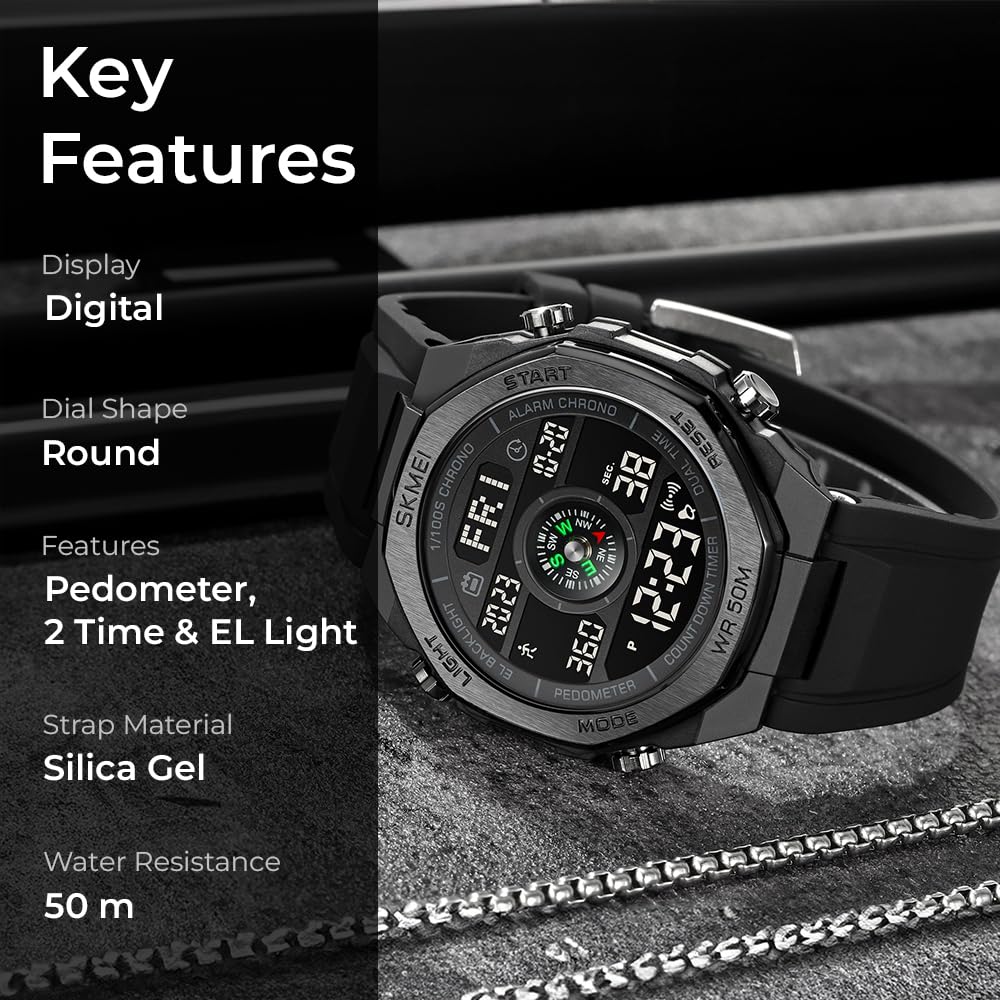
Figura 2.1: Diagram highlighting key features and button locations on the watch.
3. Configuração
3.1 Inicialização Inicial
Upon first use, the watch may require initial setup. If the display is blank, press any button to activate it. If the display remains blank, the battery may need replacement (refer to Maintenance section).
3.2 Configuração de hora e data
- No modo de exibição de hora, pressione e mantenha pressionado o MODO button until the seconds begin to flash. This indicates setting mode.
- Pressione o REINICIAR Botão para alternar entre as configurações: Segundos → Hora → Minuto → Ano → Mês → Dia → Formato de 12/24 horas.
- Use o COMEÇAR botão para ajustar a intensidade da intermitência.
- Assim que todas as configurações estiverem corretas, pressione o MODO botão para sair do modo de configuração.
3.3 Configurar alarme
- Pressione o MODO button repeatedly until you reach the Alarm mode (indicated by an alarm icon).
- Pressione e segure o COMEÇAR Pressione o botão até que o dígito da hora pisque.
- Use o REINICIAR botão para ajustar a hora.
- Pressione o COMEÇAR button to move to the minute setting, then use the REINICIAR botão para ajustar os minutos.
- Pressione o COMEÇAR button again to confirm and exit alarm setting.
- Para ativar/desativar o alarme, pressione o REINICIAR button in Alarm mode. An alarm icon will appear/disappear on the display.
4. Instruções de operação
4.1 Modo de Navegação
Pressione o MODO button to cycle through the following functions:
- Exibição de tempo
- Pedômetro
- Cronógrafo (Cronômetro)
- Contagem regressiva
- Alarme
- Tempo duplo
4.2 Função de pedômetro
The watch features a built-in pedometer to track your steps, distance, and calories burned.
- Navigate to Pedometer mode using the MODO botão.
- The display will show your current step count, distance, and estimated calories burned.
- Para redefinir os dados do pedômetro, pressione e segure o botão. REINICIAR botão no modo Pedômetro.

Figura 4.1: The watch displaying the step counter function.
4.3 Função Bússola
The integrated compass provides directional information. For accurate readings, ensure the watch is held horizontally and away from strong magnetic fields.
- Navigate to the Compass display mode (usually integrated into the main time display or a dedicated mode).
- Orient the watch horizontally. The compass needle on the display will indicate magnetic north.

Figura 4.2: The watch displaying the compass function, indicating direction.
4.4 Cronógrafo (Cronômetro)
- Navigate to Chronograph mode using the MODO botão.
- Imprensa COMEÇAR para começar a cronometrar.
- Imprensa COMEÇAR Novamente, para pausar a cronometragem.
- Imprensa REINICIAR Para zerar o cronômetro.
- Para registrar os tempos de volta, pressione REINICIAR while the stopwatch is running. The lap time will display briefly, and the stopwatch will continue timing in the background.
4.5 Temporizador de contagem regressiva
- Navigate to Countdown Timer mode using the MODO botão.
- Para definir o tempo de contagem regressiva, pressione e segure o botão. COMEÇAR button until the hour/minute digits flash.
- Use o REINICIAR button to adjust the flashing value (hours, then minutes, then seconds).
- Imprensa COMEÇAR para confirmar cada configuração.
- Once the time is set, press COMEÇAR para começar a contagem regressiva.
- Imprensa COMEÇAR again to pause the countdown.
- Imprensa REINICIAR to reset the timer to its initial set value.
4.6 Dual Time
The Dual Time function allows you to view um segundo fuso horário.
- Navigate to Dual Time mode using the MODO botão.
- Pressione e segure o COMEÇAR Pressione o botão até que o dígito da hora pisque.
- Use o REINICIAR botão para ajustar a hora.
- Pressione o COMEÇAR button to move to the minute setting, then use the REINICIAR botão para ajustar os minutos.
- Pressione o COMEÇAR button again to confirm and exit Dual Time setting.
4.7 Luz de fundo EL
Pressione o LUZ button to illuminate the display for a few seconds, improving visibility in dark conditions.

Figura 4.3: The watch display illuminated by the EL backlight.
5. Manutenção
5.1 Limpeza
Limpe o relógio com um pano macio e seco.amp cloth. Avoid using chemical cleaners, as they may damage the watch's finish or seals.
5.2 Resistência à água
The watch is water-resistant up to 50 meters (5 ATM). This means it is suitable for showering, swimming in shallow water, and general water sports. Do not press any buttons while the watch is submerged, as this can compromise the water seal. Avoid exposure to hot water or steam, which can damage the seals.

Figura 5.1: The watch demonstrating its 50-meter water resistance.
5.3 Substituição da bateria
The watch uses a CR2025 battery. When the display dims or functions become erratic, it may be time to replace the battery. Battery replacement should ideally be performed by a qualified watch technician to ensure the water resistance seal is maintained.

Figura 5.2: The back of the watch, indicating model number 2209 and battery type CR2025.
6. Solução De Problemas
| Problema | Possível causa | Solução |
|---|---|---|
| O visor do relógio está apagado ou com brilho reduzido. | Bateria fraca. | Substitua a bateria (CR2025). |
| O horário está incorreto. | Time not set correctly or reset. | Consulte a Seção 3.2 "Configurando a hora e a data" para redefinir a hora. |
| O pedômetro não está contando os passos corretamente. | Incorrect wear position, sensor obstruction, or calibration needed. | Ensure the watch is worn securely on the wrist. Reset pedometer data. |
| A bússola indica a direção incorreta. | Interference from magnetic fields, or watch not held horizontally. | Move away from electronic devices or metal objects. Hold the watch flat. |
| Água dentro do relógio. | Water resistance compromised (e.g., buttons pressed underwater, damaged seal). | Leve o relógio imediatamente a um técnico qualificado para inspeção e reparo. Não tente secá-lo você mesmo. |
7. Especificações
- Número do modelo: 2209
- Movimento: Quartz Digital
- Material da caixa: ABS + Liga de Zinco
- Material da banda: Gel de sílica
- Mostrar: Digital com retroiluminação EL
- Resistência à água: 50M (5 ATM)
- Tipo de Bateria: CR2025
- Diâmetro da caixa: 4.63 centímetros
- Espessura da caixa: 1.43 centímetros
- Band Width (Lug Width): 2.7 centímetros
- Peso do item: 69.3 g
- Funções: Time, Date, Day, Pedometer, Calories, Distance, Compass, Chronograph, Countdown Timer, Alarm, Dual Time, EL Backlight.

Figura 7.1: Watch dimensions including case height, width, and strap width.
8. Garantia e Suporte
Your SKMEI 2209 Digital Sport Watch comes with a limited warranty. Please refer to the warranty card included in your product packaging for specific terms and conditions. For technical support or warranty claims, please contact your retailer or the official SKMEI customer service.
Fabricante: SKMEI
País de origem: China


