Introdução
The Amazon Fire TV Soundbar Plus is a 3.1 channel all-in-one soundbar designed to enhance your home audio experience. It features integrated bass, clear dialogue, and supports advanced audio formats like Dolby Atmos and DTS:X, providing immersive sound for movies, music, and more. This manual provides detailed instructions for setting up, operating, maintaining, and troubleshooting your Fire TV Soundbar Plus.

Figura 1: Frente view of the Fire TV Soundbar Plus, highlighting its key audio technologies.
Configurar
Conteúdo da embalagem
Antes de começar, verifique se todos os itens estão presentes na caixa:
- Barra de som Fire TV Plus
- Controle remoto
- Cabo HDMI 2.0
- Cabo de alimentação AC
- 2 pilhas AAA
- Kit de montagem em parede
- Guia de início rápido

Figure 2: Contents included in the Fire TV Soundbar Plus package and product dimensions.
Colocação física
The soundbar measures approximately 6.4 cm (height) x 94 cm (width) x 13.2 cm (depth) and weighs 4 kg. For optimal audio performance, place the soundbar centrally in front of your television. Ensure there are no obstructions in front of the soundbar. The included wall mount kit allows for wall installation if preferred.
Conectando a barra de som
Follow these steps to connect your Fire TV Soundbar Plus to your television:
- HDMI (eARC/ARC) Connection: Connect one end of the included HDMI 2.0 cable to the HDMI (eARC/ARC) port on the back of the soundbar. Connect the other end to the HDMI eARC/ARC port on your television. This connection ensures optimal audio quality and allows your TV remote to control the soundbar's volume.
- Conexão de energia: Connect the AC power cable to the Power port on the soundbar and then plug it into a wall outlet.
- Optical Connection (Optional): If your TV does not have an HDMI eARC/ARC port, you can use an optical cable (not included) to connect the soundbar to your TV's optical audio output.
- Porta USB-A: The USB-A port is typically used for service or firmware updates and is not for general user connection.

Figura 3: Traseira view of the soundbar displaying available connection ports.
Ligação inicial
Once connected, the soundbar will typically power on automatically with your TV if using the HDMI eARC/ARC connection. If not, press the Power button on the included remote control.
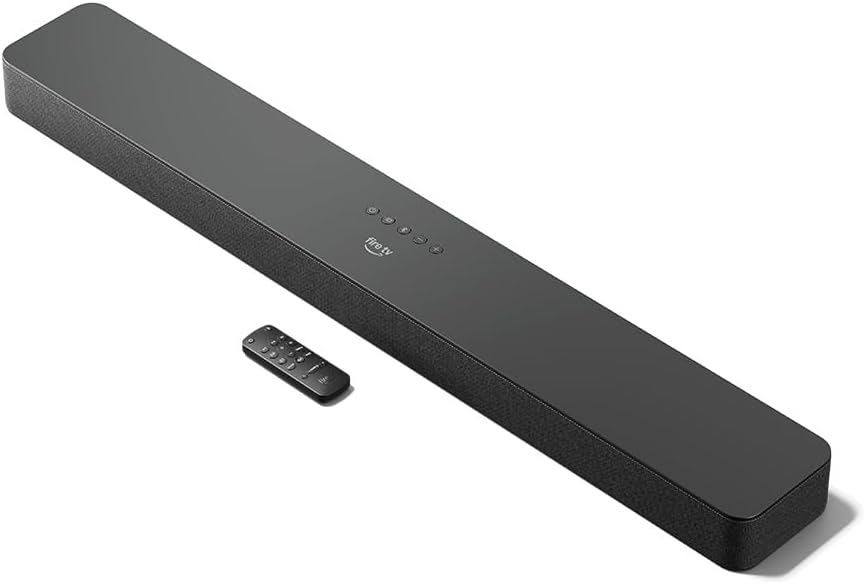
Figure 4: The Fire TV Soundbar Plus and its compact remote control.
Operando a barra de som
Controles básicos
Use the included remote control to manage your soundbar's functions:
- Botão de energia: Ativa ou desativa a barra de som.
- Aumentar/diminuir volume: Ajusta o nível de volume principal.
- Botão Mudo: Silencia ou ativa o som.
- Seleção de entrada: Switches between HDMI, Optical, and Bluetooth inputs.
- Modos de som: Cycles through optimized audio presets.
Modos de som
The Fire TV Soundbar Plus offers several equalizer modes to optimize audio for different content types:
- Modo Filme: Enhances cinematic soundscapes with dynamic range and surround effects.
- Modo de música: Provides balanced audio for music playback, emphasizing clarity and bass.
- Modo esportivo: Optimizes audio for sports broadcasts, often enhancing commentary and crowd noise.
- Modo noturno: Reduz a faixa dinâmica para evitar sons altos repentinos, ideal para o final da noite. viewindo.
The soundbar features a dedicated central channel for dialogue, ensuring clear conversations in all modes, especially beneficial for movies and TV shows.

Figure 5: Internal components illustrating the integrated speakers, tweeters, and subwoofer for rich sound.

Figure 6: The soundbar delivering immersive audio with Dolby Atmos and DTS:X in a home environment.
Transmissão Bluetooth
You can stream audio from your phone or tablet to the Fire TV Soundbar Plus via Bluetooth. To connect:
- Press the Bluetooth button on the remote control or select Bluetooth input.
- On your mobile device, go to Bluetooth settings and select "Fire TV Soundbar Plus" from the list of available devices.
- Once paired, audio from your device will play through the soundbar.

Figure 7: Connecting a mobile device via Bluetooth to stream music or podcasts.
Fire TV Integration
For seamless integration with Fire TV devices (sold separately), you can control both your TV and the soundbar with a single remote. Audio settings can be customized directly within the Fire TV interface on selected models.
Manutenção
To ensure the longevity and optimal performance of your Fire TV Soundbar Plus, follow these maintenance guidelines:
- Limpeza: Use um pano macio e seco para limpar a superfície da barra de som. Não use produtos de limpeza líquidos ou materiais abrasivos, pois podem danificar o acabamento.
- Ventilação: Certifique-se de que as aberturas de ventilação da barra de som não estejam bloqueadas para evitar superaquecimento.
- Atualizações de software: Periodically check for firmware updates to ensure your soundbar has the latest features and performance improvements. Updates are typically delivered automatically when connected to a Fire TV device or can be performed via USB if available.
Solução de problemas
If you encounter issues with your Fire TV Soundbar Plus, refer to the following common problems and solutions:
| Problema | Possível causa | Solução |
|---|---|---|
| Sem som na barra de som. |
|
|
| O som está distorcido ou pouco claro. |
|
|
| O controle remoto não funciona. |
|
|
| Problemas de emparelhamento Bluetooth. |
|
|
Especificações
| Recurso | Detalhe |
|---|---|
| Soundbar Dimensions (LxWxH) | 94 cm x 13.2 cm x 6.4 cm |
| Peso da barra de som | 4 kg (Actual dimensions and weight may vary based on configuration and manufacturing process) |
| Canais de alto-falante | 3.1 (integrated subwoofer) |
| Modos do equalizador | Movie, Music, Sport, Night |
| Suporte de som surround | Dolby Atmos, DTS: X |
| Portos | HDMI (eARC/ARC), Optical, AC Power, USB-A |
| Suporte Bluetooth | Sim |
| Compatibilidade | Smart TVs e TVs com reprodutores de mídia de streaming |
| Incluído na caixa | Fire TV Soundbar Plus, remote control, HDMI 2.0 cable, 1 AC power cable, 2 AAA batteries, wall mount kit, Quick Start Guide |
Garantia e Suporte
The Fire TV Soundbar Plus comes with a one-year limited warranty provided by the manufacturer. This limited warranty is in addition to, and does not compromise, consumer rights. Consumers may have additional rights provided by law even after the limited warranty expires. Use of the Fire TV Soundbar Plus is subject to the terms indicated by Amazon.
For further assistance, please refer to the official Amazon support channels or the Quick Start Guide included with your product.


