Introdução
This manual provides instructions for the DEWENWILS Touch Dimmer Switch, designed to control the brightness of dimmable LED/CFL and incandescent bulbs. It features a convenient touch pad with three dimming levels, allowing you to easily adjust lighting to your preference.
Informações importantes de segurança
- Somente para uso interno.
- Não exceda a temperatura máximatage: 75W for dimmable LED/CFL, 200W for incandescent bulbs.
- Garantir o lamp is unplugged from the power source before connecting the dimmer switch.
- Do not use with non-dimmable bulbs, as this may cause damage to the bulb or dimmer.
- Mantenha o dispositivo longe de água e umidade.
- Caso o dispositivo apresente danos ou mau funcionamento, interrompa o uso imediatamente e entre em contato com o suporte ao cliente.
Características do produto
The DEWENWILS Touch Dimmer Switch includes the following key components:
- Painel de toque: The circular surface used for controlling dimming levels.
- Almofada antiderrapante: Located on the bottom of the touch pad for stability on surfaces.
- Saída Lateral: A convenient outlet on the dimmer unit for plugging in your lamp's 2-pronged cord.
- 2-Prong Polarized Plug: For connecting the dimmer unit to a standard wall outlet.
- 8 ft Extension Cord: Provides flexibility in placing the touch pad in a convenient location.

Image: Key components of the black dimmer switch, illustrating the touch pad, anti-slip base, side outlet, and polarized plug.
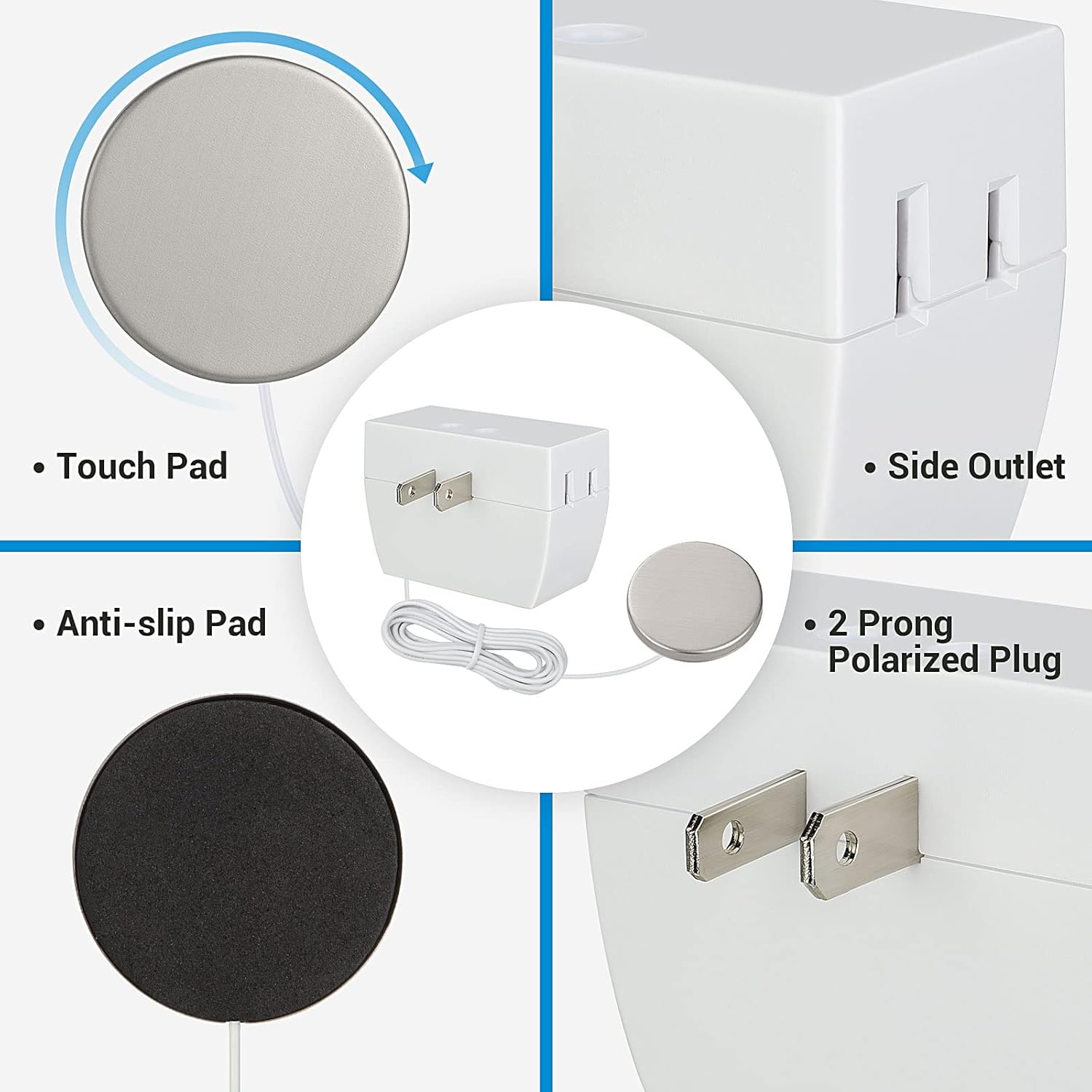
Image: Key components of the white dimmer switch, illustrating the touch pad, anti-slip base, side outlet, and polarized plug.
Especificações
| Recurso | Detalhe |
|---|---|
| Modo de operação | Manual |
| Vol operacionaltage | 120 Volts (CA) |
| Max Wattage (Dimmable LED/CFL) | 75 W |
| Max Wattage (Incandescente) | 200 W |
| Método de controle | Tocar |
| Number of Dimming Levels | 3 |
| Comprimento do cabo de extensão | 8 pés |
| Certificações | ETL, RoHS Compliant |
| Tipo de conector | Plug In (2-prong polarized plug) |
| Tipo de atuador | Tocar |
| Tipo de Circuito | 1 vias |
Instruções de configuração
The DEWENWILS Touch Dimmer Switch is designed for quick, tool-free installation. No complex wiring is required; simply plug and play.
- Garanta o seu lamp is unplugged from the wall outlet.
- Plug your 2-pronged lamp cord into the side outlet of the DEWENWILS dimmer switch.
- Plug the DEWENWILS dimmer switch into a polarized wall receptacle.
- Position the touch pad in a convenient location. The anti-slip pad on the bottom helps prevent movement.

Image: Connecting the black DEWENWILS Touch Dimmer Switch. The lamp's plug connects to the dimmer, and the dimmer plugs into the wall outlet.

Image: Connecting the white DEWENWILS Touch Dimmer Switch. The lamp's plug connects to the dimmer, and the dimmer plugs into the wall outlet.
Instruções de operação
The DEWENWILS Touch Dimmer Switch features a simple touch pad for controlling your light's brightness with three distinct levels. You can tap anywhere on the touch pad to cycle through the settings.
- Primeiro toque: Tap the touch pad once to activate the light at 30% brightness.
- Segundo toque: Tap the touch pad a second time to increase brightness to 60% (suitable for normal room lighting).
- Terceiro Toque: Tap the touch pad a third time to reach 100% brightness (ideal for tasks like reading).
- Quarto Toque: Tap the touch pad a fourth time to turn the power off completely.

Image: Visual representation of the 3-level dimming function, showing how each tap cycles through 30%, 60%, 100% brightness, and off.

Image: Compatibility details for the dimmer switch, indicating support for dimmable LED/CFL bulbs up to 75W and incandescent bulbs up to 200W.
Manutenção
- Always unplug the dimmer switch from the wall outlet before cleaning.
- Wipe the surface of the dimmer switch and touch pad with a soft, dry cloth. Do not use abrasive cleaners, solvents, or harsh chemicals.
- Ensure the dimmer switch is completely dry before plugging it back into a power source.
Solução de problemas
- Light does not turn on or dim:
- Ensure the dimmer switch is securely plugged into a working wall outlet.
- Verifique o lamp is properly plugged into the side outlet of the dimmer switch.
- Check if the bulb is dimmable and within the specified wattage limits (75W for LED/CFL, 200W for incandescent). Non-dimmable bulbs will not work.
- Try a different, known-working bulb to rule out a faulty bulb.
- Garantir o lamp itself is functional by plugging it directly into a wall outlet.
- Luz bruxuleante:
- Confirm the bulb is specifically designed as a dimmable LED or CFL. Non-dimmable bulbs may flicker or not function correctly.
- Verifique se a lâmpada tem a potência adequada.tage is within the dimmer's specifications.
- Touch pad is unresponsive:
- Unplug the dimmer from the wall for 30 seconds, then plug it back in to perform a soft reset.
- Ensure the touch pad surface is clean and dry.
Informações de garantia
DEWENWILS products are designed for reliability and performance. For specific warranty details regarding your purchase, please refer to the product packaging or contact DEWENWILS customer support directly.
Suporte ao cliente
If you have any questions, require technical assistance, or need further support, please visit the official DEWENWILS store or contact their customer service team.


