1. Introdução
The FCOB CCT Dual White RF Remote RC02RFB is designed for controlling CCT (Correlated Color Temperature) LED strips. This remote features 2.4GHz RF wireless transmission, allowing for 4-zone group control, brightness adjustment, and color temperature tuning. It is compatible with various FCOB CCT controllers, providing a convenient solution for managing your LED lighting.
2. Conteúdo da embalagem
Por favor, verifique se todos os itens estão presentes em sua embalagem:
- 1x RC02RFB Remote Control
- 1x RF Remote Bracket
- 2x Screws for Bracket Installation
- 1x Double-sided Adhesive for Bracket Installation
- 1x RC02RF Remote Control Manual (this document)
Note: 3A batteries are required for the remote control and are not included in the package.

Image: The FCOB CCT Remote RC02RFB, shown alongside its wall-mount bracket and two screws for installation.
3. Produto acabadoview
3.1 Remote Control Layout and Functions

Image: A detailed diagram illustrating each button and feature on the FCOB CCT Remote RC02RFB, including ON/OFF, color temperature slider, brightness controls, dynamic modes, and zone selection.
- Mestre LIGADO/DESLIGADO: Power on or off all linked devices.
- Color Temp Adjust Slider: Touch to dim brightness from 1% to 100% and adjust color temperature.
- Piloto Lamp: Luz indicadora.
- Cold-Warm White Switching: Press to cycle through cool white, nature white, and warm white.
- Brilho +/-: Aumente ou diminua o brilho.
- Dynamic Modes (M): Press to switch between various dynamic lighting modes.
- 100%/60%/30% Brightness: Shortcut buttons for specific brightness levels.
- Velocidade +/-: Ajuste a velocidade dos modos dinâmicos.
- Zone ON/(un)link Button (1-4): Turn on a specific zone or initiate linking/unlinking.
- Zone OFF/Night Light Mode: Turn off a specific zone or activate night light mode.
4. Configuração
4.1 Instalação da bateria
The RC02RFB remote control requires 3A batteries (not included). Open the battery compartment on the back of the remote and insert the batteries, ensuring correct polarity.
4.2 Linking Instructions
To link the remote control to an FCOB CCT controller:
- Disconnect the LED controller from its power supply for 10 seconds.
- Reconnect the LED controller to the power supply.
- Within 3 seconds of reconnecting power, short press the desired zone button (1, 2, 3, or 4) on the remote control 3 times.
- The LED strip connected to the controller will blink slowly 3 times, indicating successful linking.

Image: Visual guide for linking the remote control to an LED strip controller, detailing power cycling and button presses.
Important: If the LED strip does not blink slowly, linking has failed. Please repeat the above steps. A light that has already been linked cannot be linked again to the same zone.
4.3 Unlinking Instructions
To unlink the remote control from an FCOB CCT controller:
- Disconnect the LED controller from its power supply for 10 seconds.
- Reconnect the LED controller to the power supply.
- Within 3 seconds of reconnecting power, short press the previously connected zone button (1, 2, 3, or 4) on the remote control 5 times.
- The LED strip connected to the controller will blink quickly 10 times, indicating successful unlinking.

Image: Visual guide for unlinking the remote control from an LED strip controller, detailing power cycling and button presses.
Important: If the LED strip does not blink quickly, unlinking has failed. Please repeat the above steps. A light that hasn't been linked does not need to be unlinked.
5. Installation of Remote Bracket
The included remote bracket allows for convenient storage and access to your remote control. You can install it using either screws or double-sided adhesive.
5.1 Installation with Screws
- Choose a suitable location on a wall or surface.
- Marque as posições dos dois parafusos usando o suporte como gabarito.
- Faça furos piloto, se necessário.
- Secure the bracket to the surface using the provided screws.
5.2 Installation with Double-Sided Adhesive
- Ensure the installation surface is smooth, clean, and dry.
- Peel off the protective backing from one side of the double-sided adhesive.
- Apply the adhesive firmly to the back of the remote bracket.
- Peel off the remaining protective backing and press the bracket firmly onto the desired surface.

Image: Illustrations demonstrating how to install the remote control bracket using either screws or double-sided adhesive.
6. Instruções de operação
6.1 Controle de Potência
Pressione o ON button to turn on all linked LED strips. Press the DESLIGADO button to turn off all linked LED strips.
6.2 Ajuste de brilho
- Touch Slider: Gently touch and slide your finger along the color temperature adjust slider to dim the brightness from 1% to 100%.
- Botões de brilho +/-: Imprensa Brilho+ para aumentar o brilho e Brilho- para diminuir o brilho.
- Preset Brightness Buttons: Use o 100%, 60%, ou 30% buttons for quick brightness level selection.
6.3 Ajuste de temperatura de cor
Use the touch slider to adjust the color temperature of your CCT LED strips. Slide towards the yellow side for warmer white light and towards the blue side for cooler white light. You can also press the Cold-Warm White Switching button to cycle through cool white, nature white, and warm white presets.

Image: A user adjusting the color temperature on the remote, demonstrating the transition from warm white to cool white light.
6.4 modos dinâmicos
Pressione o M button to cycle through various pre-programmed dynamic lighting modes. Use the Velocidade+ e Rapidez- buttons to adjust the speed of the selected dynamic mode.
6.5 Zone Control and Grouping
The RC02RFB remote supports controlling up to 4 independent zones. Each zone can control one or multiple linked controllers.
- Zone ON: Press the corresponding zone button (1, 2, 3, or 4) to turn on the lights in that specific zone.
- Zone OFF/Night Light: Press the corresponding zone button (1, 2, 3, or 4) again to turn off the lights in that zone or activate night light mode if supported by the controller.
The remote features auto-transmitting and auto-sync functions. One controller can transmit signals to another controller within 30 meters (98 feet), extending the effective control distance. This allows for independent control of individual areas without device limits.

Image: A visual representation of the 4-zone wireless control capability, demonstrating how one remote can manage LED controllers across different areas of a home.

Image: An illustration detailing the auto-transmitting and auto-sync features, where one controller relays signals to others, extending the control range.
7. Compatibilidade
The RC02RFB remote control is designed to work with FCOB CCT controllers. Compatible controllers include, but are not limited to:
- C02RF Controller
- Controlador C02W
- WB5 Controller
- LM051 Controller
- LM052 Controller
- LM053 Controller
It supports 5050SMD, 3528SMD, 5630SMD CCT FCOB COB CCT 3-wire (+ WW CW) LED strips. Please note that this remote requires a compatible controller to function.

Image: The FCOB CCT remote displayed with several compatible CCT controllers (C02W, C02RF, WB5, LM051, LM052, LM053) and an illuminated LED strip, illustrating system compatibility.
8. Solução De Problemas
- O controle remoto não está respondendo: Verifique se as baterias estão instaladas corretamente e têm carga suficiente. Substitua as baterias, se necessário.
- Linking failure: If the LED strip does not blink as expected during linking, repeat the linking steps carefully. Ensure the remote is within close proximity to the controller during the linking process.
- Controle intermitente: Check for obstructions between the remote and the controller. Ensure the remote is within the specified 98-foot (30-meter) control range.
- Incorrect color temperature/brightness: Verify that the remote is correctly linked to the desired zone. Adjust settings using the touch slider and dedicated buttons.
9. Especificações
| Recurso | Especificação |
|---|---|
| Marca | FCOB |
| Número do modelo | RC02RFB-Z |
| Peso do item | 3.52 onças |
| Dimensões da embalagem | 5.91 x 5.91 x 0.79 polegadas |
| Fonte de alimentação (controlador) | AC/DC (Remote uses batteries) |
| Pilhas necessárias | Yes (3A batteries, not included) |
| Recurso especial | Sem fio |
| Tecnologia de Conectividade | Radio Frequency (2.4GHz) |
| Faixa de controle | Até 98 pés (30 metros) |
| Dispositivos compatíveis | C02RF, C02W, LM051, LM052, LM053, WB5 Controllers |
9.1 Energy Efficiency Information
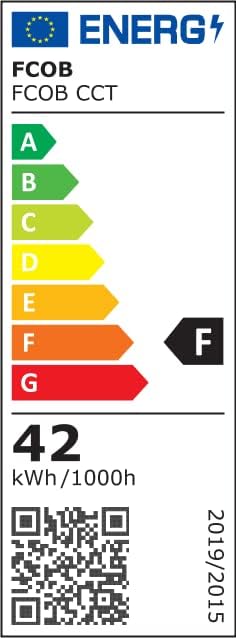
Image: The energy label for FCOB CCT products, indicating an energy efficiency class of F and an energy consumption of 42 kWh per 1000 hours.
Para obter mais detalhes, visite a base de dados EPREL: https://eprel.ec.europa.eu/qr/1552759
10. Informações e avisos de segurança
10.1 General Attention
- Temperatura de armazenamento: -40℃ a +80℃
- Temperatura de operação: -25℃ a +60℃
- Superfície de instalação: Must be smooth, clean, and dry.
- Componentes de LED: The part of LED components cannot be fixed on the surface of a sharp edge.
- Faixa de LED: The strip cannot be collided or crushed. The strip can be cut following the cutting lines only.
10.2 Packaging Warning

Image: A close-up of the product packaging, displaying caution regarding moisture and electrostatic sensitive devices, and a warning about the plastic bag being a suffocation hazard.
CAUTION! THIS BAG CONTAINS MOISTURE ELECTROSTATIC SENSITIVE DEVICES!
WARNING! To avoid the danger of suffocation, keep this plastic bag away from babies and children. Do not use this bag in cribs, beds, baby strollers, or playpens. This bag is not a toy.
11. Garantia e Suporte
For technical support, warranty information, or other inquiries, please contact the manufacturer:
- Fabricante: SHENZEN CHAOGUOSE Technology Co., Limited
- E-mail de suporte: suporte@fcob.com
- Website: www.fcob.com
- Endereço: 201, 2F, C-C2, Chuangfu Tech Park, Beihuan Rd, Shiyan St, Baoan District, Shenzhen, Guangdong, China
- Representante da CE: Like Sun GmbH, Planckstr. 59, 45147 Essen


