Produto acimaview
The Cello C2224WSF Traveller Smart/DVD TV is a versatile entertainment solution designed for travel, including caravans, motorhomes, boats, and trucks. It combines a Full HD Smart TV powered by LG's WebOS Hub with an integrated DVD player, offering entertainment options even without a stable internet connection. This model features Pitch Perfect Sound technology for enhanced audio and flexible power options (12V DC and mains AC).
Its lightweight and frameless design makes it ideal for space-constrained environments and wall mounting.

Figure 1: Cello C2224WSF Traveller Smart/DVD TV with WebOS Hub interface and integrated DVD player.
Principais características
- Integrated Smart TV & DVD Player: Combines LG WebOS Hub for streaming apps (Netflix, Prime Video, Disney+, YouTube, BBC iPlayer, ITVX) with a built-in DVD player for offline entertainment.
- Pitch Perfect Sound: Patented Cello technology with a speaker enclosure below the TV for enhanced bass, clearer mids, and defined highs, providing an immersive audio experience.

Figure 2: Illustration of Cello's Pitch Perfect Sound technology, highlighting the speaker enclosure for improved audio.
- Sintonizador Triplo: Built-in DVB-C/-S2/-T2 tuner for crystal-clear HD resolution and access to digital channels. Supports USB recording (DVR) and media playback.
- Compatibilidade Universal: Designed for 12V operation in caravans, motorhomes, boats, and trucks, with an integrated regulator for 10V to 27V DC input. Also operates on mains AC power.
- Conectividade Bluetooth: Allows easy connection to Bluetooth soundbars for enhanced audio without cables.
- Lightweight and Frameless Design: Compact dimensions (49 x 30 x 8 cm, 2.4 kg) and ultra-thin bezel for seamless integration and wall mounting in small spaces.

Figure 3: The Cello C2224WSF TV seamlessly integrated into a small living space, highlighting its compact design.
Guia de configuração
1. Desembalagem e inspeção inicial
Carefully remove the TV and all accessories from the packaging. Check for any signs of damage. Retain the packaging for future transport or service.
2. Opções de montagem
The TV can be placed on its included stand or wall-mounted. Ensure the mounting surface is stable and can support the TV's weight (2.4 kg).
- Instalação do suporte: Attach the stand securely to the base of the TV using the provided screws.
- Montagem na parede: Use a VESA-compatible wall mount (not included). Refer to the wall mount's instructions for proper installation. Ensure adequate ventilation around the TV.
3. Conexão de energia
The TV supports both 12V DC and mains AC power.
- Alimentação de 12V CC: Connect the supplied 12V power adapter cable to the TV's 12V input port and to your vehicle's 12V power source. The integrated regulator handles voltage fluctuations (10V to 27V DC).
- Mains AC Power: Connect the supplied AC power cable to the TV's AC input and then to a standard wall outlet.
4. Conexão de antena/cabo
Connect your antenna or cable source to the RF input port on the TV for digital terrestrial (DVB-T2), satellite (DVB-S2), or cable (DVB-C) reception.
5. Assistente de configuração inicial
Ao ser ligada pela primeira vez, a TV irá guiá-lo por um assistente de configuração inicial. Isso inclui:
- Seleção de idioma
- Conexão de rede (Wi-Fi ou Ethernet)
- Channel scanning for DVB-T2/S2/C
- Configurações de hora e data
Instruções de operação
1. Funções de controle remoto
Familiarize yourself with the provided remote control. Key buttons include Power, Volume Up/Down, Channel Up/Down, Source, Home (for WebOS), Navigation (arrows, OK), and specific app buttons.
2. Smart TV (WebOS Hub) Usage
Pressione o Lar button on the remote to access the WebOS Hub. This interface provides quick access to:
- Aplicativos de streaming: Netflix, Prime Video, Disney+, YouTube, etc. (requires internet connection).
- Catch-up TV: BBC iPlayer, ITVX (UK specific, requires internet connection).
- Web Navegador: For general internet browsing.
- Seleção de entrada: Switch between TV, HDMI, USB, and DVD inputs.
- Configurações: Configure picture, sound, network, and system settings.
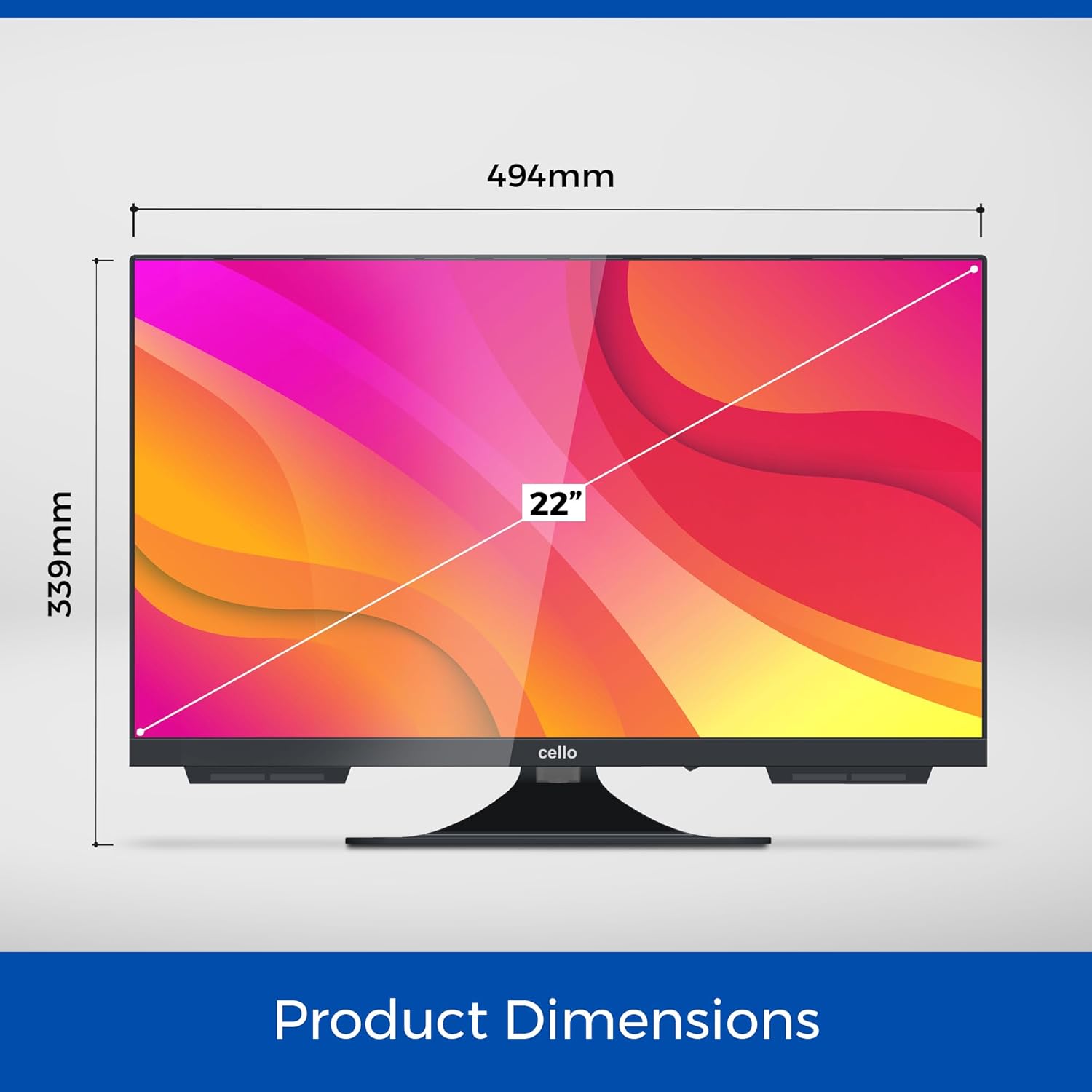
Figura 4: A WebOS Hub interface, showcasing available streaming applications and smart features.
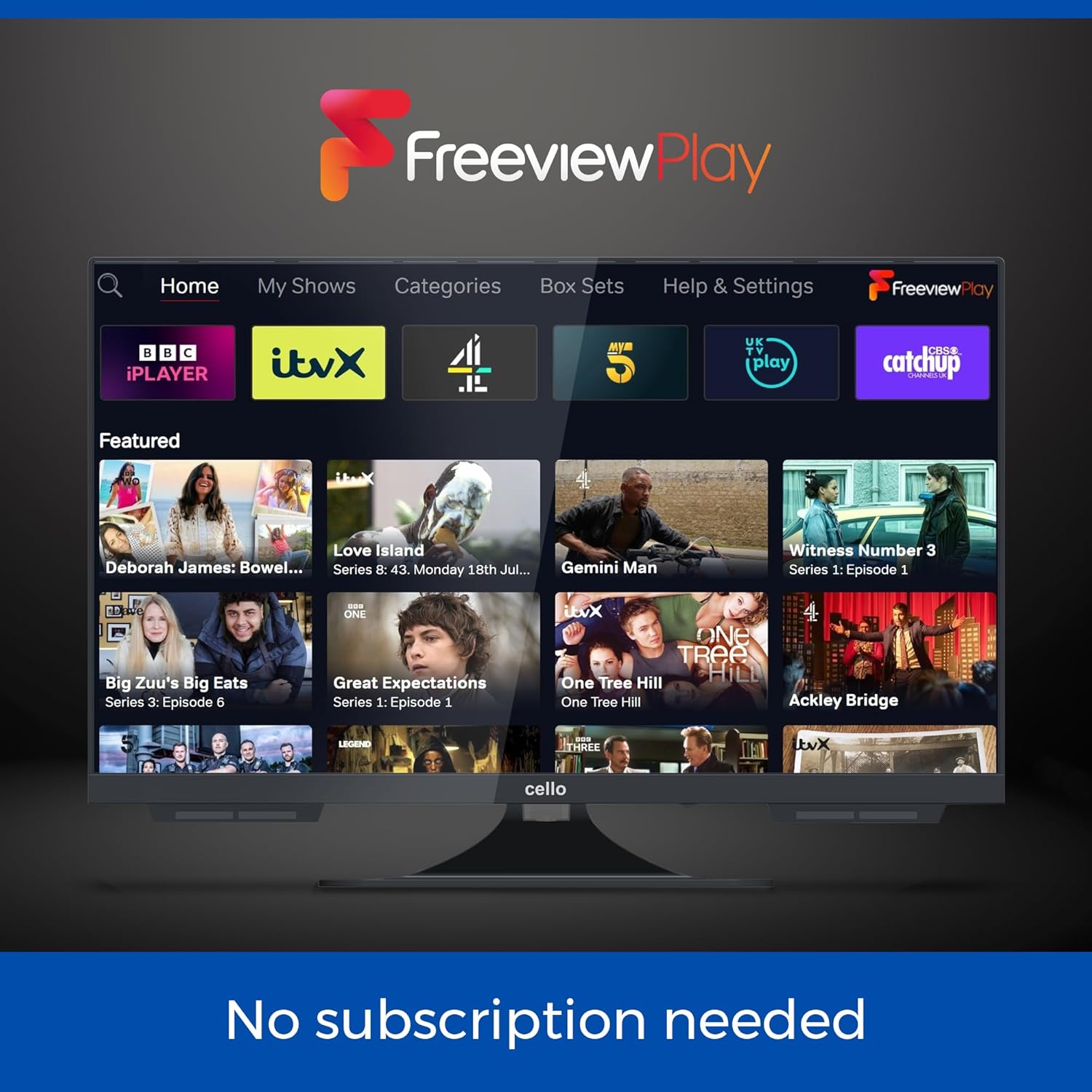
Figure 5: The Freeview Play interface, providing access to catch-up TV services without subscription.
3. Operação do Leitor de DVD
Insert a DVD disc into the slot on the side of the TV. The TV will automatically switch to the DVD input or prompt you to do so. Use the remote control for playback functions (Play, Pause, Stop, Skip, Fast Forward/Rewind).
4. Conectando dispositivos externos
The TV is equipped with multiple ports:
- HDMI: 1 port for connecting devices like gaming consoles, set-top boxes, or laptops.
- USB: 2 ports for media playback (photos, videos, music) or USB recording (DVR).
- Óptico: 1 port for digital audio output to a sound system.
- RF: Para conexão de antena/cabo.
- Ethernet: Para conexão de internet com fio.
Para alternar entre as entradas, pressione o Fonte button on the remote and select the desired input.
5. Áudio Bluetooth
To connect a Bluetooth soundbar or headphones:
- Vá para Configurações > Som > Bluetooth.
- Enable Bluetooth and put your audio device into pairing mode.
- Selecione seu dispositivo na lista para emparelhar.
Manutenção
1. Limpando a TV
Use a soft, dry cloth to clean the screen and cabinet. For stubborn marks, slightly dampen the cloth with water or a mild, non-abrasive screen cleaner. Do not use alcohol, benzene, thinners, or other volatile substances.
2. Atualizações de software
O WebOS system may receive software updates. It is recommended to keep the TV connected to the internet to receive these updates, which can improve performance and add new features. You can check for updates in the Configurações menu.
3. DVD Player Care
Only insert clean, undamaged discs into the DVD player. Avoid touching the disc's playback surface. If the player experiences issues, try cleaning the disc or using a dedicated DVD lens cleaner disc.
Solução de problemas
| Problema | Possível causa | Solução |
|---|---|---|
| Sem energia | Power cable not connected; no power from outlet/12V source. | Check power connections. Ensure outlet/12V source is active. |
| No picture/sound from TV channels | Antenna/cable not connected; incorrect input selected; no channels scanned. | Check antenna/cable connection. Select correct input. Perform channel scan. |
| Sem conexão com a internet | Wi-Fi signal weak; incorrect Wi-Fi password; router issue. | Check Wi-Fi signal strength. Re-enter password. Restart router. Try wired Ethernet connection. |
| O DVD não está funcionando. | Disc dirty/damaged; incorrect input selected. | Clean disc. Try another disc. Select DVD input. |
| Má qualidade de som | Volume too low; sound settings incorrect; external speakers not connected properly. | Adjust volume. Check sound settings (e.g., EQ, balance). Ensure external speakers/soundbar are connected and selected. |
| Controle remoto não funciona | Batteries dead/incorrectly inserted; obstruction between remote and TV. | Replace batteries. Remove obstructions. Point remote directly at TV. |
Especificações
- Modelo: C2224WSF TRAV
- Tamanho da tela: 22 polegadas
- Tecnologia de exibição: LIDERADO
- Resolução: 1080p (Full HD)
- Taxa de atualização: 60 Hz
- Sistema operacional: WebOS Hub (by LG)
- Recursos integrados: DVD Player, Triple Tuner (DVB-C/-S2/-T2)
- Áudio: Pitch Perfect Sound, Integrated Speaker
- Conectividade:
- 1 x Porta HDMI
- 2 portas USB
- 1 x Optical Port
- 1 x RF Port (Antenna/Cable)
- Ethernet
- Bluetooth
- Wi-fi
- Entrada de energia: 12V DC (10V-27V range) / Mains AC
- Dimensões (L x A x P): Approximately 49 cm x 30 cm x 8 cm (excluding stand)
- Peso: Aproximadamente 2.4 kg
- Características especiais: Frameless Design, USB Recording (DVR), Miracast, Web Navegador
- País de origem: Reino Unido

Figure 6: Product dimensions of the Cello C2224WSF TV.
Garantia e Suporte
This product comes with a standard manufacturer's warranty. For specific warranty terms and conditions, please refer to the warranty card included with your product or visit the official Cello website.
For technical support, troubleshooting assistance beyond this manual, or warranty claims, please contact Cello customer service. Contact details can typically be found on the manufacturer's website ou na embalagem do produto.
Please have your model number (C2224WSF TRAV) and purchase date available when contacting support.


