1. Produto acabadoview
The ANNKE 5MP Home Security Camera System N44PAM-51DS provides comprehensive surveillance with a 12MP H.265+ Network Video Recorder (NVR) and two 5MP 3K PoE IP Turret Cameras. This system features advanced human and vehicle detection, IP67 weatherproofing, and color night vision capabilities, ensuring reliable 24/7 recording and monitoring.
2. O que está na caixa
Antes de iniciar a instalação, verifique se todos os componentes listados abaixo estão incluídos na sua embalagem:
- 1x 8-Channel 12MP NVR with 8TB HDD
- 2x 3K PoE Cameras with Mounting Screw Bags
- 1x Rato USB
- 1x Power Adapter (for NVR)
- 1x 30m Ethernet Cable
- 1x 18m Ethernet Cable
- 1 cabo de rede de 1 m
- Cabo HDMI 1x 1.8m
- 1x Manual do Usuário
- 1 adesivo de parede

Imagem: All components included in the ANNKE 5MP Home Security Camera System package.
3. Instruções de configuração
3.1 Configuração Inicial do NVR
- Conecte a energia: Plug the provided power adapter into the NVR and then into a power outlet.
- Conectar monitor: Use the HDMI cable to connect the NVR to a monitor or TV for display. Alternatively, use a VGA cable if your monitor supports it.
- Conectar Mouse: Conecte o mouse USB a uma das portas USB do NVR para navegar.
- Conexão de rede: Connect the NVR to your router using the provided network cable for internet access and remote viewcapacidades de aprendizagem.
3.2 Instalação de câmeras (PoE)
The ANNKE PoE cameras simplify installation by using a single Ethernet cable for both power and data transmission.
- Local de montagem: Choose a suitable location for each camera, considering the desired viewing angle and coverage. Ensure the location is within reach of an Ethernet cable connection to the NVR. The cameras are IP67 weatherproof, suitable for both indoor and outdoor use.
- Montagem segura: Use the provided mounting screw bags to securely attach the cameras to the chosen surface.
- Conecte o cabo Ethernet: Connect one end of an Ethernet cable (30m or 18m provided) to the camera's PoE port and the other end to an available PoE port on the NVR. The camera will power on automatically.
3.3 Configuração de Acesso Remoto
Para view your camera feeds remotely, download the ANNKE Vision app on your mobile device.
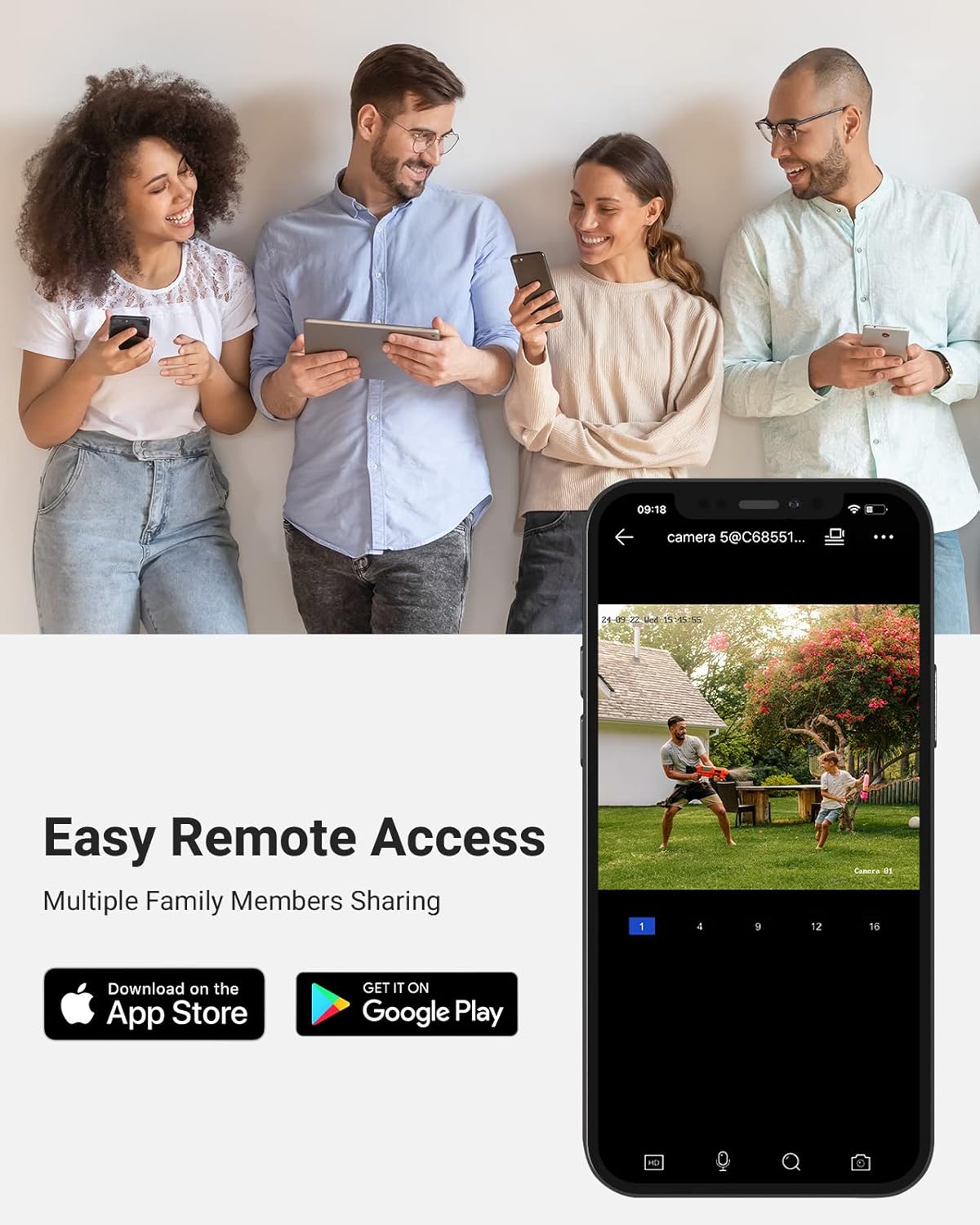
Imagem: Easy remote access via the ANNKE mobile application, available on App Store and Google Play.
- Baixar aplicativo: Procurar "ANNKE Vision" in the Apple App Store or Google Play Store and install it.
- Registro de conta: Abra o aplicativo e registre-se para uma nova conta ou faça login se você já tiver uma.
- Adicionar dispositivo: Follow the in-app instructions to add your NVR system by scanning the QR code on the NVR or manually entering its details.
- Ao vivo View: Once added, you can access live views, playback recordings, and manage settings from your mobile device.
4. Instruções de operação
4.1 Ao vivo View, Recording, and Playback
O NVR suporta transmissões ao vivo viewing of all connected cameras, continuous recording, and playback of recorded footage. Use the connected mouse to navigate the NVR's on-screen interface.
- Ao vivo View: Select the desired camera channel to view Sua transmissão ao vivo.
- Gravação: The system is configured for 24/7 recording by default to the included 8TB HDD. Recording settings can be customized via the NVR menu.
- Reprodução: Acesse o menu de reprodução para review foo gravadotage por data e hora.
4.2 Human & Vehicle Detection
The cameras feature advanced Human & Vehicle Detection 2.0, which helps reduce false alarms by distinguishing between human and vehicle movement and other environmental factors.

Imagem: Human and Vehicle Detection 2.0 in action, identifying specific objects for accurate alerts.
- Configuração: Detection settings can be configured through the NVR interface or the mobile app. You can define detection zones and sensitivity levels.
- Alertas: Receive push notifications on your mobile device when human or vehicle activity is detected.
4.3 Capacidades de visão noturna
The 5MP cameras provide clear surveillance even in low-light conditions, featuring both standard IR night vision and advanced color night vision.

Imagem: Day and night comparison demonstrating the clarity and detail captured by the 3K cameras.

Imagem: Comparison of day vision and Starlight Color Night Vision, highlighting enhanced visibility in low light.
- Visão nocturna do IR: Up to 100 ft (30m) distance for clear black and white footage na mais completa escuridão.
- Visão noturna colorida: Utilizes advanced sensors and ambient light to provide full-color images at night, enhancing detail and identification.
4.4 Gravação de Áudio
Each camera is equipped with a built-in microphone to record audio alongside video footage, providing a more complete surveillance record.

Imagem: The built-in microphone captures both video and sound, useful for events like package deliveries.
- Ativar áudio: Ensure audio recording is enabled in the camera settings via the NVR or mobile app.
- Playback Audio: Audio will be synchronized with video during playback.
4.5 Opções de armazenamento
The system offers flexible storage solutions to ensure your footage is always saved.
- NVR with 8TB HDD: The included 8TB hard disk drive provides ample storage for continuous 24/7 recording. The NVR supports up to 12MP resolution input.
- Micro SD Card (Cameras): Each camera supports a built-in microSD/SDHC/SDXC slot for local storage up to 256 GB (card not included). This can serve as a backup or primary storage for motion-triggered events if not connected to the NVR.
5. Manutenção
5.1 Weatherproofing and Durability
The cameras are designed for robust performance in various environmental conditions.

Imagem: The IP67 weatherproof rating ensures the camera operates reliably in extreme temperatures and various environments.
- Classificação IP67: The cameras are rated IP67, meaning they are fully protected against dust and can withstand immersion in water up to 1 meter for 30 minutes. This ensures reliable operation in rain, snow, and dusty conditions.
- Faixa de temperatura: The cameras operate effectively in temperatures ranging from -22 °F to 140 °F (-30 °C to 60 °C).
5.2 Limpeza e cuidados
- Lente da câmera: Limpe periodicamente a lente da câmera com um pano macio e seco.amp Use um pano para garantir uma imagem nítida. Evite produtos de limpeza abrasivos.
- NVR Unit: Keep the NVR unit in a well-ventilated area, free from dust and direct sunlight.
5.3 atualizações de firmware
Consulte regularmente o site oficial da ANNKE. website for firmware updates for both the NVR and cameras. Firmware updates can improve performance, add new features, and enhance security.
6. Solução De Problemas
If you encounter issues with your ANNKE security system, consider the following common troubleshooting steps:
- Sem energia: Ensure the NVR's power adapter is securely connected to both the NVR and a working power outlet. Check the power indicator light on the NVR.
- Sem saída de vídeo: Verify that the HDMI/VGA cable is securely connected between the NVR and the monitor. Ensure the monitor is set to the correct input source.
- Câmera não está sendo exibida: Check the Ethernet cable connection between the camera and the NVR's PoE port. Ensure the cable is not damaged. Try connecting the camera to a different PoE port on the NVR.
- Sem acesso remoto: Confirm the NVR is connected to your router and has internet access. Check your mobile device's internet connection. Ensure the ANNKE Vision app is updated to the latest version.
- Má qualidade de imagem: Limpe a lente da câmera. Certifique-se de que não haja obstruções no campo de visão da câmera. view. Adjust camera position if necessary.
- Alarmes falsos: Adjust the sensitivity settings for human/vehicle detection in the NVR or app. Define specific detection zones to exclude irrelevant areas.
For more detailed troubleshooting guides or persistent issues, please refer to the ANNKE support website ou entre em contato com o atendimento ao cliente.
7. Especificações
7.1 NVR Specifications
| Entrada de vídeo | 4-Channel PoE IP Video Input |
| Saída de vídeo | HDMI up to 4K (4096 × 2160), VGA up to 1080p (1920 × 1080) |
| Formato de decodificação | H.264+/H.264/H.265/H.265+ |
| Resolução Máxima | Até 12 MP |
| Capacidade do HDD | 1 SATA Interface, up to 8 TB (8TB HDD Included) |
| Interface USB | USB 2.0 * 2 |
| Potência operacional | Corrente contínua 48 V |
| PoE | 4 RJ-45 10/100 Mbps, IEEE 802.3 af/at, Max 25.5 W for Single Port |
| interface de rede | 1 RJ-45 10/100Mbps self-adaptive Ethernet interface |
| Dimensões | 16.93 x 12.2 x 3.86 polegadas |
7.2 Especificações da câmera
| Resolução de captura de vídeo | 5MP (3072*1728) |
| Sensor de imagem | CMOS de varredura progressiva de 1/3" |
| Lente | 4 milímetros |
| Ângulo de View | Horizontal FOV 76°, Vertical FOV 41°, Diagonal FOV 90° |
| Distância de visão noturna | Up to 100 ft (30 m) with 2 pcs Infrared LEDs |
| Ampla faixa dinâmica | WDR de 120 dB |
| Entrada de áudio | Microfone embutido |
| Armazenar | Slot microSD/SDHC/SDXC integrado, até 256 GB |
| Proteção contra intempéries | IP67 |
| Temperatura de operação | -22 °F – 140 °F (-30 °C – 60 °C) |
8. Garantia e Suporte
8.1 Garantia do Produto
For detailed information regarding the product warranty, please refer to the warranty card included in your product packaging or visit the official ANNKE website. Warranty terms typically cover manufacturing defects and hardware malfunctions under normal use.
8.2 Suporte ao cliente
If you require technical assistance, have questions about installation, or need help with troubleshooting, please contact ANNKE customer support through their official website. Support resources often include FAQs, online guides, and direct contact options.


