1. Introdução
Welcome to the user manual for your Thomson RT850BT Bluetooth Speaker, FM Radio, and Alarm Clock. This guide provides detailed instructions on how to set up, operate, and maintain your device. Please read this manual thoroughly before use to ensure proper functionality and to maximize your experience with the RT850BT.
2. Informações de segurança
Para garantir o funcionamento seguro e evitar danos, observe as seguintes precauções de segurança:
- Não exponha o aparelho à chuva, umidade ou temperaturas extremas.
- Evite colocar o aparelho perto de fontes de calor ou sob luz solar direta.
- Assegure uma ventilação adequada; não bloqueie nenhuma abertura de ventilação.
- Utilize somente o adaptador de energia fornecido.
- Não tente desmontar ou modificar a unidade. Encaminhe todos os serviços de manutenção para pessoal qualificado.
- Mantenha a unidade longe de campos magnéticos fortes.
3. Conteúdo da embalagem
Verifique se todos os itens estão presentes na embalagem:
- Thomson RT850BT Unit
- Adaptador de energia
- Manual do usuário

Image: Thomson RT850BT packaging, illustrating the product and its key features.
4. Produto acabadoview
4.1 Painel Frontal
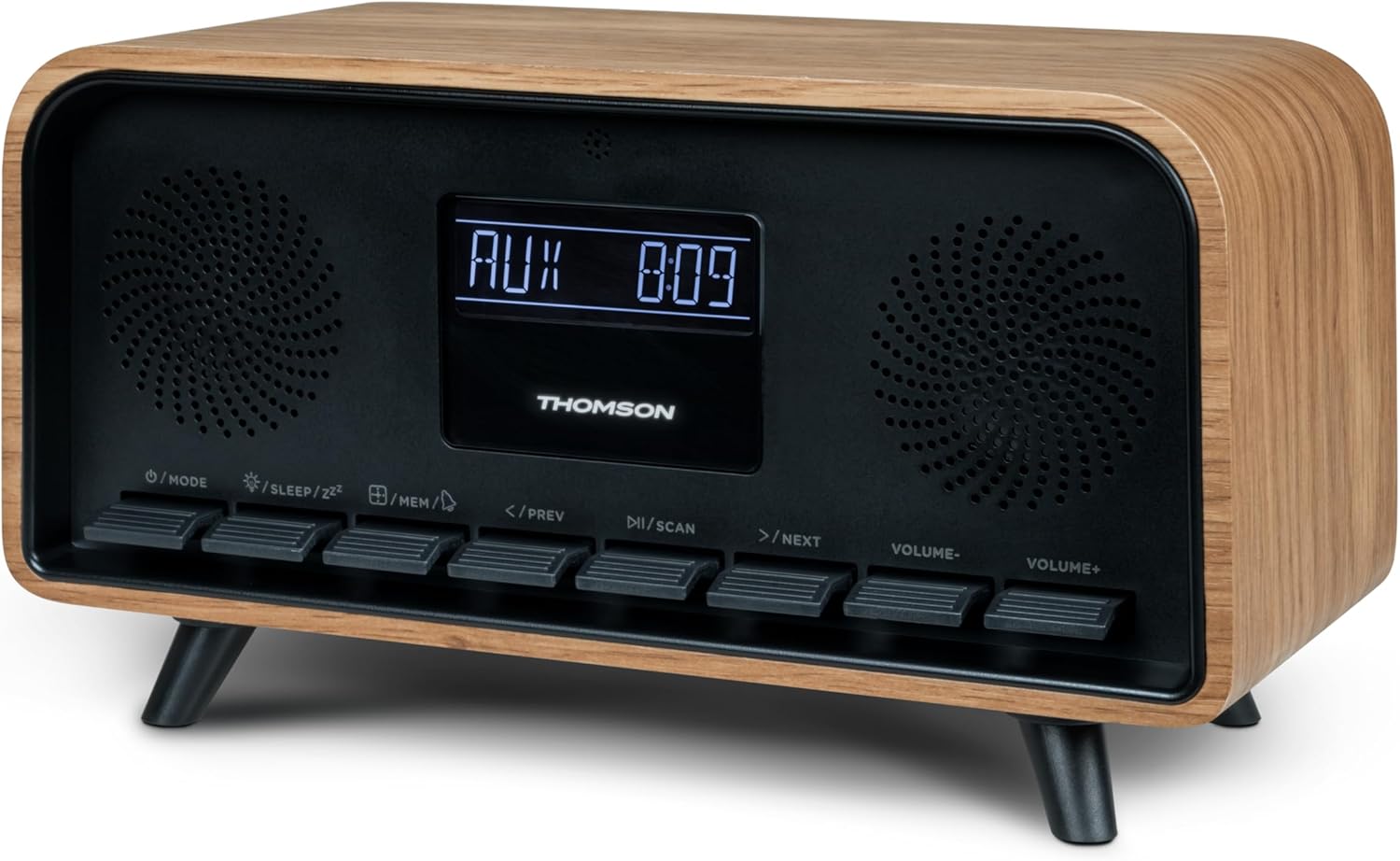
Imagem: Frente view of the Thomson RT850BT unit, showing the LCD display, speakers, and control buttons.
- Tela LCD: Exibe a hora, o modo e outras informações.
- /MODE Button: Power On/Off, switch between modes (Bluetooth, FM, AUX).
- /SLEEP/ZZ Botão: Set sleep timer, activate snooze.
- /MEM Button: Set alarm, save/recall radio stations.
- </PREV Button: Previous track (Bluetooth), tune down (FM).
- /SCAN Button: Play/Pause (Bluetooth), auto scan (FM).
- >/NEXT Button: Next track (Bluetooth), tune up (FM).
- VOLUME- Button: Diminuir volume.
- VOLUME+ Button: Aumentar o volume.
4.2 Painel traseiro

Imagem: Traseira view of the Thomson RT850BT, highlighting the power supply, Line In (AUX-IN), and USB-C charge output ports.
- Power Supply (DC IN 5V): Conecte o adaptador de energia fornecido.
- Line In (AUX-IN): Entrada de áudio de 3.5 mm para dispositivos externos.
- Charge Output (USB-C): USB Type-C port for charging external devices.
5. Configuração
5.1 Conexão de Energia
- Connect the power adapter to the DC IN 5V port on the rear of the RT850BT.
- Conecte o adaptador de energia a uma tomada de parede padrão.
- A unidade ligará automaticamente ou entrará em modo de espera.
5.2 Inicialização do sistema e configuração do relógio
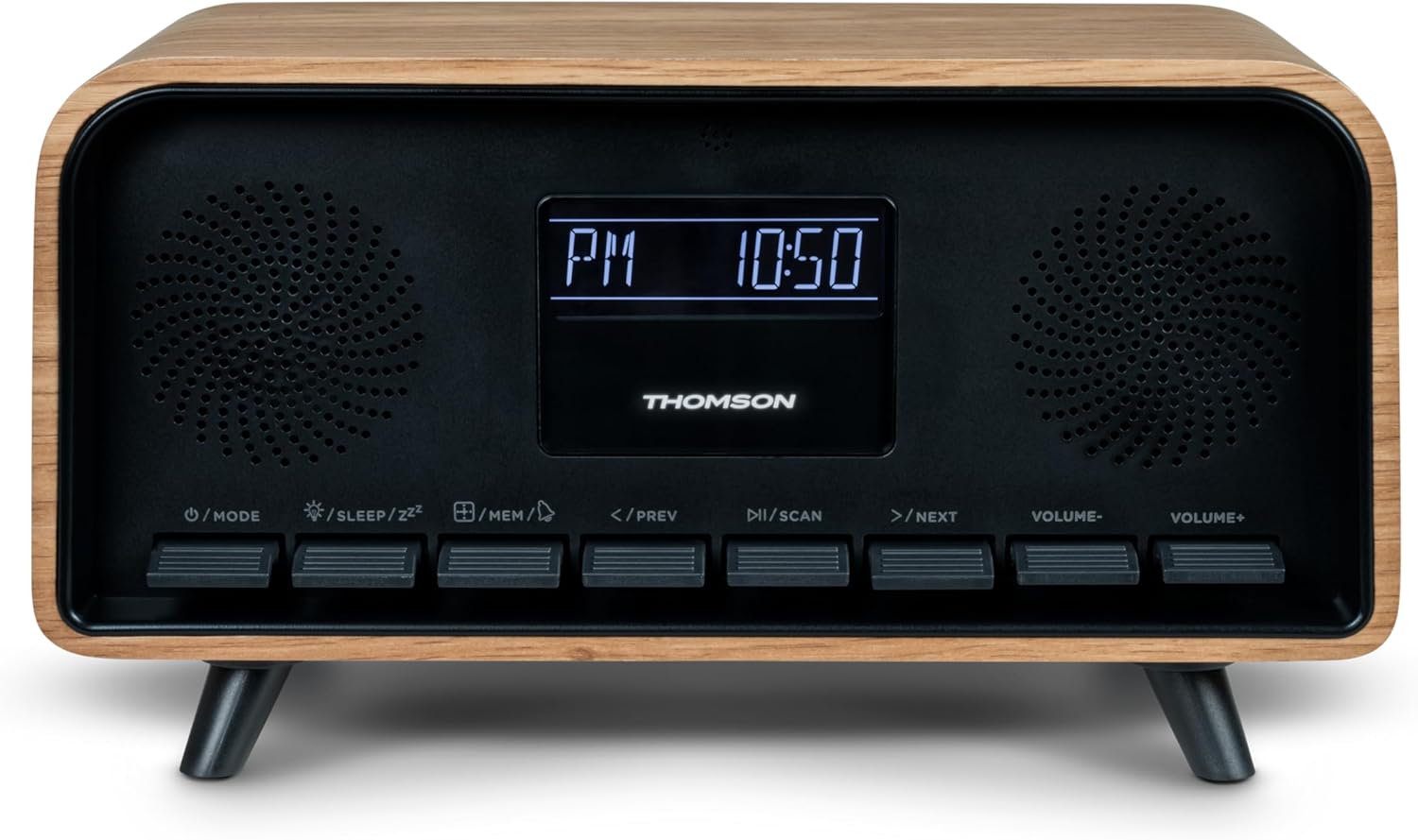
Image: Close-up of the RT850BT's LCD display showing the time, 10:50 PM, and the 'PM' indicator.
- If the unit is in standby, press the /MODO botão para ligá-lo.
- Para acertar o relógio, pressione e segure o botão /MEM Pressione o botão até que o visor do tempo pisque.
- Use o </PREV e >/NEXT botões para ajustar a hora. Pressione /MEM para confirmar.
- Use o </PREV e >/NEXT botões para ajustar os minutos. Pressione /MEM para confirmar.
- O relógio está acertado.
6. Instruções de operação
6.1 Modo Bluetooth

Image: Close-up of the RT850BT's LCD display indicating 'bt' for Bluetooth mode, along with the current time.
- Pressione o /MODO button repeatedly until 'bt' appears on the display. The unit is now in Bluetooth pairing mode.
- No seu dispositivo móvel, ative o Bluetooth e pesquise os dispositivos disponíveis.
- Select 'RT850BT' from the list to pair. A confirmation tone will sound upon successful connection.
- You can now play audio from your device through the RT850BT.
- Use o / VARREDURA button to Play/Pause, and </PREV / >/NEXT botões para pular faixas.
- Ajuste o volume usando o VOLUME- e VOLUME+ botões.
6.2 Modo Rádio FM
- Pressione o /MODO button repeatedly until the FM frequency appears on the display.
- Analise automatica: Pressione e segure o / VARREDURA button to automatically scan and save available FM stations (up to 50 stations).
- Sintonia manual: Pressione brevemente </PREV or >/NEXT to fine-tune the frequency. Press and hold to scan for the next available station.
- Recall Saved Stations: Pressione brevemente o /MEM Botão para alternar entre as estações salvas.
6.3 Função de despertador
The RT850BT supports setting multiple alarms.
- No modo de espera, pressione e segure o /MEM button until 'AL1' or 'AL2' flashes.
- Usar </PREV e >/NEXT Para definir a hora do alarme, pressione /MEM para confirmar.
- Repita por alguns minutos.
- Select the alarm source (Buzzer or FM Radio) using </PREV e >/NEXT, então pressione /MEM.
- Para ativar/desativar um alarme, pressione brevemente o botão. /MEM button in standby mode to cycle through alarm settings (AL1 ON/OFF, AL2 ON/OFF).
- Quando o alarme tocar, pressione /SLEEP/ZZ for snooze (alarm will sound again after 9 minutes) or press /MODO para desligar o alarme do dia.
6.4 Modo AUX-IN
- Connect an external audio device (e.g., MP3 player, smartphone) to the 'Line In' (AUX-IN) port on the rear panel using a 3.5mm audio cable (not included).
- Pressione o /MODO button repeatedly until 'AUX' appears on the display.
- Audio from the connected device will now play through the RT850BT. Control playback from your external device.
6.5 Dimmer Function
The display brightness can be adjusted to three intensity levels.
- In any mode, briefly press the /SLEEP/ZZ botão para alternar entre os níveis de brilho.
6.6 Função Sono
Set a timer for the unit to automatically turn off.
- While the unit is on, press the /SLEEP/ZZ button repeatedly to select the desired sleep timer duration (e.g., 15, 30, 60, 90 minutes, OFF).
- The unit will automatically power off after the selected time.
6.7 porta de carregamento USB-C
The USB-C port on the rear panel is for charging external devices.
- Connect your compatible device's USB-C charging cable to the 'Charge output' port.
- Ensure the RT850BT is powered on or in standby mode for charging functionality.
7. Manutenção
To maintain the performance and appearance of your RT850BT:
- Limpeza: Use a soft, dry cloth to clean the exterior. Do not use abrasive cleaners, waxes, or solvents.
- Armazenar: Se for armazenar o aparelho por um período prolongado, desconecte-o da tomada e guarde-o em local fresco e seco.
- Ventilação: Certifique-se de que as grelhas de ventilação estejam livres de poeira e obstruções.
8. Solução De Problemas
If you encounter issues with your RT850BT, refer to the following table for common problems and solutions:
| Problema | Possível causa | Solução |
|---|---|---|
| Sem energia | Adaptador de energia não conectado ou tomada com defeito. | Certifique-se de que o adaptador de energia esteja conectado firmemente e que a tomada esteja funcionando. |
| Sem som | Volume too low, incorrect mode, or device not paired (Bluetooth). | Increase volume. Check if the correct mode (BT, FM, AUX) is selected. Re-pair Bluetooth device. |
| Falha no pareamento Bluetooth | Device too far, Bluetooth not enabled on source, or RT850BT not in pairing mode. | Ensure devices are within range. Enable Bluetooth on your device. Set RT850BT to 'bt' mode. |
| Fraca recepção de FM | Sinal fraco. | Adjust the unit's position to improve reception. |
| O alarme não soa | Alarme não ativado ou configurado incorretamente. | Verify alarm settings and ensure it is set to ON. |
9. Especificações
- Modelo: RT850BT
- Versão Bluetooth: 5.3
- Sintonizador de rádio: FM (87.5-108 MHz)
- Memória da estação: Estações 50 FM
- Entrada de áudio: AUX-IN (3.5 mm)
- Mostrar: LCD with 3-intensity dimmer
- Potência de saída: 30W Total Music Power
- Porta de carregamento: USB-C (for external devices)
- Fonte de energia: Elétrico com fio (DC 5V)
- Peso: 600 gramas
10. Garantia e Suporte
For warranty information and technical support, please refer to the documentation provided at the time of purchase or contact your local Thomson customer service. Keep your proof of purchase for warranty claims.


