1. Produto acabadoview
The ZGCINE DT-FZ100 D-Tap to FZ100 Dummy Battery Cable is designed to provide continuous power to compatible Sony cameras from an external D-Tap power source, such as a V-mount battery or battery grip. This cable replaces the standard NP-FZ100 battery, offering an ideal solution for extended shooting sessions without the need for frequent battery changes.
Compatibilidade: This dummy battery is compatible with Sony cameras that use NP-FZ100 batteries, including models such as Sony ZV-E10 II, Alpha A7III, A7 IV, a6600, A7R IV, Alpha A9 II, A7C, A7S III, A7R IV, A7C II, A7 IV, A7R V, FX30, ZV-E1, A7R III, A9, A1, A7M4, A7M3.

Figure 1: ZGCINE D-Tap to FZ100 Dummy Battery Cable. This image shows the complete cable with the dummy battery and D-Tap connector.
2. Principais características
- NP-FZ100 Replacement: Functions as a direct replacement for the Sony NP-FZ100 battery, ensuring seamless integration with compatible cameras.
- D-Tap Power Input: Allows powering your camera from D-Tap devices such as V-mount batteries, battery grips, or other external power sources with D-Tap output.
- 60CM Cable Length: Provides sufficient length for flexible camera rigging and setup.
- 180-Degree Rotatable D-Tap Connector: The D-Tap male connector features an anti-reverse indicator and offers 180-degree rotation for versatile positioning and ease of use in various setups.
- Várias proteções de segurança: Built-in protection system guards against overcurrent, overvoltage, and short circuits, ensuring safe operation for your camera and power source.
- Extended Shooting: Ideal for long-duration applications like time-lapse photography, starry sky photography, wedding videography, sports events, and live streaming.
3. Instruções de configuração
- Prepare a câmera: Ensure your camera is powered off before inserting the dummy battery. Open the battery compartment door on your compatible Sony camera.
- Insert Dummy Battery: Carefully insert the ZGCINE DT-FZ100 dummy battery into the camera's battery compartment, ensuring it clicks securely into place. Close the battery compartment door. The cable should exit through the designated opening in the battery door, if available, to allow the door to close completely.
- Connect to D-Tap Power Source: Take the D-Tap connector end of the cable. Observe the anti-reverse indicator on the D-Tap connector to ensure correct polarity.
- Adjust D-Tap Connector Angle: The D-Tap connector can rotate 180 degrees. Adjust its angle as needed to fit your external D-Tap power source (e.g., V-mount battery, battery plate, or battery grip) without straining the cable.
- Conexão segura: Firmly plug the D-Tap connector into the D-Tap output port of your external power source. Ensure a snug and secure connection to prevent accidental disconnections during operation.
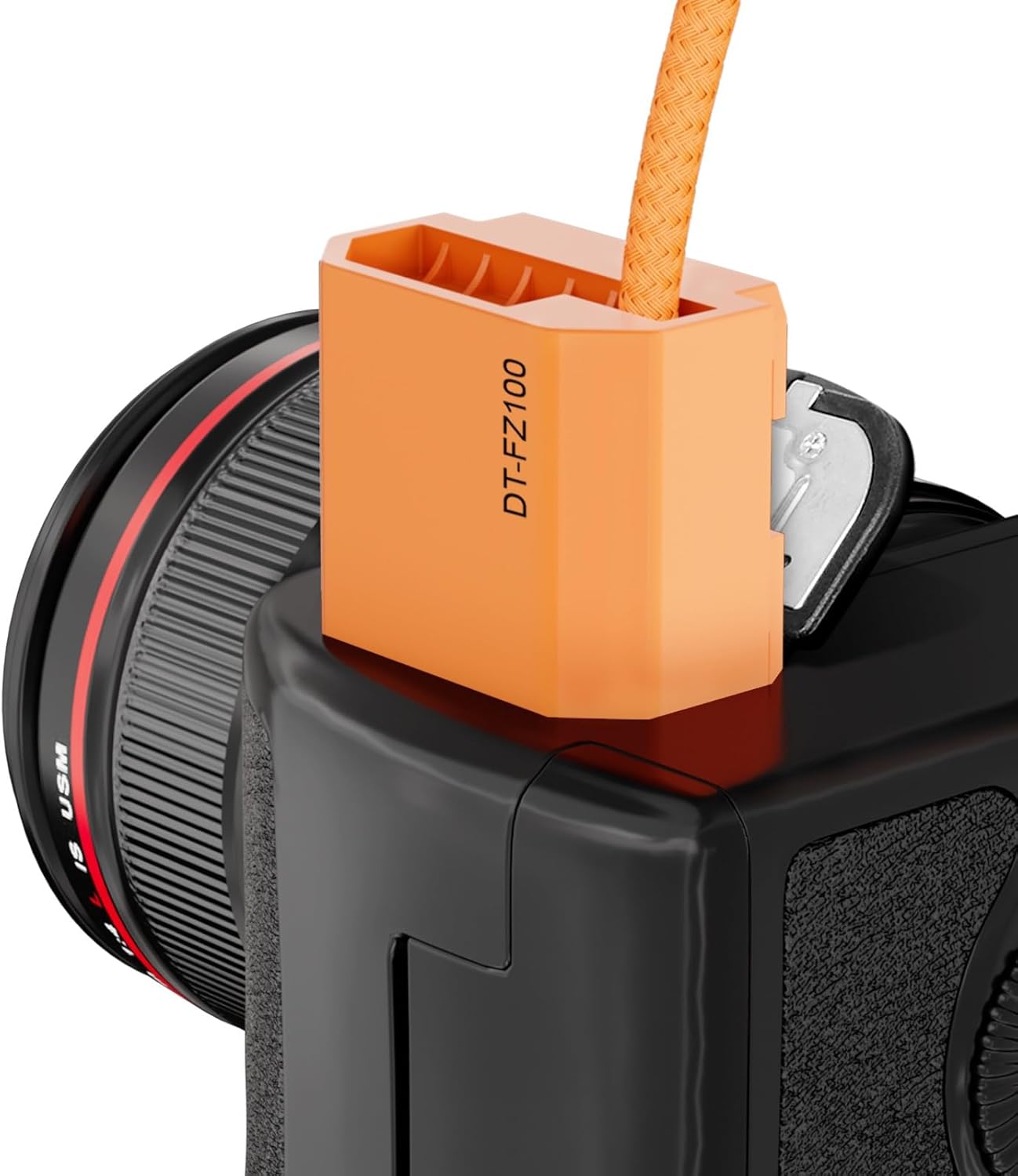
Figure 2: The ZGCINE DT-FZ100 dummy battery inserted into a compatible Sony camera's battery compartment.

Figura 3: Close view of the D-Tap connector and dummy battery, highlighting the rotatable D-Tap head.
4. Instruções de operação
- Ligar: Once both the dummy battery and D-Tap connector are securely connected, power on your external D-Tap power source, then power on your camera. The camera should recognize the dummy battery as a power source.
- Potência do Monitor: Some D-Tap power sources may have indicators for remaining power. Always monitor your external power source to avoid unexpected power loss during shooting.
- Desligar: To power off, first turn off your camera, then disconnect the D-Tap connector from the external power source. Finally, remove the dummy battery from the camera if storage is required.
5. Manutenção
- Armazenar: Guarde o cabo em local seco e fresco, longe da luz solar direta e de temperaturas extremas.
- Limpeza: Use um pano macio e seco para limpar o cabo e os conectores. Evite usar produtos químicos agressivos ou materiais abrasivos.
- Inspecione os conectores: Regularly inspect the D-Tap and dummy battery connectors for any signs of damage, corrosion, or wear. Do not use if damaged.
- Cuidados com os cabos: Evite curvas acentuadas ou puxões excessivos no cabo para prevenir danos aos fios internos.
6. Solução De Problemas
- A câmera não liga:
- Ensure the dummy battery is fully inserted into the camera and the battery compartment door is closed.
- Verify the D-Tap connector is correctly and securely plugged into the external power source, observing polarity.
- Check if the external D-Tap power source is charged and functioning correctly.
- Potência intermitente:
- Check all connections for looseness. Re-seat the dummy battery and D-Tap connector.
- Inspecione o cabo para verificar se há danos visíveis ou dobras.
- Safety Protection Activation: The cable has built-in protection against overcurrent, overvoltage, and short circuits. If the cable stops working unexpectedly, disconnect it immediately and check for any issues with the power source or camera.
7. Especificações
| Modelo | DT-FZ100 |
| D-Tap Input | 14.8V |
| Saída | 8.4V / 3A |
| Comprimento do cabo | 60CM (approximately 1.97 feet) |
| Peso do item | 1.94 onças |
| Características de segurança | Sobrecorrente, Sobrevoltage, Short Circuit Protection |
8. Suporte
For any questions or support regarding your ZGCINE D-Tap to FZ100 Dummy Battery Cable, please contact the seller or manufacturer directly. If you purchased through Amazon, you can find seller contact information by clicking on the seller profile and looking for "Have a question for HolaFoto?". For existing orders, use the "problem with this order" option on your Amazon Order Page. Responses are typically provided within 24 hours during working days.


