Introdução
The Mytrix Tac Master Wireless Gaming Headset is designed to provide a high-quality audio experience for gaming across multiple platforms. Featuring 2.4GHz lossless wireless technology, Bluetooth 5.3, and a 3.5mm wired connection, this headset offers versatile connectivity, low latency, and immersive surround sound. The detachable noise-canceling microphone ensures clear communication, while the ergonomic design and long battery life provide comfort for extended use.
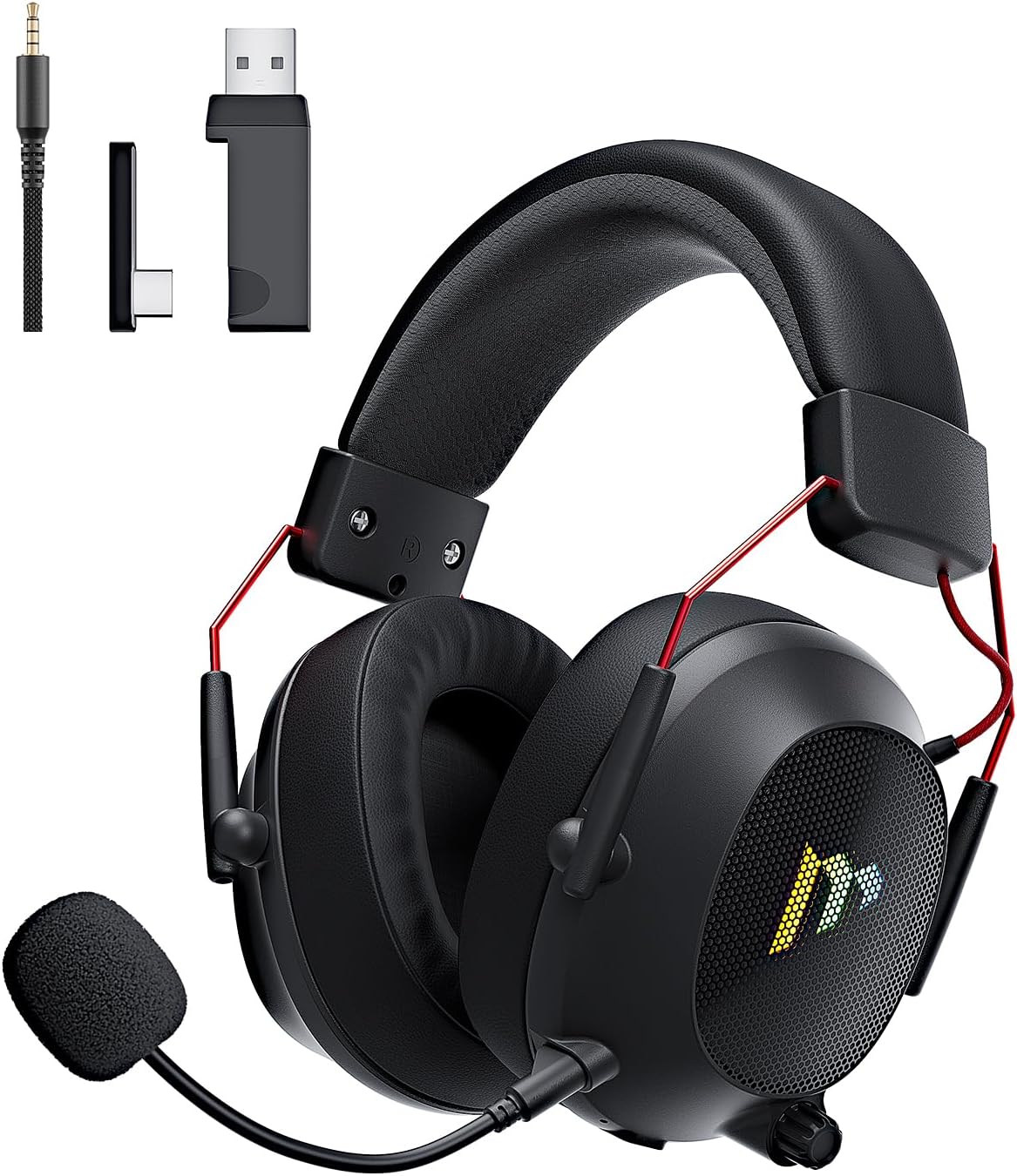
Image: The Mytrix Tac Master Wireless Gaming Headset, showcasing its sleek black design with red accents, detachable microphone, and included USB dongle and Type-C adapter.
Conteúdo da embalagem
Verifique se todos os itens listados abaixo estão incluídos no seu pacote:
- Mytrix Tac Master Wireless Gaming Headset
- Microfone destacável com cancelamento de ruído
- 2.4GHz USB-A Wireless Dongle
- USB Type-C Transmitter
- Cabo de áudio de 3.5 mm
- Cabo de carregamento USB (USB-A para USB-C)
- Manual do usuário (este documento)
Headset Controls and Components
Familiarize yourself with the various controls and components of your Mytrix Tac Master headset:

Image: Diagram illustrating the location and function of controls on the Mytrix Tac Master headset, including power button, volume wheel, microphone mute button, and mode switch.
- Botão de energia: Press and hold for 3 seconds to turn on/off. Single press to pause/play audio.
- Botão de modo (M): Single press to toggle microphone on/off. Double press to switch between Bluetooth and 2.4G wireless modes. Press and hold for 3 seconds to turn RGB lights on/off.
- Roda de volume: Gire para cima para aumentar o volume, gire para baixo para diminuir o volume.
- Porta do microfone: Para fixar o microfone removível.
- Conector de áudio de 3.5 mm: Para conexão com fio.
- Porta de carregamento USB-C: Para carregar o fone de ouvido.
- Iluminação RGB: Located on the earcups.
Configurar
1. Carregando o fone de ouvido
Before first use, fully charge the headset. Connect the USB charging cable to the headset's USB-C port and the other end to a USB power source (e.g., computer USB port, USB wall adapter). The LED indicator will show charging status and turn off when fully charged. A full charge takes approximately 3 hours and provides up to 48 hours of battery life.

Image: Visual representation of the headset's long-lasting battery life, indicating approximately 50 hours of use and a 3-hour charging time.
2. Conectando o microfone
Insert the detachable microphone into the microphone port on the left earcup. Ensure it is securely seated. The microphone is flexible and omni-directional, allowing for angle adjustment.
3. Opções de conectividade
The Mytrix Tac Master headset offers multiple connection methods for broad compatibility:

Image: Diagram illustrating the four connection modes: 2.4GHz Dongle (USB-A and USB-C), Bluetooth 5.3, and 3.5mm Wired, along with compatible devices for each mode.
3.1. 2.4GHz Wireless Connection (Recommended for PC, PS4, PS5, Switch Docked Mode)
- Identify the appropriate dongle for your device:
- For devices with a USB-A port (PC, PS4, PS5, Switch Docked): Use the 2.4GHz USB-A dongle.
- For devices with a USB-C port (Switch Handheld, Laptops, Tablets): Use the USB Type-C transmitter.
- Plug the selected 2.4GHz dongle/transmitter into an available USB port on your device.
- Power on the headset by pressing and holding the Power button for 3 seconds.
- Ensure the headset is in 2.4GHz mode. If not, double-press the 'M' button to switch modes until the headset connects to the dongle. The headset will automatically pair with the dongle.
- No seu dispositivo, selecione o fone de ouvido como dispositivo de saída e entrada de áudio.
3.2. Bluetooth 5.3 Connection (Recommended for Mobile Phones, Tablets, Laptops)
- Power on the headset by pressing and holding the Power button for 3 seconds.
- Double-press the 'M' button to switch the headset to Bluetooth pairing mode. The LED indicator will flash, indicating it's ready to pair.
- On your device, enable Bluetooth and search for "Mytrix Tac Master" in the list of available devices.
- Select "Mytrix Tac Master" to connect. Once connected, the LED indicator will stop flashing.
3.3. 3.5mm Wired Connection (Recommended for Xbox, Game Console Controllers, Devices without USB/Bluetooth)
- Conecte uma extremidade do cabo de áudio de 3.5 mm à entrada de 3.5 mm do fone de ouvido.
- Connect the other end of the 3.5mm audio cable to the audio jack on your device (e.g., Xbox controller, phone).
- In wired mode, the headset's microphone and RGB lighting functions are not active.
Instruções de operação
Ligar/Desligar
- Para ligar: Press and hold the Power button for approximately 3 seconds until the headset powers on.
- Para desligar: Press and hold the Power button for approximately 3 seconds until the headset powers off.
Controle de volume
- Aumentar o volume: Rotate the Volume wheel upwards.
- Diminuir o volume: Rotate the Volume wheel downwards.
Controle de microfone
- Silenciar/ativar microfone: Single press the 'M' button.
- The detachable microphone features noise cancellation for clear voice chat.
Controle de Iluminação RGB
- Turn RGB Lights On/Off: Press and hold the 'M' button for approximately 3 seconds.
Controle de reprodução de áudio
- Reproduzir/Pausar áudio: Pressione o botão Liga/Desliga uma única vez.
Som Surround
The headset features 7.1 stereo surround sound for an immersive audio experience, allowing for precise positioning of sound details in games.

Imagem: Uma explosão view of the headset's 50mm drivers, illustrating the components that contribute to its 7.1 stereo surround sound capability.
Manutenção
- Limpeza: Use um pano macio e seco para limpar o fone de ouvido. Não use produtos de limpeza abrasivos ou solventes. Para limpar os fones, limpe-os delicadamente com um pano úmido.amp Limpe o pano e deixe secar completamente ao ar livre antes de usar.
- Armazenar: Guarde o headset em local fresco e seco, longe da luz solar direta e de temperaturas extremas. Se for armazená-lo por um longo período, certifique-se de que a bateria esteja parcialmente carregada (cerca de 50%) para preservar sua vida útil.
- Cuidados com a bateria: Avoid fully discharging the battery frequently. Charge the headset regularly, even if not in constant use, to maintain battery longevity.
- Cuidados com o microfone: Handle the detachable microphone gently. Avoid excessive bending or twisting.
Solução de problemas
| Problema | Possível causa | Solução |
|---|---|---|
| Não há som no fone de ouvido. | Headset not powered on, low battery, incorrect audio output selected, connection issue. | Ensure headset is powered on and charged. Check device's audio settings to confirm "Mytrix Tac Master" is selected as output. Re-establish 2.4GHz or Bluetooth connection. For wired mode, ensure cable is fully inserted. |
| O microfone não está funcionando. | Microphone muted, not properly attached, incorrect audio input selected, wired mode limitation. | Single press the 'M' button to unmute. Ensure microphone is securely attached. Check device's audio settings to confirm "Mytrix Tac Master" is selected as input. Note: Microphone does not function in 3.5mm wired mode. |
| Não consigo conectar via Wi-Fi de 2.4 GHz. | Dongle not recognized, headset not in 2.4GHz mode, interference. | Ensure dongle is fully inserted into a working USB port. Double-press 'M' button to switch headset to 2.4GHz mode. Try a different USB port. Move closer to the dongle to reduce interference. |
| Não consigo conectar via Bluetooth. | O fone de ouvido não está em modo de emparelhamento, o Bluetooth está desativado no dispositivo e já está conectado a outro dispositivo. | Double-press 'M' button to enter Bluetooth pairing mode (LED flashes). Ensure Bluetooth is enabled on your device. Disconnect from other Bluetooth devices if necessary. |
| As luzes RGB não estão funcionando. | Lights turned off, low battery, wired mode limitation. | Press and hold the 'M' button for 3 seconds to toggle RGB lights. Ensure headset has sufficient battery. Note: RGB lights do not function in 3.5mm wired mode. |
Especificações
| Recurso | Detalhe |
|---|---|
| Nome do modelo | Gaming Headset (G901) |
| Tecnologia de Conectividade | Conexão sem fio de 2.4 GHz, Bluetooth 5.3, entrada com fio de 3.5 mm |
| Entrada para fones de ouvido | 3.5 mm Jack |
| Distância wireless | Up to 50 feet (in open spaces) |
| Latência | ≤20ms (2.4GHz) |
| Tipo de driver de áudio | Drivers dinâmicos de 50 mm |
| Recursos de som | 7.1 Stereo Surround Sound |
| Microfone | Detachable, Omni-directional, Noise-Canceling |
| Duração da bateria | Até 48 horas |
| Tempo de carregamento | Aproximadamente 3 horas |
| Tipo de Bateria | 1 bateria de íon de lítio (incluída) |
| Formato do fone de ouvido | Sobre a orelha |
| Características especiais | Ergonomic Design, RGB Lighting, Foldable & Portable |
| Dimensões do produto | 5.91 x 3.94 x 5.91 polegadas |
| Peso do item | 13.4 onças |
| Fabricante | Mytrix |
Garantia e Suporte
Mytrix products are manufactured to high quality standards. For information regarding warranty coverage, technical support, or service inquiries, please refer to the warranty card included with your product or visit the official Mytrix website. You may also contact Mytrix customer support directly for assistance with your Tac Master Gaming Headset.
Para obter mais assistência, visite o Loja Mytrix na Amazon.
Informações importantes de segurança
- Não exponha os fones de ouvido a temperaturas extremas, umidade ou líquidos.
- Evite deixar o fone de ouvido cair ou submetê-lo a impactos fortes.
- Não tente desmontar ou reparar o fone de ouvido por conta própria. Isso anulará a garantia.
- Ouça em níveis de volume moderados para evitar danos à audição. A exposição prolongada a sons altos pode causar perda auditiva permanente.
- Mantenha fora do alcance de crianças.