1. Introdução
The LSC Smart Connect Solar IP Camera is designed to provide reliable outdoor surveillance with the convenience of solar power. This camera offers 1080p video recording, two-way audio, and night vision capabilities up to 10 meters. It integrates seamlessly with the LSC Smart Connect app, allowing for remote monitoring and control. Key features include a light and sound alarm, flash function, and privacy mode to enhance security.
This manual provides essential information for the proper setup, operation, and maintenance of your LSC Smart Connect Solar IP Camera, ensuring optimal performance and longevity.
2. Conteúdo da embalagem e instalação
Antes de iniciar a instalação, certifique-se de que todos os componentes estejam presentes e sem danos.

Imagem 2.1: The LSC Smart Connect Solar IP Camera packaging, showing the camera, solar panel, and app interface. This image represents the complete product package as received.
2.1 Componentes Acimaview
The package typically includes the LSC Smart Connect Solar IP Camera unit, a solar panel for continuous power, and mounting accessories.
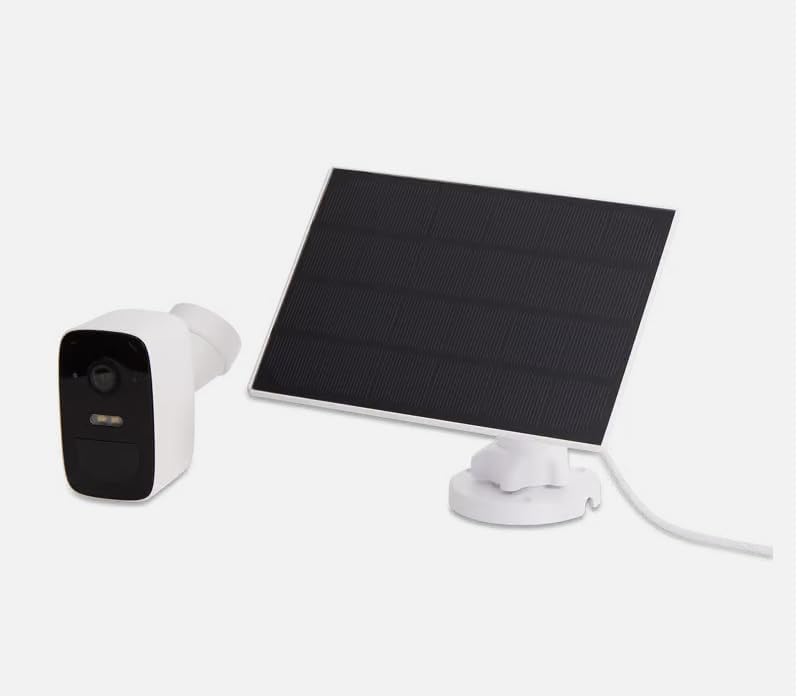
Imagem 2.2: The LSC Smart Connect Solar IP Camera shown alongside its separate solar panel. This illustrates the two main components of the surveillance system.
2.2 Etapas de Configuração Inicial
- Baixe o aplicativo: Download the "LSC Smart Connect" app from your smartphone's app store (iOS or Android).
- Criar uma conta: Abra o aplicativo e registre-se para uma nova conta ou faça login se você já tiver uma.
- Ligar a câmera: Ensure the camera is charged or connected to the solar panel. The camera should enter pairing mode (indicated by an LED light).
- Adicionar dispositivo: In the app, select "Add Device" or the "+" icon. Follow the on-screen instructions to connect the camera to your 2.4GHz Wi-Fi network. Ensure your Wi-Fi signal is strong at the installation location.
- Montagem: Choose a suitable outdoor location for the camera and solar panel. The solar panel should receive direct sunlight for most of the day. Use the provided screws and mounting brackets for secure installation. The camera supports wall mounting.
For detailed mounting instructions, refer to the quick start guide included in your product packaging.
3. Instruções de operação
Once your camera is set up and connected, you can begin monitoring and utilizing its features through the LSC Smart Connect app.
- Ao vivo View: Abra o aplicativo e selecione sua câmera para view a transmissão ao vivo.
- Áudio bidirecional: Use the microphone icon in the app to speak through the camera and the speaker icon to hear audio from the camera's vicinity.
- Visão noturna: The camera automatically switches to night vision in low-light conditions, providing clear images up to 10 meters.
- Detecção de movimento e alertas: Configure motion detection sensitivity and set up push notifications to receive alerts on your smartphone when activity is detected.
- Funções de alarme: Activate the light and sound alarm or flash function via the app to deter intruders.
- Gravação e reprodução: The camera supports local storage (e.g., microSD card, not included) or cloud storage (subscription may be required) for recording. Access recorded footage através da função de reprodução do aplicativo.
- Modo de privacidade: Utilize the privacy function to temporarily disable recording and live view for specific periods.
4. Manutenção
Regular maintenance ensures the optimal performance and longevity of your LSC Smart Connect Solar IP Camera.
- Limpeza: Limpe periodicamente a lente da câmera e o painel solar com um pano macio e seco.amp Use um pano para remover poeira, sujeira e detritos. Evite produtos de limpeza abrasivos.
- Eficiência do painel solar: Ensure the solar panel is free from obstructions (e.g., leaves, snow) that could block sunlight and reduce charging efficiency.
- Atualizações de firmware: Check the LSC Smart Connect app regularly for firmware updates. Keeping the camera's firmware updated ensures access to the latest features and security enhancements.
- Verificação de conexão: Periodically verify the Wi-Fi connection strength and camera status in the app.
5. Solução De Problemas
If you encounter issues with your LSC Smart Connect Solar IP Camera, refer to the following common troubleshooting steps:
- Câmera off-line:
- Verifique a intensidade do sinal Wi-Fi no local da câmera.
- Ensure the camera is receiving adequate power from the solar panel or is sufficiently charged.
- Reinicie o roteador Wi-Fi e a câmera.
- Verify that the camera is connected to a 2.4GHz Wi-Fi network.
- Má qualidade de imagem:
- Limpe a lente da câmera.
- Certifique-se de que não haja obstruções em frente à lente.
- Verifique a velocidade da sua conexão com a internet.
- A detecção de movimento não funciona:
- Verify motion detection settings in the app (sensitivity, detection zones).
- Ensure notifications are enabled on your smartphone and in the app.
- Bateria não carregando:
- Certifique-se de que o painel solar esteja limpo e recebendo luz solar direta.
- Verifique a conexão entre o painel solar e a câmera.
If issues persist, consult the LSC Smart Connect app's help section or the manufacturer's support resources.
6. Especificações
| Recurso | Especificação |
|---|---|
| Resolução de gravação de vídeo | 1080p |
| Cor | Preto/Branco |
| Tecnologia de comunicação sem fio | Wi-Fi (2.4 GHz) |
| Tipo de instalação | Montagem com parafuso/na parede |
| Alcance de visão noturna | 10 metros |
| Dimensões do item (C x L x A) | 15 x 6 x 15 cm |
| Fabricante | LSC |
| Número do modelo | 3203968 |
| ASIN | B0D899HFXL |
| Uso recomendado do produto | Segurança ao ar livre |
| Tecnologia de Conectividade | Sem fio |
| Dispositivos compatíveis | Smartphone |
| Tipo de controlador | SmartThings (via LSC Smart Connect App) |
| Uso interno/externo | Ar livre |
7. Garantia e Suporte
For warranty information, please refer to the documentation included with your purchase or contact the retailer/manufacturer directly. Typically, products come with a limited warranty covering manufacturing defects.
For technical support, frequently asked questions, or further assistance, please visit the official LSC Smart Connect website or utilize the support section within the LSC Smart Connect mobile application.
Recursos on-line:
- LSC Smart Connect App (available on iOS App Store and Google Play Store)
- Manufacturer's Official Website (for product updates and support)


