1. Introdução
Thank you for choosing the AUGUESLD 1002S 2.0 Channel Bluetooth Amplifier Board. This high-performance amplifier board is designed to deliver clear and powerful stereo audio, featuring dual TPA3116D2 chips for robust output. With multiple input options, it offers versatile connectivity for various audio sources. This manual provides detailed instructions for setup, operation, and maintenance to ensure optimal performance and longevity of your ampplaca mais viva.
2. Produto acabadoview
The AUGUESLD 1002S is a compact yet powerful 2.0 channel stereo amplifier board. It integrates Bluetooth connectivity, USB audio input, and a 3.5mm AUX input, making it suitable for a wide range of applications from DIY audio projects to upgrading existing sound systems.
2.1 Principais Características
- Dual TPA3116D2 Chips: Ensures stable and high-fidelity stereo dual-channel output with peak power up to 100W + 100W.
- Volume Amplotage Entrada: Operates efficiently with a DC input range of 9-24V.
- Múltiplas entradas de áudio: Supports Bluetooth, 3.5mm AUX, USB sound card, and USB flash drive inputs for broad compatibility.
- Suporte de formato versátil: When using a USB flash drive, it supports MP3, FLAC, WAV, and APE formats. (Note: FLAC bitrate should be within 1400kbps, WAV sampling rate within 44100Hz. USB flash drive format must be FAT32 and ≤ 32GB).
- Design aprimorado: Features an upgraded DC socket for spark-free power connection and an input mode indicator light for clear status display.
2.2 Identificação do Componente
Refer to the diagram below for a detailed view do amplifier board's components and their functions.

Figura 2.1: Component layout of the 1002S Amplifier Board, highlighting the DC input, 3.5mm AUX input, USB input, power switch, multifunctional knob, large heat sink, and Bluetooth antenna base.

Figura 2.2: Illustration of the multiple input modes (Bluetooth, 3.5mm AUX, USB) and the input mode indicator lights on the ampplaca mais viva.
3. Conteúdo da embalagem
Ao abrir a embalagem, verifique se todos os itens estão presentes e em boas condições:
- 1 x AUGUESLD 1002S Amptábua mais viva
- (Os acessórios adicionais podem variar de acordo com os pacotes de produtos específicos)
4. Instruções de configuração
4.1 Conexão de Energia
Connect a DC power supply (9-24V) to the upgraded DC socket on the amplifier board. Ensure the plug specification is 5.5x2.5mm. If a 5.5x2.5mm plug is not available, a DC terminal can also be used. The upgraded socket design helps prevent sparks during connection.

Figura 4.1: Close-up of the upgraded DC socket, designed for spark-free power connection.
4.2 Conexão de alto-falante
Connect your passive speakers to the speaker output terminals (L and R) on the amplifier board. Ensure correct polarity (+/-) for each speaker.
Conexão de entrada de áudio 4.3
Escolha o seu método de entrada de áudio preferido:
- Entrada Bluetooth: Ligue o amplifier board. The input mode indicator light will show the current mode. Procurar o amplifier's Bluetooth name on your device (e.g., smartphone, tablet) and pair. You can customize the Bluetooth name and set a password if desired.
- Entrada AUX de 3.5 mm: Connect an audio source (e.g., MP3 player, TV, computer) to the 3.5mm AUX input jack using a standard 3.5mm audio cable.
- USB Sound Card Input: Conecte o amplifier board to a computer via a USB cable. The computer should recognize it as an audio output device.
- Entrada de unidade flash USB: Insert a FAT32 formatted USB flash drive (max 32GB) containing supported music files (MP3, FLAC, WAV, APE) into the USB port.
5. Instruções de operação
5.1 Ligar/Desligar
Use the power switch on the board to turn the amplifier ligado ou desligado.
5.2 Multifunctional Knob Operation
The multifunctional knob controls various playback and mode settings:
- 1 Clique: Reproduzir / Pausar
- 2 cliques: Próxima música
- 3 cliques: Música Anterior
- 4 cliques: Alternar modo de entrada
- 5 cliques: Redefinição de fábrica
- Pressão longa: Ligado/Em espera
Figura 5.1: Detalhado view of the multifunctional knob and its various click functions for controlling playback and input modes.
5.3 USB Flash Drive Music Playback
Quando uma unidade flash USB é inserida, o amplifier will automatically detect and play music. You can navigate through your music list using the multifunctional knob.

Figura 5.2: Example of a music list displayed when a USB flash drive is connected, allowing for easy song selection.
6. DIY Customization
The AUGUESLD 1002S amplifier board is designed with DIY enthusiasts in mind, offering options for panel customization. You can replace the small front panel with a larger one for easier access and a different aesthetic.
6.1 Panel Replacement Steps
- Take out the bottom board.
- Drill through the pre-designated holes on the new panel.
- Remove the small panel from the ampplaca mais viva.
- Install the large panel onto the ampplaca mais viva.

Figura 6.1: Step-by-step guide for replacing the amplifier board's small panel with a larger, custom panel.
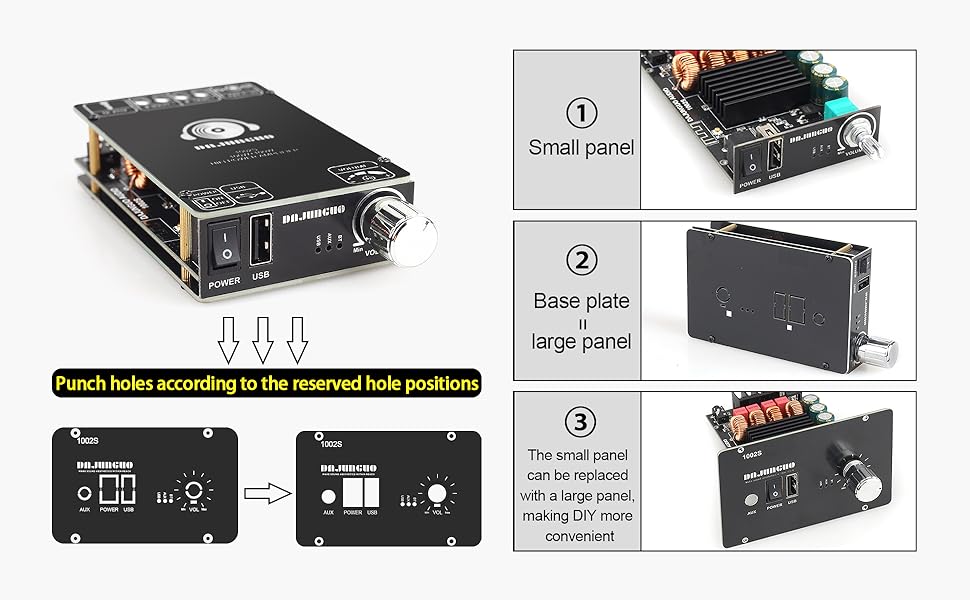
Figura 6.2: Visual guide for punching holes in the new panel according to the reserved positions for a perfect fit.
6.2 DIY Installation Video
Watch the official DIY installation video for a visual guide on customizing your ampplaca mais viva.
6.1 vídeo: "1002S Amplifier Board Panel DIY" - This video demonstrates the process of disassembling the amplifier board and replacing its front panel for custom projects.
7. Especificações
| Atributo | Detalhe |
|---|---|
| Número do modelo | 1002S(100W+100W) |
| Chipset | Dual TPA3116D2 |
| Canais | 2.0 Estéreo |
| Potência de pico de saída | 100W + 100W |
| Volumetage entrada | DC 9-24V |
| Entradas de áudio | Bluetooth, 3.5mm AUX, USB Sound Card, USB Flash Drive |
| Versão Bluetooth | 5.1 |
| USB Decoding Formats | WAV, FLAC, APE, MP3 |
| USB Flash Drive Format | FAT32 (≤ 32GB) |
| Dimensões do produto (C x L x A) | 5.67 x 4.17 x 1.73 polegadas |
| Peso | 5.44 onças |
| Fabricante | AUGESLD |
7.1 Tabela de Potência de Saída
The following table details the power output under various test conditions (1kHz).

Figura 7.1: Power output specifications for the 1002S amplifier board at different DC voltages and speaker impedances.
- If the speaker impedance is 2 ohms, the voltage should not exceed 21V; 20V or 19V is recommended.
- Quando o volume de entradatage is 24V, the impedance of the left and right channel speakers must be greater than or equal to 4 ohms.
8. Solução De Problemas
If you encounter any issues with your AUGUESLD 1002S amplifier board, please refer to the following common troubleshooting steps:
- Sem energia: Ensure the DC power supply is correctly connected and within the 9-24V range. Check the power switch position.
- Sem som: Verify speaker connections and polarity. Check the audio input source and ensure it's properly connected and playing. Confirm the correct input mode is selected using the multifunctional knob (4 clicks). Adjust volume.
- Som distorcido: Check speaker impedance compatibility with the power output table. Ensure the input voltage is appropriate for the connected speakers. Reduce volume if distortion occurs at high levels.
- Problemas de emparelhamento Bluetooth: Garantir o amplifier is in Bluetooth mode (check indicator light). Turn off and on Bluetooth on your device. Perform a factory reset (5 clicks on the knob) if necessary.
- USB Flash Drive Not Reading: Ensure the USB flash drive is formatted to FAT32 and its size is ≤ 32GB. Verify music file formats are supported (MP3, FLAC, WAV, APE).
For protection against overvoltage, sobrecorrente, subvoltage, clipping, short circuit, and overheating, the amplifier board includes built-in protection mechanisms.
9. Manutenção
Para garantir a longevidade e o desempenho ideal do seu amplifier board, follow these maintenance guidelines:
- Mantenha o amplifier board clean and free from dust. Use a soft, dry cloth for cleaning.
- Evite expor a placa à umidade ou a temperaturas extremas.
- Ensure adequate ventilation around the heat sink to prevent overheating.
- Do not attempt to disassemble or repair the board beyond the specified DIY modifications unless you are a qualified technician.
10. Garantia e Suporte
AUGUESLD provides 7*24 hour after-sales service for this product. If you have any questions or encounter quality issues, please do not hesitate to contact us. We are committed to providing satisfactory answers and solutions.
For further assistance, please visit the official AUGUESLD store or contact customer support through your purchase platform.
Manufacturer: AUGUESLD


