Introdução
This user manual provides comprehensive instructions for the setup, operation, maintenance, and troubleshooting of your Thomson Streaming Stick 4K 145G. Please read this manual carefully before using the device to ensure proper functionality and to avoid damage.

Image: The Thomson Streaming Stick 4K 145G alongside its remote control, illustrating the main components of the product.
O que está na caixa
Upon unboxing your Thomson Streaming Stick 4K 145G, please verify that all components are present:
- Thomson Streaming Stick 4K 145G
- Controle remoto
- Adaptador de energia
- Cabo USB (para alimentação)
- HDMI Extender (optional, may be included)
- Guia de início rápido
Guia de configuração
Follow these steps to set up your Thomson Streaming Stick 4K 145G:
- Conecte o Streaming Stick: Plug the Thomson Streaming Stick 4K 145G directly into an available HDMI port on your television. If space is limited, use an HDMI extender if provided.
- Conecte a energia: Connect the provided USB cable to the power input port on the streaming stick and then connect the other end to the power adapter. Plug the power adapter into a wall outlet.
- Ligue a TV e selecione a entrada: Turn on your television and select the HDMI input to which the streaming stick is connected.
- Configuração inicial: The device will boot up and guide you through the initial setup process on your TV screen. This typically includes:
- Seleção de idioma.
- Connecting to your Wi-Fi network.
- Signing in with your Google account (required for Google TV features and app downloads).
- Aceitar os termos e condições.
- Emparelhamento de controle remoto: The remote control should automatically pair with the device. If not, follow the on-screen instructions or press and hold the Home and Back buttons simultaneously on the remote until pairing is complete.
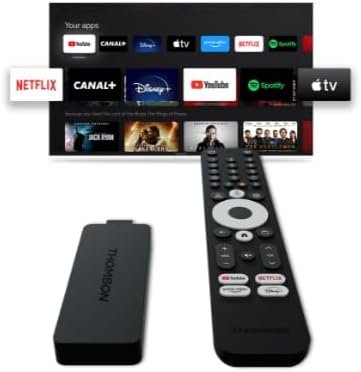
Imagem: Uma imagem detalhada view of the Thomson Streaming Stick 4K 145G, highlighting its HDMI connector for TV input and the power input port.
Instruções de operação
Once set up, you can begin using your Thomson Streaming Stick 4K 145G to access various streaming services and content.
Funções do controle remoto
Familiarize-se com os botões do controle remoto:
- Botão de energia: Liga ou desliga o dispositivo (modo de espera).
- Botão do Google Assistente: Ativa comandos de voz para busca e controle.
- Teclado de navegação (círculo): Use up, down, left, right to navigate menus.
- Botão OK/Selecionar: Confirma seleções.
- Botão Voltar: Retorna à tela anterior.
- Botão Home: Retorna à tela inicial do Google TV.
- Botões de volume (+/-): Ajusta o volume da TV.
- Botão Mudo: Mutes TV volume.
- Botões de atalho do aplicativo: Dedicated buttons for Netflix, Disney+, YouTube, and Prime Video for quick access.

Image: The Thomson Streaming Stick 4K 145G and its remote control, showing the layout of the buttons on the remote.
Navegando no Google TV
The Google TV interface organizes content from your streaming services into a single, personalized experience.
- Tela inicial: Displays recommended content, installed apps, and your watchlist.
- Aplicativos: Access all your installed applications. You can download more from the Google Play Store.
- Biblioteca: Find your purchased movies and TV shows from Google Play.
- Procurar: Use the search icon or Google Assistant button to find content by title, genre, or actor.
To stream content, simply select an app or a recommended title from the home screen. Ensure you have an active subscription for paid services.
Manutenção
Proper maintenance ensures the longevity and optimal performance of your streaming stick.
- Limpeza: Use a soft, dry, lint-free cloth to clean the device and remote control. Do not use liquid cleaners or aerosols.
- Ventilação: Ensure the streaming stick is placed in a well-ventilated area and not covered, as proper airflow prevents overheating.
- Atualizações de software: The device will automatically check for and install software updates. Ensure it remains connected to the internet for these updates.
- Armazenar: Quando não estiver em uso por longos períodos, guarde o dispositivo em local fresco e seco, longe da luz solar direta.
Solução de problemas
If you encounter issues with your Thomson Streaming Stick 4K 145G, refer to the following common problems and solutions:
| Problema | Possível causa | Solução |
|---|---|---|
| Sem energia/O dispositivo não liga | Power adapter not connected, faulty outlet, or damaged cable. | Verifique se o adaptador de energia está firmemente conectado ao dispositivo e a uma tomada elétrica em funcionamento. Tente usar outra tomada. |
| Sem sinal na TV | Incorrect HDMI input selected, loose HDMI connection, or device not powered on. | Verify the TV is on the correct HDMI input. Re-seat the HDMI cable. Ensure the streaming stick has power. |
| Controle remoto não responde | Batteries low/dead, remote not paired, or obstruction. | Replace batteries. Re-pair the remote by holding Home and Back buttons. Ensure no obstructions between remote and device. |
| Problemas de buffering ou baixa qualidade de streaming. | Weak Wi-Fi signal, internet speed issues, or network congestion. | Move the device closer to the Wi-Fi router. Restart your router. Check your internet speed. Reduce other network activity. |
| Aplicativos travando ou congelando | Outdated app, insufficient memory, or software glitch. | Restart the device. Check for app updates in the Google Play Store. Clear app cache (Settings > Apps > [App Name] > Clear cache). |
If the issue persists after trying these solutions, you may need to perform a factory reset (Settings > System > About > Factory reset). Note that a factory reset will erase all data and settings on the device.
Especificações
Key technical specifications for the Thomson Streaming Stick 4K 145G:
- Nome do modelo: STREAMING STICK 4K THOMSON 145G
- Número do modelo: 145G
- Resolução: 4K UHD
- Conectividade: Wi-Fi, USB, Ethernet (via adapter), HDMI, IR
- Tipo de conector: HDMI
- Serviços de Internet suportados: Netflix, Disney+, Prime Video, YouTube, Spotify (and others via Google Play Store)
- Tipo de Controlador: Controle remoto
- Fator de forma: Bastão de TV
- Cor: Preto
- Dimensões do produto: 1.3 x 9.3 x 3.4 cm
- Peso: 460 g
- Fabricante: Thomson
- Primeiro disponível: 8 de agosto de 2024
Garantia e Suporte
For warranty information and technical support, please refer to the documentation included with your purchase or visit the official Thomson support website. Guarde o comprovante de compra para solicitações de garantia.
Fabricante: Thomson
Atualizações de software garantidas até: Unknown (as per product data)


