1. Introdução
This manual provides instructions for the Ropwol H15 Digital Camera. Please read this manual thoroughly before using the camera to ensure proper operation and to maximize its features. Keep this manual for future reference.
2. Conteúdo da embalagem
Verifique se todos os itens estão presentes na embalagem:
- Ropwol H15 Digital Camera (Black)
- Cartão SD de 32 GB
- Correia
- Bateria
- Adaptador
- Cabo de dados USB-C
- Manual do usuário (este documento)
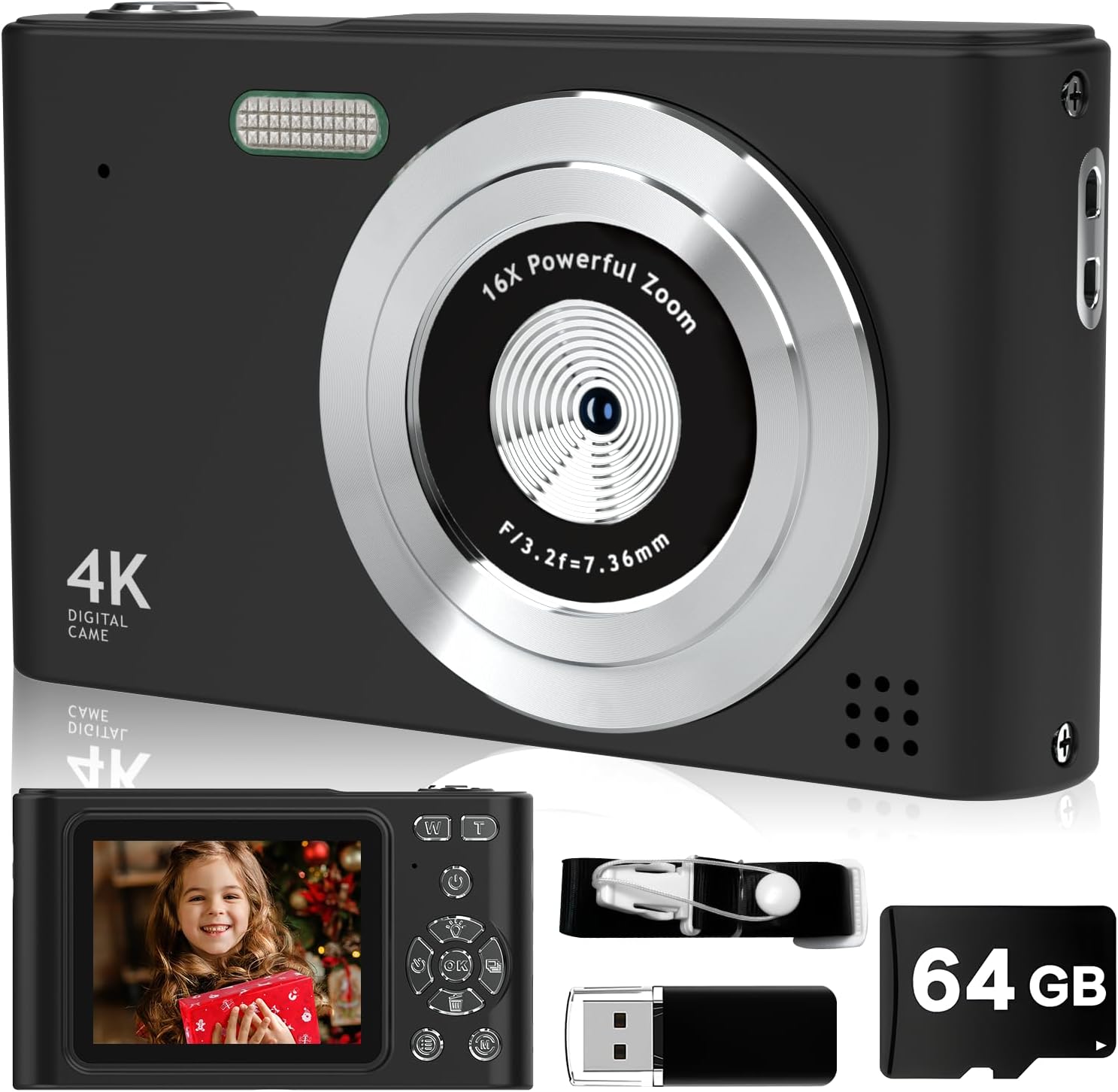
Image: The Ropwol H15 Digital Camera shown with its included accessories: a 32GB SD card, USB cable, and strap.
3. Configuração
3.1. Carregando a bateria
- Localize a porta USB-C na câmera.
- Connect the provided USB-C data cable to the camera and the adapter.
- Conecte o adaptador a uma tomada elétrica.
- The camera's indicator light will show charging status. Once fully charged, the light will change or turn off.
Observação: The camera features a built-in rechargeable battery. It is not necessary to remove the battery for charging.
3.2. Inserindo o cartão SD
- Certifique-se de que a câmera esteja desligada.
- Locate the SD card slot, typically on the side or bottom of the camera.
- Insert the provided 32GB SD card into the slot with the metal contacts facing the correct direction (refer to the diagram on the camera or slot cover).
- Push the card gently until it clicks into place.

Image: The Ropwol H15 Digital Camera displaying its ports for the SD card and USB cable, highlighting connectivity options.
3.3. Prendendo a Correia
Thread the camera strap through the designated loop on the camera body to prevent accidental drops.
4. Operação
4.1. Ligar / desligar
Press and hold the power button (usually marked with ⏻ power symbol) to turn the camera on or off.
4.2. Tirando fotos
- Ligue a câmera.
- Enquadre a sua foto usando a tela LCD.
- Press the shutter button (typically on top of the camera) halfway to focus, then press fully to capture the image.

Image: The Ropwol H15 Digital Camera's rear view, showing the LCD screen and control buttons, with a photo of a child displayed.
4.3. Gravação de vídeos
- Switch the camera to video mode (refer to the camera's on-screen menu or a dedicated button).
- Press the record button (often marked with a ponto vermelho) to start recording.
- Pressione o botão de gravação novamente para interromper a gravação.
4.4. Função Zoom
Use the zoom buttons (often marked 'W' for Wide and 'T' for Telephoto) to adjust the 16x digital zoom. 'T' zooms in, 'W' zooms out.

Image: A visual comparison showing the effect of 2x and 16x digital zoom on the Ropwol H15 Digital Camera, illustrating its magnification capability.
4.5. Using Filters and Special Features
Navigate through the camera's menu to access various functions such as:
- Filtros: Apply different visual effects (e.g., Black/White, Warm, Cold) to your photos.
- Anti-vibração: Activates digital image stabilization to reduce blur from camera movement.
- Temporizador: Set a delay (e.g., 2s, 5s, 10s) before a photo is taken, allowing you to be in the shot.
- Tiro contínuo: Capture várias fotos em rápida sucessão.

Image: The Ropwol H15 Digital Camera showcasing its self-timer options (2s, 5s, 10s), continuous shooting mode, and the anti-shake function for clearer images.
4.6. Connecting to a Computer (Webcam Function)
The camera can function as a webcam. Connect the camera to your computer using the USB-C cable. Select the "Webcam" option on the camera's screen if prompted.
5. Manutenção
- Limpeza da lente: Use um pano macio e sem fiapos, próprio para lentes de câmeras. Não utilize materiais abrasivos ou produtos químicos agressivos.
- Limpando o Corpo: Limpe o corpo da câmera com um pano macio e seco. Para sujeira persistente, umedeça levemente a câmera.ampen o pano com água.
- Armazenar: Guarde a câmera em um local fresco e seco, longe da luz solar direta e de temperaturas extremas.
- Cuidados com a bateria: Recharge the battery regularly, even if the camera is not in frequent use, to maintain battery health. Avoid fully discharging the battery for extended periods.
- Gerenciamento de cartão SD: Regularly transfer photos and videos to a computer or backup storage to free up space on the SD card and prevent data loss.
6. Solução De Problemas
| Problema | Possível causa | Solução |
|---|---|---|
| A câmera não liga. | A bateria está descarregada. | Charge the camera battery using the provided USB-C cable and adapter. |
| Não é possível tirar fotos/vídeos. | SD card is full or not inserted correctly. | Check if the SD card is properly inserted. Transfer files to free up space or replace the SD card. |
| As imagens estão desfocadas. | Camera shake; lens is dirty; subject is too close. | Ensure Anti-Shake is enabled. Clean the lens. Maintain appropriate distance from the subject. |
| A câmera congela ou não responde. | Falha temporária de software. | Pressione e mantenha pressionado o botão liga/desliga por 10 segundos para forçar o desligamento e, em seguida, reinicie a câmera. |
| Computer does not recognize camera as weblaranja. | Incorrect connection mode selected. | Ensure "Webcam" mode is selected on the camera after connecting to the computer. Try a different USB port. |
7. Especificações
| Recurso | Detalhe |
|---|---|
| Nome do modelo | H15 |
| Resolução Estática Efetiva | 44 MP (Maximum Image Size) |
| Resolução de vídeo | 1080p Full HD |
| Zoom Digital | 16x |
| Estabilização de Imagem | Digital (Antivibração) |
| Tecnologia de sensor fotográfico | CMOS |
| Tamanho da tela | 2.4 polegadas |
| Tipo de exibição | LCD |
| Conectividade | Micro USB |
| Suporte para cartão de memória | SD Card (up to 32GB included) |
| Tipo de Bateria | Lithium Ion (Built-in) |
| Características especiais | Anti Shake, Self Timer, Filters, Continuous Shooting |
| Cor | Preto |
8. Garantia e suporte
Garantia: The Ropwol H15 Digital Camera comes with a 2-year manufacturer's warranty. This warranty covers defects in materials and workmanship under normal use. Please retain your proof of purchase for warranty claims.
Apoiar: For technical assistance, troubleshooting beyond this manual, or warranty inquiries, please contact Ropwol customer support through the retailer where the product was purchased or refer to the contact information provided in the product packaging.


