Introdução
The HyperGear 4-in-1 Foldable Wireless Charging Station is designed to provide a convenient and efficient charging solution for multiple devices. This station allows you to simultaneously charge your iPhone, Apple Watch, AirPods, and an additional USB-powered device. Its foldable design enhances portability, making it suitable for both home and travel use. Key features include 15W wireless fast charging for compatible iPhones, a dedicated 2.5W Apple Watch charger, a 5W charging pad for AirPods, and an extra 5W USB-A port. The device also incorporates an adjustable charging coil for optimal phone alignment, dimmable LED mood lighting, and advanced safety features to protect your devices.
Conteúdo da embalagem
- 1 x HyperGear 4-in-1 Foldable Wireless Charging Station
- 1 carregador de parede PD USB-C de 20 W
- 1 x 3ft USB-C Power Cable
Instruções de configuração
- Desembale o dispositivo: Carefully remove the charging station, 20W USB-C PD wall charger, and USB-C power cable from the packaging.
- Conecte a energia: Insert one end of the provided USB-C power cable into the USB-C input port on the back of the charging station.
- Ligue na tomada: Connect the other end of the USB-C power cable to the 20W USB-C PD wall charger, then plug the wall charger into a standard electrical outlet.
- Ligar: The charging station will power on, and the LED indicators may briefly illuminate.

Image: The HyperGear 4-in-1 Foldable Wireless Charger ready for use, showing an iPhone, Apple Watch, and AirPods charging, with the power adapter and cable connected to a wall outlet.
Instruções de operação
- Charging an iPhone (Wireless Stand):
- Unfold the charging stand to your desired viewing angle (0-60 degrees).
- Place your iPhone on the adjustable wireless charging pad. The charging coil can glide up and down to ensure optimal alignment for various phone sizes and charging coil locations.
- The phone can be charged in both portrait and landscape orientations.
- Ensure your phone is case-friendly (charges through most protective cases up to 3mm thick). Remove cases with magnets, metal, or credit cards.

Image: The charging station demonstrating its fully adjustable design, allowing the phone stand to tilt and the charging coil to move vertically for optimal device placement.

Image: A diagram illustrating the case-friendly charging capability, showing that the charger works through protective cases up to 3mm thick, but not with metal, magnetic, or credit card cases.
- Carregando um Apple Watch:
- Place your Apple Watch on the built-in magnetic charging mount. Ensure the watch is properly aligned and securely attached to initiate charging.
- Charging AirPods (Wireless Pad):
- Place your AirPods charging case on the designated wireless charging pad located on the base of the station.
- Charging a Fourth Device (USB-A Port):
- Connect any compatible USB-powered device (e.g., another phone, tablet, or accessory) to the 5W USB-A output port on the side of the charging station using its respective charging cable.
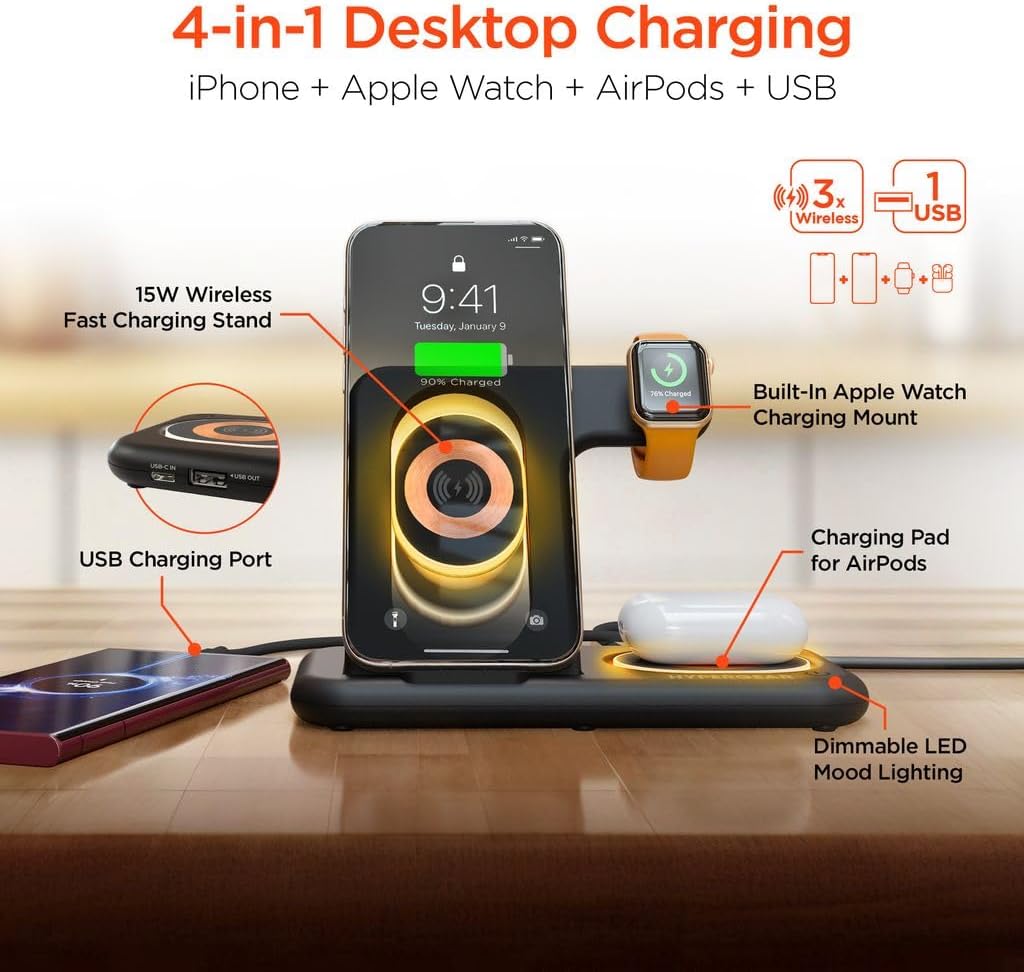
Imagem: Um excessoview of the 4-in-1 charging station highlighting its components: 15W Wireless Fast Charging Stand, Built-in Apple Watch Charging Mount, Charging Pad for AirPods, and USB Charging Port.
- Dimmable LED Mood Lights:
- The charging station features dimmable LED mood lights. Tap the touch-sensitive control area on the base to cycle through low, medium, bright, and off settings.

Image: The charging station illustrating its dimmable LED mood lights, which can be adjusted to low, medium, or bright settings via touch controls.
Video: An official product video demonstrating the foldable design and multi-device charging capabilities of the HyperGear 4-in-1 Wireless Charging Station.
Manutenção e Cuidados
- Limpeza: Use a soft, dry cloth to clean the surface of the charging station. Avoid using abrasive cleaners, solvents, or harsh chemicals.
- Armazenar: When not in use, store the charging station in a cool, dry place away from direct sunlight and extreme temperatures. Its foldable design allows for compact storage.
- Evite líquidos: Mantenha o dispositivo longe de água e outros líquidos. Não o utilize com as mãos molhadas.
- Manuseie com cuidado: Avoid dropping or subjecting the device to strong impacts, as this may damage internal components.
- Desconexão de energia: Always unplug the charging station from the power outlet before cleaning or if it will not be used for an extended period.
Solução de problemas
| Problema | Possível causa | Solução |
|---|---|---|
| O dispositivo não está carregando sem fio. | Incorrect placement; phone case too thick or contains metal/magnets; foreign object on charging pad; device not Qi-compatible. | Adjust device position on the charging pad; remove phone case or use a compatible one; remove any foreign objects; ensure device supports wireless charging. |
| Apple Watch não carrega. | Watch not properly aligned or securely attached to the magnetic mount; watch band interfering. | Ensure the Apple Watch is centered and firmly seated on the magnetic mount. Adjust watch band if it prevents proper contact. |
| Carregamento lento. | Using a non-original or low-power adapter/cable; device not supporting fast wireless charging. | Use the provided 20W USB-C PD wall charger and cable. Ensure your device supports 15W fast wireless charging. |
| LED mood lights not working. | Not powered on; touch control not activated. | Ensure the charging station is plugged in. Tap the touch-sensitive control area on the base to turn on/adjust lights. |
| Charging station is unstable. | Uneven surface; heavy device causing imbalance. | Place the station on a flat, stable surface. Ensure devices are placed gently and balanced. |
Especificações
- Número do modelo: HYP-PD20-3000
- Entrada: USB Tipo C
- Saída sem fio (telefone): Até 15W
- Wireless Output (Apple Watch): 2.5 W
- Wireless Output (AirPods): 5W
- Porta de saída USB-A: 5W (3 Amps)
- Total de portas USB: 1
- Dispositivos compatíveis: iPhone, Apple Watch, AirPods
- Peso do item: 12 onças
- Dimensões da embalagem: 8.12 x 7.53 x 1.3 polegadas
- Cor: Retro Transparent Design
Garantia e Suporte
Para informações sobre garantia ou suporte técnico, consulte o site oficial da HyperGear. website or contact their customer service directly. Keep your purchase receipt for warranty claims. Protection plans may be available for extended coverage; please check with your retailer for details.