Bem-vindo
Thank you for choosing the BYTECH BICONIC True Wireless Earbuds. This manual provides essential information on how to set up, operate, maintain, and troubleshoot your new earbuds. Please read this manual thoroughly before use to ensure optimal performance and longevity of your device.
Instruções importantes de segurança
- Não exponha os fones de ouvido ou o estojo de carregamento a temperaturas extremas, umidade ou líquidos.
- Evite deixar o dispositivo cair, sofrer impactos ou desmontá-lo.
- Do not use abrasive cleaners or harsh chemicals to clean the earbuds or case.
- Ouça em níveis de volume moderados para evitar danos à audição. A exposição prolongada a sons altos pode causar perda auditiva irreversível.
- Mantenha fora do alcance de crianças e animais de estimação.
- Dispose of the device responsibly according to local regulations. Do not dispose of with household waste.
O que está incluído
Por favor, verifique o conteúdo da embalagem para garantir que todos os itens estejam presentes:
- BYTECH BICONIC True Wireless Earbuds (Left and Right)
- Estojo de carregamento
- Cabo de carregamento
- Manual do usuário
Produto acimaview
Familiarize yourself with the components of your BYTECH BICONIC True Wireless Earbuds.

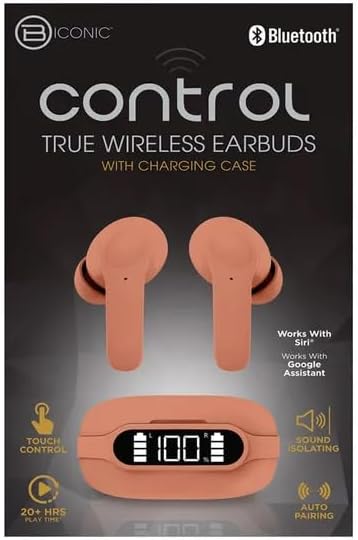
Começando
Carregando os fones de ouvido e o estojo
The BYTECH BICONIC earbuds come with a rechargeable battery in both the earbuds and the charging case. Ensure both are fully charged before first use.
- Coloque os fones de ouvido no estojo de carregamento, certificando-se de que estejam encaixados corretamente em seus respectivos compartimentos (L para esquerdo, R para direito).
- Connect the provided charging cable to the charging port on the case and the other end to a USB power source (e.g., computer USB port, wall adapter).
- The digital display on the charging case will show the battery level. Allow sufficient time for a full charge.
- Depois de totalmente carregado, desconecte o cabo de carregamento.
Emparelhamento Bluetooth
Follow these steps to pair your earbuds with your Bluetooth-enabled device:
- Certifique-se de que os fones de ouvido estejam carregados e dentro do estojo de carregamento.
- Open the charging case. The earbuds will automatically enter pairing mode, and an indicator light on the earbuds will flash.
- No seu dispositivo (smartphone, tablet, etc.), acesse as configurações de Bluetooth e ative o Bluetooth.
- Procurar available devices. You should see "BYTECH BICONIC" or a similar name appear in the list.
- Select "BYTECH BICONIC" to connect. Once connected, a voice prompt will confirm the successful pairing, and the indicator lights on the earbuds will stop flashing.
- Os fones de ouvido se reconectarão automaticamente ao último dispositivo emparelhado ao serem retirados do estojo, desde que o Bluetooth esteja ativado no dispositivo.
Instruções de operação
Controles de toque
The BYTECH BICONIC earbuds feature intuitive touch controls for easy management of your audio and calls.
| Ação | Função |
|---|---|
| Um toque (fone de ouvido esquerdo/direito) | Tocar / pausar música, atender / encerrar chamada |
| Toque duplo (fone de ouvido direito) | Próxima faixa |
| Toque duplo (fone de ouvido esquerdo) | Faixa anterior |
| Toque triplo (fone de ouvido esquerdo/direito) | Ativar assistente de voz (Siri/Google Assistant) |
| Pressione e segure (fone de ouvido esquerdo/direito) | Rejeitar chamada |
Ligar e desligar
- Ligar: Os fones de ouvido serão ligados automaticamente quando removidos do estojo de carregamento.
- Desligar: Coloque os fones de ouvido de volta no estojo de carregamento e feche a tampa. Eles desligarão automaticamente e começarão a carregar.
Manutenção e Cuidados
Proper care will extend the life of your BYTECH BICONIC True Wireless Earbuds.
- Limpeza: Use a soft, dry, lint-free cloth to clean the earbuds and charging case. Do not use liquids or aerosol cleaners.
- Armazenar: Quando não estiverem em uso, guarde sempre os fones de ouvido no estojo de carregamento para protegê-los e mantê-los carregados.
- Evite condições extremas: Do not expose the device to extreme heat, cold, or direct sunlight.
- Resistência à água: These earbuds are not waterproof. Avoid contact with water or excessive moisture.
Solução de problemas
Caso encontre algum problema com seus fones de ouvido, consulte as seguintes soluções comuns:
| Problema | Solução |
|---|---|
| Fones de ouvido não emparelham | Certifique-se de que os fones de ouvido estejam carregados. Desligue e ligue o Bluetooth no seu dispositivo. Esqueça o dispositivo nas configurações de Bluetooth e emparelhe-o novamente. |
| Apenas um fone de ouvido funcionando | Place both earbuds back into the charging case, close the lid, wait a few seconds, then take them out again. Ensure both are charged. |
| Sem som | Check volume levels on both your device and the earbuds. Ensure earbuds are properly connected. Try playing different audio. |
| O estojo de carregamento não carrega | Verifique se o cabo de carregamento está firmemente conectado tanto à capa quanto à fonte de alimentação. Tente usar uma porta USB ou um adaptador de energia diferente. |
Especificações técnicas
Detailed specifications for your BYTECH BICONIC True Wireless Earbuds:
| Recurso | Detalhe |
|---|---|
| Número do modelo | BC-AU-BE-144-TN |
| Tecnologia de Conectividade | Wireless (Bluetooth) |
| Fator de forma | Intra-auriculares (Intra-auriculares) |
| Cor | Café |
| Características especiais | Rechargeable Battery, Touch Control, Sound Isolating, Auto Pairing |
| Componentes incluídos | Cabo |
| Estimated Play Time | 20+ Hours (with charging case) |
Informações sobre garantia e suporte ao cliente
BYTECH products are designed and manufactured to the highest quality standards. For information regarding warranty coverage, please refer to the warranty card included with your purchase or visit the official BYTECH website.
If you require further assistance or have questions not covered in this manual, please contact BYTECH customer support through their official channels. Please have your model number (BC-AU-BE-144-TN) and purchase details ready when contacting support.


