1. Introdução
The iVANKY FusionFinder Smart Tag is a compact item finder designed to help you locate your valuable belongings using the Apple Find My network. This device offers reliable tracking, audible alerts, and long-lasting battery performance, ensuring your items are always within reach or easily locatable.

Image: Two iVANKY FusionFinder Smart Tags, one with a keyring attached, showcasingraças ao seu design compacto.
2. Conteúdo da embalagem
- iVANKY FusionFinder Smart Tag(s)
- Manual do usuário
- Keyrings (quantity may vary based on pack size)
- CR2032 Battery (pre-installed or included as spare)
3. Configuração
3.1 Ligar/Desligar
To power on the iVANKY FusionFinder Smart Tag, press and hold the button on the device for approximately 5 seconds until you hear a beep sound. To power off, press and hold the button again for approximately 3 seconds until you hear a different series of beeps, indicating it has powered down. Powering off the device can help conserve battery life when not in active use.
3.2 Emparelhamento com o recurso Buscar da Apple
The iVANKY FusionFinder Smart Tag is designed to work exclusively with Apple iOS devices via the Apple Find My app. Follow these steps to pair your device:
- Ensure your iVANKY FusionFinder Smart Tag está ligado.
- Abra o Encontre meu aplicativo no seu iPhone.
- Toque no Unid aba na parte inferior da tela.
- Tocar Adicionar item, então selecione Other Supported Items.
- The app will search for nearby compatible devices. Once 'LocatePro' or a similar name appears, tap Conectar.
- Follow the on-screen prompts to name your tag and select an emoji to represent it.
- Tocar Concordar to link the item to your Apple ID and then Terminar.
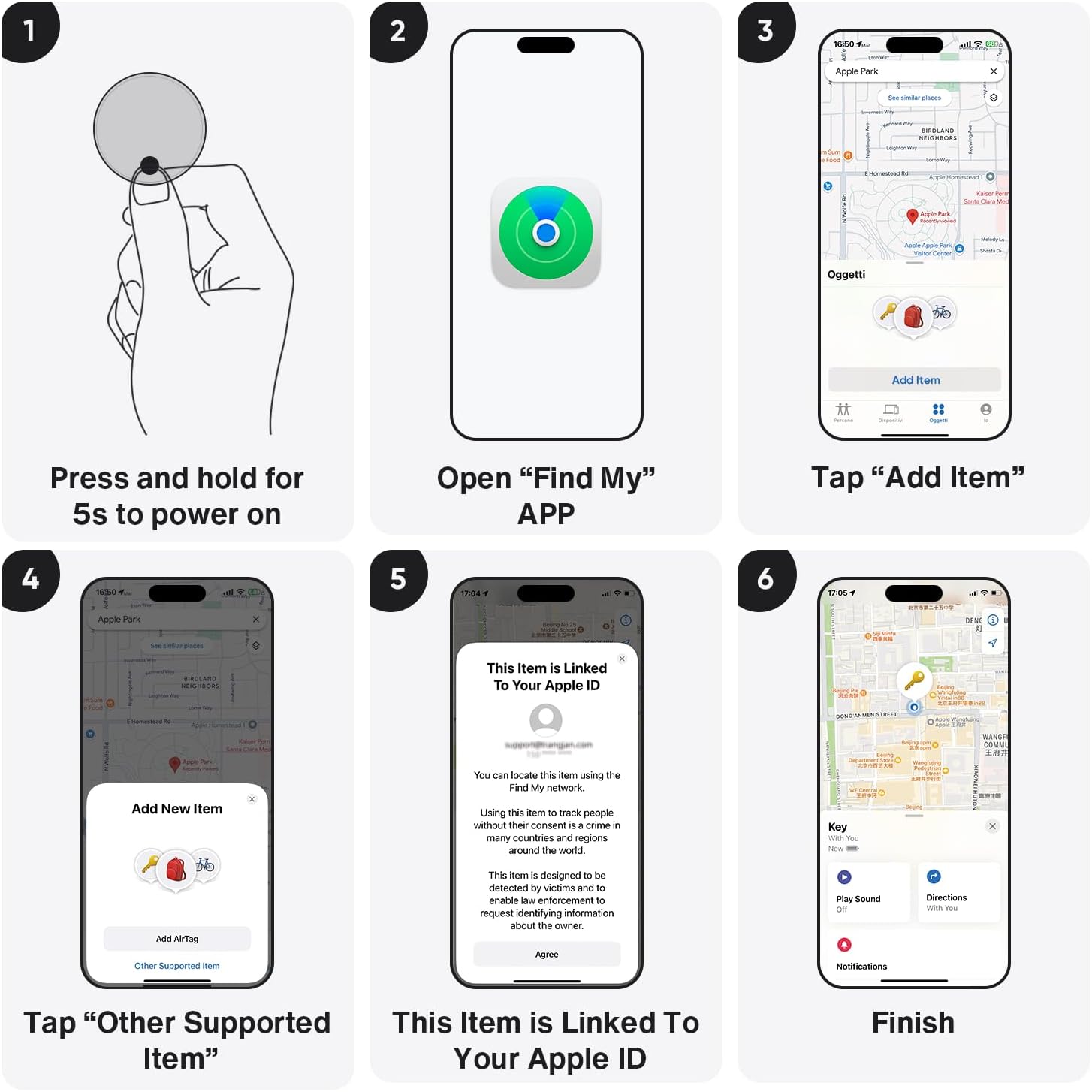
Image: Visual guide demonstrating the pairing process with the Apple Find My app.
Video: A seller-provided video demonstrating the pairing process of the Air tracking Tags with a mobile phone.
4. Instruções de operação
4.1 Locating Items Nearby (Sound Alarm)
When your iVANKY FusionFinder is within Bluetooth range (up to 20 meters), you can use the Find My app to play a loud 85-decibel alarm. This audible alert helps you pinpoint the exact location of your lost item, even if it's hidden from view.

Image: The FusionFinder emitting an 85dB+ sound, with a smartphone displaying its proximity on the Find My app.
4.2 Locating Items Far Away (Map Navigation)
If your item is outside of Bluetooth range, the Apple Find My network can still help you locate it. The network anonymously uses millions of Apple devices worldwide to detect your FusionFinder and report its location to you. You can view its last known location on a map within the Find My app and get directions to it.

Image: A smartphone screen showing map directions to a FusionFinder that has been left behind.
4.3 Alertas de pessoas esquecidas
Enable 'Notify When Left Behind' in the Find My app to receive instant alerts on your iPhone if your iVANKY FusionFinder moves out of the connected Bluetooth range. This feature helps prevent you from forgetting your valuables.
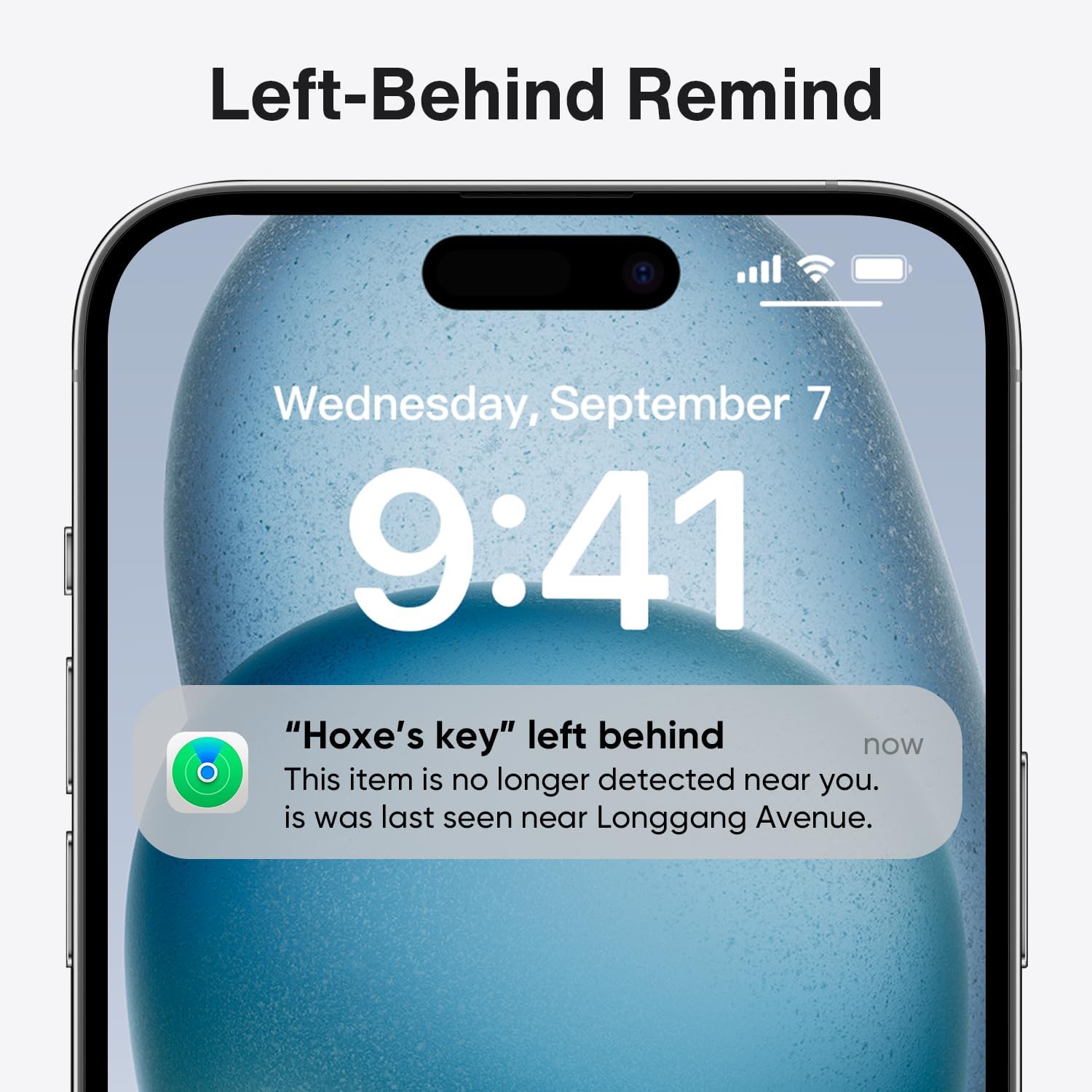
Image: A smartphone displaying a notification indicating that an item with a FusionFinder has been left behind.
5. Gerenciamento de bateria
5.1 Duração da bateria
The iVANKY FusionFinder is powered by a replaceable CR2032 coin cell battery, offering up to one full year of battery life under typical usage conditions. This ensures long-term reliability without frequent battery changes.
5.2 Substituição da bateria
When the battery needs replacement, gently open the device casing (refer to the user manual for specific instructions) and replace the old CR2032 battery with a new one. Ensure correct polarity during installation.

Image: Features of the FusionFinder, highlighting its 365-day battery life and replaceable battery design.
6. Recursos do Produto
- Bluetooth 5.2 avançado: Provides a robust and stable connection for tracking within a 20-meter range.
- 85dB+ Audible Alarm: A loud alarm helps locate items quickly when nearby.
- Resistência à água IP67: Offers protection against dust and temporary immersion in water, making it suitable for various environments.
- Replaceable CR2032 Battery: Ensures extended use with easy battery changes.
- Apple Find My Network Integration: Utilizes the extensive Find My network for global positioning and tracking.
7. Cenários de uso
The iVANKY FusionFinder is versatile and can be attached to a variety of items to prevent loss and aid in recovery:
- Chaves: Attach to your house or car keys.
- Carteiras: Slip into your wallet or purse.
- Bagagem: Secure to suitcases or travel bags.
- Backpacks: Ideal for school bags or hiking packs.
- Other Valuables: Use for any item you wish to keep track of.

Imagem: Examples of FusionFinder usage, showing tags attached to luggage, keys, and a wallet for anti-loss protection.
8. Especificações
| Atributo | Detalhe |
|---|---|
| Número do modelo | VFA01 |
| Tecnologia de Conectividade | Bluetooth 5.2 |
| Tipo de Bateria | 1 x CR2032 (incluído) |
| Duração da bateria | Até 1 ano |
| Alarme Nível sonoro | 85dB+ |
| Resistência à água | IP67 |
| Dispositivos compatíveis | iPhone (iOS Only) |
| Material | Plástico |
| Peso do item | 2.11 onças |
| Dimensões da embalagem | 3.58 x 3.5 x 0.55 polegadas |
9. Solução De Problemas
- Dispositivo não liga: Ensure the CR2032 battery is correctly installed and has sufficient charge. Replace the battery if necessary.
- Unable to pair with Find My app: Make sure Bluetooth is enabled on your iPhone and the FusionFinder is powered on and within range. Restart both devices and try again.
- No sound from the alarm: Check the volume settings on your iPhone and ensure the FusionFinder is within Bluetooth range.
- Localização incorreta: Location accuracy can be affected by environmental factors and the density of the Find My network in your area. Ensure your iPhone has a stable internet connection.
10. Garantia e Suporte
For warranty information, technical support, or any inquiries regarding your iVANKY FusionFinder Smart Tag, please refer to the contact details provided in the product packaging or visit the official iVANKY website. Guarde o recibo de compra para reclamações de garantia.


