1. Introdução
The FLEXISPOT E6 Pro Oval Dual Motor Standing Desk Frame (Model E8) is designed to provide a versatile and ergonomic workspace. This height-adjustable electric desk frame features a robust 3-stage oval leg system and powerful dual motors, allowing for smooth and quiet transitions between sitting and standing positions. The intuitive LED control panel includes memory presets and a convenient USB charging port, enhancing user experience and productivity. This manual provides essential information for the safe assembly, operation, and maintenance of your desk frame.

Figure 1: FLEXISPOT E6 Pro Oval Dual Motor Standing Desk Frame (Black)
2. Informações de segurança
Para garantir o funcionamento seguro e evitar danos, siga as seguintes orientações:
- Ensure the desk is securely assembled according to the provided instructions.
- Do not exceed the maximum weight capacity of 330 lbs (150 kg) to prevent tipping or instability.
- Keep hands and objects clear of moving parts during height adjustments.
- Evite colocar líquidos diretamente sobre o painel de controle ou perto de componentes elétricos.
- Regularly inspect all connections and fasteners to ensure they are tight and secure.
- The desk is equipped with an anti-collision system. However, always exercise caution when adjusting height to prevent accidental contact with objects or persons.
3. Montagem
The FLEXISPOT E6 Pro desk frame is designed for straightforward assembly. Please follow the detailed instructions provided in the separate user manual included with your product. Ensure all components are present before beginning assembly.
3.1 Componentes principais
- Colunas de Elevação (Pernas)
- Pés
- Trave transversal
- Caixa de controle
- Aparelho (Painel de Controle)
- Adaptador de energia
- Hardware de montagem
3.2 Montagem encerradaview
Typically, assembly involves attaching the feet to the lifting columns, connecting the crossbeam, mounting the control box and handset, and finally securing your chosen desktop (sold separately) to the frame. All necessary tools are usually included. Refer to the specific step-by-step diagrams in your product manual for precise instructions.

Figura 2: Explodido view of the FLEXISPOT E6 Pro desk frame components.
4. Instruções de operação
4.1 Ajuste de Altura
The E6 Pro features a 3-stage oval leg system, offering a broad height adjustment range from 23.6 inches to 48.8 inches. This allows users of various heights, from children to tall adults, to find their optimal ergonomic position.
- Elevar a mesa: Pressione e segure o Seta para cima botão no painel de controle.
- Mesa inferior: Pressione e segure o Seta para baixo botão no painel de controle.
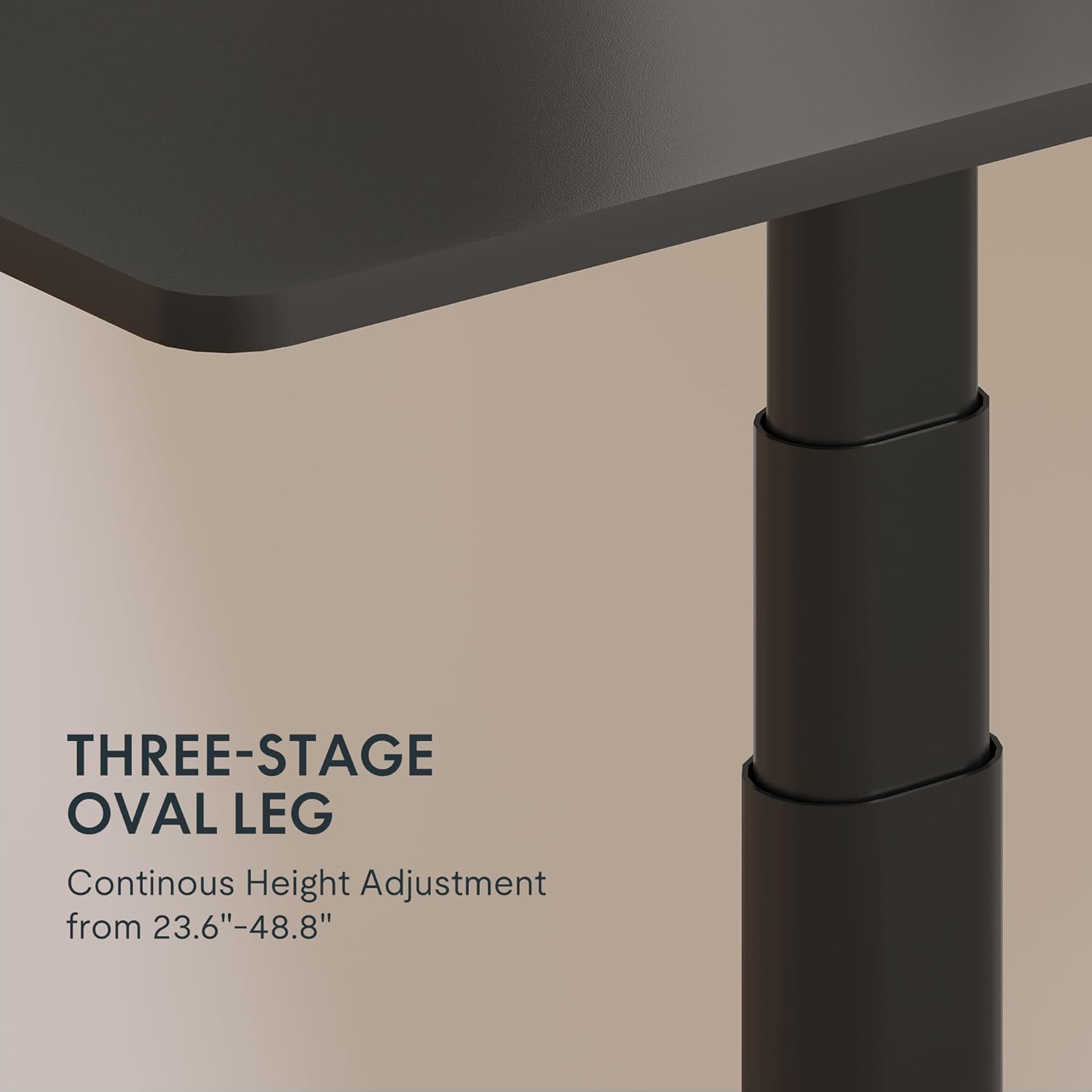
Figura 3: Detalhe do 3-stage oval leg mechanism.
4.2 LED Control Panel with Memory Presets and USB Port
The intuitive LED control panel allows for easy height adjustments and includes programmable memory presets for your preferred sitting and standing heights. It also features a convenient USB port for charging devices.
- Definindo predefinições de memória: Ajuste a mesa à altura desejada usando as setas para cima/para baixo. Pressione o 'M' botão, depois pressione um dos botões predefinidos numerados ('1', '2', '3', ou '4') to save the current height.
- Recuperando configurações de memória predefinidas: Press any of the numbered preset buttons ('1', '2', '3', ou '4') para mover automaticamente a mesa para a altura salva.
- Porta de carregamento USB: Use the integrated USB port to conveniently charge your electronic devices.
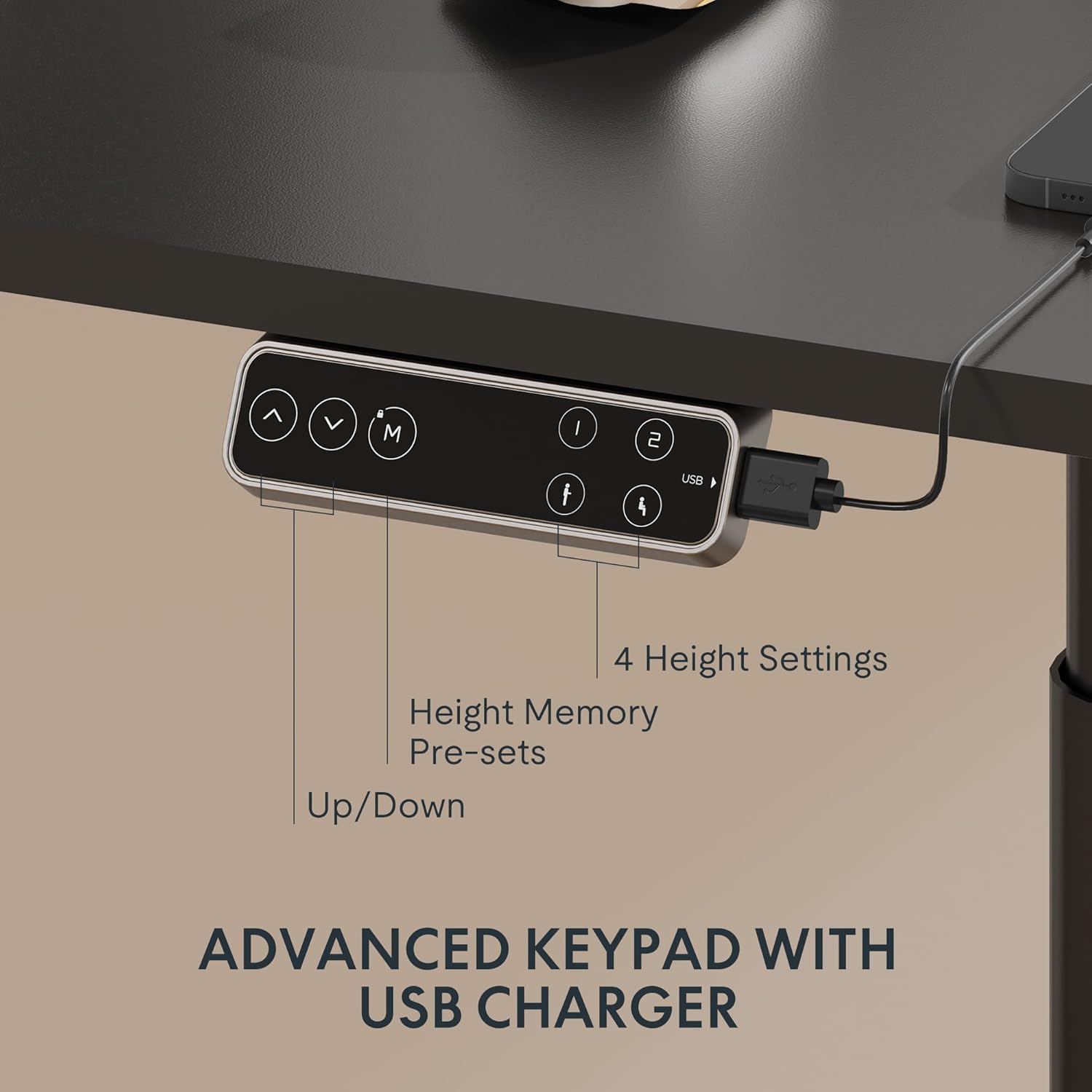
Figure 4: LED Control Panel with memory presets and USB port.
4.3 Dual Motor System
The E6 Pro is equipped with quiet dual motors that operate at less than 45dB, ensuring minimal disturbance in your workspace. These powerful motors can handle up to 330 lbs (150 kg) of weight, providing stable and reliable performance.
4.4 Sistema Anticolisão
For enhanced safety, the desk features an anti-collision system. If the desk encounters an obstruction during height adjustment, it will automatically stop and reverse slightly to prevent damage or injury. This system is designed to protect both the desk and its surroundings.
5. Especificações
| Recurso | Detalhe |
|---|---|
| Marca | PONTO FLEXI |
| Número do modelo | E8 |
| Design de mesa | Estrutura de mesa em pé |
| Perna Stages | 3 Stages Oval Leg |
| Faixa de ajuste de altura | 23.6" a 48.8" |
| Tipo de motor | Motor duplo |
| Capacidade de peso | Até 330 libras (150 kg) |
| Nível de ruído | Menos de 45dB |
| Painel de controle | LED with 4 Memory Presets & USB Port |
| Recurso especial | Sistema anticolisão |
| Material base | Metal |
| Cor | Moldura preta |
| Montagem necessária | Sim |
6. Manutenção
To ensure the longevity and optimal performance of your FLEXISPOT E6 Pro desk frame, regular maintenance is recommended:
- Limpeza: Limpe a estrutura da mesa com um pano macio e seco.amp pano. Evite usar produtos químicos agressivos ou abrasivos que possam danificar o acabamento.
- Gerenciamento de cabos: Verifique e organize os cabos periodicamente para evitar emaranhados ou danos, especialmente durante ajustes de altura.
- Verificação do fixador: Every few months, inspect all screws and bolts to ensure they are tight. Re-tighten if necessary.
- Distribuição de peso: Distribua o peso uniformemente sobre a mesa para evitar tensão excessiva na estrutura e nos motores.
7. Solução De Problemas
If you encounter any issues with your desk frame, please refer to the following common troubleshooting steps:
- Mesa não se move: Check all cable connections to ensure they are securely plugged into the control box and power outlet. Verify the power adapter is functioning.
- Movimento irregular: Ensure the desk is not overloaded and that weight is evenly distributed. Perform a reset procedure (refer to your specific user manual for reset instructions).
- Códigos de erro em exibição: Consult your user manual for a list of error codes and their corresponding solutions.
- Sistema anticolisão sendo acionado frequentemente: Ensure there are no obstructions in the desk's path during movement.
If the problem persists after attempting these steps, please contact FLEXISPOT customer support for further assistance.
8. Garantia e suporte
FLEXISPOT provides a comprehensive warranty for your peace of mind:
- Cobertura de 5 anos: Aplica-se à estrutura da mesa e ao motor.
- Cobertura de 2 anos: Aplica-se ao painel de controle e aos componentes eletrônicos.
For warranty claims, technical support, or any questions regarding your FLEXISPOT E6 Pro desk frame, please visit the official FLEXISPOT webou entre em contato diretamente com o serviço de atendimento ao cliente. Guarde o comprovante de compra como prova de aquisição.
9. Vídeos de Produtos
9.1 Why Choose FLEXISPOT E6
Video 1: This official FLEXISPOT video highlights the key features and benefits of the E6 series, including its robust construction and smooth operation.
9.2 Welcome to FLEXISPOT'S Mega Factory
Video 2: An inside look at the FLEXISPOT manufacturing facility, showcasing the precision and quality control involved in producing their products.


