Introdução
This manual provides essential information for setting up, operating, maintaining, and troubleshooting your HP Elite Mini 800 G9 Desktop Computer. This compact and powerful mini PC is designed for business environments, offering high performance in a small form factor.
The HP Elite Mini 800 G9 features an Intel Core i5-12500T processor, 16 GB DDR5 RAM, and a 256 GB SSD, running on Windows 11 Pro. Its small size allows for flexible deployment options, including mounting behind a monitor or discreet placement on a desk.
O que está na caixa
Verifique se todos os itens estão presentes na embalagem:
- Computador de mesa HP Elite Mini 800 G9
- Adaptador CA
- Teclado
- Rato
Configurar
Follow these steps to set up your HP Elite Mini 800 G9 Desktop Computer:
1. Desembalagem e colocação
Carefully remove the mini PC and all accessories from the packaging. Place the mini PC on a stable, flat surface with adequate ventilation. Ensure no vents are obstructed.
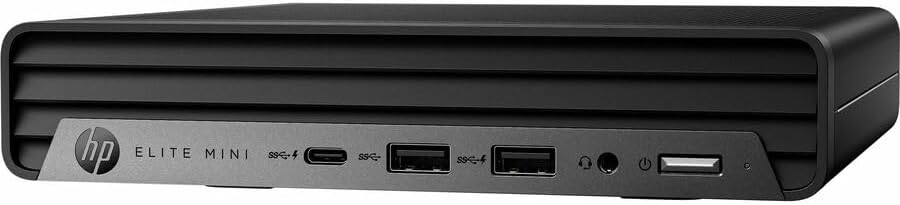
Imagem: Frente view of the HP Elite Mini 800 G9 Desktop PC, highlighting the accessible front ports including USB-C, USB-A, and a headphone jack.
2. Conectando Periféricos
- Conectar monitor: Connect your monitor to one of the available video output ports (e.g., DisplayPort, HDMI) on the rear of the mini PC.
- Conecte o teclado e o mouse: Plug the included keyboard and mouse into the USB ports on the mini PC.
- Conectar à rede (opcional): For a wired internet connection, connect an Ethernet cable from your router or network switch to the Ethernet port on the mini PC. Wireless connectivity (Wi-Fi 6) is also available.
- Conecte a energia: Connect the AC adapter to the power input port on the mini PC, then plug the power cord into a wall outlet.
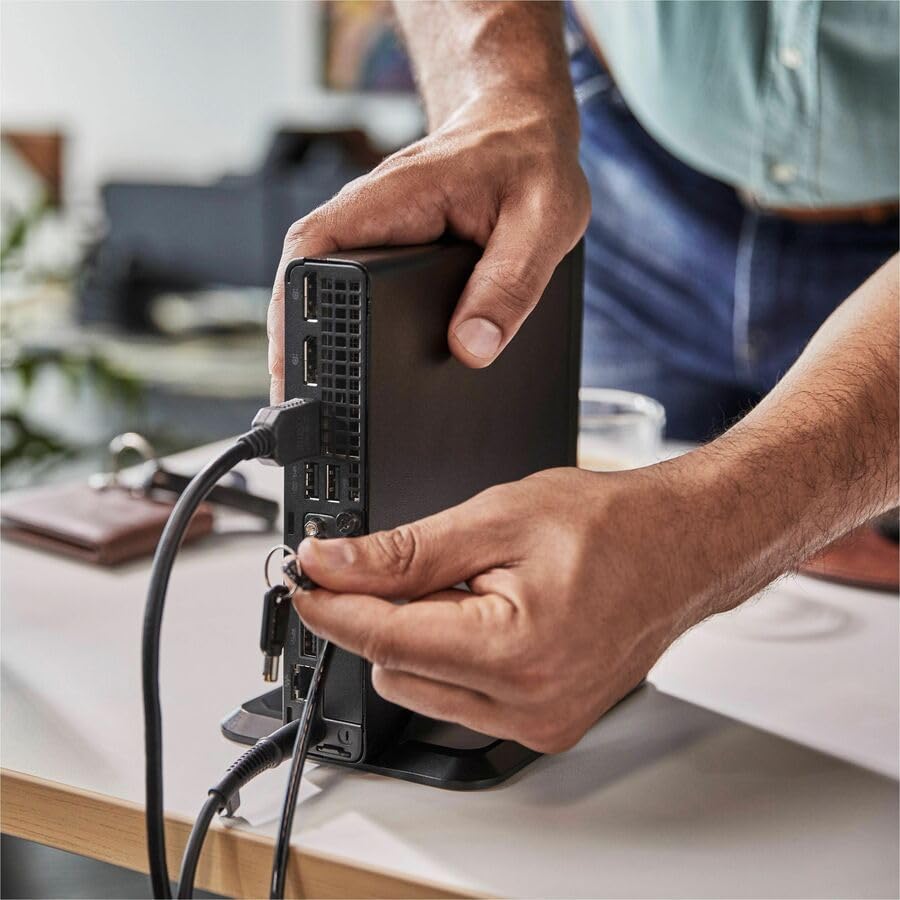
Image: A user connecting various cables, including power and display, to the rear ports of the HP Elite Mini 800 G9. This illustrates the typical connection process for peripherals.
Instruções de operação
Once your HP Elite Mini 800 G9 is set up, follow these steps for basic operation:
1. Ligando
Press the power button located on the front of the mini PC. The power indicator light will illuminate, and the system will begin to boot up. The operating system (Windows 11 Pro) will load automatically.
2. Configuração inicial (primeiro uso)
Upon first boot, you will be guided through the Windows 11 Pro setup process. This includes selecting your region, language, accepting terms, and setting up a user account. Follow the on-screen prompts to complete this process.
3. Desligando
To properly shut down the computer, click the Começar button in Windows, then select Poder > Desligar. Avoid powering off the system by holding the power button, as this can lead to data loss or system corruption.

Image: A professional working at a desk, demonstrating the compact integration of the HP Elite Mini 800 G9, which is mounted discreetly behind a monitor.
Manutenção
Regular maintenance helps ensure the longevity and optimal performance of your HP Elite Mini 800 G9 Desktop Computer.
1. Atualizações de software
Keep your operating system and drivers updated. Windows Update automatically handles OS updates. For driver updates, visit the official HP support website for your model.
2. Limpeza
- Exterior: Use um pano macio e sem fiapos levementeampened with water or a mild cleaning solution to clean the exterior surfaces.
- Vents: Periodically use compressed air to clear dust from the ventilation grilles to prevent overheating. Ensure the system is powered off before cleaning vents.
3. Backup de Dados
Regularly back up important data to an external drive or cloud storage to prevent data loss in case of hardware failure or other issues.
Solução de problemas
This section addresses common issues you might encounter with your HP Elite Mini 800 G9.
Sem energia
- Ensure the AC adapter is securely connected to both the mini PC and a working power outlet.
- Verifique se a tomada está funcionando conectando outro aparelho.
- Check the power button for any damage or obstruction.
Nenhuma imagem exibida no monitor
- Confirm the monitor is powered on and correctly connected to the mini PC's video output port.
- Certifique-se de que a fonte de entrada correta esteja selecionada em seu monitor.
- Try connecting the mini PC to a different monitor or using a different video cable if available.
Desempenho lento
- Feche os aplicativos desnecessários que estão sendo executados em segundo plano.
- Verifique e instale quaisquer atualizações pendentes do Windows ou de drivers.
- Execute uma limpeza e desfragmentação de disco (para HDDs; geralmente não é necessário para SSDs).
- Scan for malware or viruses using reputable antivirus software.
Especificações
Detailed technical specifications for the HP Elite Mini 800 G9 Desktop Computer:
| Recurso | Detalhe |
|---|---|
| Número do modelo | AS1F8AT#ABA |
| Processador | Intel Core i5-12500T (12th Gen, Hexa-core, 2 GHz) |
| BATER | 16 GB de RAM DDR5 |
| Armazenar | SSD de 256 GB |
| Gráficos | Placa gráfica Intel UHD Graphics 770 (Integrada) |
| Sistema operacional | Windows 11 Pro |
| Conectividade sem fio | Wi-Fi 6 (802.11ax), Bluetooth |
| Dimensões (CxLxA) | 6.9 x 7 x 1.4 polegadas |
| Peso | 3.13 libras |
| Portas (Frontais) | USB-C, USB-A, Headphone/Microphone Combo |
| Portas (traseiras) | Multiple USB-A, Video Outputs (e.g., DisplayPort, HDMI), Ethernet, Power Input |
Garantia e Suporte
Your HP Elite Mini 800 G9 Desktop Computer comes with a standard manufacturer's warranty. For specific warranty terms and conditions, please refer to the documentation included with your product or visit the official HP support website.
Para obter assistência técnica, downloads de drivers ou suporte adicional, visite o site de suporte da HP. website: