Introdução
Thank you for choosing the APORO T18 Portable 30W UHF Wireless Voice Amplifier. This device is designed to provide clear and powerful sound amplification for various applications, including teaching, training, conferences, and public speaking. Featuring a 30W output, UHF wireless microphone, long-lasting battery, and multiple playback options, the T18 offers versatility and convenience. Please read this manual carefully to ensure proper use and maintenance of your device.
Conteúdo da embalagem
Por favor, verifique se a embalagem contém os seguintes itens:
- 1 x APORO T18 Wireless Voice Ampmais vivo
- 1 x microfone de lapela sem fio
- 1 x cabo de áudio de 3.5 mm
- 1 x cabo de carregamento USB
- 1 x Adaptador de energia (Carregador)
- 1 x Waist Strap
- 1 x Manual do Usuário (este documento)
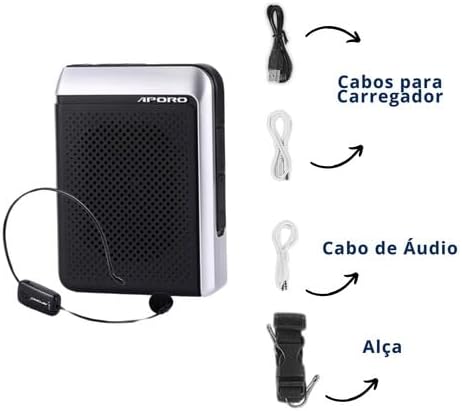
Figura 1: All items included in the APORO T18 package. This image displays the main amplifier unit, the wireless microphone, various cables (USB, 3.5mm audio), a power adapter, and a waist strap.
Produto acimaview
The APORO T18 features a compact and durable design with intuitive controls. Familiarize yourself with the device's components:

Figura 2: Frente view of the APORO T18 Portable Voice Amplifier with the wireless microphone headset. The amplifier has a black mesh speaker grille and silver-colored sides, with the APORO logo visible.

Figura 3: Principal view of the APORO T18 control panel, highlighting the 'REC' button for recording. The display shows 'UHF', indicating the wireless mode. Recording requires an SD card or USB drive.

Figura 4: Illustration of the APORO T18's battery capabilities: 4000 mAh battery, providing up to 10 hours of music playback or 20 hours of voice amplificação.

Figura 5: The APORO T18 features silicone protection against dust and splashes, enhancing its durability. Water droplets are depicted around the device to illustrate this feature.

Figura 6: The APORO T18 offers versatile wearing options, including a belt clip for hands-free use. The image shows the device attached to a belt and a close-up of the belt clip mechanism.
Configurar
1. Carregando o dispositivo
- Connect the USB charging cable to the amplifier's charging port.
- Conecte a outra extremidade do cabo USB ao adaptador de energia fornecido.
- Conecte o adaptador de alimentação a uma tomada elétrica padrão.
- A luz indicadora de carregamento acenderá. Uma carga completa normalmente leva de 4 a 6 horas.
- Once fully charged, the indicator light may change or turn off. Disconnect the charger.
2. Pairing the Wireless Microphone
- Garantir que ambos amplifier and the wireless microphone are powered off.
- Ligue o ampmais vivo.
- Turn on the wireless microphone. The microphone's indicator light should blink, indicating it's in pairing mode.
- O amplifier and microphone should automatically pair. The microphone's indicator light will become solid when successfully paired.
- If pairing fails, refer to the troubleshooting section or try restarting both devices.
3. Inserting SD Card or USB Drive (for recording/playback)
- Locate the SD card slot or USB port on the ampmais vivo.
- Gently insert the SD card or USB drive into the respective slot/port until it clicks into place or is firmly seated.
- Ensure the device is inserted correctly to avoid damage.
Instruções de operação
1. Ligar/desligar
Pressione e segure o botão Liga/Desliga (Ⓘ) for a few seconds to turn the amplifier ligado ou desligado.
2. Controle de volume
Use o botão Aumentar Volume (+) e Diminuir Volume (-) buttons to adjust the ampnível de lificação.
3. Uso do microfone
- Wear the wireless lapel microphone comfortably.
- Ensure the microphone is positioned correctly for optimal voice pickup.
- Ajuste o amplifier's volume to a comfortable level, avoiding feedback (a high-pitched squeal).
4. Função de gravação
- Insert an SD card or USB drive into the ampmais vivo.
- Pressione o REC Botão para iniciar a gravação. O visor pode mostrar um indicador de gravação.
- Pressione o REC botão novamente para parar a gravação.
- As gravações são salvas no dispositivo de armazenamento inserido.
5. Rádio FM
- Pressione o botão Mode para alternar para o modo de rádio FM.
- Use the Previous/Next track buttons to scan for radio stations.
- O amplifier supports loop playback modes for FM radio.
6. Conexão AUX
- Connect one end of the 3.5mm audio cable to the AUX input port on the ampmais vivo.
- Connect the other end to the audio output of your computer, smartphone, or other compatible device.
- O amplifier will play audio from the connected device.
7. Reprodução via USB/SD
- With an SD card or USB drive inserted, press the Mode button to select the appropriate playback mode.
- Use the Previous/Next track buttons to navigate through files.
- Pressione o botão Reproduzir/Pausar para controlar a reprodução.
Manutenção
- Limpeza: Use um pano macio e seco para limpar o amplifier's surface. Do not use abrasive cleaners or solvents.
- Cuidados com a bateria: Para prolongar a vida útil da bateria, evite descarregá-la completamente com frequência. Carregue o dispositivo regularmente, mesmo que não o utilize por longos períodos.
- Armazenar: Armazene o ampColoque o amplificador em local fresco e seco, longe da luz solar direta e de temperaturas extremas.
- Proteção: While the device offers splash protection, avoid submerging it in water or exposing it to heavy rain.
Solução de problemas
| Problema | Possível causa | Solução |
|---|---|---|
| Nenhum som de ampmais vivo | Device is off; Low battery; Volume too low; Microphone not paired/connected; Incorrect mode selected. | Turn on device; Charge battery; Increase volume; Re-pair microphone; Select correct input mode (UHF, AUX, SD/USB). |
| Feedback (som estridente) | Microphone too close to amplifier; Volume too high. | Aumente a distância entre o microfone e amplifier; Lower the volume. |
| Wireless microphone not pairing | Microphone battery low; Out of range; Interference. | Charge microphone; Ensure microphone is within 20 meters of amplifier; Move away from other wireless devices. |
| A gravação não está funcionando. | No SD card/USB drive inserted; Storage device full; Storage device not formatted correctly. | Insert a compatible SD card or USB drive; Delete old files; Format storage device (refer to device manual for formatting instructions if available, or use a computer). |
| Bateria de curta duração | Battery not fully charged; Old battery; High volume usage. | Ensure full charge; Consider battery replacement if very old; Reduce volume when possible. |
Especificações
| Recurso | Detalhe |
|---|---|
| Marca | APORO |
| Modelo | T18 |
| Potência de saída | 30 Watts |
| Tecnologia de Conectividade | AUX, Bluetooth, USB, Wi-Fi (UHF Wireless) |
| Capacidade da bateria | 4000 mAh (Lithium) |
| Tempo de carregamento | 4-6 horas |
| Tempo de uso | 12-15 hours (amplification), 10 hours (music playback) |
| Distância wireless | Up to 20 meters (UHF) |
| Resposta de frequência | 50 - 18,000 Hz |
| Nível de ruído | 50 dB |
| Impedância | 16 Ohm |
| Material | Plástico |
| Cor | Preto |
| Dimensões (C x L x A) | 30 x 100 x 170 mm (3 x 10 x 17 cm) |
| Peso | 321 gramas |
| Mídia Suportada | SD Card, USB Drive |
| Características adicionais | FM Radio, Noise Reduction, Recording Function, Dust and Splash Protection |
Garantia e Suporte
The APORO T18 Portable Voice Amplifier comes with a manufacturer's warranty of 1 year from the date of purchase. This warranty covers defects in materials and workmanship under normal use.
For technical support, warranty claims, or further assistance, please contact your retailer or the APORO customer service department. Please retain your proof of purchase for warranty validation.
For more information, visit the official APORO webou entre em contato com os canais de suporte.