1. Introdução
This manual provides detailed instructions for the installation, operation, and maintenance of your ANJIELO SMART Wired Video Intercom System. This system includes a 7-inch touch screen indoor monitor, a 1080P outdoor doorbell camera, and two additional cameras, offering enhanced security and communication for your home or office. Please read this manual thoroughly before use to ensure proper functionality and safety.
2. Produto acabadoview
2.1. Indoor Monitor Features
- 7-inch HD IPS Touch Screen with Acrylic Wire Drawing Panel.
- Supports Tuya Smart / Smart Life mobile applications for remote access.
- Room-to-room intercom functionality.
- Door answering, monitoring, and unlocking capabilities.
- Motion detection support with photo and video playback.
- Adjustable color, brightness, and volume settings.
- Built-in memory for saving up to 86 pictures; supports external Micro SD card up to 128GB (not included).
- Six selectable ringtones.
- Hands-free dual-way communication.
- Supports connection of up to 2 call panels, 4 indoor monitors, and 2 IP cameras.
- Multi-language support: Chinese, English, German, French, Russian, Spanish, Arabic, Portuguese, Italian.
- Supports dual door unlocking (electric locks).
- Weather, calendar, and standby wallpaper display.
- CCTV Anti-tamper Alarm function.
- Three operational modes: At Home, Leave Home, Sleep Home.
2.2. Outdoor Doorbell Features
- 1080P Full HD camera with a 140° wide-angle lens.
- Anti-destructive metal material for increased durability.
- Two white LEDs for clear night vision.
- IC Card (13.56khz) support for unlocking.
- Dual-way intercom.
- Fácil instalação.
- Rust-proof metal call panel.
- IP65 weatherproof rating.
- High performance temperature resistance: -45 ℃ to +60 ℃.
- Supports dual unlock (electric locks).
3. Configuração
3.1. Conteúdo da embalagem
Seu pacote deve incluir:
- 1 x Campainha Externa
- 1 x Indoor Monitor Unit
- 2 x Additional Cameras (AHD 1080P)
- 1 x 32GB Micro SD Card
- Power Adapter for Monitor (DC15V 1.2A)
- Mounting Hardware and Connectors
- Manual do usuário (este documento)
3.2. Instruções de fiação
The ANJIELO SMART video intercom system requires wired connections between the indoor monitor and the doorbell, as well as between monitors and cameras. The monitor supports WiFi for network connectivity, but the core intercom functionality is wired.
Observações importantes sobre a fiação:
- The monitor and doorbell require a 4-wire connection.
- You can extend the distance between the monitor and doorbell, or between monitors, using RVV4 (4-core wire), Cat5, or Cat6 cables. The maximum recommended distance can exceed 300 feet (approximately 100 meters).
- The system supports connecting up to 2 CCTV cameras.
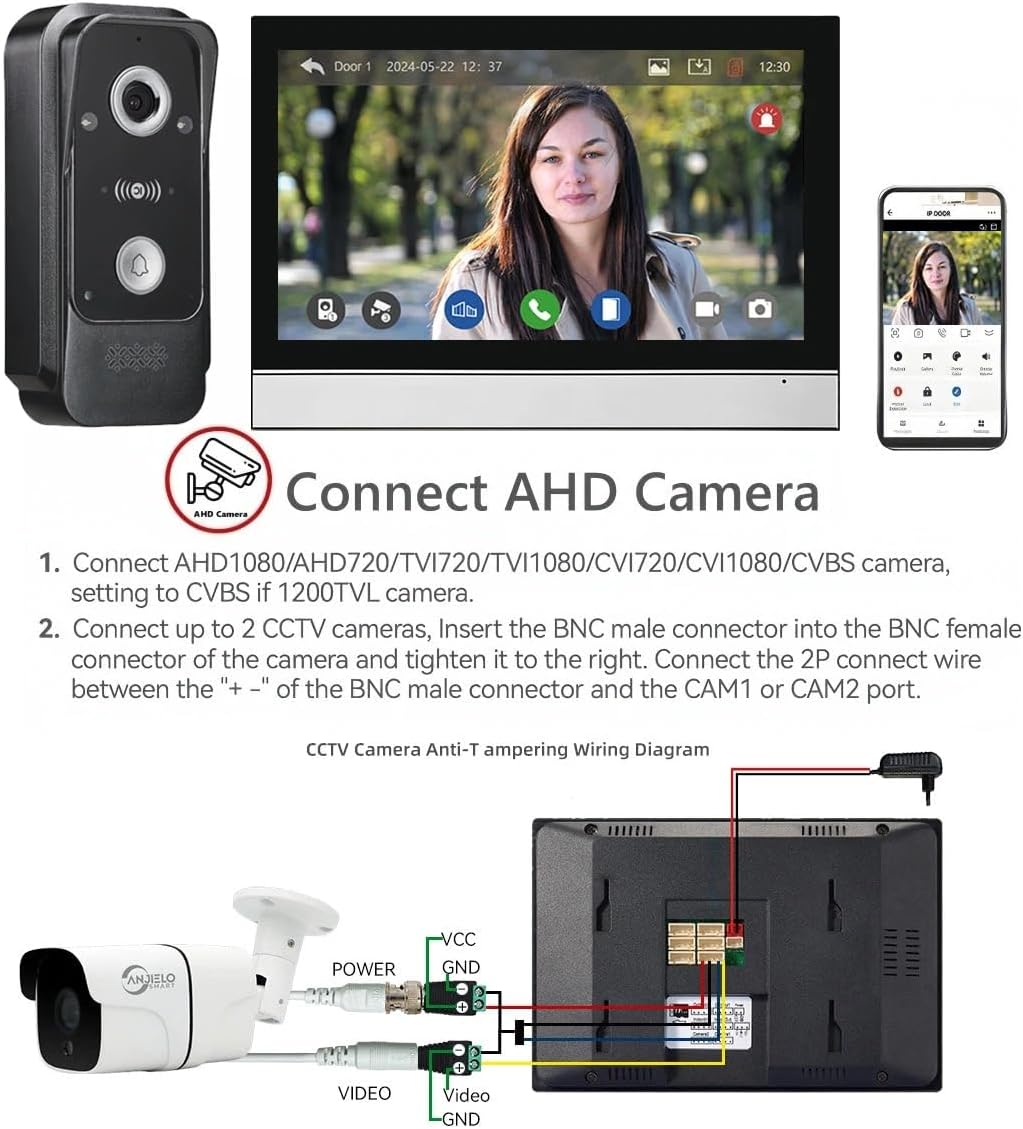
Figura 1: System capacity and general wiring diagram. This diagram illustrates how multiple outdoor units, indoor monitors, and CCTV cameras can be interconnected within the system.
Connecting AHD Cameras
To connect AHD cameras (2MP 1080P AHD Camera only):
- Ensure the camera is compatible (AHD1080/AHD720/TVI720/TVI1080/CVI720/CVI1080/CVBS). Set to CVBS if using 1200TVL.
- Insert the BNC male connector of the camera into the BNC female connector and tighten it.
- Connect the 2P wire between the "+-" of the BNC male connector and the CAM1 or CAM2 port on the monitor.

Figura 2: CCTV Camera Anti-Tampering Wiring Diagram. This image shows the specific connections for integrating an AHD camera with the indoor monitor, including power and video signals.
3.3. Internet Connection & App Setup
The main monitor can connect to your home WiFi network (2.4GHz band only) to enable remote viewing and control via the Tuya Smart or Smart Life app.
- Ensure your monitor is powered on and connected to the network.
- Baixe o Tuya Inteligente or Vida Inteligente app on your mobile phone or tablet.
- Abra o aplicativo e siga as instruções na tela para adicionar um novo dispositivo.
- Scan the QR code displayed on the monitor screen to bind the device to your app. This process typically takes less than two minutes.
- Uma vez conectado, você pode view visitor information, receive alerts, and control the system remotely from your smartphone.

Figura 3: Easy Internet Connection. This image demonstrates the process of scanning a QR code on the monitor with a smartphone to connect the device to the Tuya or Smart Life app.
4. Operação
4.1. Comunicação de áudio bidirecional
When a visitor presses the doorbell, the indoor monitor will ring, and you can see and speak to the visitor hands-free. The system supports clear two-way audio communication.

Figura 4: Two-Way Audio. This image illustrates the two-way audio feature, allowing communication between the doorbell and the indoor monitor or connected mobile devices.
4.2. Detecção e gravação de movimento
The system is equipped with motion detection. When motion is detected or the doorbell is pressed, the camera will automatically record videos or capture snapshots. These recordings are saved to the included 32GB Micro SD card and can be viewed on your monitor or mobile phone.

Figura 5: Motion Detection. This image demonstrates the motion detection feature, showing how movement triggers recording and sends alerts to connected devices.
4.3. Visão noturna
The outdoor doorbell camera features two white LEDs for enhanced night vision, ensuring clear visibility and recording even in low-light or dark conditions.

Figura 6: IR Night Vision. This image highlights the infrared night vision feature, ensuring details are captured even in complete darkness.
4.4. Destrancamento da porta
The system supports dual door unlocking for electric locks. You can unlock doors directly from the indoor monitor with a single button press.
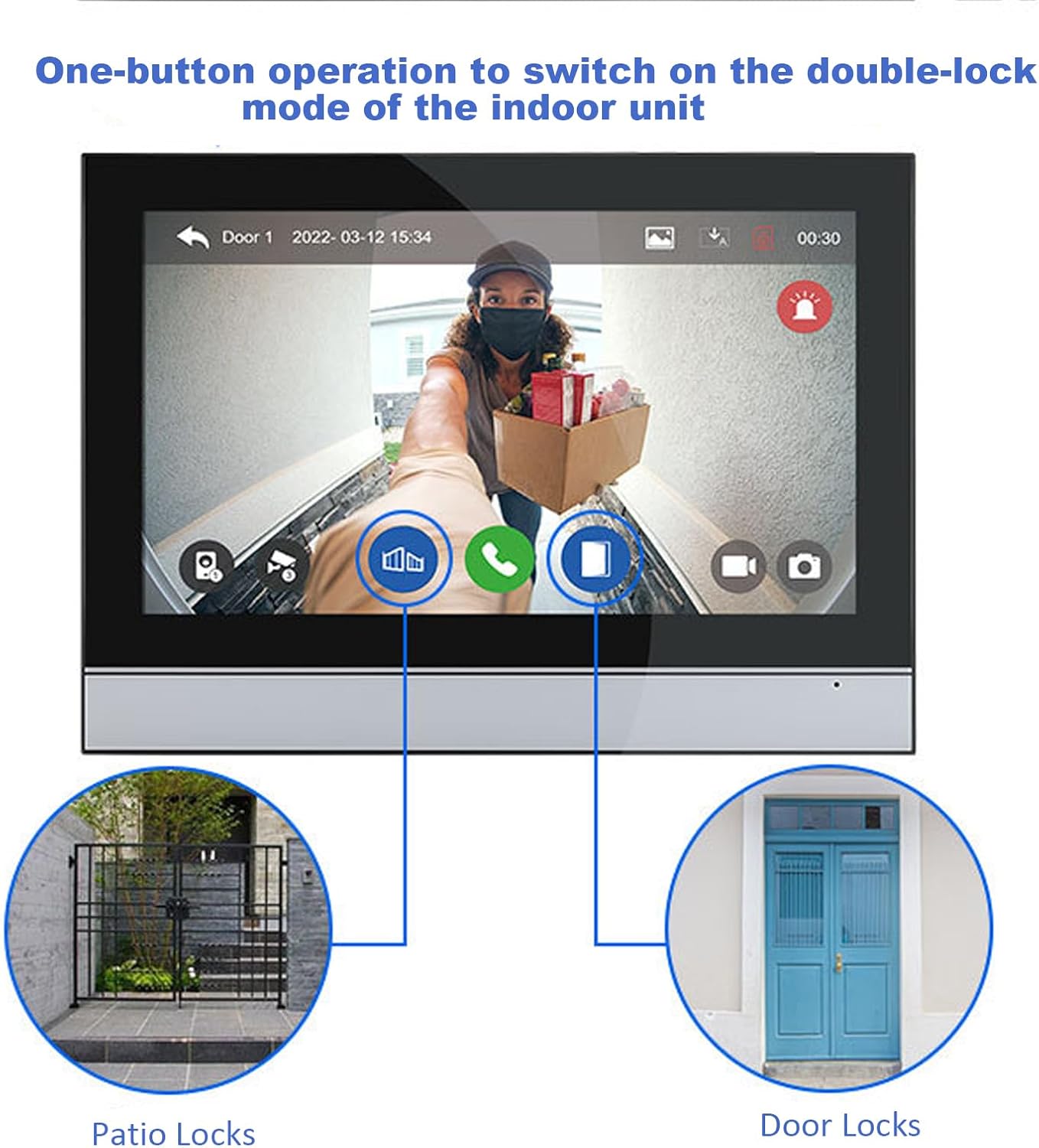
Figura 7: One-Button Unlocking. This image illustrates the one-button operation on the indoor unit to control and unlock connected patio and main door locks.
4.5. Multi-Device Usage
The system is highly expandable, supporting connections for up to 2 outdoor doorbells, 6 indoor monitors, and 2 CCTV cameras. This allows for comprehensive surveillance and communication across multiple rooms and entry points. You can also share access with up to 5 mobile phones via the app.
5. Manutenção
5.1. Resistência às intempéries
The outdoor doorbell unit is designed with an IP65 weatherproof rating, making it resistant to dust and water ingress. It can operate effectively in temperatures ranging from -45 ℃ to +60 ℃.

Figura 8: IP65 Waterproof. This image demonstrates the outdoor doorbell's resistance to water, confirming its IP65 rating and wide operating temperature range.
5.2. Cuidados Gerais
- Clean the monitor screen and camera lens periodically with a soft, dry cloth to ensure clear visibility.
- Evite usar produtos químicos agressivos ou produtos de limpeza abrasivos.
- Certifique-se de que todas as conexões de fiação permaneçam seguras.
- Mantenha o sistema longe de fortes interferências eletromagnéticas.
6. Solução De Problemas
6.1. Problemas e soluções comuns
| Emitir | Possível causa | Solução |
|---|---|---|
| No image or sound from doorbell | Loose or incorrect wiring. No power to doorbell or monitor. | Check all 4-wire connections between doorbell and monitor. Ensure power adapter is securely connected to the monitor and receiving power. |
| O monitor não está conectando ao Wi-Fi. | Incorrect WiFi band (only 2.4GHz supported). Incorrect password. Router too far. | Ensure your router is broadcasting a 2.4GHz signal. Verify WiFi password. Move monitor closer to the router or use a WiFi extender. |
| App não recebe notificações | App permissions not granted. Phone's power saving mode. Monitor not connected to internet. | Check app notification permissions on your smartphone. Disable power saving mode for the app. Ensure the monitor has a stable 2.4GHz WiFi connection. |
| A detecção de movimento não funciona | Motion detection feature disabled. Sensitivity settings too low. Obstructions in detection area. | Enable motion detection in monitor settings or app. Adjust sensitivity. Clear any obstructions from the camera's field of view. |
| Cannot unlock electric lock | Lock not properly wired. Incompatible lock type. | Verify wiring to the electric lock. Ensure the lock is a 12V electronic lock compatible with the system. |
7. Especificações técnicas
| Recurso | Especificação |
|---|---|
| Nome do modelo | PMIC+AHD7024B+Camera |
| Monitor de interior | Tela sensível ao toque IPS HD de 7 polegadas |
| Câmera de campainha externa | 1080P FHD, 140° Wide Angle |
| Tecnologia de Conectividade | Wired (intercom), Wireless (Wi-Fi 2.4GHz for app) |
| Fonte de energia | Elétrico com fio (DC15V 1.2A) |
| Armazenar | Built-in memory (86 pictures), External Max. 128GB SD Card |
| Detecção de movimento | Sim |
| Visão noturna | Yes (2 White LEDs) |
| Classificação à prova de intempéries | IP65 (Campainha externa) |
| Temperatura de operação | -45 ℃ to +60 ℃ (Outdoor Doorbell) |
| Max. System Capacity | 2 Doorbell + 6 Indoor Monitors + 2 CCTV Cameras |
| Dispositivos compatíveis | Smartphone, Personal Computer |
| Método de controle | Aplicativo, Controle Remoto, Toque |
| Dimensões do produto | 8 x 3.99 x 1 polegadas (Monitor) |
| Peso do item | 1 pound (Monitor) |
8. Garantia e Suporte
For warranty information and technical support, please refer to the documentation provided with your purchase or contact ANJIELO SMART customer service directly. Keep your purchase receipt as proof of purchase for warranty claims.


