1. Introdução
Thank you for choosing the OFFNOVA Hat Heat Press Machine. This manual provides essential information for the safe and efficient operation, maintenance, and troubleshooting of your new heat press. Designed for both sublimation and HTV iron-on projects, this machine offers precise temperature and time control, ensuring consistent and professional results for various cap styles.
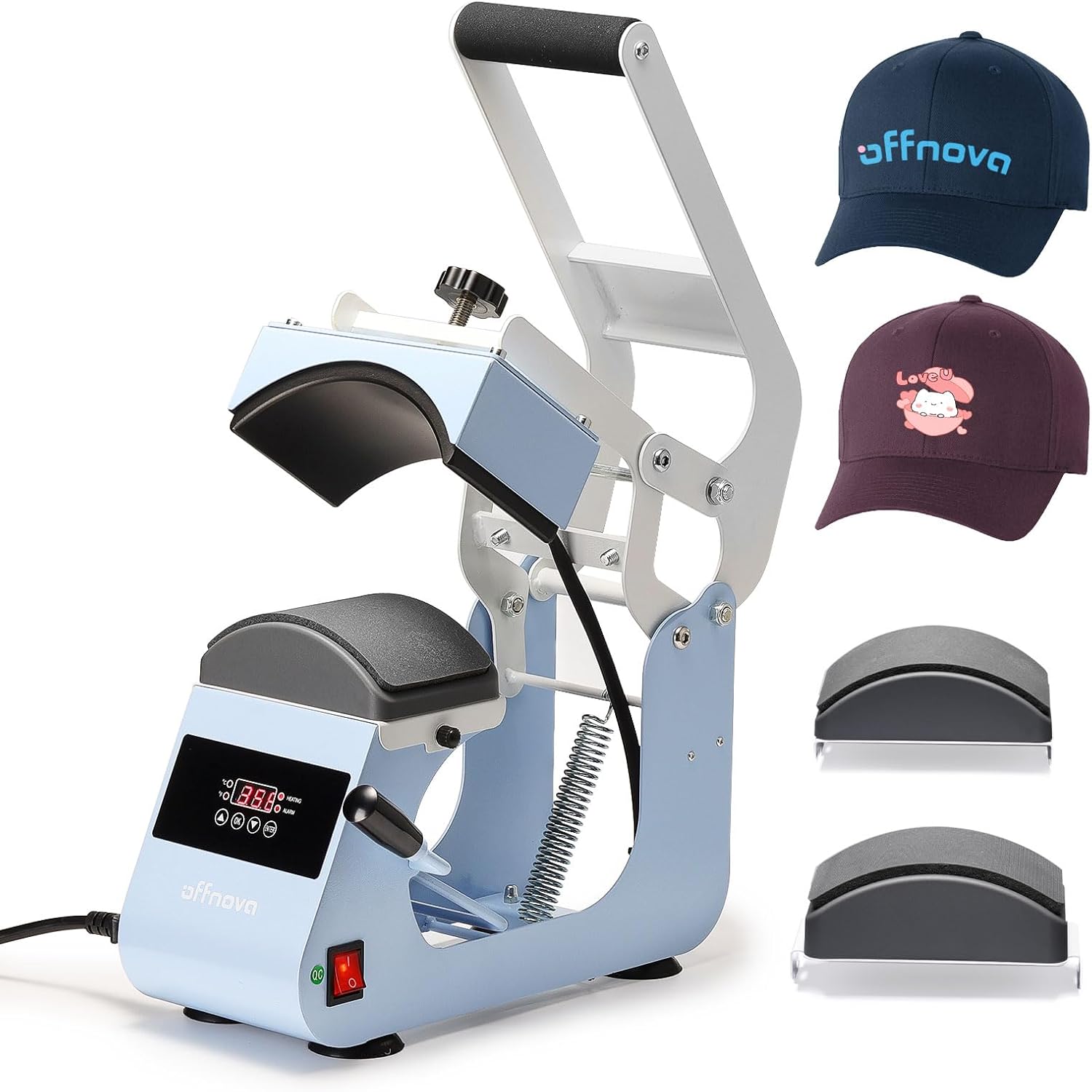
Figure 1.1: OFFNOVA Hat Heat Press Machine (Handle-Blue) with example hats.
Principais características:
- Rapid & Even Heating: One-piece cast aluminum heating plate with Teflon coating for uniform heat distribution up to 400°F (204°C).
- Easy & Stable Operation: Ergonomic handle and four-bar linkage system, combined with anti-slip silicone suction cups for stability.
- Dual Cap Platens: Includes 2 interchangeable hat bases with different curvatures to fit 99% of cap styles, plus a built-in hat stretcher.
- Controle de pressão ajustável: Easy-to-turn pressure knob for fine-tuning pressing force.
- Smart Auto Countdown: Automatic timing initiation upon handle pull-down and audible alert upon completion.
2. Components and Setup
2.1 Desembalagem e Inspeção
Carefully remove all components from the packaging. Inspect the machine for any signs of damage during transit. Retain the original packaging for future storage or shipping.
2.2 Identificação do Componente
Familiarize yourself with the main parts of your heat press machine:
- Heating Platen (Upper)
- Lower Platen (Interchangeable)
- Control Panel (Digital Display, Temp/Time Buttons)
- Botão de ajuste de pressão
- Alça de Operação
- Interruptor de energia
- Entrada do cabo de alimentação
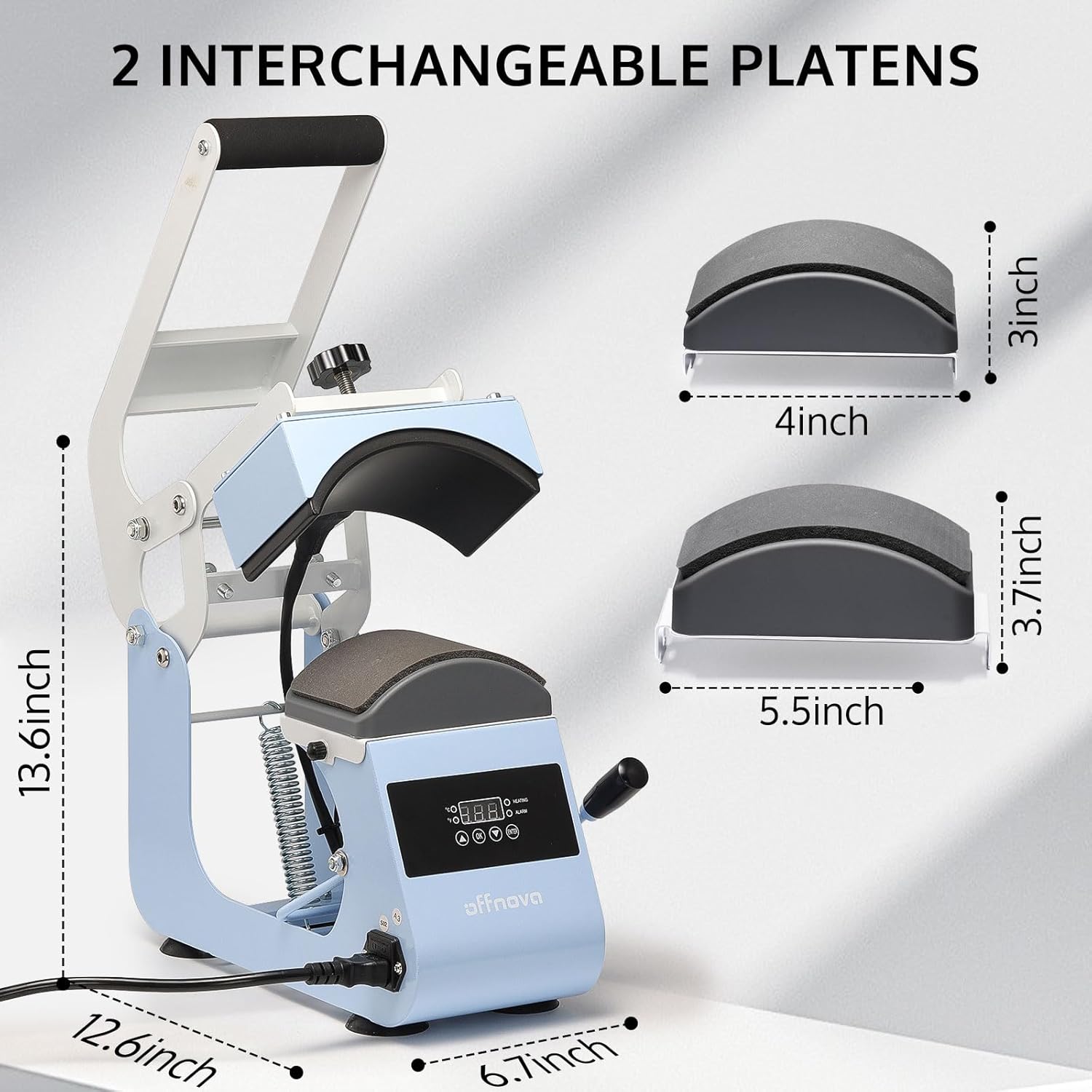
Figure 2.1: Machine dimensions and interchangeable platens (4x3 inch and 5.5x3.7 inch).
2.3 Configuração inicial
- Place the heat press on a stable, heat-resistant surface. Ensure adequate ventilation around the machine.
- Connect the power cord to the machine's power inlet and then to a grounded electrical outlet (AC110V/60Hz).
- Certifique-se de que o botão liga / desliga esteja na posição DESLIGADO antes de conectar.
- Select and install the appropriate lower platen for your cap size. The machine comes with two interchangeable platens to accommodate various cap styles.
3. Instruções de operação
3.1 Painel de controle sobreview

Figure 3.1: Digital Control Panel for Temperature and Time.
- Tela digital: Shows current temperature and set time.
- Controle de temperatura: Adjustable from 0-400°F (0-204°C).
- Controle de tempo: Adjustable from 0-999 seconds.
- Poder: 500 W.
- Volumetage: AC110V/60Hz.
- Time Up Alarm: Alerts when the set time is complete.
- Contagem regressiva automática: Initiates automatically when the handle is pressed down.
3.2 Ajuste da pressão
The pressure adjustment knob, located on top of the heating platen, allows you to fine-tune the pressing force. Turn clockwise to increase pressure and counter-clockwise to decrease pressure. Adjust based on the thickness of the cap and transfer material for optimal results.
3.3 Operação passo a passo
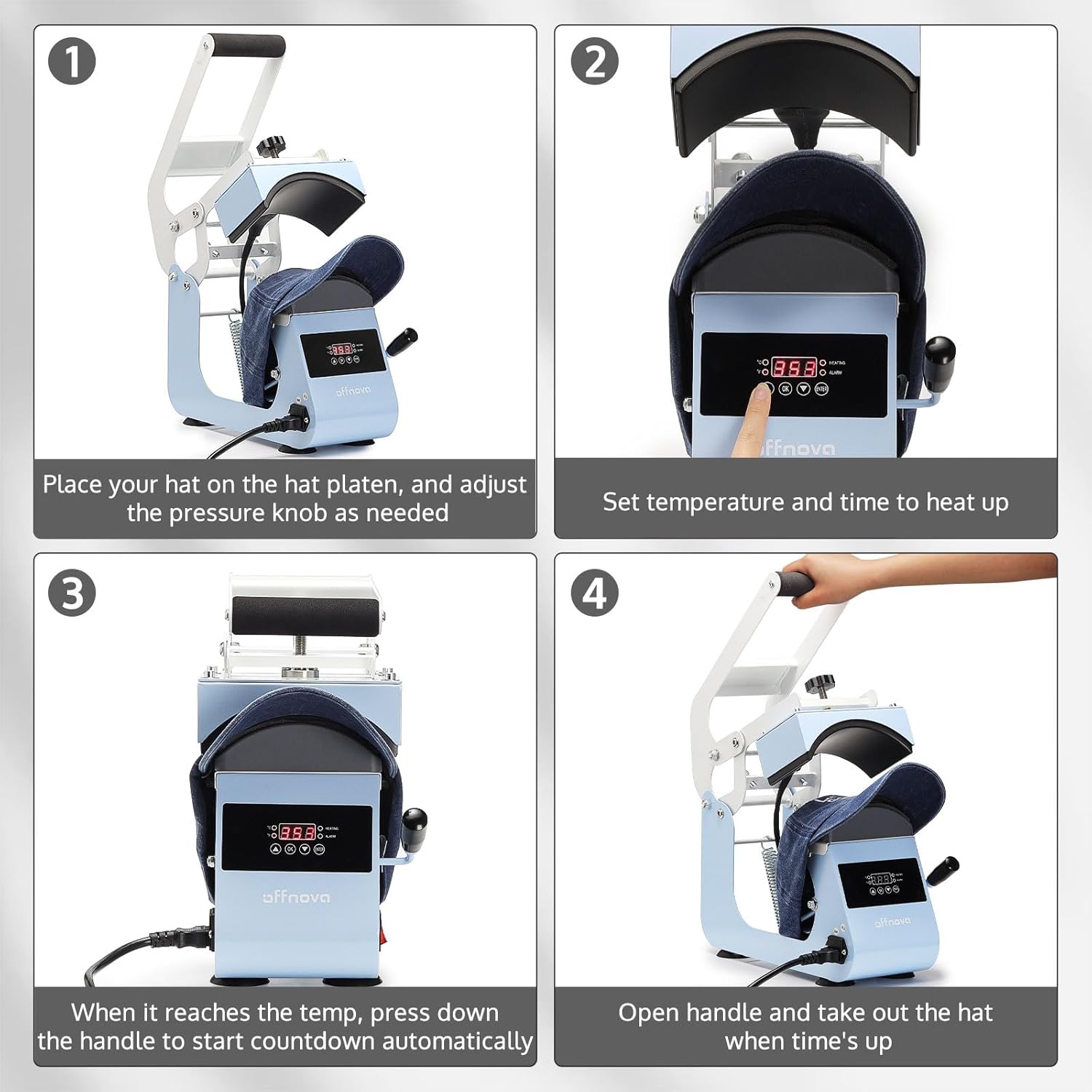
Figure 3.2: Four-step operation guide.
- Prepare the Hat: Place your hat on the lower platen. Adjust the pressure knob as needed to ensure a snug fit and even contact.
- Definir temperatura e tempo: Turn on the power switch. Use the control panel to set your desired temperature and time according to your transfer material's specifications. The machine will begin to heat up.
- Initiate Pressing: Once the machine reaches the set temperature, place your transfer design on the hat. Pull the operating handle down firmly to engage the heating platen. The automatic countdown will begin.
- Transferência completa: When the set time expires, an alarm will sound. Release the handle and carefully remove the hat. Allow the transfer to cool if required by the material's instructions.

Figure 3.3: Machine in use, demonstrating versatile application.
4. Manutenção
4.1 Limpeza
- Desligue sempre o aparelho da tomada e deixe-o arrefecer completamente antes de o limpar.
- Wipe the Teflon-coated heating platen with a soft, damp cloth. Do not use abrasive cleaners or harsh chemicals, as they can damage the coating.
- Clean the lower platen and exterior surfaces with a damp pano.
- Ensure no liquids enter the control panel or electrical components.
4.2 Armazenamento
Store the heat press in a dry, dust-free environment. If possible, use the original packaging for protection. Keep out of reach of children.
5. Solução De Problemas
Esta seção aborda problemas comuns que você pode encontrar. Para problemas não listados aqui, entre em contato com o suporte ao cliente.
| Problema | Possível causa | Solução |
|---|---|---|
| A máquina não liga. | Cabo de alimentação desconectado; Interruptor de energia desligado; Problema na tomada. | Ensure power cord is securely plugged in. Turn power switch ON. Test outlet with another device. |
| Temperature not reaching set value. | Incorrect temperature setting; Heating element issue. | Verify temperature setting. Allow sufficient time for preheating. If issue persists, contact support. |
| Uneven heat transfer or poor adhesion. | Uneven pressure; Incorrect temperature/time; Material not suitable. | Adjust pressure knob for even contact. Verify temperature and time settings for your material. Ensure material is compatible with heat pressing. |
| Automatic countdown not starting. | Handle not fully pressed down. | Ensure the operating handle is fully depressed to activate the sensor for the automatic countdown. |
6. Especificações
| Recurso | Detalhe |
|---|---|
| Número do modelo | HPM-H0 |
| Marca | OFFNOVA |
| Classificação de temperatura superior | 400°F (204°C) |
| Poder | 500 W |
| Volumetage | CA 110 V/60 Hz |
| Dimensões do produto | 12.6"C x 6.7"L x 13.6"A |
| Peso do item | 15.57 libras |
| Material | Alumínio |
| Usos recomendados | Boné, Chapéu |
7. Informações de garantia
The OFFNOVA Hat Heat Press Machine (Model HPM-H0) comes with a Garantia de 1 anos a partir da data da compra. Esta garantia cobre defeitos de fabricação e mau funcionamento sob condições normais de uso. Guarde o comprovante de compra para solicitações de garantia.
For detailed warranty terms and conditions, please refer to the warranty card included with your product or visit the official OFFNOVA website.
8. Suporte ao cliente
If you have any questions, require technical assistance, or need to report an issue with your OFFNOVA Hat Heat Press Machine, please contact our customer support team.
Please have your model number (HPM-H0) and purchase information ready when contacting support to expedite assistance.
For more information and resources, you may visit the OFFNOVA Store on Amazon.


