Introdução
Thank you for choosing the Ourlife Mini Drone. This drone is equipped with dual 4K cameras, offering high-quality photo and video capture, and can be controlled via a smartphone app for real-time viewing. Designed for ease of use, it features one-button takeoff/landing, altitude hold, headless mode, and gesture control, making it suitable for beginners and enthusiasts alike. Its compact, foldable design ensures portability for all your adventures. Please read this manual carefully before operation to ensure safe and optimal performance.
Diretrizes de segurança
Always prioritize safety when operating your drone. Failure to follow these guidelines may result in injury, damage to property, or legal issues.
- Leia o Manual: Fully understand all instructions and warnings before first flight.
- Espaço aberto: Always fly in open, unobstructed areas, away from people, animals, buildings, and power lines. Avoid flying in strong winds.
- Linha de visão: Mantenha contato visual direto com o drone em todos os momentos.
- Segurança da bateria: Use only original batteries and charging cables. Do not overcharge or short-circuit batteries. Discontinue use if batteries are damaged or swollen.
- Segurança da hélice: Keep fingers, hair, and loose clothing away from rotating propellers. Always turn off the drone before handling propellers.
- Restrição de idade: Este produto é recomendado para usuários com 14 anos ou mais.
- Conformidade legal: Be aware of and comply with local laws and regulations regarding drone operation.
Conteúdo da embalagem
Verifique se todos os itens estão presentes no seu pacote:

Image: Contents of the Ourlife Mini Drone package, showing the drone, remote control, two rechargeable batteries, a screwdriver, four protective frames, four main propellers, a USB charging cable, and an instruction manual.
- Ourlife Mini Drone x 1
- Controle Remoto x 1
- Rechargeable Drone Battery x 2
- Chave de fenda x 1
- Protective Frame x 4
- Main Propeller x 4 (spare)
- Cabo de carregamento USB x 1
- Manual de instruções x 1
Note: The remote control requires 3 AAA batteries, which are not included.
Produto acimaview
Familiarize yourself with the drone and remote control components.

Image: The Ourlife Mini Drone in its unfolded state, alongside its remote control, two drone batteries, and the drone in its folded, compact form.
Componentes de drones
- Braços dobráveis: Para armazenamento compacto e portabilidade.
- Hélices: Quatro hélices principais para o voo.
- Câmeras duplas: Front 4K camera (120° adjustable) and bottom optical flow lens for stable flight and diverse shooting angles.
- Compartimento da bateria: Localizado na parte traseira do drone.
- Luzes LED: Indica o estado e a orientação do drone.

Imagem: Close-up view of the Ourlife Mini Drone's dual camera system, highlighting the adjustable front camera and the lower lens for stable flight. The front camera can be adjusted by 120 degrees.
Layout do controle remoto
- Joystick esquerdo: Controla a altitude (para cima/para baixo) e a rotação (para a esquerda/para a direita).
- Joystick direito: Controla os movimentos para frente/para trás e para a esquerda/para a direita.
- Botão de decolagem/pouso com um único toque: Inicia a decolagem ou o pouso automático.
- Botão do modo sem cabeça: Activates/deactivates headless mode.
- Botão de mudança de velocidade: Toggles between different flight speeds (low, medium, high).
- Botão de rotação de 360°: Executes a 360-degree flip.
- Suporte para telefone: Para montar seu smartphone em view Transmissão FPV.
Configurar
1. Carregando a bateria do drone
- Conecte o cabo de carregamento USB à bateria do drone.
- Plug the USB end into a 5V/1A USB adapter (not included) or a computer USB port.
- The indicator light on the cable will show charging status. It will turn off or change color when fully charged.
2. Instalação da bateria do drone
- Certifique-se de que o drone esteja desligado.
- Insert the charged battery into the battery compartment at the rear of the drone until it clicks into place.
3. Instalando pilhas do controle remoto
- Abra o compartimento da bateria na parte traseira do controle remoto.
- Insira 3 pilhas AAA (não incluídas) respeitando a polaridade indicada.
- Feche bem a tampa do compartimento da bateria.
4. Fixação das proteções das hélices
- Carefully attach the four protective frames to each motor arm of the drone.
- Ensure they are securely fastened to prevent detachment during flight.
5. App Installation (KY UFO)
- Scan the QR code provided in the manual or search for "KY UFO" in your smartphone's app store (App Store for iOS, Google Play for Android).
- Baixe e instale o aplicativo.
- Turn on the drone, then go to your phone's Wi-Fi settings and connect to the drone's Wi-Fi network (usually named "KY-UFO-XXXXXX").
- Open the KY UFO app to access the real-time FPV feed and advanced controls.
Instruções de operação
1. Emparelhando o drone e o controle remoto
- Coloque o drone em uma superfície plana e nivelada.
- Ligue o interruptor de energia do drone. As luzes indicadoras do drone piscarão.
- Ligue o controle remoto.
- Push the left joystick all the way up, then pull it all the way down. The drone's lights will stop flashing and remain solid, indicating successful pairing.
2. Controles básicos de voo
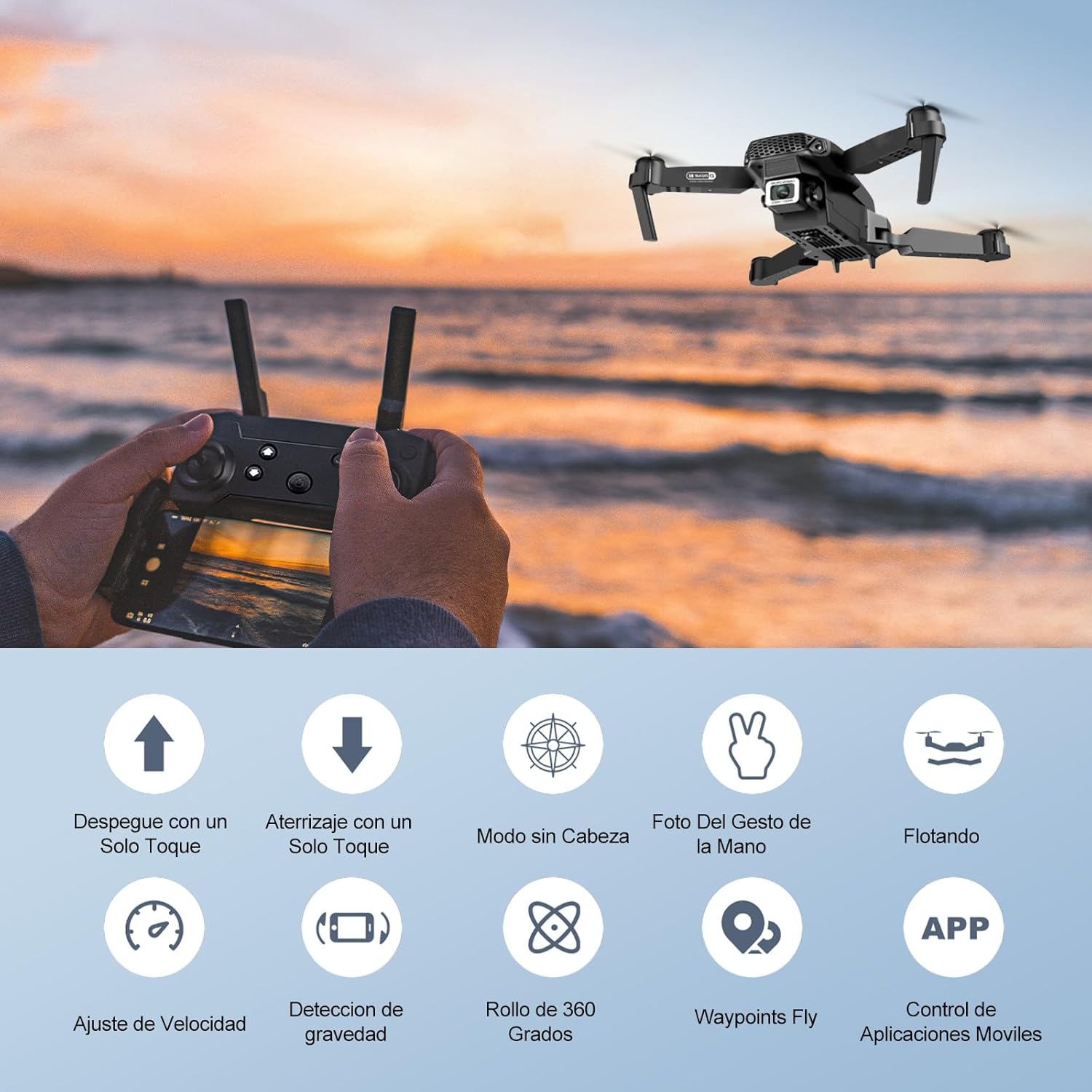
Image: Icons representing various flight features: One-touch takeoff, One-touch landing, Headless Mode, Hand Gesture Photo, Floating (Altitude Hold), Speed Adjustment, Gravity Detection, 360 Degree Roll, Waypoints Fly, and APP Control.
- Decolagem com um único toque: Pressione o Decolagem/Aterrissagem com um único toque button. The drone will automatically ascend and hover at a certain altitude.
- Aterrissagem com uma tecla: Pressione o Decolagem/Aterrissagem com um único toque button again. The drone will automatically descend and land.
- Manter altitude: O drone mantém sua altitude atual automaticamente, permitindo um voo estacionário estável.
- Joystick esquerdo (acelerador/guinada):
- Push up/down: Increase/decrease altitude.
- Push left/right: Rotate drone left/right.
- Joystick direito (para frente/para trás/para os lados):
- Push up/down: Fly forward/backward.
- Push left/right: Fly left/right (strafe).

Image: The Ourlife Mini Drone taking off or landing with a single button press, illustrating the ease of use for beginners.
3. Recursos avançados de voo
- Modo sem cabeça: Pressione o Modo sem cabeça button. In this mode, the drone's orientation is relative to the pilot, regardless of the drone's actual front. This simplifies control, especially for beginners.
- Inversão de 360°: Fly the drone to a height of at least 2 meters. Press the 360 ° Flip button, then push the right joystick in any direction to perform a flip in that direction.
- Gesture Control (Photos/Videos): With the KY UFO app open, make specific hand gestures in front of the drone's camera to trigger photo or video recording.
- "V" Gesture: Triggers photo capture.
- Gesto da palma: Triggers video recording.
- Voo com ponto de referência: In the KY UFO app, draw a desired flight path on your smartphone screen. The drone will automatically follow this path.
- Ajuste de velocidade: Pressione o Interruptor de velocidade button to cycle through low, medium, and high-speed modes. Adjust according to your skill level and environmental conditions.
- Transmissão FPV em tempo real: Connect your smartphone to the drone's Wi-Fi. Open the KY UFO app to view live video feed from the drone's camera on your phone screen.
- Indução gravitacional: In the KY UFO app, activate gravity induction mode. You can then control the drone's movement by tilting your smartphone.

Image: The Ourlife Mini Drone performing a 360-degree flip in the air and demonstrating the Waypoints Fly feature, where the drone follows a pre-drawn path.

Image: Demonstrates 1080P FPV Real-Time Transmission, showing a live view from the drone. Also illustrates gesture control for taking photos (V-sign) and recording videos (palm gesture), and the 120-degree adjustable camera angle.
Manutenção
- Limpeza: Use um pano macio e seco para limpar o drone e o controle remoto. Não use produtos químicos ou solventes agressivos.
- Substituição da hélice: If propellers are damaged, replace them with spare ones provided. Ensure correct propeller (A or B) is installed on the corresponding motor.
- Cuidados com a bateria: Armazene as baterias em local fresco e seco. Não armazene baterias totalmente carregadas ou completamente descarregadas por longos períodos. Carregue-as até cerca de 50% para armazenamento a longo prazo.
- Armazenar: When not in use, store the drone and its accessories in a safe, dry place, away from direct sunlight and extreme temperatures.
Solução de problemas
| Problema | Possível causa | Solução |
|---|---|---|
| O drone não responde ao controle remoto. | Not paired; low battery (drone/remote); interference. | Re-pair drone and remote. Charge batteries. Move to an area with less interference. |
| O drone deriva durante o voo. | Não calibrado; superfície irregular na decolagem; vento. | Calibrate the gyroscope (refer to app instructions). Take off from a flat surface. Avoid flying in windy conditions. |
| Camera feed is not showing in app. | Not connected to drone Wi-Fi; app issue. | Ensure phone is connected to the drone's Wi-Fi network. Restart the app and drone. |
| Tempo de voo curto. | Bateria não está totalmente carregada; bateria antiga. | Certifique-se de que a bateria esteja totalmente carregada antes do voo. Considere substituir baterias antigas. |
| Drones caem com facilidade. | Lack of experience; strong wind; damaged propellers. | Practice in open areas. Avoid strong winds. Replace damaged propellers. |
Especificações

Image: Diagram showing the dimensions of the Ourlife Mini Drone (unfolded and folded) and its remote control in inches.
| Recurso | Detalhe |
|---|---|
| Marca | Ourlvida |
| Número do modelo | AF-E88-BK |
| Peso do produto | 430 g (aproximadamente 0.95 libras) |
| Dimensões do produto (expandidas) | 28 x 22 x 5 cm (aproximadamente 11 x 8.7 x 2 polegadas) |
| Dimensões do produto (dobrado) | 12.5 x 8.1 x 5.3 cm (aproximadamente 4.9 x 3.2 x 2.1 polegadas) |
| Tipo de Bateria | Íon de lítio (2 incluído) |
| Resolução de captura de vídeo | 4K (Dual Cameras) |
| Tecnologia de Conectividade | Wi-fi |
| Método de controle | Controle remoto, aplicativo para smartphone |
| Cor | Preto |
Garantia e Suporte
Ourlife provides post-sale warranty support for this product. If you encounter any issues with the drone, remote control, or the KY UFO application during flight or operation, please do not hesitate to contact the seller directly for assistance.
For optimal performance and to minimize potential issues, it is recommended to conduct initial flight tests in an open space, especially when using the propeller protectors. Please note that wind interference may occur when operating outdoors.


