1. Introdução
This manual provides detailed instructions for the AMIR WA143BKM-AMUS Indoor Outdoor Thermometer with 3 Wireless Sensors. Please read this manual thoroughly before use to ensure proper operation and to maximize the product's lifespan. This device allows you to monitor temperature and humidity in up to four different locations simultaneously (one main unit, three remote sensors).

Image: The AMIR Indoor Outdoor Thermometer main display unit and three wireless remote sensors.
2. O que está na caixa
Verifique se todos os componentes estão presentes ao desembalar:
- Thermometer Main Unit x1
- Wireless Sensor x3
- Manual de Operação x1

Image: The package contents, showing the main thermometer unit, three remote sensors, and the instruction manual.
3. Recursos do Produto
- Wide Range & High Accuracy: The thermometer features a 3-channel system with three transmitters for monitoring temperature and humidity in multiple locations. It offers an indoor temperature range of 0°C to 60°C (32°F to 140°F) and an outdoor temperature range of -40°C to 60°C (-40°F to 140°F). Humidity is measured from 10% to 99%. Accuracy is ±1°C (±1.8°F) for temperature and ±5% for humidity. The wireless transmission range between the main unit and sensors is up to 100 meters (328 feet).
- Registro máximo e mínimo: The device records maximum and minimum temperature and humidity values for the main unit and all three remote sensors. Data updates every 60 seconds. Users can switch between Celsius and Fahrenheit display modes. The main unit also includes time, alarm clock, calendar, and snooze/light functions.
- Tela LCD transparente: The LCD screen provides clear readability. A humidity comfort indicator uses smiley icons to represent environmental conditions: 'DRY' for humidity below 45%, 'COMFORT' for humidity between 45% and 65%, and 'WET' for humidity above 65%.
- Função de luz de fundo: The display features a backlight for enhanced visibility in low-light conditions. Pressing the backlight button activates the illumination, which automatically turns off after 5 seconds.
- Fácil de operar: The main unit can be placed on a surface using its integrated stand or mounted on a wall. Each remote sensor also supports wall mounting or standing. The main unit requires 3 AAA batteries, and each sensor requires 2 AAA batteries (batteries not included). A low battery indicator will appear on the display when sensor batteries need replacement.

Image: Visual representation of the thermometer's high precision and sensitivity, highlighting temperature and humidity accuracy.
4. Configuração
4.1 Instalação da bateria
- Unidade principal: Abra o compartimento das pilhas na parte traseira da unidade principal. Insira 3 pilhas AAA, certificando-se da polaridade correta (+/-). Feche o compartimento.
- Sensores Remotos: Open the battery compartment on the back of each remote sensor. Insert 2 AAA batteries into each sensor, observing correct polarity. Close the compartments.
Observação: as pilhas não estão incluídas e devem ser adquiridas separadamente.
4.2 Emparelhamento de sensores
After battery installation, the main unit will automatically begin searching for sensor signals. The receiving icon on the main unit will flash. To pair the sensors:
- Ensure all sensors have batteries installed and are powered on.
- The main unit will attempt to connect to the sensors for approximately 3 minutes.
- If a sensor does not connect automatically, press the 'CHANNEL' button on the main unit to cycle through channels until the desired sensor's data appears.
- For manual re-pairing, press and hold the 'CHANNEL' button on the main unit until the receiving icon flashes again, then press the 'TX' button inside the battery compartment of the remote sensor you wish to pair.
Video: Demonstrates the pairing process of the main unit with remote sensors, showing how to select channels and view MAX/MIN values.
4.3 Opções de Colocação
The main unit and remote sensors offer flexible placement:
- Unidade principal: Features an integrated kickstand for desktop placement and a mounting hole for wall hanging.
- Sensores Remotos: Can be placed on a flat surface, mounted on a wall, or hung using the integrated hook.

Image: Illustrates different ways to place the main unit (desktop, wall mount) and remote sensors (stand, wall mount, hanging).
5. Instruções de operação
5.1 Exibiçãoview
A tela LCD exibe diversas informações:
- Temperatura e umidade internas: Shown at the top of the display.
- Channel 1, 2, 3 Temperature & Humidity: Displayed for each remote sensor.
- Indicador de conforto: Smiley icons indicating humidity levels (Dry, Comfort, Wet).
- Trend Arrow: Indica se a temperatura/umidade está subindo, caindo ou estável.
- Indicador de bateria fraca: Appears when sensor batteries need replacement.
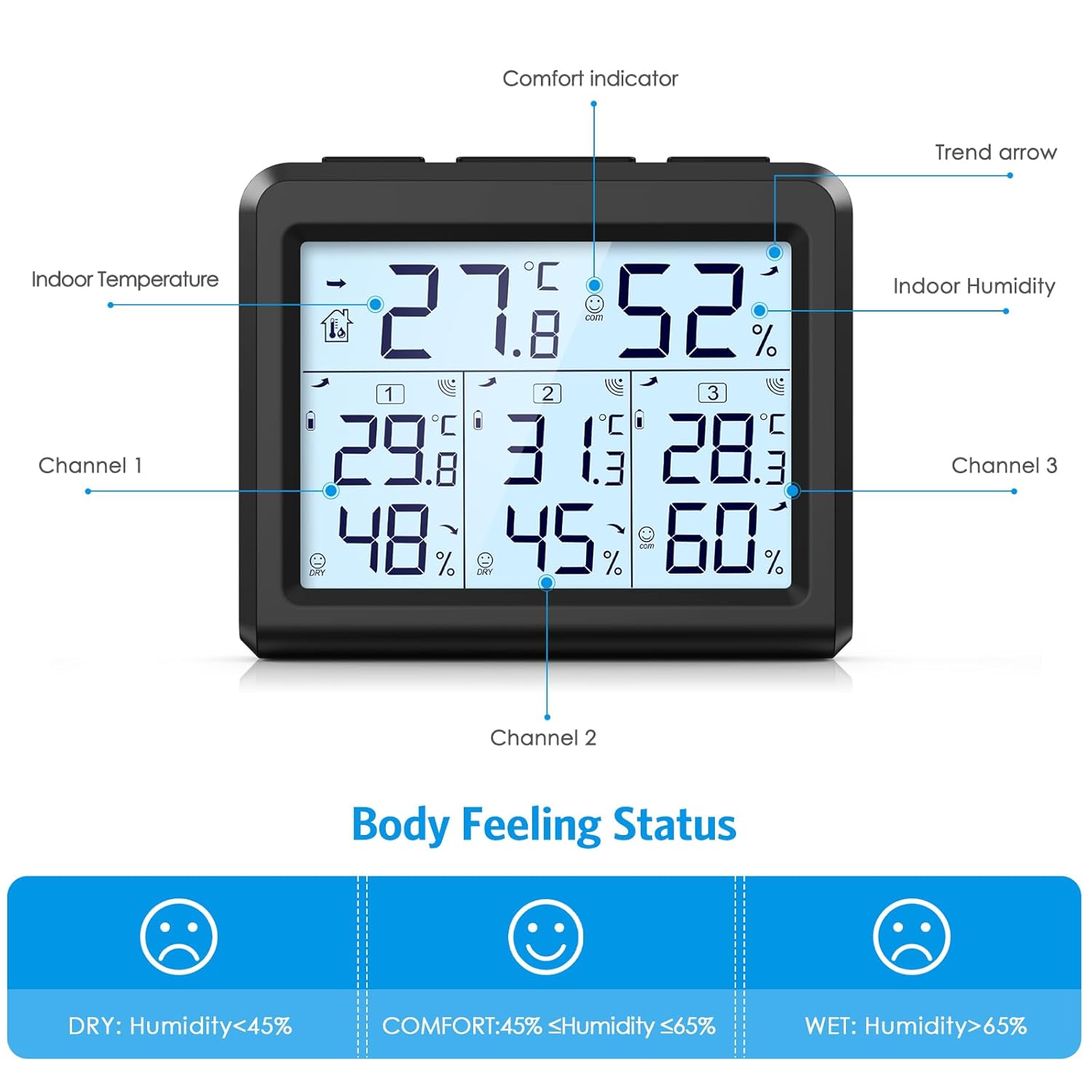
Imagem: Uma imagem detalhada view of the LCD screen, labeling the indoor temperature, indoor humidity, comfort indicator, trend arrow, and data for channels 1, 2, and 3.
5.2 Seleção da unidade de temperatura (°C/°F)
Pressione o ° C / ° F button on the main unit to toggle between Celsius and Fahrenheit temperature displays.
5.3 MAX/MIN Record Function
The device stores maximum and minimum temperature and humidity readings. To access these records:
- No modo de exibição normal, pressione o MÁX/MÍN botão uma vez para view the maximum indoor and outdoor temperature/humidity values. The screen will show "MAX".
- Pressione o MÁX/MÍN button a second time to view the minimum indoor and outdoor temperature/humidity values. The screen will show "MIN".
- Pressione o MÁX/MÍN button a third time to return to the current temperature and humidity values.
- To manually clear the recorded MAX/MIN values, press and hold the MÁX/MÍN botão por aproximadamente 3 segundos.
5.4 Função de retroiluminação
To activate the display backlight, press the LUZ button. The backlight will illuminate for 5 seconds and then automatically turn off.

Image: Shows the LCD screen's visibility in both bright and dark environments, demonstrating the effect of the backlight.
5.5 Indicador de Conforto
The comfort indicator provides a quick visual reference for humidity levels:
- SECO: Umidade abaixo de 45%
- CONFORTO: Umidade entre 45% e 65%
- MOLHADO: Umidade acima de 65%
6. Manutenção
6.1 Substituição da bateria
When the low battery indicator appears on the main unit's display for a specific sensor, it is time to replace the batteries for that sensor. For the main unit, replace batteries when the display dims or functions become erratic.
- Abra o compartimento da bateria.
- Remova as pilhas velhas.
- Insira pilhas AAA novas, certificando-se da polaridade correta.
- Feche o compartimento da bateria.
Descarte sempre as baterias usadas de forma responsável, de acordo com as normas locais.
6.2 Limpeza
Wipe the main unit and sensors with a soft, dry cloth. Do not use abrasive cleaners or immerse the devices in water.
7. Solução De Problemas
If you encounter issues with your AMIR thermometer, refer to the following common problems and solutions:
- No Reading from Remote Sensor:
- Check if the sensor batteries are installed correctly and are not depleted. Replace if necessary.
- Ensure the sensor is within the 100m (328ft) transmission range of the main unit.
- Reduce obstacles between the sensor and the main unit (e.g., thick walls, electronic devices).
- Re-pair the sensor by pressing the 'CHANNEL' button on the main unit and the 'TX' button on the sensor.
- Leituras imprecisas:
- Ensure sensors are not exposed to direct sunlight, rain, or extreme temperature fluctuations.
- Place sensors away from heat sources or vents.
- Allow the devices to stabilize for 15-30 minutes after initial setup or relocation.
- A tela está escura ou em branco:
- Substitua as pilhas da unidade principal.
8. Especificações
| Recurso | Especificação |
|---|---|
| Dimensões do produto | 3.5 x 3.5 x 3.9 polegadas; 9.44 onças |
| Número do modelo do item | WA143BKM-AMUS |
| Fabricante | AMIR |
| Marca | AMIR |
| Fonte de energia | Battery Powered (Main unit: 3x AAA, Sensors: 2x AAA each) |
| Características especiais | LCD Backlight, Large Display, Wireless, Max/Min Record, Comfort Indicator |
| Tecnologia de Conectividade | Frequência de rádio |
| Cor | Preto |
| Precisão da temperatura | ±1°C (±1.8°F) |
| Precisão de umidade | ±5% |
| Faixa de temperatura interna | 0 °C a 60 °C (32 °F a 140 °F) |
| Faixa de temperatura externa | -40 °C a 60 °C (-40 °F a 140 °F) |
| Faixa de umidade | 10% a 99% |
| Alcance de transmissão sem fio | 100 metros (328 pés) |
9. Garantia e Suporte
For warranty information or technical support, please refer to the contact details provided with your purchase or visit the official AMIR webGuarde o comprovante de compra como prova para eventuais solicitações de garantia.


