1. Introdução
Obrigado pela compra.asing the Max Power MPD437 Ultra PRO M2 Portable Bluetooth Speaker. This speaker is designed to provide high-quality audio in various environments, featuring water resistance and dust-proof capabilities for outdoor use. Please read this manual carefully before using the product to ensure proper operation and to maximize its lifespan.
Informações de segurança
- Não exponha o alto-falante a temperaturas extremas ou à luz solar direta por períodos prolongados.
- Evite deixar cair ou submeter o alto-falante a impactos fortes.
- Não tente desmontar ou modificar a caixa de som. Isso anulará a garantia.
- Mantenha a caixa de som longe de equipamentos médicos.
- Use apenas o cabo de carregamento fornecido.
2. Conteúdo da embalagem
Verifique se todos os itens estão presentes na embalagem:
- Max Power MPD437 Ultra PRO M2 Portable Bluetooth Speaker
- Cabo de energia
- Cabo AUX
- Manual do usuário (este documento)
3. Produto acabadoview
Familiarize yourself with the components of your Max Power MPD437 Ultra PRO M2 speaker.
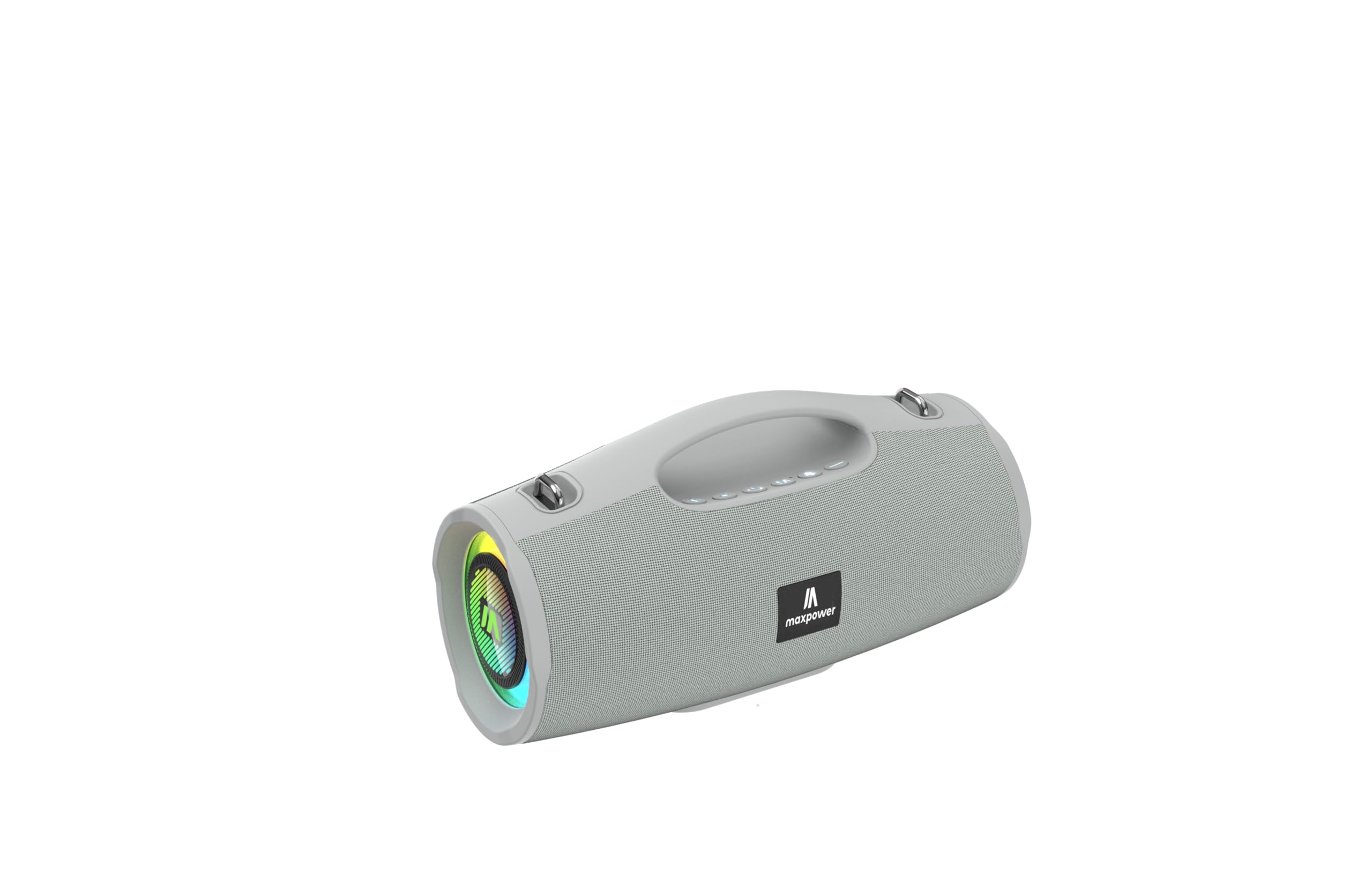
This image displays the Max Power MPD437 Ultra PRO M2 speaker. It features a robust grey casing, an integrated carrying handle at the top, and a series of control buttons. One end of the speaker is equipped with an LED light ring, indicating its operational status and adding visual effects.
Componentes principais:
- Alça de transporte integrada: Para facilitar o transporte.
- Botões de controle: For power, volume, playback, and mode selection.
- Grade do alto-falante: Protects the speaker drivers.
- Anel de luz LED: Provides visual effects and indicates status.
- Porta de carregamento: Para conectar o cabo de alimentação.
- Entrada AUX: Para conexão de áudio com fio.
4. Configuração
4.1 Carregando o alto-falante
- Connect the provided Power Cable to the charging port on the speaker.
- Plug the other end of the Power Cable into a suitable power source.
- O indicador LED mostrará o status do carregamento. Uma carga completa leva aproximadamente 3 horas.
- Desconecte o cabo de carregamento quando estiver totalmente carregado.
4.2 Emparelhamento Bluetooth
- Press and hold the Power button to turn on the speaker. The speaker will enter Bluetooth pairing mode, indicated by a flashing LED light.
- No seu dispositivo (smartphone, tablet, laptop), ative o Bluetooth e procure por dispositivos disponíveis.
- Select "MPD437 Ultra PRO M2" from the list of devices.
- Após o emparelhamento, o alto-falante emitirá uma confirmação sonora e a luz LED parará de piscar.
- O alto-falante tentará se reconectar automaticamente ao último dispositivo emparelhado ao ser ligado.
4.3 Conexão AUX
- Connect one end of the provided AUX Cable to the AUX input port on the speaker.
- Connect the other end of the AUX Cable to the audio output jack of your device.
- A caixa de som mudará automaticamente para o modo AUX.
5. Instruções de operação
5.1 Ligar/Desligar
- Ligar: Pressione e mantenha pressionado o botão Liga/Desliga por 2 a 3 segundos.
- Desligar: Pressione e mantenha pressionado o botão Liga/Desliga por 2 a 3 segundos.
5.2 Controle de volume
- Aumentar o volume: Pressione o botão '+'.
- Diminuir o volume: Pressione o botão '-'.
5.3 Playback Control (Bluetooth/AUX Mode)
- Reproduzir/Pausar: Pressione o botão Reproduzir/Pausar.
- Próxima faixa: Pressione e mantenha pressionado o botão '+'.
- Faixa anterior: Pressione e mantenha pressionado o botão '-'.
Seleção de 5.4 modos
Press the 'M' (Mode) button to switch between Bluetooth, AUX, and FM Radio modes.
5.5 Operação de rádio FM
- Alterne para o modo de rádio FM usando o botão 'M'.
- Pressione o botão Reproduzir/Pausar para buscar e salvar automaticamente as estações de FM disponíveis.
- Use os botões '+' e '-' para navegar entre as estações salvas.
5.6 modos de luz LED
The speaker features vibrant LED lights. Press the dedicated LED button (if available, or a long press on a specific button) to cycle through different light modes or turn them off.
6. Manutenção
6.1 Limpeza
- Limpe o alto-falante com um suave, damp pano.
- Não utilize produtos de limpeza abrasivos, álcool ou solventes químicos.
- Certifique-se de que todas as portas estejam secas antes de carregar ou conectar cabos.
6.2 Armazenamento
- Guarde a caixa de som em local fresco e seco, longe da luz solar direta.
- Se for armazenar a bateria por um longo período, carregue-a até aproximadamente 50% a cada poucos meses para manter sua saúde.
7. Solução De Problemas
| Problema | Possível causa | Solução |
|---|---|---|
| A caixa de som não liga. | A bateria está esgotada. | Carregue a caixa de som usando o cabo de alimentação fornecido. |
| Sem som no alto-falante. | Volume is too low or muted. Device not paired correctly. AUX cable not fully inserted. | Increase volume on both speaker and connected device. Re-pair Bluetooth. Ensure AUX cable is securely connected. |
| Não foi possível emparelhar via Bluetooth. | Speaker is not in pairing mode. Device Bluetooth is off. Speaker is too far from device. | Ensure speaker is in pairing mode (flashing LED). Turn on Bluetooth on your device. Move speaker closer to your device (within 35 feet). |
| Recepção de rádio FM ruim. | Sinal fraco na localização atual. | Mova a caixa de som para um local com melhor recepção de sinal. |
8. Especificações
| Nome do modelo | Ultra Pro M2 |
| Número do modelo do item | MPD437 |
| Marca | Potência Máxima |
| Tipo de alto-falante | Speaker Portátil |
| Tecnologia de Conectividade | Bluetooth, Auxiliar |
| Tecnologia de comunicação sem fio | Bluetooth |
| Alcance Bluetooth | 35 pés |
| Características especiais | Dustproof, FM Radio, LED Light, Water Resistant |
| Nível de resistência à água | Resistente à água |
| Fonte de energia | Alimentado por bateria |
| Capacidade da bateria | 3000 Miliamp Horas |
| Tempo de carregamento | 3 horas |
| Modo de saída de áudio | Estéreo |
| Sinal-Ruído | 85 dB |
| Método de controle | Tocar |
| Dimensões do produto | 4.5"P x 5"L x 9.9"A |
| Peso do item | 2.65 libras |
| Componentes incluídos | AUX Cable, Power Cable |
| UPC | 785571466584 |
| GTIN | 785571466584 |
9. Garantia e Suporte
9.1 Garantia limitada
The Max Power MPD437 Ultra PRO M2 Portable Bluetooth Speaker comes with a limited warranty. Please refer to the warranty card included in your package or contact Max Power customer support for detailed warranty terms and conditions.
9.2 Suporte ao cliente
For technical assistance, troubleshooting, or warranty inquiries, please contact Max Power customer support. Contact information can typically be found on the product packaging or the official Max Power website.


