1. Introdução
This manual provides detailed instructions for the FREEWOLF M68 60% Wireless Gaming Keyboard. Please read this manual carefully before using the product to ensure proper operation and longevity.

Figure 1: FREEWOLF M68 Wireless Gaming Keyboard (Shimmer color variant)
2. Produto acabadoview
Principais características:
- Conectividade Tri-Mode: Supports wired (USB-C), 2.4GHz wireless, and Bluetooth 5.0 connections.
- Compatibilidade com vários dispositivos: Connects to Windows, Mac, Linux, PC, Laptop, iPad, iOS, and Android devices.
- Layout compacto de 60%: Features 67 keys, optimizing desktop space.
- Teclas PBT: Durable Polybutylene Terephthalate keycaps with clear legends.
- Retroiluminação LED em arco-íris: Offers constant and breathing modes with adjustable brightness and speed.
- Bateria de longa duração: Built-in 2000mAH battery provides extended usage.
- Design ergonômico: Double leg braces allow for three adjustable typing angles.
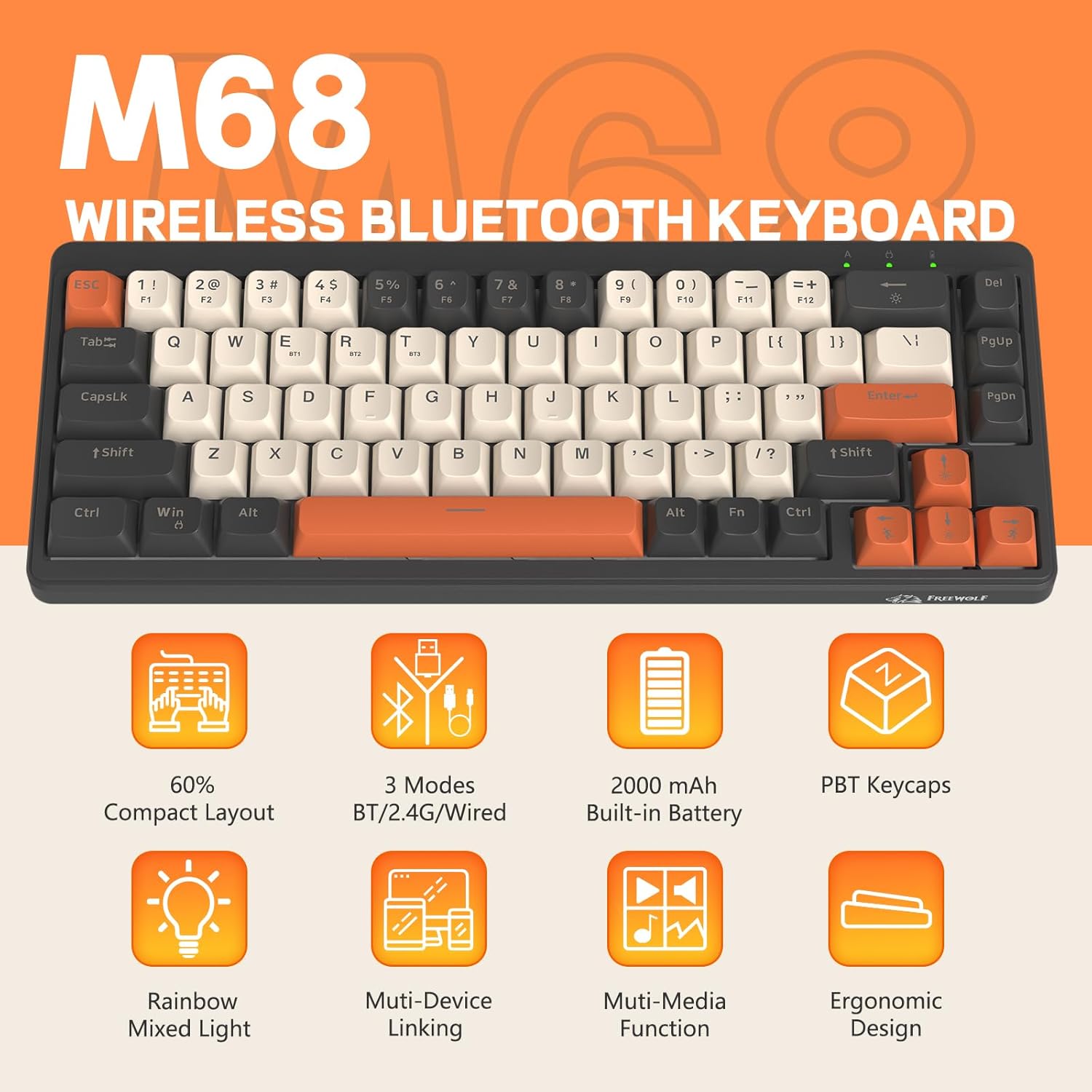
Figura 2: Overview of FREEWOLF M68 key features.
3. Configuração e conexão
3.1. Tri-Mode Connection Overview
The M68 keyboard supports three connection methods: wired via USB-C, 2.4GHz wireless via a USB receiver, and Bluetooth 5.0. You can switch between these modes using the dedicated switch on the keyboard.

Figura 3: Detalhado view of the 3-mode connection options.
3.2. Conexão com fio
- Localize a porta USB-C no teclado.
- Connect the provided USB-C cable to the keyboard and the other end to your computer's USB port.
- Ensure the mode switch on the keyboard is set to the wired (USB) position.
- O teclado será reconhecido automaticamente pelo seu sistema.
3.3. Conexão sem fio de 2.4 GHz
- Locate the 2.4GHz USB receiver (often stored in a compartment on the keyboard).
- Conecte o receptor USB a uma porta USB disponível em seu computador.
- Set the mode switch on the keyboard to the 2.4GHz wireless position.
- O teclado deve conectar-se automaticamente. Caso contrário, pressione FN + R para iniciar o emparelhamento.
3.4. Conexão Bluetooth
The M68 can connect to up to three Bluetooth devices simultaneously.
- Coloque a chave seletora de modo no teclado na posição Bluetooth.
- To enter pairing mode for a specific channel (BT1, BT2, or BT3), press and hold FN +Q (para BT1), FN + W (para BT2), ou FN + E (for BT3) until the corresponding indicator light flashes rapidly.
- On your device (PC, laptop, tablet, phone), open Bluetooth settings and search for "FREEWOLF M68".
- Selecione o teclado que deseja emparelhar. A luz indicadora ficará acesa continuamente quando a conexão for estabelecida.
- Para alternar entre dispositivos Bluetooth emparelhados, pressione FN + Q/W/E brevemente.
4. Operação
4.1. Controle de luz de fundo
The M68 features customizable rainbow LED backlighting.
- FN + Backspace: Toggle backlight on/off or switch between constant and breathing modes.
- FN + Seta para a Esquerda: Diminua a velocidade da luz de fundo.
- FN + seta para a direita: Aumentar a velocidade da luz de fundo.
- FN + seta para cima: Aumente o brilho da luz de fundo.
- FN + seta para baixo: Diminua o brilho da luz de fundo.

Figure 4: Backlight adjustment key combinations.
4.2. Ajuste Ergonômico
The keyboard includes double leg braces on the back to adjust the typing angle for comfort.
- Flip the keyboard over to access the leg braces.
- Adjust the two-stage leg braces to achieve your preferred typing angle (flat, one stage, or two stage).

Figure 5: Ergonomic angle adjustments.
4.3. Gerenciamento de bateria
The keyboard has a built-in 2000mAH rechargeable battery.
- Carregamento: Connect the keyboard via the USB-C cable to a power source (computer USB port or wall adapter). The charging indicator will show status.
- Duração da bateria: Up to 60 hours with backlight on, and up to 200 hours with backlight off.
- Economia de energia: The keyboard will enter sleep mode after a period of inactivity to conserve battery. Press any key to wake it up.

Figure 6: Battery capacity information.
5. Manutenção
- Limpeza: Use a soft, dry cloth to clean the keyboard surface. For keycaps, you may use a slightly damp tecido. Evite umidade excessiva.
- Remoção da tecla: If necessary, use a keycap puller to carefully remove PBT keycaps for deeper cleaning or replacement.
- Armazenar: Guarde o teclado em local fresco e seco, longe da luz solar direta e de temperaturas extremas.
- Evite líquidos: Do not expose the keyboard to liquids to prevent damage to internal components.
6. Solução De Problemas
| Problema | Possível causa | Solução |
|---|---|---|
| Teclado não responde (com fio) | Conexão de cabo solta, modo incorreto. | Ensure USB-C cable is securely connected. Check if the mode switch is set to wired. Try a different USB port. |
| Keyboard not responding (2.4GHz) | USB receiver not connected, incorrect mode, pairing issue. | Ensure USB receiver is plugged in. Set mode switch to 2.4GHz. Re-pair by pressing FN + R. Try a different USB port for the receiver. |
| Teclado não responde (Bluetooth) | Not paired, incorrect mode, device Bluetooth off. | Ensure device Bluetooth is on. Set mode switch to Bluetooth. Enter pairing mode (FN + Q/W/E) and re-pair. Forget the device on your system and re-pair. |
| A luz de fundo não funciona ou está travada. | Backlight off, low battery, software glitch. | Imprensa FN + Backspace to toggle. Charge the keyboard. Try resetting the keyboard (refer to advanced functions if available, or disconnect/reconnect). |
| Teclas não registram ou digitam duas vezes. | Dust/debris under keycap, switch issue. | Carefully remove keycap and clean. If issue persists, contact support. |
7. Especificações
| Modelo | M68 |
| Marca | LOBO LIVRE |
| Conectividade | Com fio (USB-C), sem fio de 2.4 GHz, Bluetooth 5.0 |
| Layout de chave | 60% (67 teclas) |
| Material Keycap | PBT (polibutileno tereftalato) |
| Iluminação de fundo | Rainbow LED (RGB) |
| Capacidade da bateria | 2000 mAh |
| Dispositivos compatíveis | Laptop, PC, Tablet (Windows, Mac, Linux, iOS, Android) |
| Dimensões do produto | 32.51 x 12.5 x 3.99 cm |
| Peso | 600 g |
| Características especiais | Ergonomic (adjustable angles), Backlit |
8. Garantia e Suporte
For warranty information, technical support, or customer service inquiries, please refer to the contact information provided with your purchase or visit the official FREEWOLF website.
Guarde o comprovante de compra para eventuais solicitações de garantia.


