1. Produto acabadoview
The MOBAPAD N1 HD is a versatile wireless controller designed for an enhanced gaming experience across multiple platforms. It features advanced technologies such as Hall Effect Joysticks for precise control, ALPS Dual-Axis Motors for immersive HD vibration, and six-axis motion control. This controller is compatible with Nintendo Switch, PC, iOS, and Android devices, offering seamless connectivity and responsive performance.

Imagem: Frente view of the MOBAPAD N1 HD Wireless Controller, showcasingraças ao seu design ergonômico e à disposição dos botões.
2. Principais características
- Compatibilidade multiplataforma: Fully compatible with Nintendo Switch, PC, iOS, and Android devices, ensuring broad usability.
- Joysticks de efeito Hall: Provides smooth, precise, and durable control with minimal wear, ideal for accurate gaming.
- ALPS Dual-Axis Motors with HD Vibration: Delivers realistic and immersive haptic feedback for enhanced gameplay.
- Controle de movimento de seis eixos: Built-in gyroscope enables enhanced motion control for compatible games.
- NFC for Amiibo Scanning: Supports NFC technology for scanning Amiibo figures on Nintendo Switch.

Image: The controller illustrating its immersive motion control capabilities with swirling lines around it.

Image: The controller positioned in front of a collection of Amiibo figures, highlighting its NFC scanning function.

Image: The controller shown alongside icons for Switch, Android/iOS, and PC, demonstrating its multi-device compatibility.
3. Configuração e conexão
Follow these steps to connect your MOBAPAD N1 HD controller to your desired device.
3.1. Conectando ao Nintendo Switch
- No menu HOME, selecione Controladores, então Alterar Pega/Ordem.
- While the screen is displaying "Press L + R on the controller", press and hold the Botão Home on the MOBAPAD N1 HD controller for 3-5 seconds until the player LEDs begin to flash.
- Once connected, the player LED(s) corresponding to the controller number will remain lit.
3.2. Connecting to PC (Windows)
- Connect the controller to your PC using a USB-C cable. The controller will be recognized as a wired controller.
- For wireless connection, ensure your PC has Bluetooth enabled. Go to Bluetooth & other devices settings.
- Selecione "Adicionar Bluetooth ou outro dispositivo" e escolha "Bluetooth".
- Pressione e segure o Botão Home on the controller until the LEDs flash rapidly, indicating pairing mode.
- Select "MOBAPAD N1 HD" from the list of available devices.
3.3. Connecting to iOS/Android Devices
- Ative o Bluetooth no seu dispositivo iOS ou Android.
- Acesse as configurações de Bluetooth e procure por novos dispositivos.
- Pressione e segure o Botão Home on the controller until the LEDs flash rapidly.
- Select "MOBAPAD N1 HD" from the list of available devices to pair.
4. Operando o Controlador
Familiarize yourself with the controller's layout and functions for optimal gameplay.
4.1. Layout dos botões
- Alavanca analógica esquerda: For movement and camera control. Features Hall Effect technology.
- Alavanca analógica direita: For camera control and aiming. Features Hall Effect technology.
- D-pad: Entrada direcional para navegação nos menus e ações específicas do jogo.
- Botões A/B/X/Y: Botões de ação padrão.
- Botões L/R: Botões nos ombros.
- Botões ZL/ZR: Botões de gatilho.
- Botão Menos (-): Typically for opening in-game menus or specific functions.
- Botão Mais (+): Typically for opening in-game menus or specific functions.
- Botão Home: Returns to the system's home screen. Also used for pairing and NFC scanning.
- Botão de captura: Takes screenshots or video clips (Nintendo Switch).
- Botões M1/M2: Programmable back buttons for custom macros or remapping.
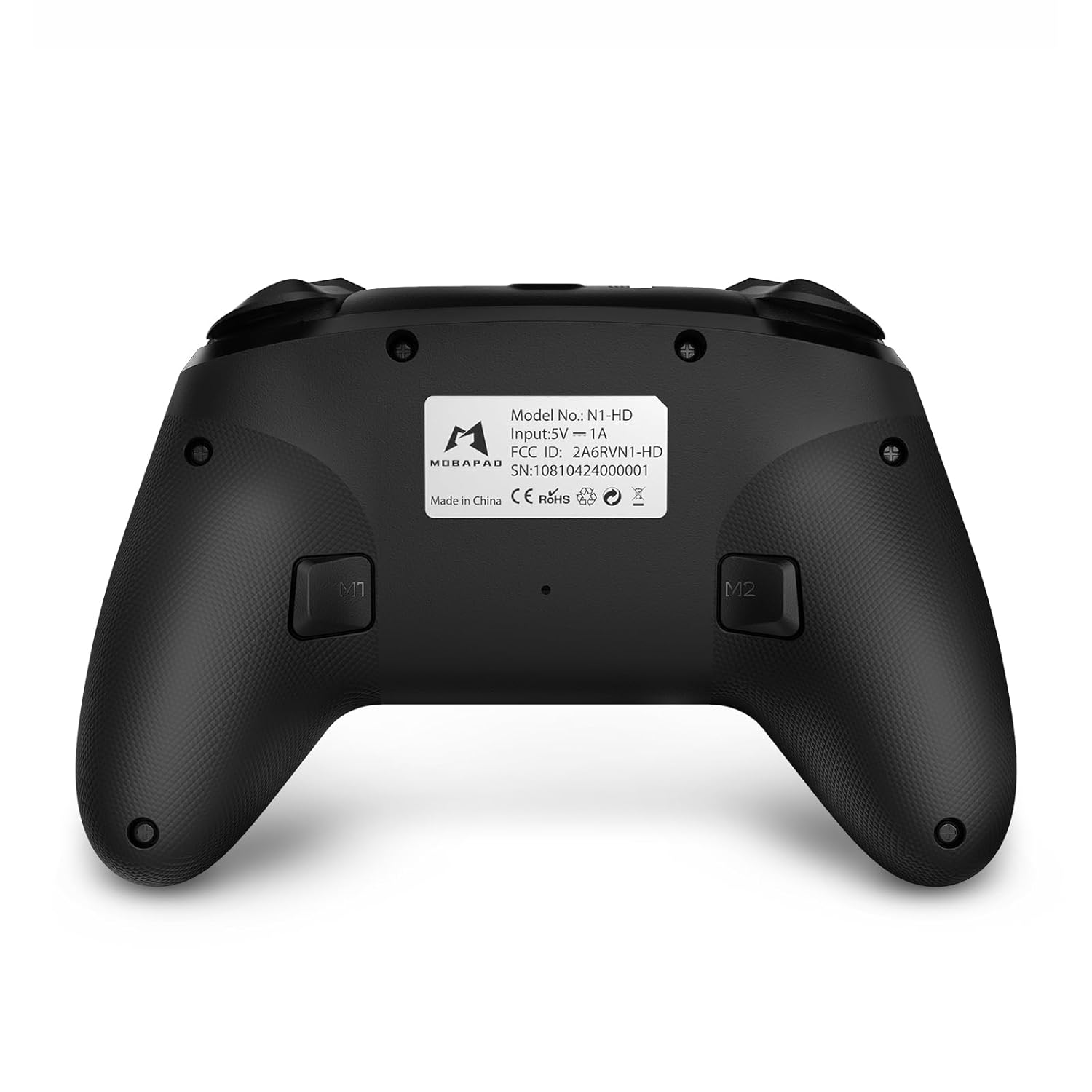
Imagem: Frente detalhada view of the MOBAPAD N1 HD controller, showing all buttons and joysticks.

Imagem: Costas view of the MOBAPAD N1 HD controller, highlighting the M1 and M2 programmable buttons and product label.
4.2. NFC Functionality (Amiibo Scanning)
To use the NFC function for Amiibo scanning on Nintendo Switch:
- Ensure your controller is connected to the Nintendo Switch.
- In a compatible game, when prompted to scan an Amiibo, place the Amiibo figure directly over the Botão Home area on the controller.
- Hold the Amiibo in place until the game registers the scan.
5. Manutenção e Cuidados
Proper maintenance ensures the longevity and optimal performance of your controller.
- Limpeza: Use um pano macio e seco para limpar o controle. Para sujeira mais difícil de remover, umedeça levemente o controle.ampUmedeça o pano com água. Evite produtos químicos agressivos ou materiais abrasivos.
- Armazenar: Guarde o controlador em local fresco e seco, longe da luz solar direta e de temperaturas extremas.
- Cuidados com a bateria: The controller contains a Lithium Ion battery. Avoid fully discharging the battery frequently. If storing for extended periods, charge the battery to about 50% to prolong its lifespan. Do not expose the battery to fire or extreme heat.
- Manuseio: Evite deixar o controle cair ou submetê-lo a impactos fortes, pois isso pode danificar os componentes internos.
6. Solução De Problemas
If you encounter issues with your MOBAPAD N1 HD controller, refer to the following common solutions.
| Problema | Possível causa | Solução |
|---|---|---|
| O controle não conecta. | Bateria fraca, fora do alcance, modo de emparelhamento incorreto, interferência. | Charge the controller fully. Ensure it is within range of the device. Re-enter pairing mode (hold Home button). Move closer to the device or away from other wireless devices. |
| Os botões ou joysticks não respondem. | Software glitch, physical obstruction, damage. | Restart the controller and the connected device. Check for any debris around the buttons/joysticks. If issues persist, contact customer support. |
| A vibração é fraca ou ausente. | Vibration setting off, game does not support vibration, motor issue. | Check in-game settings and system settings to ensure vibration is enabled. Verify if the game supports vibration feedback. |
| NFC scanning fails. | Incorrect placement, game not prompting scan, controller not connected. | Ensure the Amiibo is placed directly over the Home button area. Confirm the game is prompting for an Amiibo scan. Verify controller is properly connected to the Switch. |
7. Especificações
| Recurso | Detalhe |
|---|---|
| Número do modelo | Mobapad N1 HD Black |
| Dimensões (C x L x A) | 5.91 x 2.36 x 3.94 polegadas |
| Peso | 7.05 onças |
| Tipo de Bateria | 1 bateria de íon de lítio (incluída) |
| Conectividade | Sem fio (Bluetooth), USB-C (com fio) |
| Compatibilidade | Nintendo Switch, PC, iOS, Android |
| Características especiais | Hall Effect Joysticks, ALPS Dual-Axis Motors, HD Vibration, Six-Axis Gyroscope, NFC |
8. Garantia e Suporte
For warranty information or technical support, please contact MOBAPAD customer service. Refer to the official MOBAPAD webPara obter informações específicas sobre os termos da garantia e detalhes de contato, consulte o site ou a documentação de compra.
You can visit the official MOBAPAD store on Amazon for more information: MOBAPAD Store


