1. Informações de segurança
Before using the ZIBOO 15B PRO Digital Multimeter, please read and understand all safety instructions. Failure to follow these instructions may result in electric shock, fire, or personal injury.
1.1 Diretrizes Gerais de Segurança
- Sempre verifique se o multímetro está na função e escala corretas antes de fazer medições.
- Não utilize o multímetro se ele parecer danificado ou se os cabos de teste estiverem comprometidos.
- Observe all safety precautions for working with electricity, including wearing appropriate personal protective equipment (PPE).
- Never exceed the maximum input values for any function.
- The device is rated CAT III 600V and CAT II 1000V. Adhere to these ratings for safe operation.
- The multimeter features double fuse protection to prevent damage from overload.
2. Produto acabadoview
The ZIBOO 15B PRO True RMS Digital Multimeter is a compact and reliable tool designed for a wide range of electrical testing applications. It offers accurate measurements for AC/DC voltage, AC/DC current, resistance, continuity, diode, capacitance, and duty cycle. Its True RMS capability ensures precise readings for non-sinusoidal waveforms.
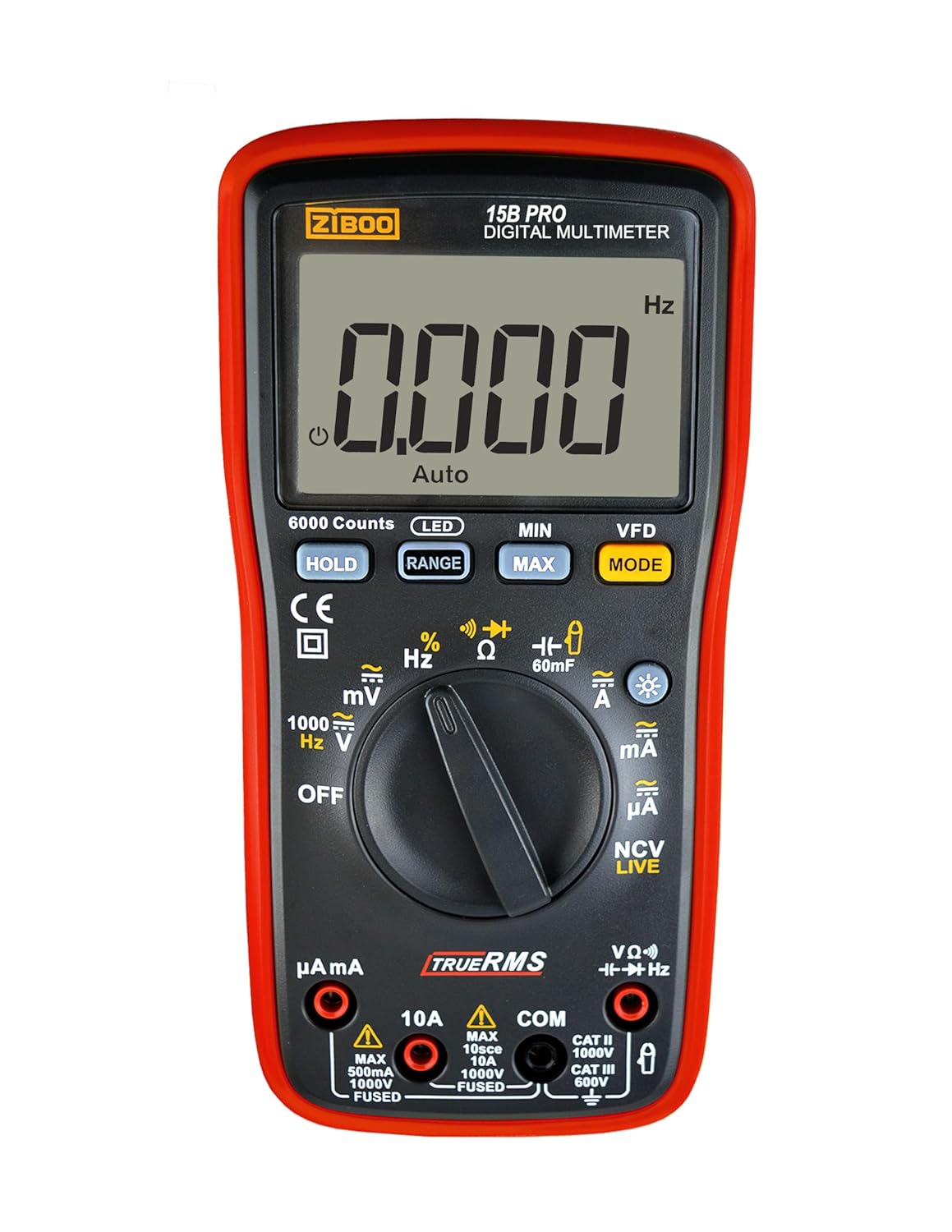
Figura 1: Frente view of the ZIBOO 15B PRO Digital Multimeter, showing the display, rotary dial, and function buttons.
2.1 Principais Características
- RMS verdadeiro: Provides accurate measurements for both sinusoidal and non-sinusoidal AC waveforms.
- Exibição de 6000 contagens: Visor de alta resolução para leituras precisas.
- AC / DC Voltage: Mede até 1000V.
- AC/DC Current: Measures up to 10A (optional current clamp for up to 600A).
- Resistance, Continuity, Diode, Capacitance, Duty Cycle: Essential functions for comprehensive electrical troubleshooting.
- VFD AC 600V: Variable Frequency Drive measurement capability.
- NCV/LIVE: Vol sem contatotage and Live Wire Detection with Red LED Flash.
- Dados em espera: Freezes the displayed reading for easier recording.
- Luz de fundo: Bright white backlight for clear visibility in various lighting conditions.
- C protetorasing: exterior durávelasing for enhanced protection.

Figure 2: Visual representation of the various measurement functions available on the multimeter.
2.2 O que vem na caixa
- ZIBOO 15B PRO Digital Multimeter
- Multimeter Test Leads (Red and Black)
- Protective Caps for Test Leads
- Manual do usuário
Note: AC pliers are an optional accessory and are not included with the standard package.
3. Configuração
3.1 Instalação da bateria
- Certifique-se de que o multímetro esteja desligado.
- Localize o compartimento da bateria na parte traseira do dispositivo.
- Unscrew the single Phillips #1 screw to open the compartment.
- Insert three AA 1.5V batteries, observing correct polarity.
- Recoloque a tampa do compartimento da bateria e prenda-a com o parafuso.
3.2 Conectando os Cabos de Teste
- Insira o fio de teste preto no conector 'COM' (Comum).
- Para a maioria das medições (vol.)tage, resistance, continuity, diode, capacitance, frequency, duty cycle), insert the red test lead into the 'VΩHz' jack.
- For current measurements up to 10A, insert the red test lead into the '10A' jack.
- Para miliampere (mA) ou microampere (µA) measurements, insert the red test lead into the 'µAmA' jack.

Figure 3: The ZIBOO 15B PRO Multimeter with its test leads, showing the connection points.
4. Instruções de operação
4.1 Ligar/Desligar e Visor
Turn the rotary dial from 'OFF' to any desired function to power on the multimeter. To power off, turn the dial back to 'OFF'. The device features an automatic power-off function to conserve battery life. Press the LIDERADO button to activate or deactivate the display backlight for improved visibility.
4.2 Funções de Medição
Rotate the dial to select the desired measurement function. Use the MODO button to toggle between different sub-functions within a dial position (e.g., AC/DC voltage, NCV/LIVE).
- Volumetage Medição (CA/CC):
Set the dial to 'V~' for AC voltage ou 'V=' para volume CCtage. Connect the test leads in parallel to the circuit or component being measured. The display will show the voltage leitura. - Medição de corrente (CA/CC):
Set the dial to 'A~' for AC current or 'A=' for DC current. Ensure the red test lead is in the appropriate current jack (10A or µAmA). Connect the multimeter in series with the circuit. - Medição de resistência (Ω):
Set the dial to 'Ω'. Connect the test leads across the component. Ensure the circuit is de-energized before measuring resistance. - Teste de continuidade ():
Set the dial to 'Ω' and press MODO until the continuity icon appears. A buzzer will sound and a green LED will flash if continuity is detected (low resistance). - Teste de diodo ():
Set the dial to 'Ω' and press MODO until the diode icon appears. Connect the test leads across the diode. - Medição de capacitância (F):
Set the dial to 'F'. Connect the test leads across the capacitor. Ensure the capacitor is discharged before measurement. - NCV (Vol sem contatotage) / LIVE (Live Wire Detection):
Set the dial to 'NCV LIVE'. The multimeter will detect AC voltage without direct contact. 'L' indicates a live wire with voltage, accompanied by a red LED flash and buzzer. 'EF' indicates non-contact detection.

Figure 4: The multimeter's NCV function detecting voltage near an electrical outlet, indicated by 'EF' on the display.
Video 1: This video demonstrates the difference between the NCV (Non-Contact Voltage) and LIVE (Live Wire Detection) functions on the ZIBOO 15B PRO/17B PRO multimeters. It shows how to toggle between these modes and their respective indications when detecting live electrical circuits.
4.3 Funções especiais
- ESPERA: Pressione o SEGURAR Pressione o botão para congelar a leitura atual no visor. Pressione novamente para liberar.
- MÍNIMO MÁXIMO: Pressione o MÍNIMO MÁXIMO button to record the minimum and maximum values during a measurement session. Press again to cycle through MIN, MAX, and current readings.
- ALCANCE: Pressione o GAMA button to switch between auto-ranging and manual ranging.
5. Manutenção
5.1 Limpeza
Limpe o multímetro casing com anúncioamp cloth and mild detergent. Do not use abrasive cleaners or solvents. Ensure the device is completely dry before use.
5.2 Substituição da bateria
When the battery indicator appears on the display, replace the batteries as described in Section 3.1. Always use three new AA 1.5V batteries.
5.3 Substituição de fusíveis
The multimeter is equipped with internal fuses for protection. If a current measurement function stops working, the fuse may need replacement. To access the fuses, open the battery compartment (Section 3.1). The fuses are located inside. Replace with fuses of the correct type and rating (e.g., 10A/1000V and 500mA/1000V).
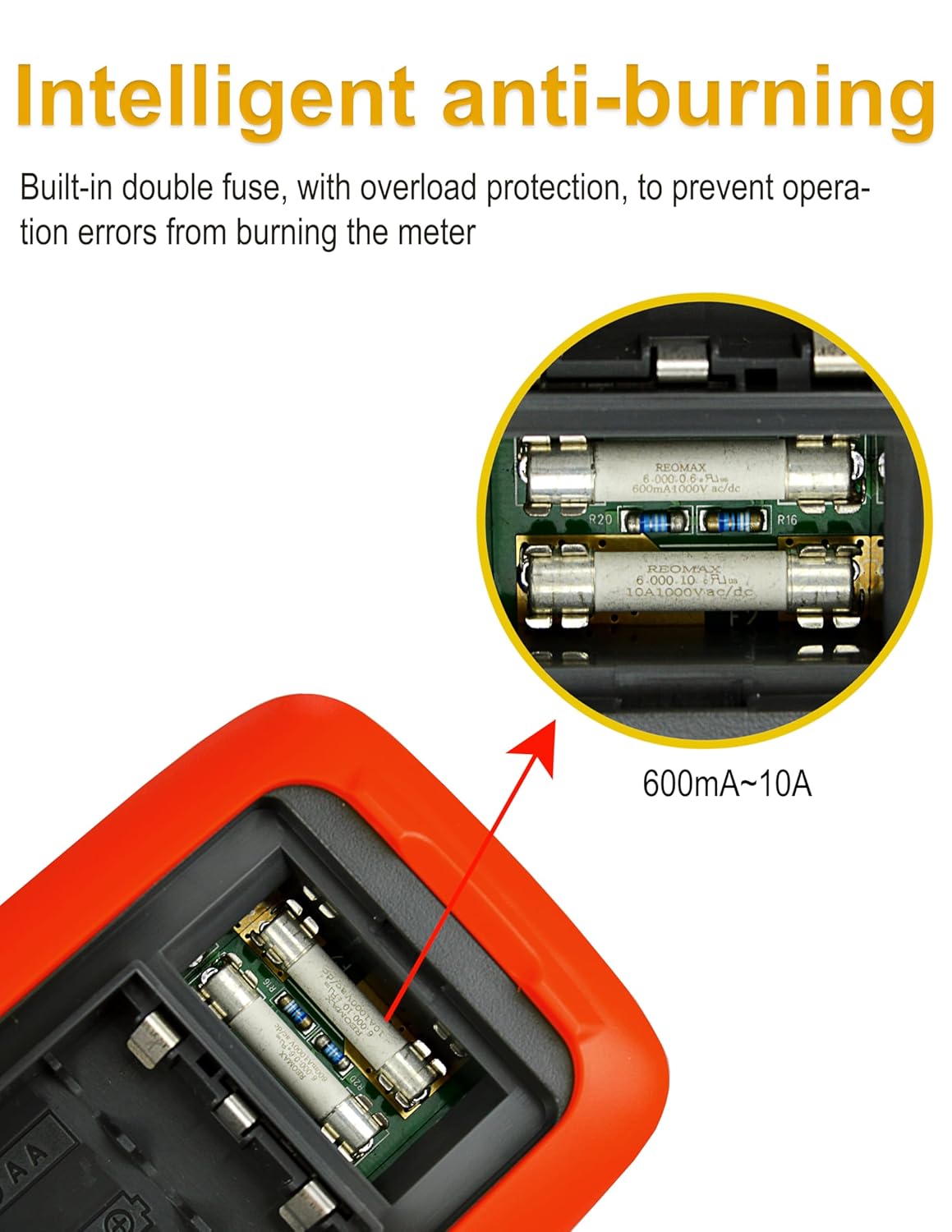
Figura 5: interno view highlighting the double fuse protection for safety and durability.
5.4 Cuidados com os Cabos de Teste
The test leads come with protective caps. Use these caps to protect the sharp tips when not in use or when measuring in situations where only a short tip is required. This helps prevent damage to the probes and ensures safety.
6. Solução De Problemas
If you encounter issues with your ZIBOO 15B PRO Digital Multimeter, refer to the following common troubleshooting steps:
- Sem imagem/Imagem fraca: Check battery levels and replace if necessary. Ensure the multimeter is powered on.
- Leituras incorretas: Verify the test leads are correctly inserted into the appropriate jacks for the selected function. Ensure the rotary dial is set to the correct measurement type and range. Check for damaged test leads.
- Current Function Not Working: The internal fuse for current measurement may have blown due to an overload. Replace the fuse as described in Section 5.3.
- Continuity Buzzer Not Sounding: Ensure the multimeter is in continuity mode. Check for open circuits or high resistance.
For persistent issues, consult the manufacturer's support resources.
7. Especificações
| Recurso | Especificação |
|---|---|
| Mostrar | 6000 Counts, True RMS |
| Vol. DCtage (V) | 6V/60V/600V/1000V (±(0.5%+3)) |
| Vol. CAtage (V) | 6V/60V/600V/1000V (±(0.8%+5)) |
| Vol. AC do VFDtage (V) | 600V (±(0.8%+5)) |
| Corrente CC (A) | 600µA/6mA/60mA/600mA/6A/10A (±(0.8%+5) to ±(1.5%+5)) |
| Corrente AC (A) | 600µA/6mA/60mA/600mA/6A/10A (±(1.0%+5) to ±(1.8%+5)) |
| Resistência (Ω) | 600Ω/6KΩ/60KΩ/600KΩ/6MΩ/60MΩ (±(0.8%+5) to ±(2.5%+5)) |
| Capacitância (F) | 60nF-60mF (±(3%+5) to ±(5%+5)) |
| Frequência (Hz) | 10Hz-20MHz (±(0.1%+5)) |
| Ciclo de trabalho | 10%-90% (±(2%+5)) |
| Classificação de segurança | CAT III 600 V, CAT II 1000 V |
| Fonte de energia | 3 pilhas AA de 1.5 V |
| Dimensões do produto | 3.58 x 1.77 x 7.2 polegadas |
| Peso do produto | 1.19 libras (402 g) |
Note: Accuracy specifications are typical values and may vary slightly.

Figure 6: A detailed table outlining the technical specifications for the ZIBOO 15B PRO multimeter.
8. Garantia e Suporte
For warranty information and customer support, please refer to the official ZIBOO website or contact the seller directly through the platform where the product was purchased. Standard return policies typically apply (e.g., 30-day return window).


