1. Introdução
This manual provides detailed instructions for the setup, operation, and maintenance of your GIEC G5300 4K Ultra HD Blu Ray Player. Designed for an enhanced home entertainment experience, this player supports true 4K ultra-high-definition picture quality, HDR10, Dolby Vision, BT.2020 color spaces, and Dolby audio decoding for immersive visuals and sound.
2. Informações de segurança
- Ensure proper ventilation around the player to prevent overheating.
- Não exponha a unidade à chuva ou umidade para reduzir o risco de incêndio ou choque elétrico.
- Avoid placing heavy objects on top of the player.
- Não abra o casing; encaminhe todos os serviços de manutenção para pessoal qualificado.
- Keep the player away from direct sunlight, heat sources, and strong magnetic fields.
- Use apenas o adaptador de energia fornecido com a unidade.
3. Conteúdo da embalagem
Por favor, verifique se todos os itens listados abaixo estão incluídos em seu pacote:
- GIEC G5300 Blu-ray Player (x1)
- Cabo HDMI (x1)
- Controle Remoto (x1)
- Manual do usuário (x1)
4. Produto acabadoview
4.1 Painel Frontal

Figura 4.1: Frente view of the GIEC G5300 Blu Ray Player, showing the disc tray, display, USB port, and control buttons (power, play/pause, eject).
- Bandeja de disco: Insert Blu-ray or DVD discs here.
- Painel de display: Shows playback status and time.
- Porta USB 3.0: Conecte dispositivos de armazenamento USB para reprodução de mídia.
- Botões de controle: Power On/Off, Play/Pause, Eject.
4.2 Painel Traseiro e Conexões

Figura 4.2: Traseira view of the GIEC G5300 Blu Ray Player, highlighting various input/output ports including LAN, HDMI 2.0, HDMI 1.4, USB 3.0, Coaxial, and Optical outputs.
- Porta LAN: For network connection (e.g., firmware updates).
- HDMI 2.0 Output (Video/Audio): Primary HDMI output for 4K video and audio.
- HDMI 1.4 Output (Audio Only): Dedicated HDMI output for audio to an AV receiver.
- USB 3.0 Input: Conecte dispositivos de armazenamento USB para reprodução de mídia.
- Saída coaxial: Saída de áudio digital.
- Saída óptica: Saída de áudio digital.
5. Configuração
5.1 Instalação da bateria do controle remoto
Insert two AAA batteries (not included) into the remote control, ensuring correct polarity.
Video 5.1: This video demonstrates how to install batteries into the remote control and connect the Blu-ray player to a TV using an HDMI cable.
5.2 Connecting to a Display Device (TV/Projector)
- Conecte uma extremidade do cabo HDMI fornecido à HDMI 2.0 Output (Video/Audio) porta na parte traseira do reprodutor de Blu-ray.
- Conecte a outra extremidade do cabo HDMI a uma porta de entrada HDMI disponível na sua TV ou projetor.
- For separate audio output, connect another HDMI cable from the HDMI 1.4 Output (Audio Only) port to your AV receiver, or use the Coaxial/Optical outputs.
5.3 Conexão de Energia
- Connect the power cable to the power input on the rear of the Blu-ray player.
- Ligue a outra extremidade do cabo de alimentação a uma tomada de parede.
- Turn on your TV/projector and select the correct HDMI input source corresponding to the port you connected the Blu-ray player to.
- Press the Power button on the Blu-ray player or remote control to turn on the unit.
6. Instruções de operação
Reprodução de disco 6.1
- Ensure the player is powered on and connected to your display device.
- Pressione o EJETAR Botão no painel frontal ou no controle remoto para abrir a bandeja de discos.
- Carefully place a Blu-ray or DVD disc onto the tray with the label side facing up.
- Pressione o EJETAR button again to close the tray. The player will automatically begin loading and playing the disc.
- Use the remote control for playback functions such as Play, Pause, Stop, Fast Forward, and Rewind.
Reprodução de mídia USB 6.2
The GIEC G5300 supports playback of various media files de um dispositivo de armazenamento USB.
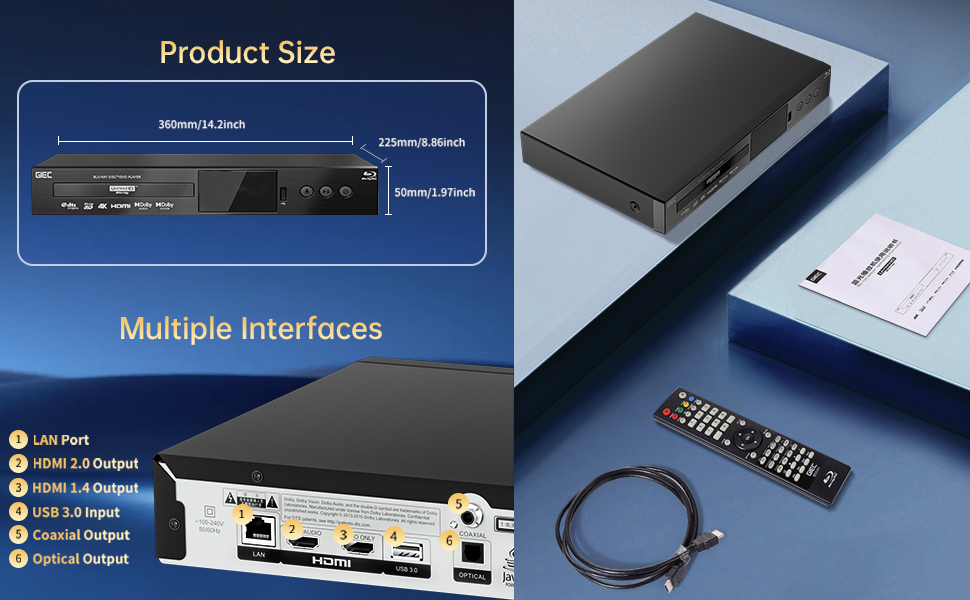
Figure 6.1: Illustration of the multiple disc, video, and audio formats supported by the player.
- Insert your USB storage device into the Porta USB 3.0 on the front or rear panel.
- Navigate to the "Video," "Music," or "Photo" section on the player's main menu using the remote control.
- Selecione o desejado file from the USB device to begin playback.
Formatos suportados:
- Tipos de disco: BD, BD-R, BD-RE, DVD-R/RW, DVD+R/RW, DVD-Video, VCD, CD, CD-R/RW.
- Formatos de vídeo: MPEG-1, MPEG-2, MPEG-4, VC1, H.264, MOV, MKV, AVI, TS.
- Formatos de áudio: AAC, APE, CUE, FLAC, OGG, MP3, WAV.
7. Características
- 4K Ultra HD Playback: Experience movies and shows in stunning 4K resolution with clearer images and richer colors.
- Suporte HDR10: Enjoy a wider range of brightness and contrast, revealing more detail in both dark and bright scenes.
- Visão Dolby: Enhances image quality by dynamically adjusting brightness and expanding dynamic range for more detailed and vivid pictures.
- BT.2020 Color Spaces: Provides a broader color gamut than standard 1080p Blu-ray, resulting in purer, more natural, and realistic colors.
- Dolby Sound & DTS Decoding: Supports Dolby audio decoding and DTS effects for an immersive 5.1 stereo surround sound experience.
- 3D Blu-ray Playback: Compatible with 3D Blu-ray discs for an immersive three-dimensional viewing experience (requires a 3D-compatible TV and glasses).
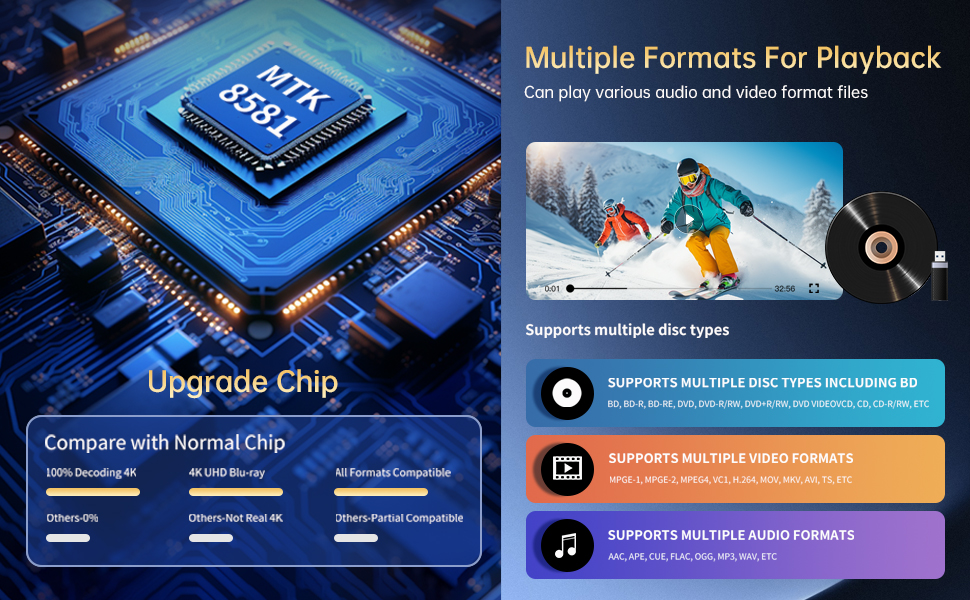
Figure 7.1: Visual comparison illustrating the difference between 8-bit (16.67 million colors) and 10-bit (1.07 billion colors) color depth, highlighting the enhanced detail and delicacy of 10-bit color.

Figure 7.2: The GIEC G5300 Blu Ray Player connected to a TV, showcasing its support for 4K UHD, 3D, HDR, HDR10+, Dolby, and Dolby Vision technologies.
8. Manutenção
- Limpeza: Use um pano macio e seco para limpar a parte externa do aparelho. Não use produtos de limpeza líquidos ou em aerossol.
- Cuidados com o disco: Manuseie os discos pelas bordas. Limpe-os com um pano macio e sem fiapos, limpando do centro para as bordas.
- Ventilação: Certifique-se de que as aberturas de ventilação do aparelho não estejam bloqueadas para evitar superaquecimento.
9. Solução De Problemas
If you encounter issues with your Blu-ray player, please refer to the following common solutions:
- Sem energia: Check if the power cable is securely connected to both the player and the power outlet. Ensure the outlet is functional.
- Sem imagem/som: Verify that the HDMI cable is correctly connected to both the player and the TV/receiver. Ensure the correct HDMI input is selected on your TV/receiver.
- Disco não reproduz: Check if the disc is clean and free of scratches. Ensure the disc is inserted correctly with the label side up. The player supports Region A Blu-ray discs and all region DVD discs.
- Controle remoto não funciona: Check the batteries in the remote control and replace them if necessary. Ensure there are no obstructions between the remote and the player.
10. Especificações
| Recurso | Detalhe |
|---|---|
| Marca | GIEC |
| Nome do modelo | G5300 |
| Peso do item | 4.18 libras (1.9 kg) |
| Dimensões do produto | 14.2 x 8.9 x 2 polegadas |
| Cor | Preto |
| Tipo de mídia | Disco Blu-ray, DVD |
| Resolução | 3840x2160 (4K Ultra HD) |
| Características especiais | Anti-Shock, Compact, Dust Proof, Multi-Format Playback, Surround Sound, HDR10, Dolby Vision, BT.2020 Color Spaces |
| Tipo de conector | HDMI (Dual Outputs), USB 3.0, Coaxial, Optical, LAN |
| Tecnologia de Conectividade | HDMI |
11. Garantia e Suporte
For warranty information or technical support, please refer to the documentation included with your purchase or contact GIEC customer service. Keep your proof of purchase for warranty claims.