Introdução
Thank you for choosing the Kamon K40 Wireless Earbuds. These earbuds are designed to provide a high-quality audio experience with advanced features such as Bluetooth 5.3 connectivity, AI Environmental Noise Cancellation (ENC), smart touch controls, and a portable charging case with an LED display. This manual will guide you through the setup, operation, and maintenance of your new earbuds to ensure optimal performance.

Image: Kamon K40 Wireless Earbuds in their charging case, displaying battery levels on the LED screen.
Conteúdo da embalagem
Por favor, verifique se todos os itens estão presentes em sua embalagem:
- 2 Wireless Earbuds (Left and Right)
- 1 LED Display Charging Case
- 1 cabo de carregamento USB-C
- 3 pares de pontas auriculares de silicone (P/M/G)
- 1 Manual do usuário
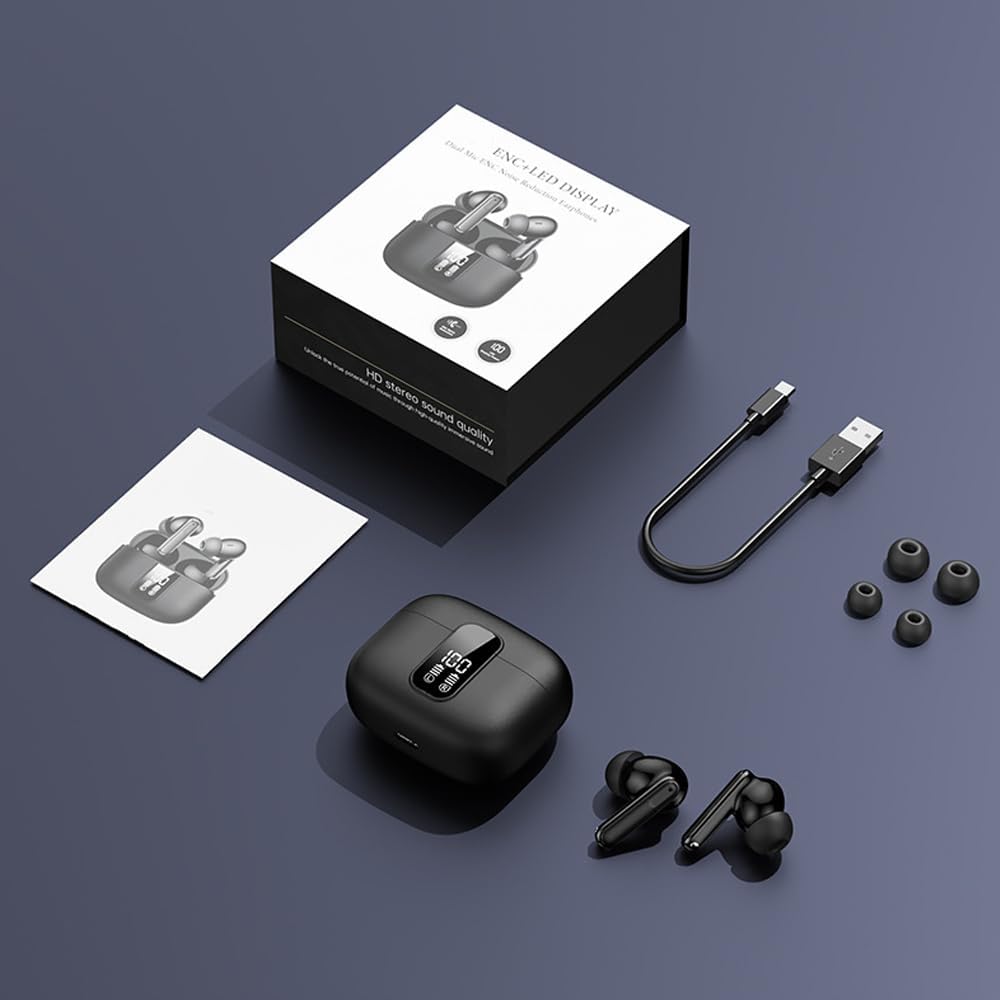
Image: All components included in the Kamon K40 Wireless Earbuds package: earbuds, charging case, USB-C cable, and three sizes of ear tips.
Produto acimaview
The Kamon K40 earbuds feature an ergonomic in-ear design for secure and comfortable fit. The charging case includes an LED display to show battery levels for both the case and individual earbuds. Key features include:
- Bluetooth 5.3: Provides stable and fast wireless connection up to 15 meters.
- AI ENC Noise Reduction: Enhances call clarity by filtering ambient noise.
- Controle de toque inteligente: Controles intuitivos para música, chamadas e assistente de voz.
- Tempo de reprodução longo: Up to 5 hours per charge, extended to 20 hours total with the charging case.
- Design impermeável: Resistant to sweat and light rain, suitable for workouts.
- HiFi Stereo Bass: Equipped with 13mm speakers for immersive audio.

Image: The Kamon K40 charging case open, revealing the earbuds and an LED display indicating the charge percentage and individual earbud battery status.
Configurar
1. Carregando os fones de ouvido e o estojo
Antes da primeira utilização, carregue totalmente os fones de ouvido e o estojo de carregamento.
- Coloque os fones de ouvido no estojo de carregamento. Certifique-se de que estejam encaixados corretamente; os indicadores LED nos fones de ouvido acenderão.
- Conecte o cabo de carregamento USB-C à porta de carregamento da capa e a outra extremidade a um adaptador de energia USB (não incluído).
- The LED display on the case will show the charging progress. A full charge for the case takes approximately 1.5 hours.
Video: An official product video demonstrating the features of the Kamon K40 Wireless Earbuds, including charging and touch controls.
2. Emparelhamento com seu dispositivo
The Kamon K40 earbuds feature one-step pairing for convenience.
- Open the charging case. The earbuds will automatically enter pairing mode, indicated by flashing lights (if applicable, refer to specific earbud light patterns).
- No seu dispositivo (smartphone, tablet, laptop), ative o Bluetooth.
- Procurar Encontre os dispositivos Bluetooth disponíveis e selecione "K40" na lista.
- Once connected, you will hear a confirmation tone, and the earbuds' indicator lights will stop flashing.
Os fones de ouvido se reconectarão automaticamente ao último dispositivo emparelhado quando forem retirados do estojo, desde que o Bluetooth esteja ativado no dispositivo.
3. Usando os fones de ouvido
For optimal sound quality and comfort, choose the correct size ear tips and ensure a proper fit.
- Select the silicone ear tips that best fit your ear canal. Experiment with different sizes (S/M/L) for the most secure and comfortable seal.
- Gently insert each earbud into your ear canal and twist slightly to secure it. The ergonomic design helps them stay in place during various activities.

Image: A Kamon K40 Wireless Earbud correctly positioned in a human ear, demonstrating its ergonomic fit.
Instruções de operação
Controles de toque inteligentes
The Kamon K40 earbuds feature intuitive touch controls on each earbud. The following table outlines the functions:

Image: A visual guide to the smart touch controls on the Kamon K40 earbuds, detailing actions for various taps and holds.
| Ação | Função |
|---|---|
| Hold for 3 seconds (either earbud) | Ligar |
| Tap & Hold for 3 seconds (either earbud) | Desligar |
| Toque único (E / D) | Play/Pause Music / Answer/End Call |
| Double click left earbud | Faixa anterior |
| Double click right earbud | Próxima faixa |
| Fone de ouvido esquerdo de três toques | Es eseseses eseses eseseses |
| Fone de ouvido direito de três toques | volume - |
| Four strikes (L/R) | Ativar Assistente de Voz |
| Tap & Hold for 1.5 seconds (either earbud) | Rejeitar chamada |
| FTouch (either earbud) | Transparent/ANC Mode - Normal Mode Switch |
Interruptor mestre-escravo
The Kamon K40 earbuds support a master-slave switch function, allowing you to use either earbud independently or both simultaneously. This provides flexibility for various scenarios, such as taking calls with one earbud while the other charges, or sharing audio with a friend.
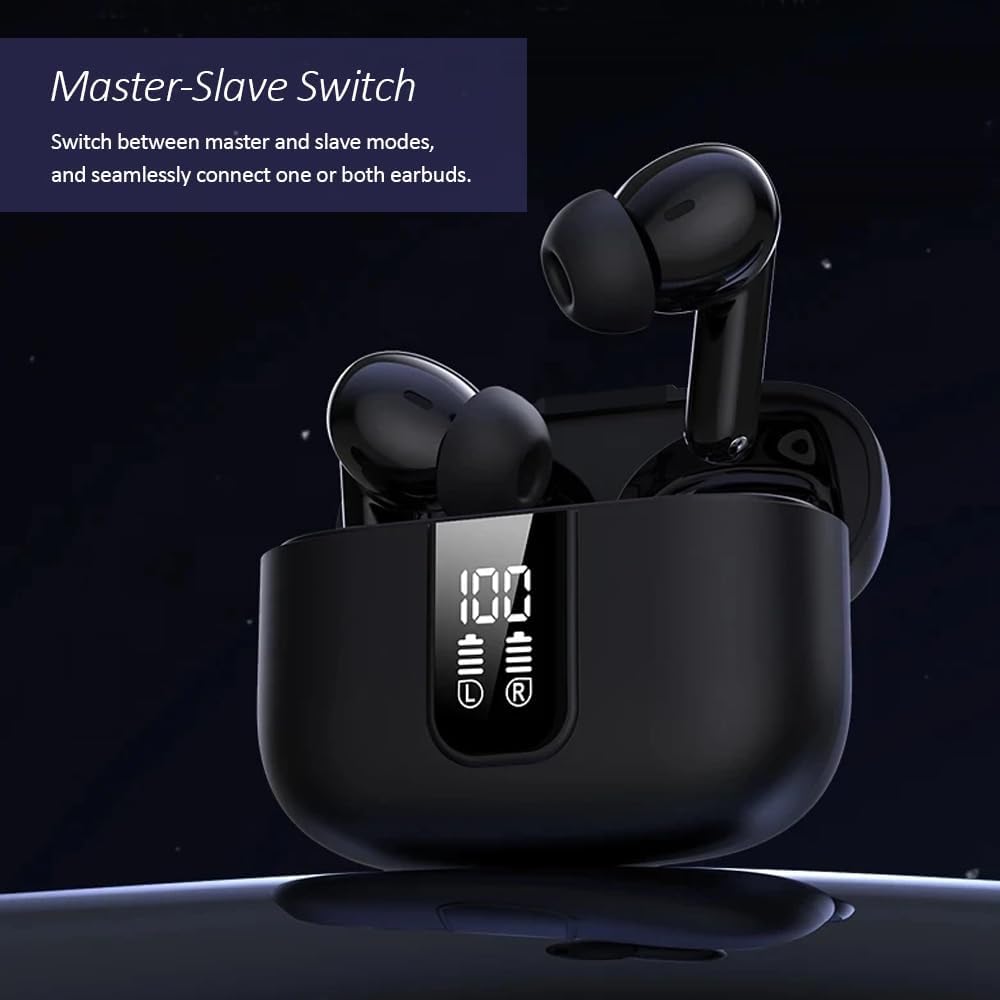
Image: The Kamon K40 earbuds in their charging case, highlighting the ability to use either earbud independently or together.
Manutenção
Limpeza
- Limpe regularmente os fones de ouvido e o estojo de carregamento com um pano macio, seco e sem fiapos.
- Retire as pontas auriculares e limpe-as com água e sabão neutro, secando-as completamente antes de recolocá-las.
- Use um cotonete para limpar delicadamente os contatos de carregamento tanto nos fones de ouvido quanto na parte interna do estojo.
Armazenar
- Quando não estiverem em uso, guarde sempre os fones de ouvido no estojo de carregamento para protegê-los e mantê-los carregados.
- Guarde o dispositivo em local fresco e seco, longe de temperaturas extremas e da luz solar direta.
Solução de problemas
Os fones de ouvido não estão emparelhando/conectando.
- Certifique-se de que ambos os fones de ouvido estejam carregados.
- Desative o Bluetooth no seu dispositivo e, em seguida, ative-o novamente.
- Forget/delete "K40" from your device's Bluetooth list and attempt to pair again.
- Coloque os dois fones de ouvido de volta no estojo de carregamento, feche a tampa, aguarde alguns segundos e abra a tampa novamente para reiniciar o modo de emparelhamento.
Sem som ou baixo volume
- Verifique o nível de volume tanto no seu dispositivo quanto nos fones de ouvido.
- Certifique-se de que os fones de ouvido estejam bem encaixados em seus ouvidos e que as ponteiras auriculares proporcionem uma boa vedação.
- Limpe qualquer resíduo dos alto-falantes dos fones de ouvido.
- Reconecte os fones de ouvido ao seu dispositivo.
Problemas de carregamento
- Certifique-se de que o cabo USB-C esteja firmemente conectado tanto ao gabinete quanto à fonte de alimentação.
- Experimente um cabo USB-C ou adaptador de energia diferente.
- Limpe os contatos de carregamento dos fones de ouvido e dentro do estojo.
Especificações
| Recurso | Detalhe |
|---|---|
| Nome do modelo | K40 |
| Marca | Kamon |
| Tecnologia de Conectividade | Wireless (Bluetooth) |
| Versão Bluetooth | 5.3 |
| Alcance Bluetooth | 15 metros |
| Controle de Ruído | Cancelamento de ruído ambiental (ENC) |
| Tipo de controle | Controle de toque inteligente |
| Colocação da orelha | No ouvido |
| Duração da bateria (fones de ouvido) | Até 5 horas |
| Tempo total de jogo (com estojo) | Até 20 horas |
| Interface de carregamento | USB-C |
| Nível de resistência à água | Impermeável |
| Tipo de driver de áudio | Driver de armadura balanceada |
| Peso do item | 2 onças |
| Material | Acrilonitrila Butadieno Estireno (ABS) |
| Dispositivos compatíveis | Cellphones, Tablets, Laptops, Televisions |
Informações de segurança
- Não desmonte nem modifique o produto.
- Keep the earbuds and charging case away from water, moisture, and extreme temperatures.
- Evite a exposição prolongada a níveis de volume elevados para evitar danos auditivos.
- Mantenha fora do alcance de crianças e animais de estimação.
- Utilize apenas o cabo de carregamento fornecido ou um equivalente certificado.
Garantia e Suporte
Kamon products are designed for reliability and performance. For warranty information, technical support, or customer service inquiries, please refer to the contact details provided with your purchase or visit the official Kamon website. Guarde o comprovante de compra para solicitações de garantia.


