Introdução
This manual provides essential information for the safe and efficient operation of your Promethean PRM-30 LCD Projector. Please read these instructions thoroughly before using the projector and retain them for future reference.
Informações de segurança
- Não obstrua as aberturas de ventilação. Garanta uma circulação de ar adequada ao redor do projetor.
- Evite a exposição direta dos olhos à lente do projetor quando o projetor estiver em uso.amp está ligado.
- Não coloque o projetor em um carrinho, suporte ou mesa instável.
- Unplug the projector from the power outlet before cleaning.
- Deixe toda a manutenção a cargo de pessoal qualificado.
Conteúdo da embalagem
Verifique se todos os itens estão presentes na embalagem:
- Promethean PRM-30 LCD Projector
- Controle remoto
- Cabo de energia
- Cabo HDMI
- Manual do usuário (este documento)
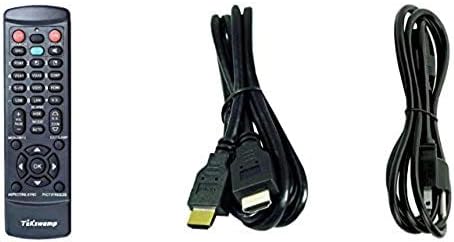
Image: Included accessories, showing the remote control, HDMI cable, and power cable.
Projetor Overview
Frente e Lateral View
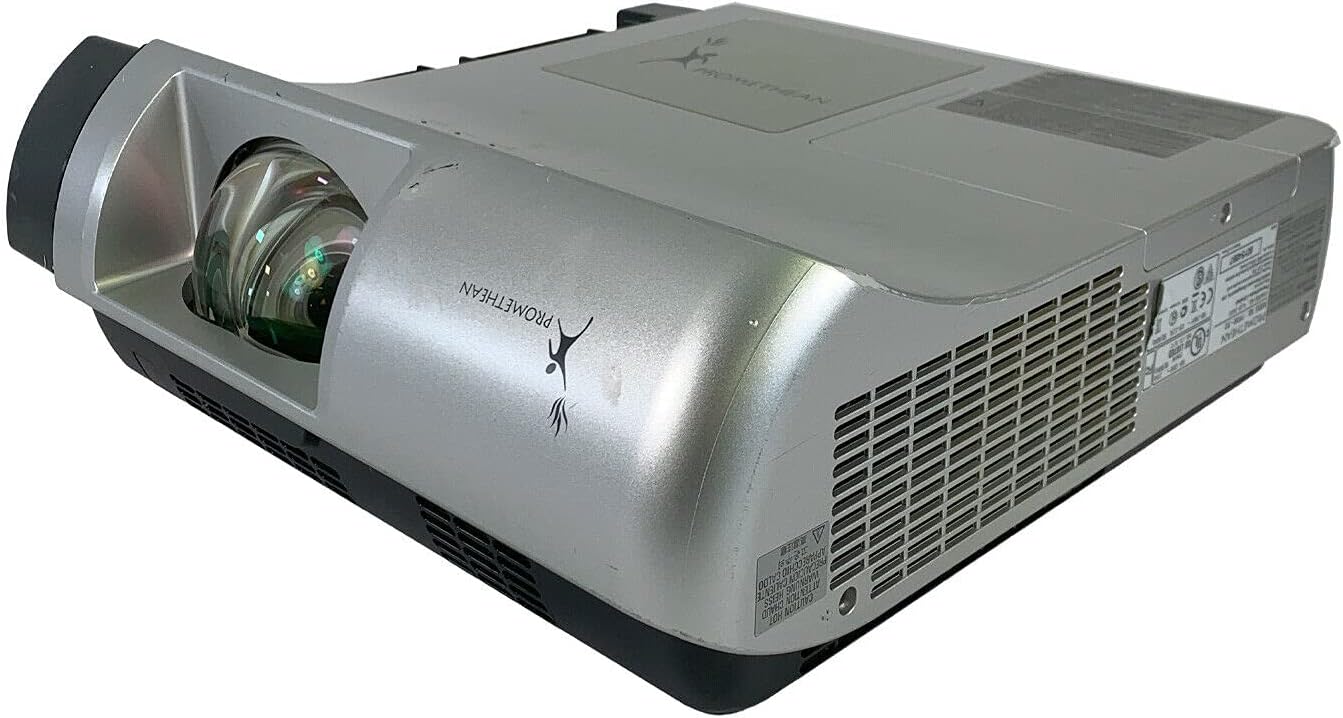
Imagem: Frente e lateral view of the Promethean PRM-30 projector, highlighting the lens and ventilation.
Conexões do painel traseiro
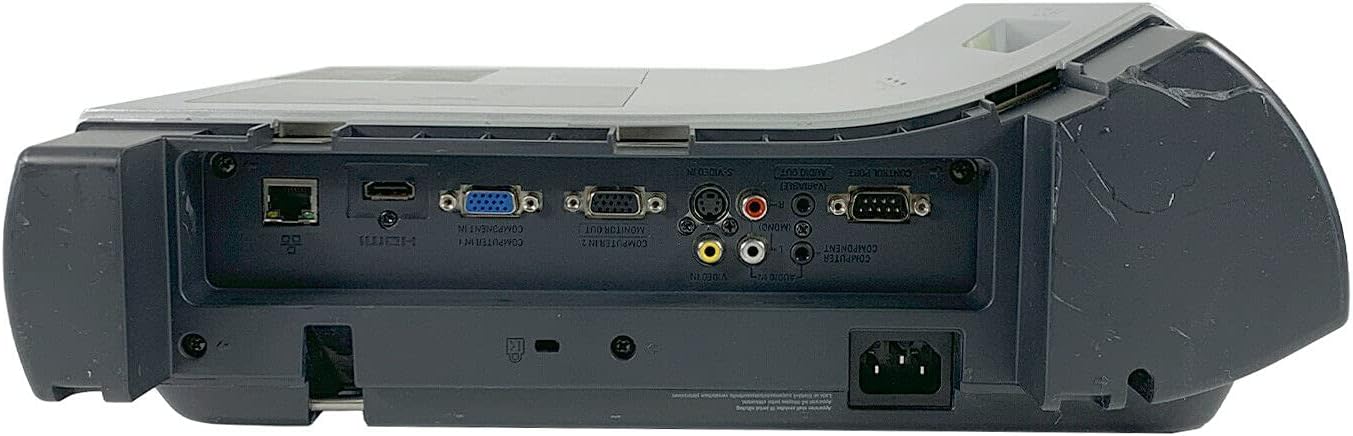
Image: Rear panel of the projector, showing various input and output ports including HDMI, VGA, Composite, LAN, and RS232.
The rear panel provides various connectivity options for your audio and video sources. Refer to the "Connecting Devices" section for detailed instructions.
Top Panel Controls and Indicators

Imagem: Topo view of the projector, displaying the control panel buttons and indicator lights for power, lamp, and warning.
The top panel features buttons for power, menu navigation, input selection, and focus/zoom adjustment. Indicator lights provide status information for power, lamp life, and warnings.
Configurar
1. Posicionamento do projetor
Position the projector on a stable, flat surface or mount it securely for ceiling projection. Ensure the projector is within the optimal throw distance for your screen size. The PRM-30 supports front, rear, ceiling, and table-top projection.
- Table Top Projection: Coloque o projetor sobre uma superfície plana em frente à tela.
- Ceiling Projection: Mount the projector inverted from the ceiling. Adjust settings in the menu for correct image orientation.
- Projeção traseira: Place the projector behind a translucent screen. Adjust settings in the menu for correct image orientation.
2. Dispositivos de conexão
Connect your video and audio sources to the appropriate ports on the projector's rear panel.
- HDMI: For high-definition digital video and audio. Use an HDMI cable to connect to your source device.
- VGA/SVGA D-Sub (Computer In): For analog computer signals. Connect using a VGA cable.
- Composite (RCA): For standard definition video. Connect using RCA cables (yellow for video, red/white for audio).
- S-Vídeo: For enhanced standard definition video.
- LAN (RJ-45): Para controle e monitoramento de rede.
- RS232 (DB-9 pinos): Para controle serial.
- Plug do fone de ouvido: For audio output to external headphones or speakers.
3. Conexão de energia
Connect the power cable to the projector's power inlet and then to a suitable electrical outlet.
Instruções de operação
Ligar/desligar
- Para ligar: Press the Power button on the projector's control panel or the remote control. The power indicator light will turn on.
- Para desligar: Press the Power button again. The projector will enter a cooling down cycle before completely shutting off. Do not unplug the projector during the cooling cycle.
Seleção da fonte de entrada
Press the "Input" or "Source" button on the projector or remote control to cycle through available input sources (HDMI, VGA, Composite, S-Video, etc.) until your desired source is displayed.
Ajuste de imagem
- Foco: Gire o anel de foco na lente do projetor até que a imagem fique nítida e clara.
- Ampliação: Ajuste o anel de zoom na lente do projetor para alterar o tamanho da imagem sem precisar mover o projetor.
- Correção Keystone: If the image appears trapezoidal, use the keystone correction function (usually via menu or dedicated buttons) to square the image.
- Correção de cor: Access the projector's on-screen display (OSD) menu to adjust color settings, brightness, and contrast for optimal image quality.
Saída de áudio
The projector has built-in speakers. For external audio, connect speakers or headphones to the Headphone Jack or use the audio output from your source device.
Manutenção
Lamp Substituição
When the "LAMP REPLACE" indicator illuminates, it is time to replace the projector lamp. Refer to the specific lamp replacement instructions provided with your replacement lamp or consult a qualified technician. Always allow the projector to cool down completely before attempting lamp substituição.
Limpeza do filtro de ar
Regularly clean the air filter to maintain optimal performance and prevent overheating. While this specific unit is noted as having "No Filter Cover", general projector maintenance often involves cleaning air intake areas. Use a soft brush or vacuum cleaner to remove dust from the ventilation grilles.

Imagem: Lado view of the projector showing the ventilation grille, which should be kept clear of dust.
Limpeza Geral
Limpe o projetor casing com um suave, damp cloth. Do not use abrasive cleaners or solvents. For the lens, use a specialized lens cleaning cloth and solution to avoid scratching.
Solução de problemas
| Problema | Possível causa | Solução |
|---|---|---|
| Sem imagem na tela |
|
|
| Image is dim or poor quality |
|
|
| Sem som |
|
|
| Controle remoto não funciona |
|
|
Especificações
| Marca | PROMETÉICO |
| Modelo | PRM-30 |
| Tipo de exibição | LCD |
| Brilho | 2500 ANSI lumens |
| Taxa de contraste | 500:1 |
| Resolução Nativa | 1280x800 |
| Modo de vídeo HD | 1080i |
| Peso do Projetor | 12.57 kg. |
| Conectividade | LAN, Composite: RCA, Network: RJ-45, RS232: DB-9pin, S-Video, Headphone Jack, HDMI Standard, VGA/SVGA D-Sub, Wired |
| Características especiais | Built-in Speakers, Ceiling Projection, Color Correction, HD Ready, Projection Tilt, Rear Projection, Short Throw Projection, Table Top Projection, Portable |
| Dimensões da embalagem | 16 x 16 x 8 polegadas |
Garantia e Suporte
This Promethean PRM-30 projector is offered as a renewed product. Please refer to the seller's (PR Renewed) specific return and warranty policies for details. Typically, renewed products come with a limited warranty or return period.
- Política de devolução: This product typically includes a 90-day refund or replacement policy.
- Suporte técnico: For technical assistance or warranty claims, please contact the seller, PR Renewed, directly.
- Planos de proteção: Optional extended protection plans may be available for purchase separately.


