1. Introdução
The Qubo GSM Flip Phone is designed for ease of use, particularly for seniors. It features a simplified operating system, large buttons, high-resolution speakers, and a loud volume. Key functionalities include an SOS emergency button, flashlight, FM radio, audio/video playback, Bluetooth, calculator, alarm clock, and calendar. The phone supports Dual SIM functionality and is compatible with major European GSM (2G) networks, ensuring stable calls.
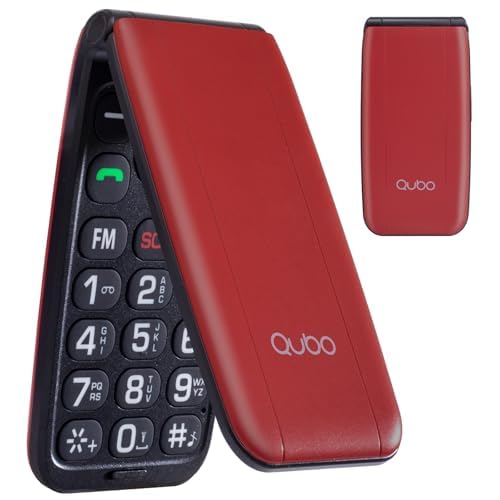
Image: The Qubo GSM Flip Phone in blue, shown both closed and open, highlighting its large buttons and external display for easy viewindo.
2. O que está na caixa
- Flip mobile phone
- Carregador
- Manual do usuário
3. Configuração
3.1. Instalação da bateria e do cartão SIM
To install the battery and SIM card(s):
- Remova cuidadosamente a tampa traseira do telefone.
- Insert your SIM card(s) into the designated slot(s). The phone supports Dual SIM.
- Insira a bateria, certificando-se de que os contatos estejam alinhados corretamente.
- Recoloque a tampa traseira até que ela se encaixe firmemente no lugar.
For a visual guide on battery and SIM card installation, please refer to the video below:
Video: An unboxing video demonstrating how to install the battery and SIM card(s) into the Qubo GSM Flip Phone.
3.2. Carregando o telefone
Connect the charger to the Type-C charging port on the phone. Plug the charger into a power outlet. The phone will be fully charged in approximately 2.3 hours. The 800 mAh battery provides up to 8 days of standby time with a single SIM.
4. Instruções de operação
4.1. Fazendo chamadas
The phone features large, clear buttons for easy dialing. Simply enter the phone number and press the green call button to initiate a call.
4.2. Quick Dial Buttons (M1, M2, M3)
The M1, M2, and M3 buttons can be pre-set for quick dialing frequently contacted numbers. Refer to the phone's settings menu to configure these speed dial contacts.
4.3. Função de Emergência SOS
The SOS button is located on the back of the phone. You can pre-set up to 5 emergency phone numbers and an emergency text message. In an emergency, press and hold the SOS button for 3 seconds. The phone will automatically call the registered numbers sequentially and send the pre-set SMS message.
4.4. Lanterna
The phone includes a built-in flashlight. Activate it via the dedicated button or through the phone's menu for convenience in low-light conditions.
4.5. Rádio FM
The integrated FM radio allows you to listen to your favorite stations. The high-volume speakers ensure clear audio output.
4.6. Controle de volume
Adjust the call and ringtone volume using the dedicated volume buttons on the side of the phone. The phone is designed with loud and clear audio to ensure important calls are not missed.
For a demonstration of various phone features, please watch the video below:
Video: A demonstration of the phone's features including dual screen, large buttons, SOS function, flashlight, and FM radio.
5. Manutenção
To ensure the longevity and optimal performance of your Qubo GSM Flip Phone, follow these maintenance guidelines:
- Mantenha o telefone seco e longe de temperaturas extremas.
- Clean the screen and keypad with a soft, dry cloth. Avoid using harsh chemicals.
- Handle the phone with care to prevent physical damage.
- Charge the battery regularly to maintain its health. Avoid overcharging or completely draining the battery frequently.
6. Solução De Problemas
If you encounter any issues with your Qubo GSM Flip Phone, consider the following common solutions:
- O telefone não liga: Certifique-se de que a bateria esteja corretamente instalada e carregada.
- Sem sinal de rede: Check if the SIM card is properly inserted. Verify that your network provider has coverage in your area.
- Cannot make calls: Ensure you have sufficient credit or an active plan. Check network signal strength.
- Problemas de som: Adjust the volume settings. Ensure the speaker is not obstructed.
For solutions to common problems, please refer to the video below:
Video: A guide providing solutions to common operational issues with the phone.
7. Especificações
| Marca | Qubo |
| Modelo | NEONW-Red-QUBO |
| Tamanho da tela | 2.4 polegadas |
| Tipo de tela | LCD |
| Resolução | 320 x 240 |
| Tipo de processador | Core i5-10600KF (Note: This appears to be a generic placeholder, actual phone processor is MT6261D as per description) |
| Tamanho da RAM instalada | 64 MB |
| Tamanho da memória flash instalada | 32 MB |
| Capacidade da bateria | 800 mAh (íon de lítio) |
| Duração média da bateria | 8 Days (standby) |
| Tecnologia de Conectividade | 2G GSM |
| Dimensões do produto | 10.5 x 5.3 x 1.74 cm |
| Peso do produto | 0.21 g |
8. Garantia e Suporte
For any inquiries or assistance, our customer service team is available to respond to your emails within 24 hours. Please refer to your purchase documentation for specific warranty details.


