Introdução
The 1Mii SafeFly Pro is a versatile Bluetooth 5.3 audio adapter designed to transmit and receive audio wirelessly. It features an OLED screen for clear status display and supports advanced audio codecs for high-quality sound. This device allows you to connect your wireless headphones to non-Bluetooth audio sources or stream audio from your Bluetooth-enabled devices to wired audio systems.
O que está na caixa

This image displays all items included in the 1Mii SafeFly Pro package. You will find the SafeFly Pro Bluetooth Audio Adapter, a USB-C Charging Cable, a 3.5mm Female to Female Audio Adapter, and a Keychain.
- Adaptador de áudio Bluetooth SafeFly Pro
- Cabo de carregamento USB-C
- Adaptador de áudio de 3.5 mm fêmea para fêmea
- Chaveiro
- Manual do usuário (este documento)
Produto acimaview

Esta imagem fornece detalhes. view of the 1Mii SafeFly Pro, highlighting its key components. These include the flexible audio cable with a 3.5mm audio connection, an audio plug protector, the OLED display screen, the 'M' key, the 'OK' key, the TX/RX sliding switch, a one-click reset button, and the USB-C charging port.
Componentes e funções:
- Conexão de áudio de 3.5 mm: Conecta-se à fonte de áudio (modo TX) ou ao receptor de áudio (modo RX).
- Audio Plug Protector: Protects the 3.5mm audio plug when not in use.
- Tela OLED: Shows battery level, volume, paired device names, and active audio codecs.
- 'M' Key: In pairing mode, press once to select the connected device. In TX mode, press twice to switch the Bluetooth decoding format.
- 'OK' Key: Power ON/OFF (long press for 1 second). Long press for 2 seconds to enter pairing mode. Also functions as Play/Pause.
- Chave deslizante TX/RX: Selects Transmitter (TX) or Receiver (RX) mode.
- Botão de reinicialização: Pressione longamente por 3 segundos para reiniciar o dispositivo.
- Porta de carregamento USB-C: Para carregar a bateria interna.
Configurar
1. Carregando o dispositivo
Before first use, fully charge the SafeFly Pro using the provided USB-C charging cable. Connect the cable to the USB-C port on the device and a standard USB power adapter (not included). The OLED screen will indicate charging status.
2. Ligar / desligar
- Para ligar: Long press the 'OK' button for 1 second.
- Para desligar: Long press the 'OK' button for 1 second.
3. Selecting Operating Mode (TX/RX)
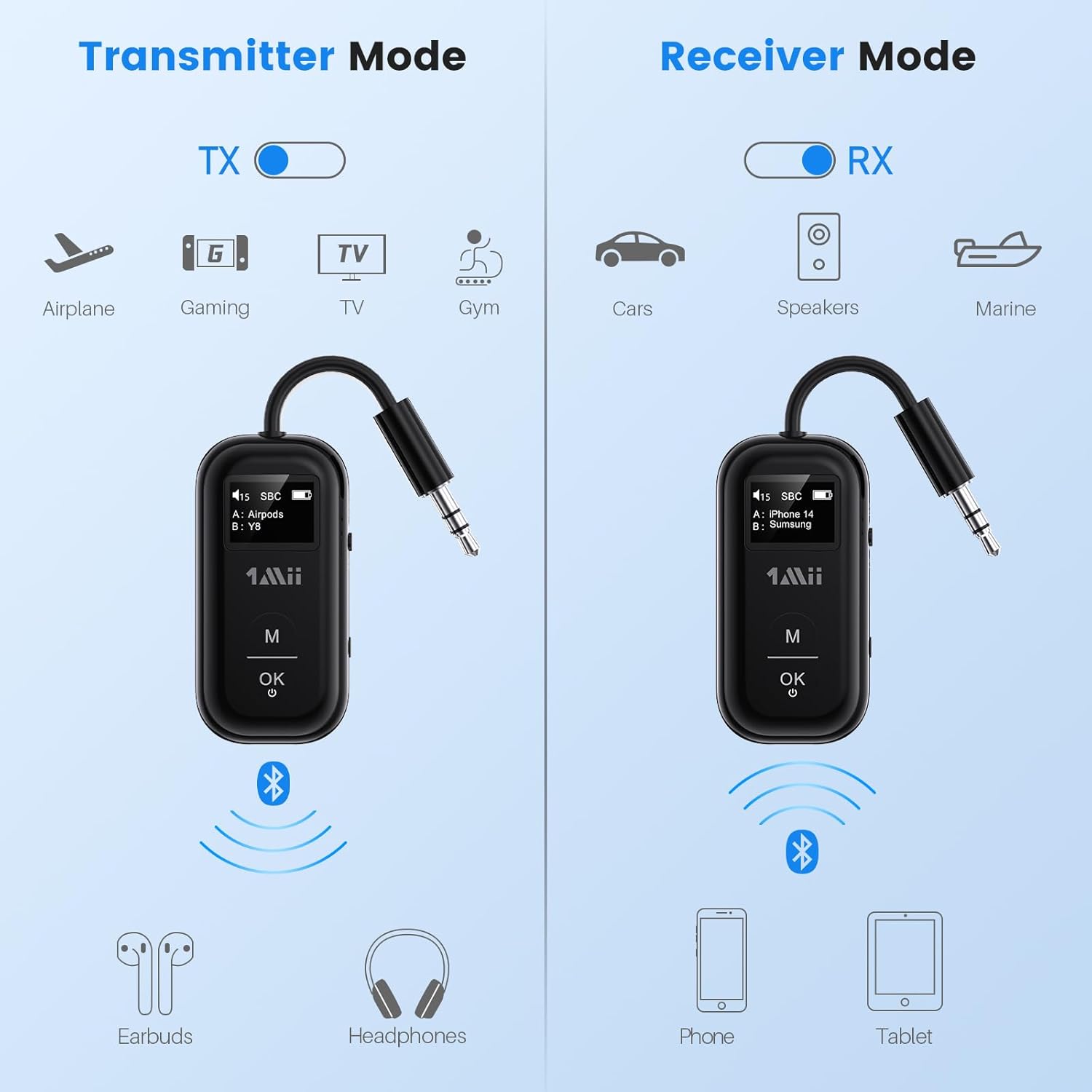
This image illustrates the two operating modes: Transmitter (TX) and Receiver (RX). TX mode is used for devices like airplanes, gaming consoles, TVs, and gym equipment to transmit audio to earbuds or headphones. RX mode is used for cars, speakers, and marine systems to receive audio from phones or tablets.
Use the TX/RX sliding switch on the side of the device to select the desired mode:
- Modo TX (Transmissor): For sending audio from non-Bluetooth devices (e.g., airplane entertainment, TV, gym equipment) to Bluetooth headphones or speakers.
- Modo RX (Receptor): For receiving audio from Bluetooth-enabled devices (e.g., smartphones, tablets) to wired audio systems (e.g., car stereo, home speakers).
4. Pairing in TX Mode (Connecting to Headphones)

- Set the SafeFly Pro to TX mode using the sliding switch.
- Plug the 3.5mm audio connection into your audio source (e.g., airplane entertainment system, TV headphone jack). If needed, use the dual-prong airplane adapter.
- Long press the 'OK' button on the SafeFly Pro for 2 seconds to enter pairing mode. The screen will display "Searching".
- Coloque seus fones de ouvido ou alto-falantes Bluetooth no modo de emparelhamento. Consulte o manual dos seus fones de ouvido para obter instruções específicas.
- O SafeFly Pro irá procurar e conectar-se automaticamente a dispositivos Bluetooth próximos. Assim que estiver conectado, o nome do dispositivo aparecerá no visor OLED.
- To connect a second pair of headphones: After the first device is connected, long press the 'OK' button again for 2 seconds to enter pairing mode for the second device. Put the second pair of headphones into pairing mode. Both devices will then be connected simultaneously.

This image shows the 1Mii SafeFly Pro connected to an airplane's in-flight entertainment system, enabling wireless audio streaming to a user's Bluetooth headphones.
5. Pairing in RX Mode (Connecting to Smartphones/Tablets)
- Set the SafeFly Pro to RX mode using the sliding switch.
- Plug the 3.5mm audio connection into your wired audio system's AUX input (e.g., car stereo, home speaker).
- Long press the 'OK' button on the SafeFly Pro for 2 seconds to enter pairing mode. The screen will display "Searching".
- On your smartphone or tablet, go to Bluetooth settings and select "1Mii SafeFly Pro" from the list of available devices to connect.
- Após a conexão, o nome do dispositivo aparecerá na tela OLED.
- To connect a second smartphone/tablet: After the first device is connected, long press the 'OK' button again for 2 seconds to enter pairing mode for the second device. Connect the second smartphone/tablet via its Bluetooth settings.

This image shows the 1Mii SafeFly Pro in RX mode, connected to a car's audio system, receiving audio wirelessly from a smartphone.
Instruções de operação
Tela OLED

Esta imagem fornece um close-up. view of the OLED screen, indicating the power status, audio format (e.g., SBC), volume level, battery level, and the names of the two currently paired devices (A and B).
The OLED screen provides real-time information:
- Nível da bateria: Indica a carga restante da bateria.
- Nível de volume: Displays the current audio output volume.
- Dispositivo emparelhado: Shows the name(s) of the connected Bluetooth headphones or smartphones.
- Codec de áudio: Displays the active audio codec (e.g., aptX LL, aptX HD, aptX Adaptive, aptX, AAC, SBC).
Funções dos botões
- Botão 'OK': Short press to Play/Pause audio.
- Botão 'M': In TX mode, press twice to cycle through available audio codecs (aptX LL, aptX HD, aptX Adaptive, AAC, SBC) if supported by your connected headphones.
Manutenção
Para garantir a longevidade e o desempenho ideal do seu 1Mii SafeFly Pro, siga estas orientações de manutenção:
- Limpeza: Limpe o dispositivo com um pano macio e seco. Não utilize produtos de limpeza líquidos ou materiais abrasivos.
- Armazenar: Guarde o dispositivo em local fresco e seco, longe da luz solar direta e de temperaturas extremas.
- Cuidados com a bateria: Evite descarregar completamente a bateria com frequência. Carregue o dispositivo regularmente, mesmo quando não estiver em uso, para manter a saúde da bateria.
- Manuseio: Manuseie o dispositivo com cuidado. Evite deixá-lo cair ou submetê-lo a impactos fortes.
Solução de problemas
If you encounter issues with your SafeFly Pro, try the following steps:
- Dispositivo não liga: Certifique-se de que o dispositivo esteja totalmente carregado. Conecte-o a uma fonte de alimentação usando o cabo USB-C.
- Não é possível parear:
- Certifique-se de que o SafeFly Pro esteja no modo TX ou RX correto.
- Make sure both the SafeFly Pro and your target Bluetooth device are in pairing mode.
- Aproxime os dispositivos um do outro.
- Turn off and on both devices, then try pairing again.
- Sem áudio/Qualidade de áudio ruim:
- Check that the 3.5mm audio cable is securely connected to both the SafeFly Pro and the audio source/receiver.
- Ensure the volume on both the SafeFly Pro and the connected device is turned up.
- Verify that the correct audio codec is selected (in TX mode, press 'M' twice to cycle).
- Test with a different audio cable or source/receiver if possible.
- Device Frozen/Unresponsive: Long press the Reset Button (small hole on the side) for 3 seconds using a thin object (e.g., paperclip) to restart the device.
Especificações
| Dimensões do produto | 2.24 x 1.18 x 0.51 polegadas |
| Peso do item | 0.64 onças |
| Número do modelo do item | SafeFly Pro |
| Baterias | 1 bateria de polímero de lítio (incluída) |
| Tecnologia de Conectividade | AUX, Bluetooth 5.3 |
| Fonte de energia | Alimentado por bateria |
| Material | Acrilonitrila Butadieno Estireno (ABS) |
| Características especiais | AptX LL/HD/Adaptive, Bluetooth Transmitter & Receiver, Built-in Battery, Connect 2 Devices, with Screen |
Informações de segurança
Leia e siga estas diretrizes de segurança para evitar danos ao dispositivo ou ferimentos pessoais:
- Avoid exposure to extreme temperatures (hot or cold).
- Handle the battery with care. Do not puncture, disassemble, or expose to fire.
- Be aware of potential interference with other wireless devices.
- Mantenha o dispositivo longe de água e outros líquidos.
- Não tente reparar ou modificar o dispositivo por conta própria. Entre em contato com o suporte ao cliente para obter assistência.
Garantia e Suporte
1Mii products are designed for reliability and performance. For warranty information, technical support, or customer service inquiries, please refer to the official 1Mii website or contact their customer support team directly. Keep your purchase receipt as proof of purchase for warranty claims.


