Introdução
This manual provides detailed instructions for the setup, operation, and maintenance of your Geevon Wireless Digital Refrigerator Thermometer. This device is designed to monitor temperatures in your refrigerator, freezer, or other environments using two wireless sensors, ensuring optimal storage conditions for your items.
Please read this manual thoroughly before using the product to ensure correct operation and to maximize its lifespan.
Conteúdo da embalagem
Ao desembalar, verifique se todos os componentes estão presentes e em boas condições:
- 1 x Unidade de Exibição Principal
- 2 x Wireless Sensors
- 6 x AAA Batteries (for main unit)
- 2 x CR2032 Batteries (pre-installed in sensors or included separately)
- 1 x Manual do Usuário (este documento)
- 2 x Suction Cups (for sensor mounting)

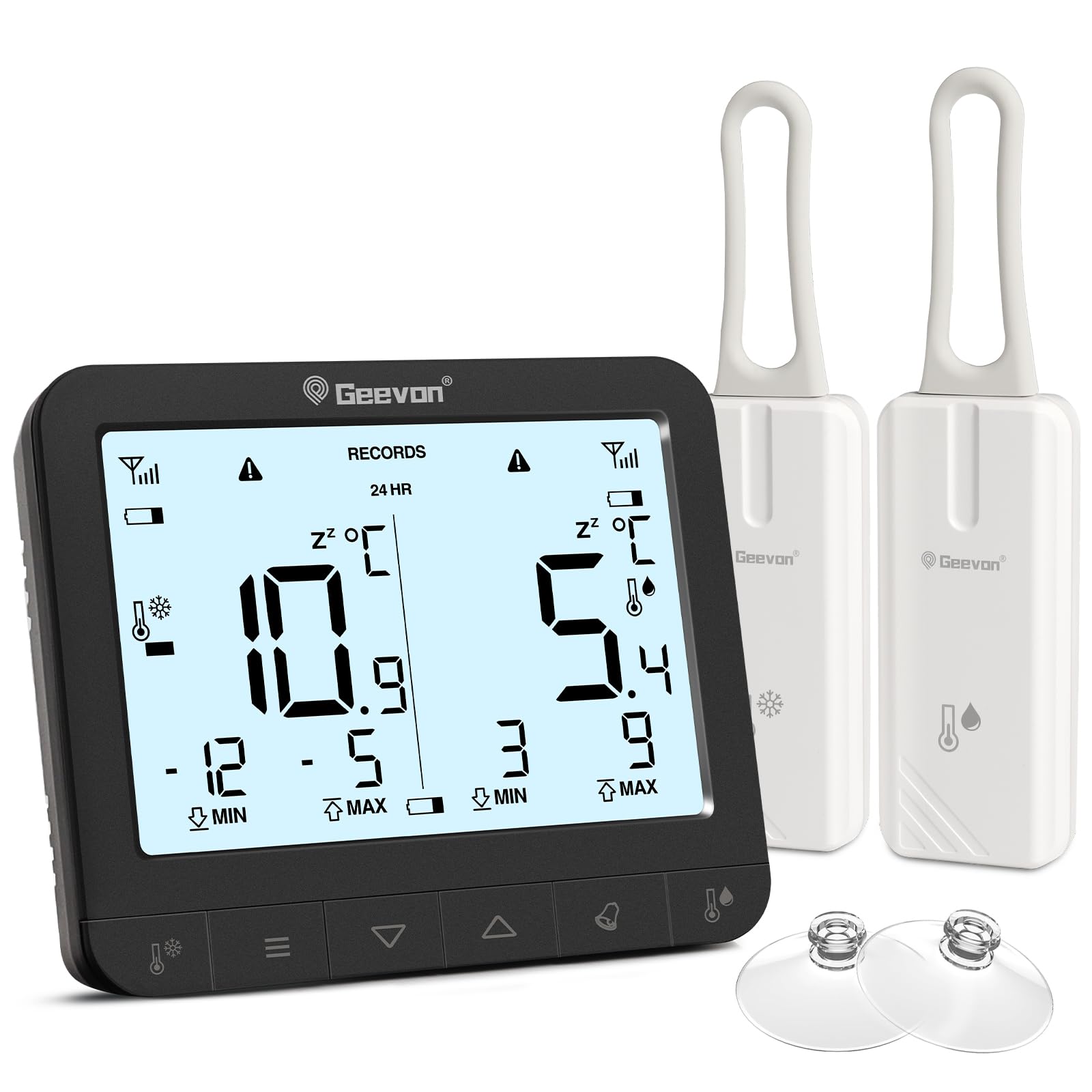
The image displays the main unit, two sensors, and accessories including suction cups for installation.
Instruções de configuração
1. Instalação da bateria
Para a unidade de exibição principal:
- Localize o compartimento da bateria na parte traseira da unidade principal.
- Abra a tampa da bateria.
- Insira 6 pilhas AAA, observando a polaridade correta (+/-).
- Feche a tampa da bateria com segurança.
For the Wireless Sensors:
- Locate the battery compartment on the back of each sensor.
- Abra a tampa da bateria.
- Insert 1 CR2032 battery into each sensor, observing the correct polarity (+/-).
- Feche a tampa da bateria com segurança.
The image illustrates the battery compartments for both the main unit and the wireless sensors.
2. Colocação do Sensor
The wireless sensors can be placed inside your refrigerator, freezer, or any other area where temperature monitoring is desired. Ensure the sensors are not submerged in liquid and are placed in a location where they can transmit signals to the main unit.
- Pendurado: Use the integrated loop to hang the sensor from a shelf or rack.
- Fixação magnética: The sensors have built-in magnets for attachment to metallic surfaces.
- Ventosas: Attach the provided suction cups to the sensor for mounting on smooth surfaces like glass or plastic.

This image demonstrates different ways to position the wireless sensors within a refrigerator or freezer.
The main display unit can be placed on a countertop using its integrated stand or mounted on a metallic surface using its rear magnets.
Instruções de operação
Exibir maisview

The main display unit shows current temperatures for two channels, along with max/min records and status icons.
The display shows temperatures for two channels (CH1 and CH2), along with their respective maximum (MAX) and minimum (MIN) recorded temperatures. Signal strength indicators for each sensor and battery level indicators are also present.
1. Temperature Unit Selection (℃/℉)
On the back of the main display unit, locate the small "C/F" button. Press this button to toggle between Celsius (℃) and Fahrenheit (℉) temperature units.

This image highlights the C/F switch on the back of the main unit and other key features.
2. Registros de temperatura máxima/mínima
The display shows the maximum and minimum temperatures recorded over a 24-hour period. To view historical max/min records (since the last reset or power cycle), briefly press the "UP" or "DOWN" buttons on the main unit. To reset the max/min records, press and hold the "CLEAR" button (usually indicated by a trash can icon or similar) for a few seconds.
3. 2-Channel Alarm Setting
The thermometer allows you to set high and low temperature alarms for each channel.
- Briefly press the channel button (e.g., "CH1" or "CH2" button, or a general "Channel" button) to enter alarm setting mode for that channel.
- Use the "UP" and "DOWN" buttons to adjust the desired high and low temperature thresholds.
- Press and hold the "Alarm" button (often indicated by a bell icon) to toggle the alarm function ON or OFF for the selected channel.
- An audible alarm will sound if the temperature exceeds the set high threshold or falls below the set low threshold.

This image illustrates the alarm function, showing how to set upper and lower temperature limits for alerts.
4. Função de retroiluminação
To illuminate the display for easier reading in low-light conditions, touch the light bulb icon on the top of the main unit. The backlight will activate for approximately 10 seconds.
Principais características
- Dual Wireless Sensors: Monitor two separate locations simultaneously.
- Ampla faixa de temperatura: Measures temperatures from -40°C to 37°C (-40°F to 98.6°F).
- Registro Máx./Mín.: Tracks the highest and lowest temperatures recorded over 24 hours or historically.
- Alarmes sonoros: Alerts you when temperatures exceed or fall below preset thresholds.
- Indicador de bateria fraca: Displays icons for low battery on both the main unit and sensors.
- Luz de fundo: Provides temporary illumination for clear reading in dim environments.
- Colocação versátil: Main unit features a stand and magnets; sensors can be hung, magnetically attached, or secured with suction cups.
The thermometer is suitable for various applications, including refrigerators, freezers, and wine coolers.
Manutenção
- Limpeza: Limpe a unidade principal e os sensores com um pano macio e seco.amp pano. Não utilize produtos de limpeza abrasivos nem mergulhe os dispositivos em água.
- Substituição da bateria: Replace batteries promptly when the low battery indicator appears on the display. Refer to the "Battery Installation" section for instructions.
- Armazenar: Se for guardar o dispositivo por um longo período, remova todas as pilhas para evitar vazamentos. Guarde em local fresco e seco.
Indicador de bateria fraca
The display unit features separate low battery indicators for the main unit and each sensor. When a battery icon appears, it indicates that the corresponding battery needs replacement.

This image highlights the low battery indicators for the sensors and the main display unit.
Solução de problemas
| Problema | Possível causa | Solução |
|---|---|---|
| Sem visor na unidade principal. | As pilhas estão descarregadas ou instaladas incorretamente. | Verifique a polaridade das pilhas e substitua-as por pilhas AAA novas. |
| Sensor reading "---" or inaccurate. | Sensor batteries are dead, sensor is out of range, or interference. | Replace sensor CR2032 batteries. Move sensor closer to the main unit. Avoid placing near large metal objects or electronics that may cause interference. |
| Alarme não soando. | Alarm function is off or thresholds are set too wide. | Ensure the alarm is enabled for the desired channel. Adjust alarm thresholds to appropriate levels. |
| A luz de fundo não está funcionando. | As baterias da unidade principal estão fracas ou descarregadas. | Replace main unit AAA batteries. |
Especificações
| Marca | Geevon |
| Número do modelo | 86218 |
| Dimensões do produto (unidade principal) | 16 x 4.8 x 17.5 cm (6.3 x 1.9 x 6.9 polegadas) |
| Peso | 310 gramas (0.68 libras) |
| Potência da unidade principal | 6 pilhas AAA (incluídas) |
| Potência do Sensor | 1 x CR2032 Battery per sensor (included) |
| Faixa de temperatura | -40°C a 37°C (-40°F a 98.6°F) |
| Precisão de medição | ± 0.1 ℉/℃ |
| Tipo de exibição | LCD digital |
| Características especiais | Low Battery Indicator, Backlit Display, Max/Min Record, 2-Channel Alarm |
| Material | Acrilonitrila Butadieno Estireno (ABS) |
Garantia e Suporte
Geevon is committed to providing high-quality products. For any questions, issues, or support needs regarding your Geevon Refrigerator Thermometer, please contact our customer service. We offer lifetime consultation service for our products.
Please refer to your purchase documentation or the official Geevon webConsulte o site para obter os termos específicos da garantia e informações de contato.
Suporte online: Contact Seller (GEEVON UK)


