1. Introdução
This manual provides comprehensive instructions for the Mycket portable DAB/DAB+/FM radio, Model D009. It covers setup, operation, maintenance, and troubleshooting to ensure optimal performance and longevity of your device. Please read this manual carefully before using the product.
The Mycket D009 radio features advanced signal reception technology for clear audio, Bluetooth 5.0 for wireless streaming, USB playback, AUX-in connectivity, a dual alarm clock, and a sleep timer. Its integrated rechargeable battery offers portability for use in various environments.
2. Instruções de segurança
- Não exponha o dispositivo à chuva, umidade ou temperaturas extremas.
- Evite deixar cair ou submeter o dispositivo a impactos fortes.
- Não desmonte nem tente reparar o dispositivo por conta própria. Encaminhe todos os serviços de manutenção a pessoal qualificado.
- Mantenha o dispositivo longe de fontes de calor, como radiadores, aquecedores, fogões ou outros aparelhos (incluindo amplificadores) que produzem calor.
- Use only the specified charging cable and power adapter (5V via USB) to charge the device.
- Assegure-se de que o dispositivo esteja bem ventilado durante o funcionamento e o carregamento.
- Descarte as baterias e os componentes eletrônicos de forma responsável, de acordo com as normas locais.
3. Produto acabadoview
3.1 Conteúdo da embalagem
- 1 x Mycket Portable DAB Radio (Model D009)
- 1 x cabo de carregamento USB
- 1 x Manual do Usuário
3.2 Layout e controles do dispositivo
Familiarize yourself with the main components and controls of your Mycket radio.

Imagem 1: Frente view of the Mycket D009 portable DAB radio, showing the speaker grille, LCD display, control buttons (MODE, OK, O/M, FAV, 1-4), and the telescopic antenna extended. The right side shows the DC 5V USB-C port, reset button, and headphone jack.
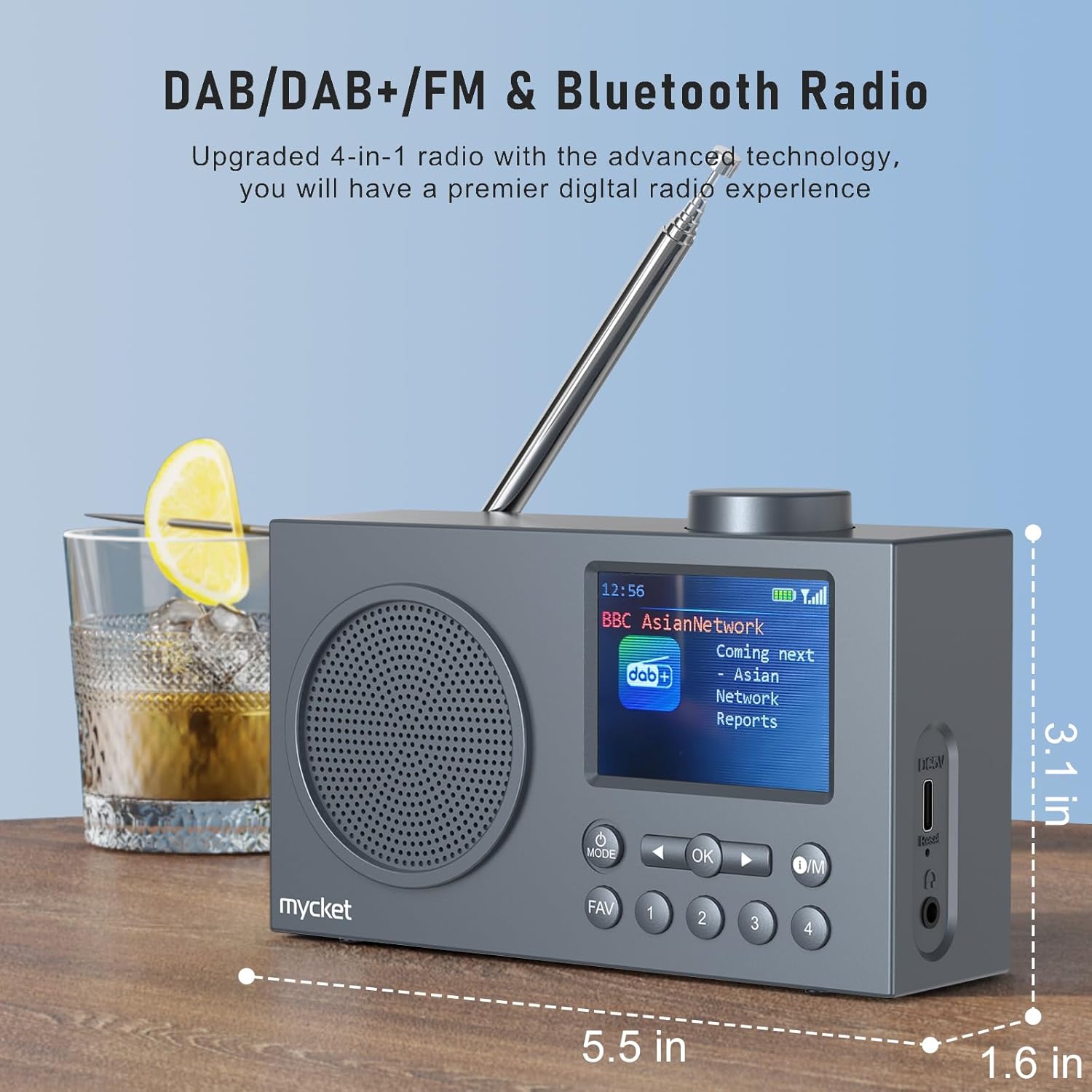
Imagem 2: Lado view of the Mycket D009 radio illustrating its compact dimensions: approximately 5.5 inches (length), 1.6 inches (width), and 3.1 inches (height). The image also highlights its DAB/DAB+/FM and Bluetooth capabilities.
- Mostrar: 2.4-inch TFT color display for station information, time, and settings.
- Palestrante: Integrated Hi-Fi speaker for audio output.
- Antena Telescópica: Para uma recepção ideal do sinal de rádio.
- Botão MODE: Switches between DAB, FM, Bluetooth, USB, and AUX modes.
- Botão OK: Confirma as seleções ou entra nos menus.
- Botão O/M: Power On/Off and Menu access.
- Botão FAV: Accesses favorite presets.
- Botões numéricos (1-4): Direct access to stored presets.
- Botões de navegação (esquerda/direita): Navigates menus or tunes stations.
- Botão de volume: Ajusta o volume do áudio.
- DC 5V USB-C Port: Para carregar a bateria interna.
- Botão de reinicialização: Resets the device (use a thin object to press).
- Tomada de fone de ouvido de 3.5 mm: Para audição privada.
4. Configuração
4.1 Carregando a bateria
The radio is equipped with a built-in 2200mAh lithium battery. Before first use, fully charge the device.
- Connect the provided USB charging cable to the DC 5V USB-C port on the side of the radio.
- Conecte a outra extremidade do cabo USB a um adaptador de energia USB compatível (não incluído) ou a uma porta USB do computador.
- The charging indicator on the display will show the charging status. A full charge typically takes approximately 2.5 hours and provides up to 12 hours of playback time at 70% volume.

Imagem 3: The Mycket D009 radio display showing a full battery indicator, emphasizing its long playback time on a single charge.
4.2 Ajuste da Antena
For optimal radio reception, fully extend the telescopic antenna. Adjust its position for the best signal quality.
4.3 Inicialização Inicial
Pressione e segure o O/M button to power on the radio. The display will light up, and the device will typically start in the last used mode or initiate a DAB scan if it's the first use.
5. Instruções de operação
5.1 modos de comutação
Pressione o MODO button repeatedly to cycle through available modes: DAB, FM, Bluetooth, USB, and AUX.
5.2 Operação de rádio DAB/DAB+
- Mude para o modo DAB usando o MODO botão.
- The radio will automatically perform a full scan for available DAB/DAB+ stations upon first use or if no stations are found. To initiate a manual scan, press and hold the OK button, then select "Full Scan" from the menu.
- Once the scan is complete, use the navigation buttons (Left/Right) to browse through the list of available stations.
- Imprensa OK to select and listen to a station.

Imagem 4: The Mycket D009 radio display showing a DAB station and highlighting the auto-scan and 40 preset features (20 DAB & 20 FM).
5.2.1 Storing DAB Presets
The radio supports up to 20 DAB presets.
- Sintonize a estação DAB desejada.
- Press and hold one of the number buttons (1-4) ou o FAV button to save the current station to a preset slot. Follow the on-screen prompts to select a slot if using the FAV button.
- To recall a preset, briefly press the corresponding number button or the FAV button and select from the list.
5.3 Operação de rádio FM
- Mude para o modo FM usando o MODO botão.
- Para sintonizar automaticamente estações de FM, pressione e segure o botão. OK botão. O rádio irá procurar e armazenar as estações disponíveis.
- To manually tune, use the navigation buttons (Left/Right) to adjust the frequency.
- Imprensa OK Para confirmar a estação.
5.3.1 Armazenando estações de FM predefinidas
The radio supports up to 20 FM presets, similar to DAB presets.
- Sintonize a estação FM desejada.
- Press and hold one of the number buttons (1-4) ou o FAV button to save the current station.
- To recall a preset, briefly press the corresponding number button or the FAV button and select from the list.
5.4 Emparelhamento Bluetooth 5.0
Connect your smartphone or tablet to the radio via Bluetooth for wireless audio streaming.
- Alterne para o modo Bluetooth usando o MODO button. The radio display will show "Bluetooth Pairing" or similar.
- No seu dispositivo móvel, ative o Bluetooth e pesquise os dispositivos disponíveis.
- Select "Mycket D009" from the list of devices.
- Once paired, the radio will confirm the connection, and you can play audio from your device through the radio.

Imagem 5: The Mycket D009 radio displaying "Playing" in Bluetooth mode, next to a smartphone showing "Mycket D009" as a connected Bluetooth device.
Reprodução USB 5.5
Reproduzir áudio MP3 files diretamente de uma unidade USB.
- Insira uma unidade USB contendo MP3 files na porta USB.
- Alterne para o modo USB usando o MODO botão.
- The radio will automatically detect and begin playing MP3 files. Use the navigation buttons to skip tracks.
5.6 Conexão AUX-in
Conecte dispositivos de áudio externos usando um cabo de áudio de 3.5 mm (não incluído).
- Connect one end of a 3.5mm audio cable to the AUX-in port on the radio.
- Conecte a outra extremidade à entrada de fone de ouvido ou à saída de áudio do seu dispositivo externo.
- Alterne para o modo AUX usando o MODO botão.
- Controle a reprodução do seu dispositivo externo.
5.7 Função de despertador
Configure até dois alarmes independentes.
- Pressione e segure o O/M botão para entrar no menu.
- Navigate to "Alarm Settings" using the navigation buttons and press OK.
- Selecione Alarme 1 ou Alarme 2.
- Set the alarm time, source (DAB, FM, or Buzzer), and volume.
- Confirme as configurações pressionando OK.
5.8 Função de temporizador de sono
Configure o rádio para desligar automaticamente após um período especificado.
- Pressione e segure o O/M botão para entrar no menu.
- Navigate to "Sleep Timer" and press OK.
- Selecione a duração desejada (ex.: 15, 30, 60 minutos).
- The radio will automatically power off after the set time.
5.9 Uso de fones de ouvido
Connect 3.5mm headphones to the headphone jack for private listening. The internal speaker will be muted automatically.
6. Manutenção
- Limpeza: Use um pano macio e seco para limpar a parte externa do rádio. Não use produtos de limpeza abrasivos ou solventes.
- Cuidados com a bateria: Para prolongar a vida útil da bateria, evite descarregá-la completamente com frequência. Carregue o dispositivo regularmente, mesmo que não o utilize por longos períodos.
- Armazenar: Guarde o rádio em local fresco e seco, longe da luz solar direta e de temperaturas extremas.
7. Solução De Problemas
| Problema | Possível causa | Solução |
|---|---|---|
| Sem energia / O rádio não liga. | A bateria está esgotada. | Carregue o rádio usando o cabo USB fornecido. |
| Recepção de rádio fraca (DAB/FM). | Antenna not fully extended or positioned correctly. Weak signal area. | Fully extend and adjust the telescopic antenna. Try moving the radio to a different location. Perform a full scan for stations. |
| O emparelhamento Bluetooth falha. | Radio not in Bluetooth mode. Device too far. Bluetooth not enabled on external device. | Ensure the radio is in Bluetooth mode. Keep devices within range (approx. 10 meters). Enable Bluetooth on your external device and search for "Mycket D009". |
| Nenhum som sai do alto-falante. | Volume too low. Headphones connected. | Increase the volume. Disconnect headphones if not intended for private listening. |
| A reprodução via USB não está funcionando. | Unidade USB não inserida corretamente. Incompatível. file formatar. | Ensure USB drive is fully inserted. Check that files estão no formato MP3. |
| Dispositivo não responde. | Falha temporária de software. | Press the reset button on the side of the radio using a thin object (e.g., a paperclip). |
8. Especificações
| Marca | Muito |
| Modelo | D009 |
| Modos de rádio | DAB, DAB+, FM |
| Versão Bluetooth | 5.0 |
| Opções de reprodução | FM, DAB, DAB+, Bluetooth, USB MP3, AUX-in |
| Potência de saída do alto-falante | 5 Watts |
| Unidade de alto-falante | 4 Ω10 W 78 mm x 1 |
| Mostrar | LCD colorido TFT de 2.4 polegadas |
| Predefinições | 40 (20 DAB, 20 FM) |
| Tipo de Bateria | Built-in Lithium-ion (18650) |
| Capacidade da bateria | 2200 mAh (3.7V - 2.2 Ah) |
| Tempo de reprodução | Approx. 8-9 hours at 70% volume (up to 12 hours) |
| Tempo de carregamento | Aproximadamente 2.5 horas |
| Entrada de energia | 5V por USB |
| Dimensões (produto) | Aproximadamente 14 cm (C) x 4 cm (L) x 7.8 cm (A) |
| Conexões de saída | Conector de fone de ouvido de 3.5 mm |
9. Garantia e Suporte
Mycket products are designed for reliability and performance. This product comes with:
- Garantia 12-Month: Enjoy a hassle-free 12-month warranty from the date of purchase.
- Suporte ao cliente: For any questions, issues, or support needs, please contact Mycket customer service.
Guarde o comprovante de compra para reclamações de garantia.


