1. Introdução
This manual provides detailed instructions for the setup, operation, maintenance, and troubleshooting of your Transformers TF-Crystal 85 Keys Mechanical Keyboard. Please read this manual thoroughly before using the product to ensure proper functionality and longevity.
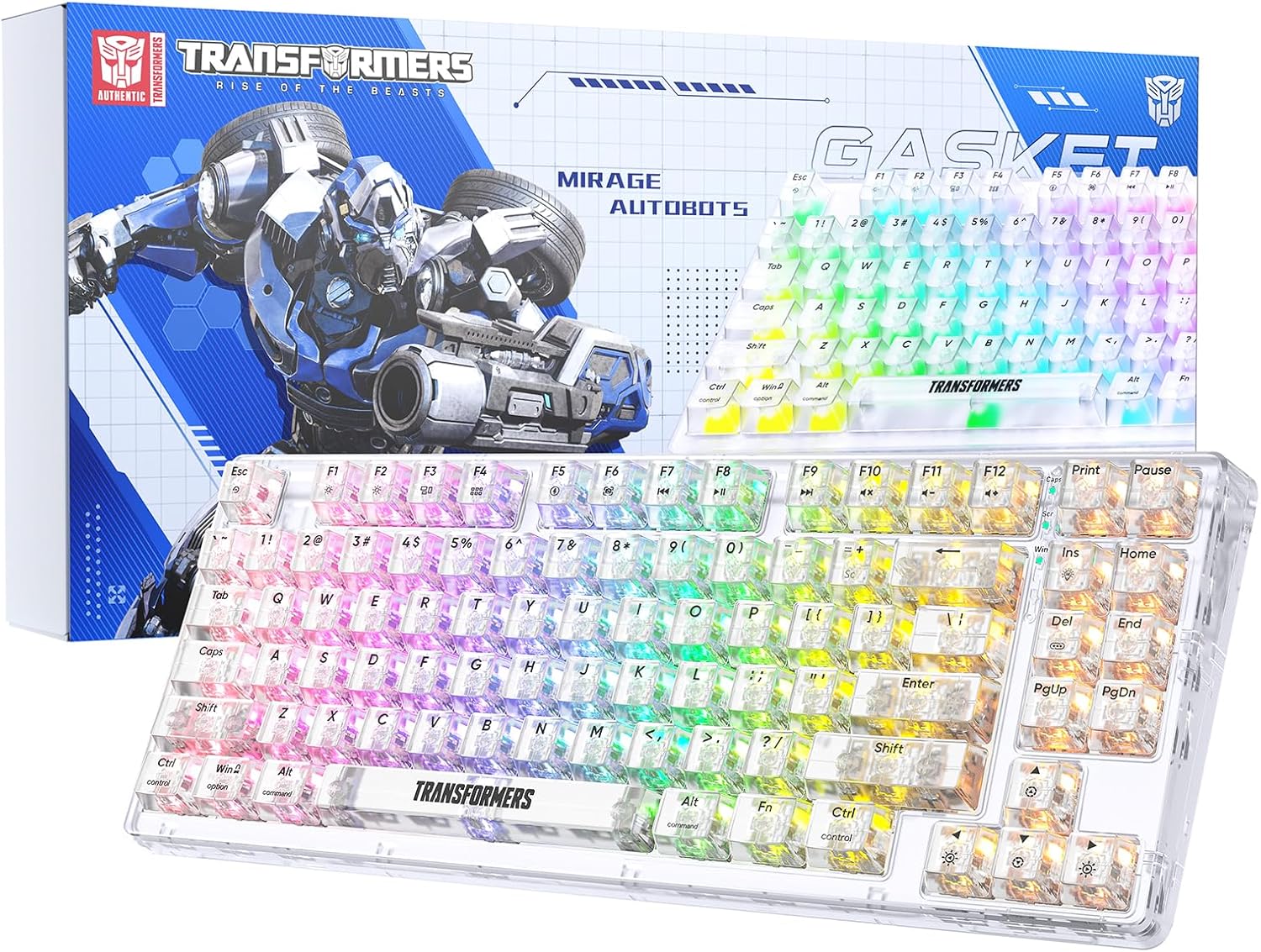
Image 1.1: Transformers TF-Crystal 85 Keys Mechanical Keyboard with its packaging, showcasing the transparent design and RGB lighting.
2. Produto acabadoview
2.1 Principais Características
- Layout de 85 teclas: Compact 75% design retaining essential functions, arrow, and navigation keys.
- Conectividade Tri-Mode: Compatível com Bluetooth 5.0, conexão sem fio de 2.4 GHz e conexão com fio USB-C.
- Placa de circuito impresso hot-swappable: Compatible with most 3-pin and 5-pin mechanical switches, allowing for easy customization and replacement.
- Linear Switches: Pre-lubricated switches with a 50 million keystroke lifespan for durability and smooth operation.
- Estrutura da junta: Incorporates high-quality gasket materials and a silicone pad to absorb vibrations and reduce typing noise.
- Customizable RGB Backlight: Features 20 built-in backlight modes, 16.8 million color options, and dynamic music rhythm effects.
- Programmable Driver: Enables macro customization, key function remapping, and advanced lighting control.
- Bateria de longa duração: Equipped with a 4000mAh battery, providing up to 240 hours of continuous use in 2.4GHz mode without backlighting.
- Ampla compatibilidade: Supports Mac, Windows, iOS, Android, PC, Laptop, Smartphone, Tablet, Switch, Xbox, and PlayStation.
- Desenho transparente: Features transparent keycaps and base for enhanced aesthetic appeal.
3. Configuração
3.1 Carregando o teclado
Before initial use, fully charge the keyboard. Connect the provided USB-C cable to the keyboard's USB-C port and the other end to a powered USB port (e.g., computer, wall adapter). The charging indicator will show the charging status.
3.2 Conexão via modo sem fio de 2.4 GHz
- Localize o receptor USB de 2.4 GHz, geralmente armazenado em um compartimento no teclado.
- Conecte o receptor USB a uma porta USB disponível em seu computador.
- Toggle the mode switch on the keyboard to the 2.4G posição.
- The keyboard will automatically connect to your device.
3.3 Connecting via Bluetooth 5.0 Mode
- Toggle the mode switch on the keyboard to the BT posição.
- Pressione e segure Fn + 1 (ou Fn + 2, Fn + 3) por 3 a 5 segundos até que a luz indicadora pisque rapidamente, indicando o modo de emparelhamento.
- No seu dispositivo (computador, tablet, smartphone), ative o Bluetooth e procure por novos dispositivos.
- Select "TF-Crystal 85" from the list of available devices to pair.
- Once paired, the indicator light will stop flashing and remain solid. You can pair up to three Bluetooth devices using Fn + 1, Fn + 2, e Fn + 3.
3.4 Connecting via USB-C Wired Mode
- Conecte o cabo USB-C fornecido à porta USB-C do teclado.
- Conecte a outra extremidade do cabo USB-C a uma porta USB disponível no seu computador.
- The keyboard will automatically switch to wired mode and function without battery power.

Image 3.1: Diagram illustrating the three connection modes: Bluetooth 5.0, 2.4GHz wireless, and USB-C wired, compatible with various devices.
4. Instruções de operação
4.1 Alternando entre modos
Use the physical switch located on the keyboard to select between BT (Bluetooth), 2.4G (2.4GHz wireless), and USB-C (wired) modes.
4.2 Controle de retroiluminação RGB
The keyboard features customizable RGB backlighting. Use the following key combinations to adjust:
- Fn + Ins: Cycle through 20 different backlight effects.
- Fn + Del: Switch backlight colors within certain modes.
- Fn + ↑ / ↓: Ajuste o brilho da luz de fundo (5 níveis).
- Fn + ← / →: Adjust backlight effect speed (5 levels).
- Fn + Esc (hold for 3s): Reset backlight settings to default.

Image 4.1: Visual guide for controlling RGB backlight effects, brightness, and speed using Fn key combinations.
4.3 Programmable Driver Usage
The keyboard includes a programmable driver for advanced customization. This driver allows you to:
- Edição de macro: Record and edit complex key sequences.
- Redefinição da chave: Customize the function of individual keys.
- RGB Effect Customization: Fine-tune lighting modes, colors, and speeds, including music rhythm lighting effects.
Refer to the software's dedicated user interface for detailed instructions on using these features.

Image 4.2: Screenshot of the programmable driver interface, showing options for macro editing, RGB effects, and key redefinition.
4.4 Interruptores de troca a quente
The TF-Crystal 85 keyboard features a hot-swappable PCB, allowing you to change mechanical switches without soldering. This supports most 3-pin and 5-pin mechanical switches.
- Desligue o teclado ou desconecte-o do seu dispositivo.
- Utilize o extrator de teclas fornecido para remover cuidadosamente a tecla desejada.
- Use the provided switch puller to gently grip the switch from its top and bottom clips, then pull it straight up to remove it.
- Alinhe os pinos do novo interruptor com os orifícios na placa de circuito impresso. Certifique-se de que os pinos estejam retos.
- Gently press the new switch into place until it clicks securely. Do not force it.
- Substitua a tecla.

Image 4.3: Illustration of the hot-swappable feature, showing how to remove and insert 3-pin/5-pin switches and the linear switch specifications.
5. Manutenção
5.1 Limpeza do teclado
- Desconecte o teclado de todas as fontes de energia antes de limpá-lo.
- Use um pano macio e sem fiapos levementeampFinalize com água ou uma solução de limpeza suave para limpar as teclas e o chassi.
- Para remover poeira e detritos entre as teclas, use ar comprimido ou uma escova pequena.
- Avoid using harsh chemicals or abrasive materials that could damage the keyboard's surface.
5.2 Cuidados com a bateria
- Evite descarregar completamente a bateria com frequência.
- Guarde o teclado em um local fresco e seco quando não for usá-lo por longos períodos.
- If the keyboard will not be used for a long time, charge it to about 50% before storage.
6. Solução De Problemas
| Problema | Possível causa | Solução |
|---|---|---|
| O teclado não responde no modo sem fio. | Low battery, incorrect mode selected, receiver not connected, Bluetooth not paired. | Charge the keyboard. Ensure the mode switch is set correctly (2.4G or BT). Re-insert the 2.4G receiver. Re-pair Bluetooth. |
| Teclas não registram ou digitam duas vezes. | Faulty switch, debris under keycap, software issue. | Clean under the keycap. Try hot-swapping the switch with a known working one. Restart your computer. |
| RGB backlight not working or incorrect. | Backlight turned off, incorrect settings, software conflict. | Ajuste o brilho usando Fn + ↑. Cycle modes with Fn + Ins. Reset backlight with Fn + Esc (hold 3s). Check programmable driver settings. |
| O teclado não está carregando. | Faulty USB-C cable, power source issue, keyboard port damage. | Try a different USB-C cable. Use a different USB port or power adapter. Ensure the cable is fully inserted. |
7. Especificações
| Recurso | Detalhe |
|---|---|
| Número do modelo | TF-Crystal 85 |
| Layout de chave | 85 teclas (75% compacto) |
| Conectividade | Bluetooth 5.0, conexão sem fio de 2.4 GHz, conexão com fio USB-C |
| Tipo de interruptor | Pre-lubricated Linear Mechanical Switches |
| Vida útil do switch | 50 milhões de pressionamentos de tecla |
| Hot-swappable | Sim (compatível com 3 pinos/5 pinos) |
| Luz de fundo | RGB (20 modos, 16.8 milhões de cores) |
| Capacidade da bateria | 4000mAh |
| Battery Life (2.4G, no light) | Até 240 horas |
| Duração da bateria (com retroiluminação ligada) | Aproximadamente 22 horas |
| Dimensões (C x L x A) | 34.7 cm x 14 cm x 4.5 cm |
| Compatibilidade | Mac, Windows, iOS, Android, PC, Laptop, Smartphone, Tablet, Switch, Xbox, PlayStation |

Image 7.1: Visual representation of the keyboard's battery life: 240 hours with backlight off, 22 hours with backlight on, powered by a 4000mAh battery.
8. Garantia e Suporte
Transformers is committed to providing exceptional customer service. If you encounter any problems with your TF-Crystal 85 Keys Mechanical Keyboard, our after-sales support team is available to assist you. This includes technical support, exchanges, or installation guidance.
Please contact our customer service for assistance. We guarantee a hassle-free service experience.


