Majority Darwin Bluetooth Alarm Clock with 10W Wireless Charging
Model: Darwin | Brand: Majority
Introdução
This manual provides detailed instructions for the operation and maintenance of your Majority Darwin Bluetooth Alarm Clock. This device integrates an FM radio, dual alarm clock, 10W wireless charging, and ambient lighting to enhance your bedside experience.
Informações de segurança
- Leia todas as instruções cuidadosamente antes de usar.
- Mantenha o dispositivo longe de água e umidade.
- Não exponha a temperaturas extremas.
- Não tente desmontar ou reparar a unidade por conta própria. Consulte pessoal de serviço qualificado.
- Ensure proper ventilation when using the wireless charging function.
Conteúdo da embalagem
Verifique se todos os itens estão presentes na caixa:
- Majority Darwin Bedside Clock
- Adaptador de energia elétrica
- Manual do usuário

Image: Package contents of the Majority Darwin alarm clock, including the clock, power adapter, and user manual.
Produto acimaview
Familiarize yourself with the main components and control buttons of your Darwin alarm clock.
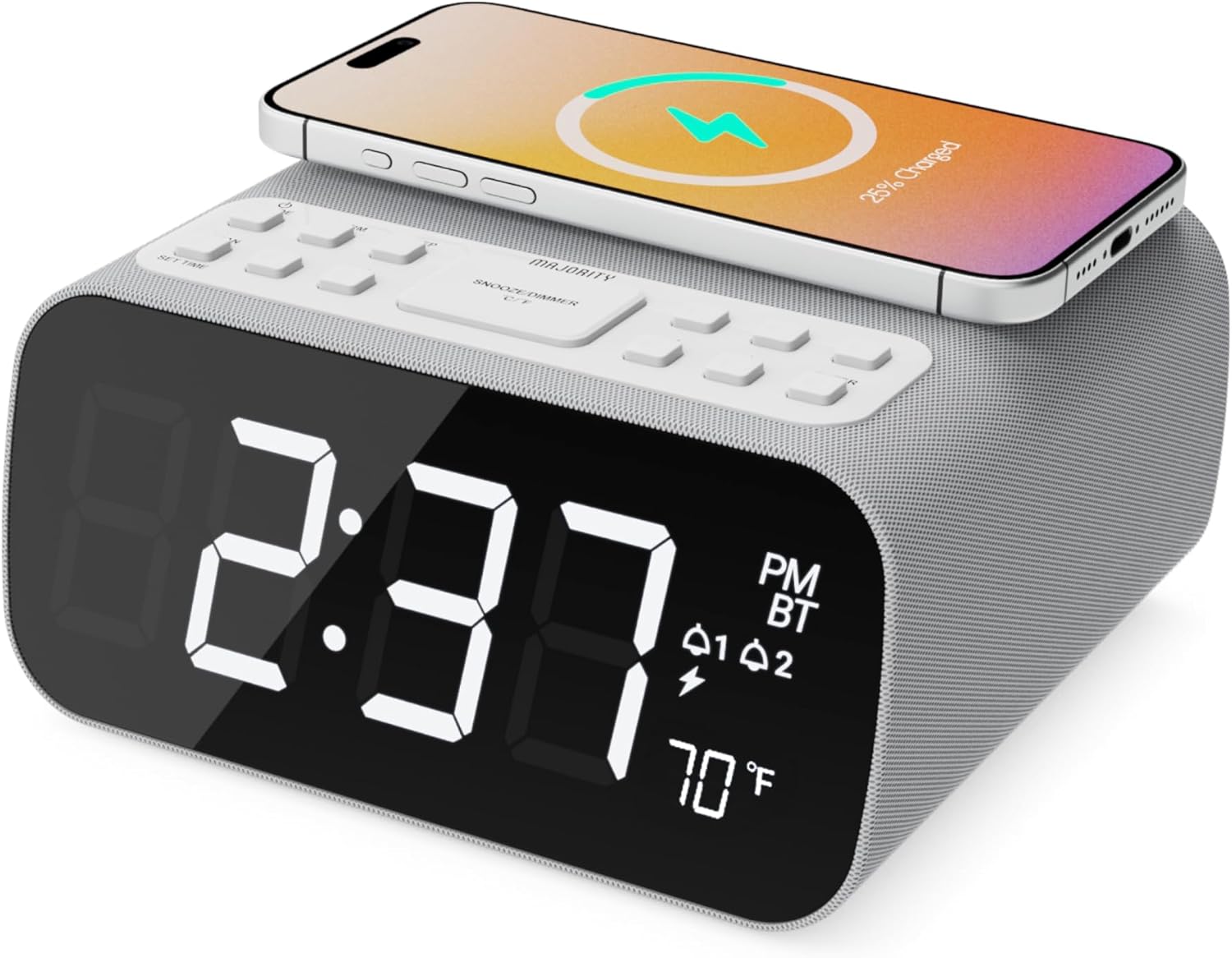
Imagem: Frente view of the Majority Darwin alarm clock showing the large digital display, wireless charging pad on top, and control buttons.

Imagem: Lado view of the Majority Darwin alarm clock highlighting the control panel with buttons for time, alarm, volume, and light settings.
Controles do painel superior
- Base de carregamento sem fio: Place compatible devices here for 10W wireless charging.
- Botão Soneca/Luz: Short press to snooze alarm; long press to adjust display brightness or cycle through ambient light colors.
- Time/Date Set Button: Press to enter time/date setting mode.
- Botões de alarme 1/2: Press to activate/deactivate Alarm 1 or Alarm 2. Long press to set alarm time.
- Volume/Tune Buttons: Adjust volume or tune FM radio stations.
- Botão de modo: Switch between FM Radio, Bluetooth, and White Noise modes.
Rear Panel Controls & Ports
- DC 12V Entrada: Connect the mains power adapter here.
- Porta de carregamento USB: For charging additional devices via USB cable.
- Compartimento da bateria: For backup batteries (not for primary power).
- Controle deslizante de brilho da tela: Manually adjust the brightness of the main time display.
- Night Light Dimmer: Adjust brightness of the ambient light.
Configurar
Conexão de energia
Connect the provided mains power adapter to the DC 12V input port on the rear of the alarm clock and plug it into a wall outlet. The display will light up.
For battery backup, open the battery compartment on the bottom and insert 2 x AAA batteries (not included). This will retain time settings during a power outage but will not power the display or charging functions.
Imagem: Traseira view of the Majority Darwin alarm clock with the power adapter connected to the DC 12V input.
Configuração de hora inicial
- Pressione e segure o Hora/data definida button on the top panel. The hour digits will start flashing.
- Use o Volume/Tune botões para ajustar a hora.
- Pressione o Hora/data definida Pressione novamente para confirmar a hora e passar para a configuração de minutos.
- Use o Volume/Tune botões para ajustar os minutos.
- Repeat this process for setting the year, month, and day.
- Pressione o Hora/data definida Pressione o botão mais uma vez para salvar todas as configurações.
Instruções de operação
Time Display & Dimmer
The large LED display shows the current time.
Escurecimento manual: Use o Display Dimmer Slider on the rear panel to manually adjust the brightness of the time display.
Escurecimento automático: The device features an auto-dimming function that adjusts display brightness at fixed time intervals (e.g., dimming at night, brightening during the day).

Imagem: Frente view of the Majority Darwin alarm clock displaying time, AM/PM, and temperature, highlighting the dual alarm icons.
Configuração de alarme
The Darwin alarm clock supports two independent alarms (Alarm 1 and Alarm 2).
- Long press either the Alarme 1 or Alarme 2 button. The hour digits for that alarm will flash.
- Use o Volume/Tune botões para definir a hora do alarme desejada.
- Pressione o correspondente Alarme Pressione novamente para confirmar a hora e passar para a configuração de minutos.
- Use o Volume/Tune botões para definir os minutos desejados do alarme.
- Pressione o Alarme button again to select the alarm source (FM radio or built-in tone). Use Volume/Tune botões para selecionar.
- Pressione o Alarme button again to set the alarm volume.
- Pressione o Alarme button one last time to activate the alarm. An alarm icon will appear on the display.
Deactivating an Alarm: Short press the corresponding Alarme 1 or Alarme 2 button to turn it off. The alarm icon will disappear.
Função soneca
When an alarm sounds, short press the Soneca / luz button on the top panel to temporarily silence the alarm for 9 minutes. The alarm will sound again after the snooze period.
Operação de rádio FM
- Pressione o Modo Pressione o botão até que "FM" apareça no visor.
- Use o Volume/Tune buttons to manually tune to your desired FM station.
- Auto Scan & Store Presets: Pressione e segure o Modo button to automatically scan and save available FM stations as presets.
- Pressione brevemente o Modo button to cycle through saved presets.
Bluetooth Pairing & Playback
- Pressione o Modo button until "BT" appears on the display and the Bluetooth indicator starts flashing.
- On your smartphone or other Bluetooth device, enable Bluetooth and search for "Majority Darwin".
- Select the device to pair. Once connected, the Bluetooth indicator on the alarm clock will stop flashing.
- You can now play audio from your device through the alarm clock's speaker. Use the Volume/Tune buttons on the alarm clock or your device to adjust volume.

Image: A smartphone displaying music playback, connected via Bluetooth to the Majority Darwin alarm clock.
Carregamento sem fio
A superfície superior do despertador possui uma base de carregamento sem fio de 10W.
- Place your Qi-compatible smartphone directly onto the wireless charging pad.
- Ensure the phone is centered on the charging symbol for optimal charging.
- A charging indicator (e.g., a lightning bolt icon) may appear on your phone's screen or the alarm clock's display to confirm charging.
Porta de carregamento USB: An additional USB port on the rear allows you to charge other devices using a USB cable.
Image: The Majority Darwin alarm clock with a smartphone placed on top, indicating active wireless charging.
Night Light / Ambient Light
The alarm clock features an ambient light ring around its base.
- Pressione e segure o Soneca / luz button to turn the ambient light on/off.
- Pressione brevemente o Soneca / luz button to cycle through different color modes (e.g., red, green, blue, purple, white, color cycle).
- Use o Dimmer de luz noturna on the rear panel to adjust the brightness of the ambient light.

Image: The Majority Darwin alarm clock illuminated with a vibrant ambient light from its base.
Função de ruído branco
The device includes various white noise sounds to aid relaxation and sleep.
- Pressione o Modo button until the white noise mode is activated (indicated by a specific icon or text on the display).
- Use o Volume/Tune buttons to adjust the volume of the white noise.
- Pressione brevemente o Modo button again to cycle through different white noise sounds (e.g., nature sounds, fan noise).
Manutenção
- Limpe o dispositivo com um pano macio e seco. Não utilize produtos de limpeza abrasivos ou solventes.
- Mantenha as aberturas de ventilação desobstruídas.
- If not in use for an extended period, disconnect from power and remove backup batteries.
Solução de problemas
Sem energia / Tela desligada
- Certifique-se de que o adaptador de energia esteja conectado firmemente tanto ao dispositivo quanto a uma tomada elétrica em funcionamento.
- Verifique se a tomada elétrica está funcionando.
Carregamento sem fio não funciona
- Certifique-se de que seu dispositivo é compatível com Qi.
- Make sure your phone is centered on the charging pad.
- Remove any thick phone cases or metallic objects between the phone and the charging pad.
Problemas de emparelhamento Bluetooth
- Ensure the alarm clock is in Bluetooth pairing mode (BT flashing).
- Make sure your device's Bluetooth is enabled and searching.
- Tente desemparelhar e emparelhar o dispositivo novamente.
- Ensure no other devices are currently connected to the alarm clock via Bluetooth.
Alarme não soa
- Verifique se o alarme está ativado (ícone de alarme visível no visor).
- Verifique a configuração do volume do alarme.
- Ensure the correct alarm time is set.
Especificações
| Recurso | Detalhe |
|---|---|
| Marca | Maioria |
| Nome do modelo | Darwin |
| Saída de carregamento sem fio | 10 W |
| Potência de saída do alto-falante | 12 Watts |
| Tecnologia de Conectividade | Bluetooth |
| Fonte de energia | Mains Power (Battery Backup) |
| Dimensões do produto | 13.07 x 8.22 x 6.09 polegadas |
| Peso do item | 1.42 libras (645 gramas) |
| Características especiais | Adjustable Volume, Dual Alarm, Bluetooth, Wireless Charging, FM Radio, Dimmable Display, Ambient Night Light, White Noise |
Garantia e Suporte
The Majority Darwin Bluetooth Alarm Clock comes with a standard manufacturer's warranty. Please refer to the warranty card included in your package for specific terms and conditions.
For technical support, troubleshooting, or warranty claims, please visit the official Majority website ou entre em contato com o atendimento ao cliente.
Online resources and FAQs may also be available on the product support page.


