1. Produto acabadoview
The Grandstream WP816 is a compact, portable Wi-Fi phone designed for clear communication. It features dual-band Wi-Fi 6 for reliable connectivity, supports two SIP accounts and two lines, and delivers HD voice quality with dual microphones, Acoustic Echo Cancellation (AEC), and Noise Shield Technology. The phone includes integrated Bluetooth for headset connectivity, a long-lasting 1500mAh rechargeable battery providing 6 hours of talk time and 120 hours of standby time, and a configurable push-to-talk button. It is equipped with a Type C USB port for fast charging and a 3.5mm headset jack. Additional features include an accelerometer and an emergency button.
Principais características:
- Dual-band Wi-Fi 6 with efficient antenna design and advanced roaming support.
- Supports 2 SIP accounts and 2 lines.
- HD voice with dual MIC design, AEC, and Noise Shield Technology.
- Integrated Bluetooth for headset connection.
- Rechargeable 1500mAh battery: 6 hours talk time, 120 hours standby.
- Configurable button for push-to-talk functionality.
- Type C USB port (supports fast charging) and 3.5mm headset jack.
- Built-in accelerometer and emergency button.
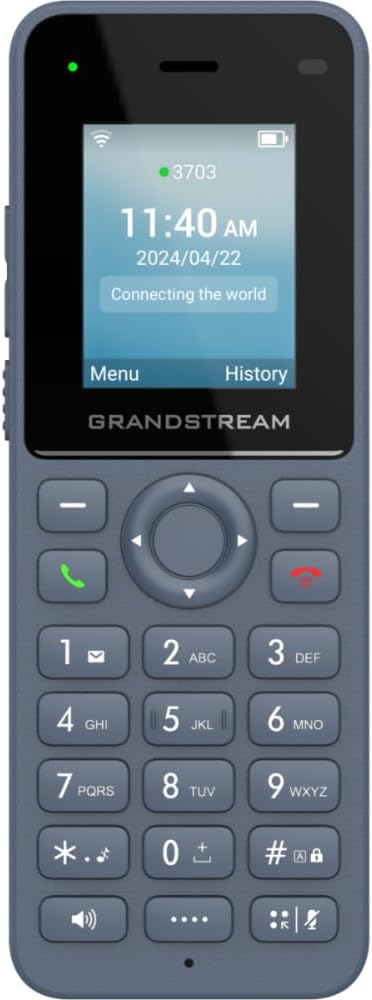
Figura 1: Frente view of the Grandstream WP816 Wi-Fi Phone, displaying its screen, keypad, and branding.
2. Configuração
2.1. Conteúdo da caixa:
- Telefone Wi-Fi Grandstream WP816
- (Additional accessories such as power adapter, charging cradle, and battery are typically included but not explicitly detailed in the provided 'whats_in_the_box' field, which only states "Phone". Assuming standard phone accessories.)
2.2. Carregando o telefone:
- Connect the power adapter to the charging cradle and a power outlet.
- Place the WP816 phone into the charging cradle. Ensure the phone is seated correctly and the charging indicator illuminates.
- Allow the phone to charge fully before initial use. This typically takes several hours. The Type C USB port also supports fast charging.
2.3. Configuração inicial:
- Ligar: Mantenha pressionado o botão Liga/Desliga/Encerrar chamada até que a tela acenda.
- Conexão Wi-Fi: Navigate to the "Settings" menu, then "Wi-Fi". Select your desired Wi-Fi network and enter the password if prompted. The phone supports dual-band Wi-Fi 6.
- SIP Account Configuration: Access the "Settings" menu to configure your SIP accounts. The phone supports 2 SIP accounts. Refer to your VoIP service provider for specific SIP settings (SIP server, User ID, Password).
- Data e hora: Ensure the date and time are correctly set, either manually or via network synchronization.
3. Instruções de operação
3.1. Fazendo chamadas:
- Discagem: Digite o número de telefone usando o teclado.
- Iniciar chamada: Press the Green Call button to place the call.
- Encerrar chamada: Press the Red End Call button to terminate the conversation.
3.2. Recebendo chamadas:
- When the phone rings, press the Green Call button to answer.
- To reject an incoming call, press the Red End Call button.
3.3. Speakerphone Function:
- During a call, press the Speaker button (often indicated by a speaker icon) to activate the speakerphone.
- Press the Speaker button again to switch back to the earpiece.
3.4. Push-to-Talk (PTT):
- The WP816 features a configurable button for Push-to-Talk functionality.
- Consult your system administrator or service provider for configuration details and usage of the PTT feature.
3.5. Bluetooth Headset Connectivity:
- Certifique-se de que seu fone de ouvido Bluetooth esteja no modo de emparelhamento.
- On the WP816, navigate to "Settings" > "Bluetooth".
- Turn Bluetooth on and scan for available devices.
- Select your headset from the list and follow any on-screen prompts to complete pairing.
4. Manutenção
4.1. Cuidados com a bateria:
- Para maximizar a vida útil da bateria, evite temperaturas extremas.
- Charge the phone regularly. Do not let the battery completely drain for extended periods.
- If the phone will not be used for a long time, charge it to about 50% and store it in a cool, dry place.
4.2. Limpeza:
- Use a soft, dry cloth to clean the phone's exterior.
- Evite usar produtos químicos agressivos, solventes de limpeza ou detergentes fortes.
5. Solução De Problemas
5.1. No Power:
- Certifique-se de que a bateria esteja inserida e carregada corretamente.
- Verify the charging cradle is properly connected to a power source.
5.2. Cannot Connect to Wi-Fi:
- Check if the Wi-Fi network is active and within range.
- Confirm the Wi-Fi password is entered correctly.
- Restart the phone and the Wi-Fi router.
5.3. Poor Call Quality:
- Ensure you are within good Wi-Fi signal range.
- Verifique a velocidade e a estabilidade da sua conexão com a internet.
- Verify SIP account settings with your service provider.
5.4. Phone Not Responding:
- Para efetuar uma reinicialização simples, remova e reinsira a bateria.
- If the issue persists, a factory reset might be necessary (refer to advanced settings, note this will erase all data).
6. Especificações
| Recurso | Detalhe |
|---|---|
| Modelo | WP816 |
| Marca | Grande fluxo |
| Dimensões do produto | 7 x 5 x 4 polegadas |
| Peso do item | 13.8 onças (390 gramas) |
| Baterias | É necessária 1 bateria não padrão. |
| Conectividade | Dual-band Wi-Fi 6, Integrated Bluetooth |
| Contas SIP | 2 contas SIP, 2 linhas |
| recursos de voz | HD voice, Dual MIC design with AEC and Noise Shield Technology |
| Capacidade da bateria | 1500mAh |
| Tempo de conversação | 6 horas |
| Tempo de espera | 120 horas |
| Portos | Type C USB (fast charging support), 3.5mm headset jack |
| Características adicionais | Accelerometer, Emergency button, Configurable Push-to-Talk button |
| Cor | Cinza |
| Material | Plástico |
| Tipo de telefone | Sem fio |
| Tipo de discador | Discagem por tons |
| Operação Multilinhas | Operação com múltiplas linhas |
7. Garantia e Suporte
Para informações sobre garantia e suporte técnico, consulte a documentação fornecida com sua compra ou visite o site oficial da Grandstream. website. Guarde o comprovante de compra para solicitações de garantia.


