1. Introdução
This user manual provides essential information for the safe and efficient operation of your iFFALCON 65U85 4K Mini LED Google TV. Please read this manual thoroughly before using the product and retain it for future reference.
2. Informações de segurança
Siga sempre as precauções básicas de segurança ao usar esta televisão para reduzir o risco de incêndio, choque elétrico e ferimentos.
- Não exponha a TV à chuva ou umidade.
- Não abra a TV casing; encaminhe todos os serviços de manutenção para pessoal qualificado.
- Garanta uma ventilação adequada e não bloqueie as aberturas de ventilação.
- Utilize apenas o cabo de alimentação e os acessórios especificados pelo fabricante.
- Mantenha a TV longe de fontes de calor e da luz solar direta.
3. Conteúdo da embalagem
Verifique se todos os itens estão presentes na embalagem:
- iFFALCON 65U85 4K Mini LED Google TV
- Controle remoto
- Cabo de energia
- Manual do usuário (este documento)
- Cartão de garantia
- Wall Bracket (if included)
4. Configuração
4.1 Desembalagem e Colocação
Carefully remove the TV from its packaging. Place the TV on a stable, flat surface or mount it on a wall using a VESA-compatible bracket. Ensure adequate space around the TV for ventilation.
4.2 Conectando a alimentação e os dispositivos
- Conecte o cabo de alimentação à TV e, em seguida, a uma tomada elétrica.
- Connect external devices (e.g., gaming consoles, Blu-ray players) to the HDMI 2.1 ports.
- For internet access, connect an Ethernet cable to the LAN port or prepare for Wi-Fi setup.
4.3 Configuração inicial e emparelhamento remoto
Upon first power-on, the TV will guide you through the initial setup process. This includes language selection, network connection, and Google account login.
Para parear o controle remoto Bluetooth:
- Aponte o controle remoto para a TV.
- Pressione e segure o Configurações botão e o Lar botão simultaneamente por 4 segundos.
- The TV will display a pairing confirmation message once successful.
4.4 Conexão de rede
Connect your TV to the internet via Wi-Fi or Ethernet to access Google TV features and streaming services.
- Wi-fi: Select your network from the list and enter the password.
- Ethernet: Conecte um cabo Ethernet do seu roteador à porta LAN da TV.
5. Operando sua TV
5.1 Interface do Google TV
Your iFFALCON 65U85 features Google TV, providing a personalized experience with access to a vast library of content and apps.

5.2 Controle por voz com o Google Assistente
Use the built-in Google Assistant for hands-free control. Press the Google Assistant button on your remote and speak your commands.
- Procurar filmes e programas.
- Controle dispositivos domésticos inteligentes.
- Obtenha respostas às perguntas.

5.3 Casting Content (AirPlay2 & Chromecast)
Easily share content from your smartphone or tablet to the TV screen.
- AirPlay 2: For Apple devices, use AirPlay2 to stream videos, photos, and music.
- Chromecast: For Android devices and Chrome browser, use Chromecast built-in to cast content.

6. Principais características
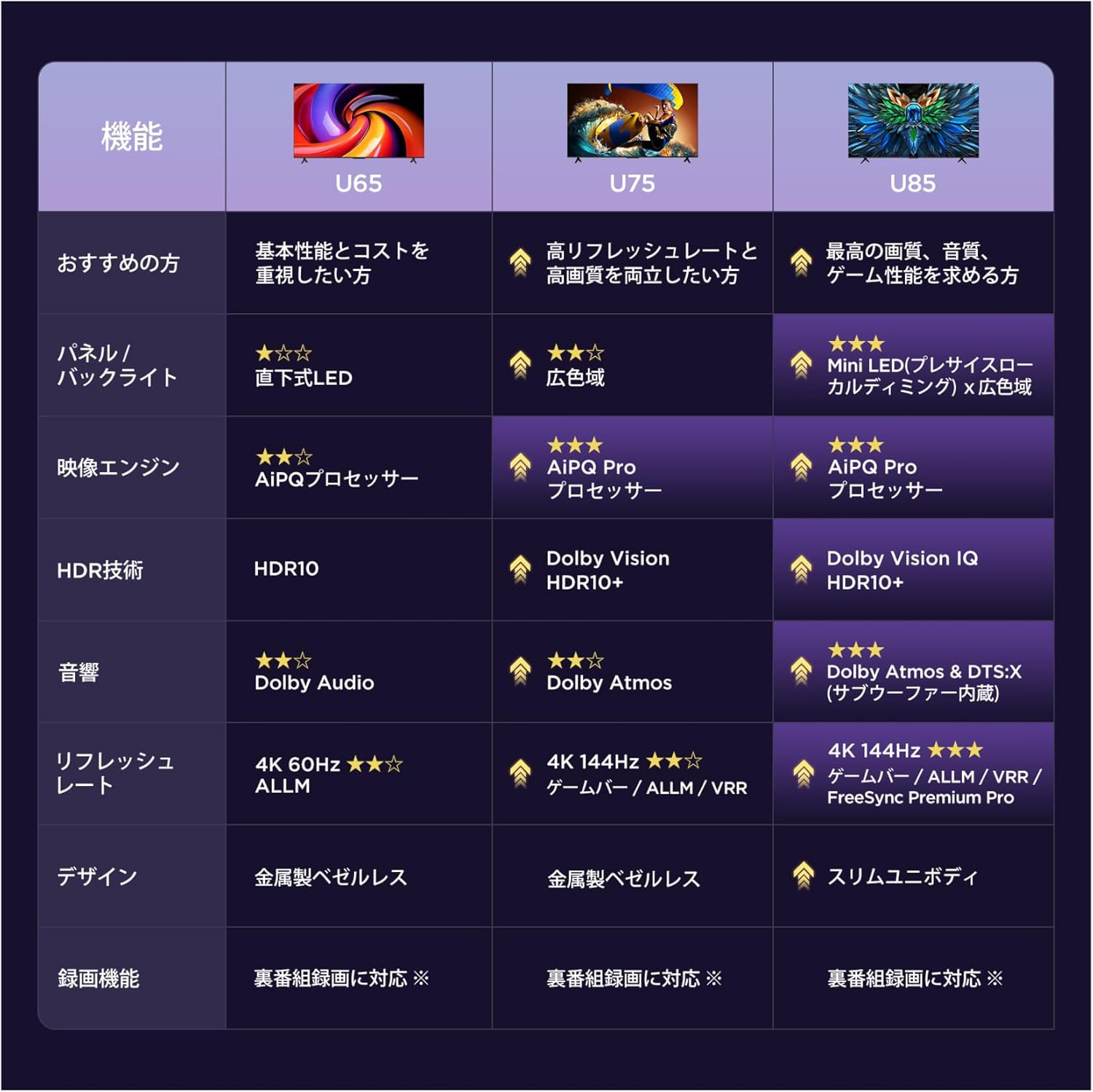
6.1 Display Technology: Mini LED & 4K HDR
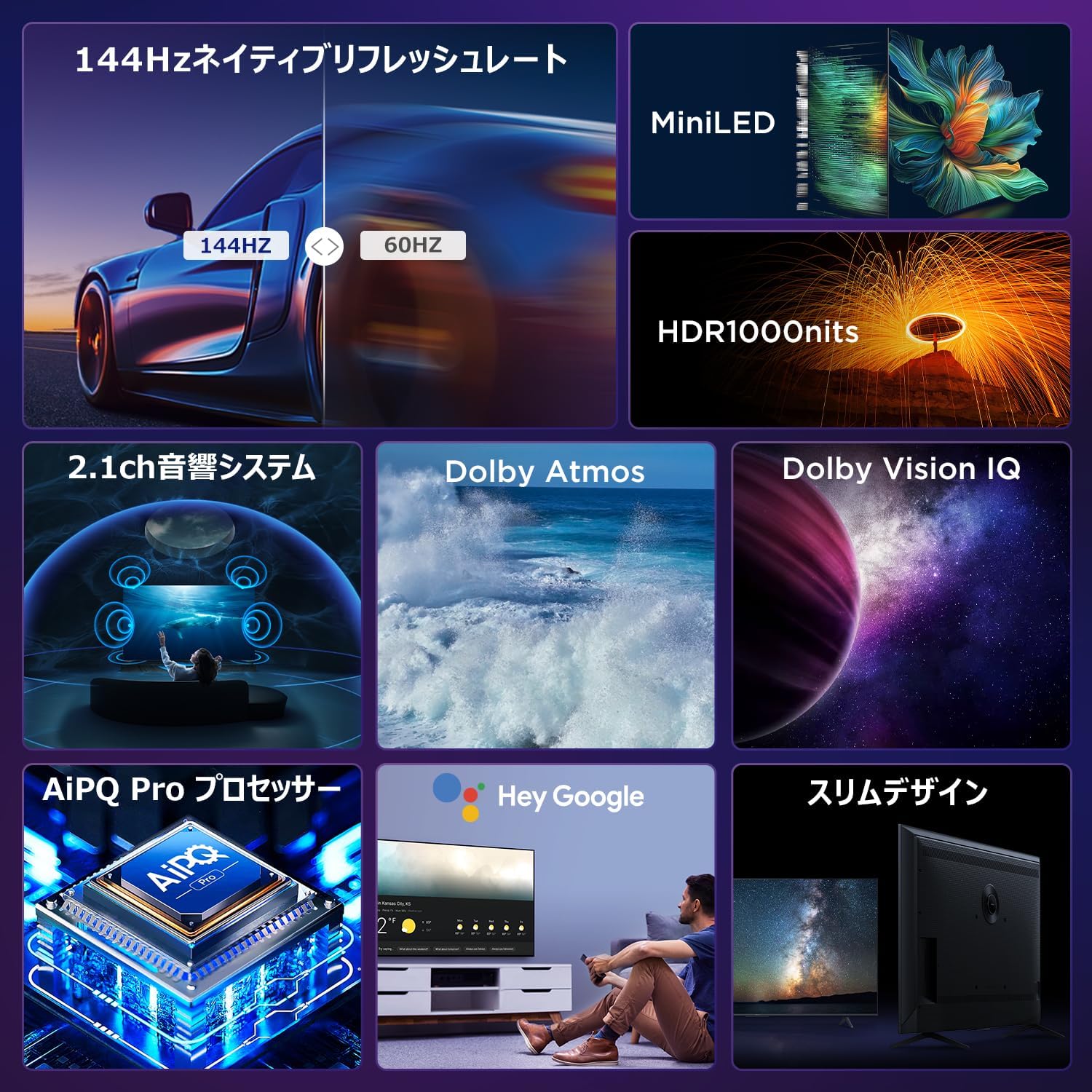
Experience stunning visuals with Mini LED backlight technology, delivering 1000 nits peak brightness and enhanced contrast. Combined with 4K resolution, Dolby Vision IQ, and HDR10+, you get precise brightness, vibrant colors, and deep blacks.


6.2 Immersive Audio: Dolby Atmos & DTS Virtual:X
Enjoy a captivating audio experience with Dolby Atmos and DTS Virtual:X, delivering multi-dimensional sound that fills your room. The 2.1ch speaker system provides powerful bass and clear audio.


6.3 Gaming Features: 144Hz VRR & Game Master
Designed for gamers, the 65U85 offers a native 144Hz refresh rate, Variable Refresh Rate (VRR), Auto Low Latency Mode (ALLM), and FreeSync Premium Pro for smooth, tear-free gameplay.


6.4 AiPQ Pro Processor
The AiPQ Pro processor intelligently optimizes color, contrast, and motion for every scene, delivering a visually stunning and immersive viewexperiência.

6.5 Slim Metal Bezel-less Design
The TV features a sleek, metal bezel-less design that blends seamlessly into any living space, offering a premium aesthetic.

7. Especificações
| Recurso | Descrição |
|---|---|
| Tamanho da tela | 65 polegadas |
| Tipo de exibição | VA Panel, Mini LED |
| Resolução | 4K (3840 x 2160) |
| Taxa de atualização | 144 Hz (Nativo) |
| Suporte HDR | Dolby Vision IQ, HDR10+ |
| Áudio | 2.1ch Speaker System, Dolby Atmos, DTS Virtual:X |
| Plataforma de TV inteligente | Google TV |
| Assistente de voz | Assistente do Google |
| Conectividade | 3x HDMI 2.1, 2x USB, Wi-Fi, Bluetooth |
| Dimensões (L x P x A) | 144.8 x 32.4 x 89.5 cm (com suporte) |
| Peso | 19 kg |
| Compatibilidade VESA | Sim |

8. Solução De Problemas
Se você tiver problemas com sua TV, consulte as seguintes soluções comuns:
- Sem energia: Certifique-se de que o cabo de alimentação esteja firmemente conectado e que a tomada esteja funcionando.
- Sem imagem/som: Check all cable connections (HDMI, audio). Verify the correct input source is selected.
- Remoto não funciona: Substitua as pilhas. Emparelhe novamente o controle remoto conforme descrito na Seção 4.3.
- Sem conexão com a Internet: Verifique seu roteador e modem. Reconecte-se à rede Wi-Fi ou certifique-se de que o cabo Ethernet esteja conectado corretamente.
- Problemas com a qualidade da imagem: Adjust picture settings (brightness, contrast, color). Ensure content source is high quality.
Para problemas persistentes, entre em contato com o suporte ao cliente.
9. Manutenção
Proper maintenance ensures the longevity of your iFFALCON TV:
- Limpando a tela: Gently wipe the screen with a soft, dry, lint-free cloth. Do not use harsh chemicals or abrasive cleaners.
- Limpando o Casing: Use um pano macio e macioamp cloth to wipe the TV casing.
- Ventilação: Mantenha as aberturas de ventilação livres de poeira e obstruções.
- Desligar: Desligue a TV da tomada durante tempestades com raios ou quando ela for deixada sem supervisão por longos períodos.
10. Garantia e Suporte
Your iFFALCON 65U85 TV comes with a manufacturer's warranty. Please refer to the included warranty card for details on coverage, terms, and conditions.
For technical support, service inquiries, or further assistance, please visit the official iFFALCON website or contact their customer service hotline. Contact information can be found on the warranty card or the official product page.
11. Vídeos de Produtos
11.1 Mini LED Quantum Dot 144Hz 65-inch TV
This video showcases the Mini LED and Quantum Dot display technology of the 65-inch iFFALCON TV, highlighting its 144Hz refresh rate for smooth visuals.


