1. Introdução
This manual provides comprehensive instructions for the setup, operation, and maintenance of your amazon basics Wireless Microphone & Receiver System. Designed for superior audio clarity, this system features advanced 8-pin connector technology, ensuring fast setup and seamless integration. It is compatible with noise cancellation microphones and is suitable for various applications including YouTube Vlogging, Live Streaming, Video Shooting, Podcasting, and Video Conferencing.
Conteúdo da embalagem:
- 1 x microfone sem fio
- 1 x Receiver with 8-pin Connector
- Manual do usuário (este documento)

Figure 1: Wireless Microphone and Receiver components.
This image displays the wireless microphone and its accompanying receiver, showcasing their compact design and the clip-on feature of the microphone.
2. Instruções de configuração
The amazon basics Wireless Microphone & Receiver system is designed for effortless plug-and-play functionality, requiring minimal setup.
- Carregue o microfone: Ensure the wireless microphone is fully charged before first use. The built-in 50 mAh Li-Poly battery provides up to 5 hours of non-stop usage.
- Conecte o Receptor: Insert the 8-pin connector of the receiver into the compatible port of your device (e.g., iPhone, other 8-pin devices). The receiver is designed for a secure and rapid connection.
- Ligue o microfone: Locate the power button on the wireless microphone and press it to turn the device on. An indicator light will typically illuminate to confirm power status.
- Emparelhamento automático: The microphone and receiver are designed to pair automatically upon power-on. No manual pairing steps are typically required.
- Verifique a conexão: Check your device's audio input settings to ensure the wireless microphone is recognized as the active input source.

Figure 2: Close-up of the 8-pin connector on the receiver, shown connected to a smartphone.
This image highlights the 8-pin connector, emphasizing its design for secure and efficient connection to compatible devices, with a visual of it plugged into a mobile phone.
3. Instruções de operação
Once set up, the wireless microphone system provides crystal-clear audio transmission for various recording and streaming needs.
- Colocação: For optimal audio capture, clip the wireless microphone to your clothing, approximately 6-12 inches from your mouth. Ensure it is not obstructed by clothing or other objects.
- Alcance sem fio: The system operates on a 2.4 GHz radio frequency and offers a wireless range of up to 10 meters (approximately 33 feet). Maintain this distance between the microphone and receiver for stable connection and audio quality.
- Cancelamento de ruído: The microphone seamlessly integrates with noise cancellation features to reduce unwanted background noise. This enhances speech clarity, especially in noisy environments.
- Monitoramento de áudio: If your recording device allows, monitor the audio input through headphones to ensure proper sound levels and quality during recording or live streaming.
- Desligar: To conserve battery life, power off the microphone when not in use. Disconnect the receiver from your device when finished.
Battery Life and Wireless Performance:

Figure 3: Battery life and usage statistics.
This image highlights the microphone's battery performance, indicating up to 5 hours of non-stop usage and a built-in 50 mAh Li-Poly battery.

Figure 4: Wireless range and frequency details.
This image illustrates the microphone's wireless capabilities, featuring a 10-meter wireless range and operation on a 2.4 GHz radio frequency.
Usos recomendados:
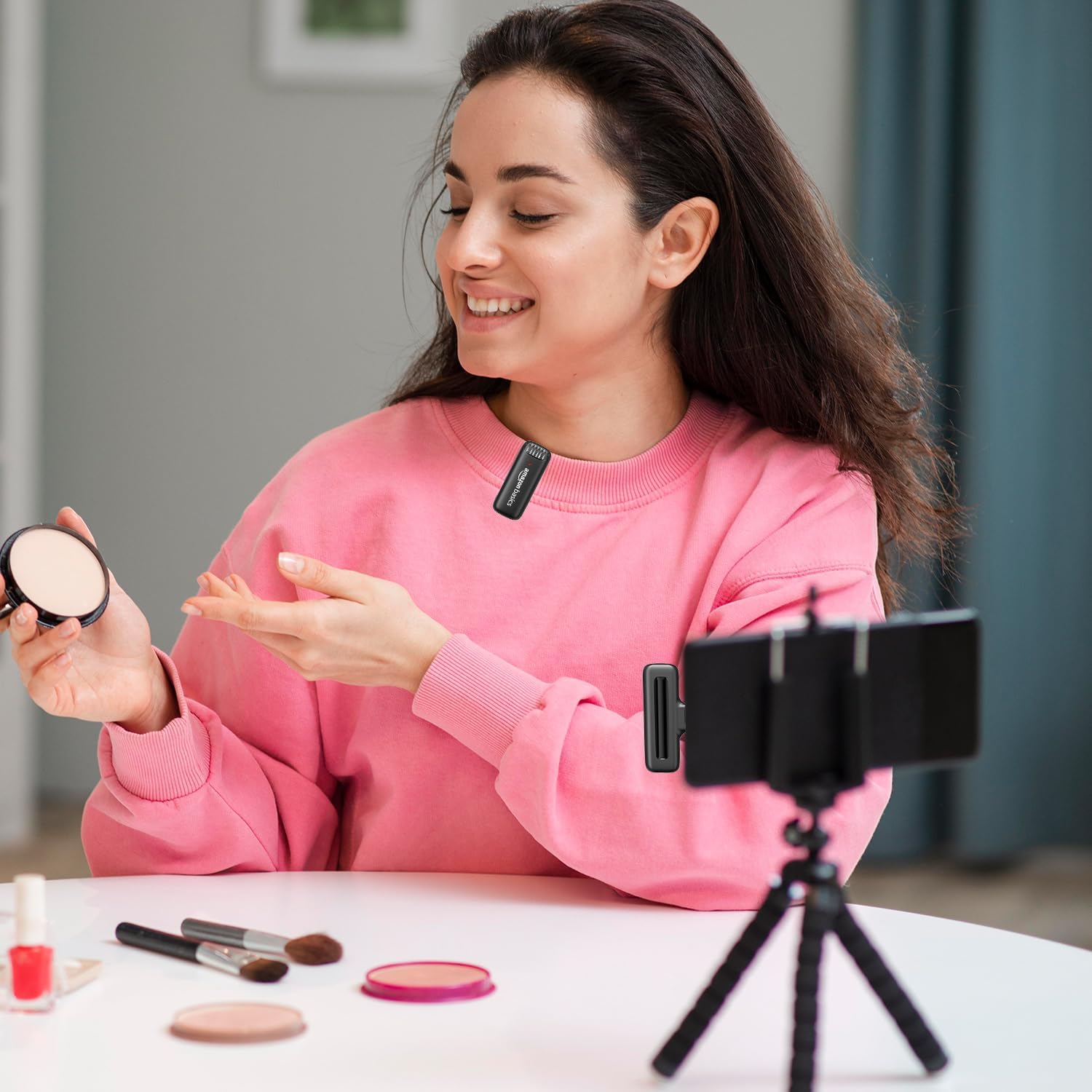
Figure 5: User demonstrating the wireless microphone in a recording setup.
This image shows a user wearing the clip-on microphone while recording video with a smartphone mounted on a tripod, illustrating a typical usage scenario for content creation.

Figure 6: Versatile applications of the wireless microphone.
This image presents a collage of four scenarios: podcasting, vlogging, live streaming, and video conferencing, demonstrating the wide range of applications for the microphone system.
- YouTube Vlogging
- Transmissão ao vivo
- Filmagem de vídeo
- Radiodifusão
- Apresentações ao vivo
- Conferências
- Podcasting
- Videoconferência
4. Cuidados e Manutenção
Proper care ensures the longevity and optimal performance of your wireless microphone system.
- Limpeza: Use a soft, dry cloth to clean the microphone and receiver. Do not use liquid cleaners, aerosols, or solvents.
- Armazenar: Guarde o dispositivo em local fresco e seco, longe da luz solar direta e de temperaturas extremas.
- Evite umidade: Do not expose the microphone or receiver to water or excessive moisture. This can damage internal components.
- Manuseie com cuidado: Avoid dropping or subjecting the devices to strong impacts, as this can cause internal or external damage.
- Cuidados com a bateria: For optimal battery life, avoid fully discharging the microphone's battery frequently. Recharge it regularly, even if not in constant use.

Figure 7: Wireless microphone and receiver highlighting durable construction.
This image showcases the robust and compact design of both the microphone and receiver, emphasizing their dependable construction and convenient configuration for long-term use.
5. Solução De Problemas
If you encounter issues with your wireless microphone system, refer to the following common problems and solutions:
| Problema | Possível causa | Solução |
|---|---|---|
| Sem som ou volume muito baixo. | Microphone not powered on, receiver not connected, device volume too low, microphone too far. | Ensure microphone is on and charged. Verify receiver is securely plugged in. Increase device volume. Move closer to the microphone. |
| A qualidade do áudio é ruim ou distorcida. | Interference, microphone too close/far, low battery. | Move away from other wireless devices. Adjust microphone placement. Recharge microphone battery. |
| O microfone não está emparelhando com o receptor. | Microphone or receiver not powered on, out of range. | Ensure both devices are powered on. Bring microphone closer to the receiver. Restart both devices. |
| Bateria de curta duração. | Frequent full discharge, aging battery. | Ensure full charge before use. Avoid frequent full discharges. Battery life naturally degrades over time. |
6. Especificações do produto
| Recurso | Detalhe |
|---|---|
| Nome do modelo | ABPBMP03 |
| Recurso especial | Wireless, Noise Cancellation |
| Dispositivos compatíveis | 8 Pin devices, iPhone |
| Cor | Preto |
| Componentes incluídos | 1 Microphone, 1 Receiver |
| Padrão polar | Super Cardioide |
| Peso do item | 61 gramas |
| Fator de forma do microfone | Handheld (Clip-on) |
| Dimensões do item (C x L x A) | 45 x 25 x 7 milímetros |
| Fonte de energia | Elétrico com fio (para carregar) |
| Número de baterias | 1 íon de lítio (incluído) |
| Tipo de Bateria | Polímero de lítio (50 mAh) |
| Material | Plástico |
| Plataforma de Hardware | USB (for connectivity) |
| Número de canais | 1 |
| Tecnologia de Conectividade | USB, Sem fio (2.4 GHz) |
| Distância wireless | Até 10 metros |
| Fabricante | DONGGUAN ARCHER TECHNOLOGY CO., LTD |
| País de origem | China |
| Data da primeira disponibilidade | 10 de fevereiro de 2025 |
7. Garantia e Suporte
For information regarding warranty coverage and customer support, please refer to the product packaging or the official amazon basics website. You may also contact the importer for assistance:
Importador: IRIS TECH
Endereço: G-1/G-2, Dharam complex, Phase-1, Opp.Sapna Bar, Anjur Mankoli Road, Bhiwandi-421302
Para obter mais assistência, visite o amazon basics Store on Amazon.


