1. Produto acabadoview
The TATTMUSE Tattoo Transfer Paper is designed for creating clear and precise tattoo stencils. This A4 size (8.27 x 11.69 inches) thermal stencil paper features a 4-layer construction, ensuring high-quality transfers for both thermal printers and hand-drawn designs. It is compatible with various thermal tattoo template printers, including M08F, A886, A887, P90, and ITP05 models.
Principais características:
- Tamanho ideal: A4 (8.27 x 11.69 inches) for standard use.
- 4-Layer Design: Engineered for clear and efficient transfer.
- Materiais de alta qualidade: Made with durable dyes and wax paper to prevent fading and smudging.
- Uso versátil: Suitable for thermal printers and manual drawing.
- Impressão nítida: Ensures sharp and distinct stencil lines.
2. Understanding the 4 Layers
The TATTMUSE Tattoo Transfer Paper consists of four distinct layers, each serving a specific purpose in the transfer process:
- First Layer (White Master Plate): This is the sheet where your design will be transferred or drawn.
- Second Layer (Semi-Transparent Protective Paper): This protective sheet must be removed and discarded before use.
- Third Layer (Blue Carbon Paper): This layer contains the ink that transfers the design.
- Fourth Layer (Yellow Backing Board): This provides support and holds the carbon paper in place.
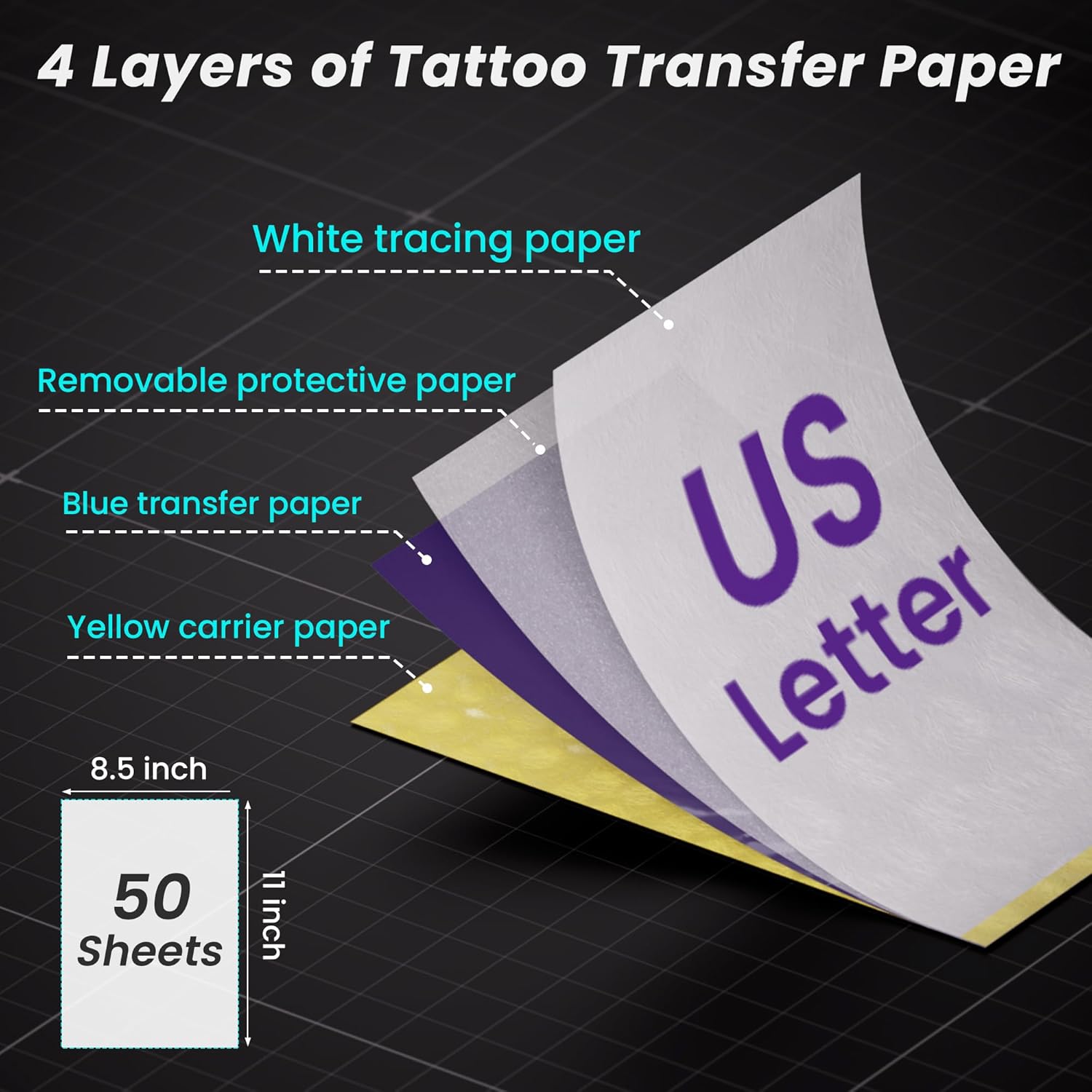
Figure 2.1: Illustration of the 4-layer structure of the tattoo transfer paper.
3. Methods of Use
There are two primary methods for utilizing the TATTMUSE Tattoo Transfer Paper:
3.1. Using a Thermal Tattoo Printer
This method is recommended for efficient and precise duplication of designs.
- Prepare o artigo: Gently tear off the yellow backing paper from the transfer sheet. Then, remove the semi-transparent protective paper.
- Insert into Printer: Open your thermal tattoo printer and carefully insert the prepared transfer paper. Ensure the ribbon side (the side with the blue carbon layer exposed) is facing towards the thermal head of the printer.
- Print the Design: Connect your printer to your device (e.g., smartphone, computer) and send the desired tattoo design for printing. The printer will transfer the design onto the white master plate.

Figure 3.1: Steps for preparing and printing with a thermal tattoo printer.
3.2. Hand Drawing
For custom designs or when a printer is not available, you can draw directly onto the paper.
- Prepare o artigo: Remove the semi-transparent protective paper from the transfer sheet.
- Desenhe seu projeto: Place the white master plate on a flat surface. Using a pencil or stylus, draw your desired pattern directly onto the white tracing paper. Apply firm, even pressure to ensure the design transfers clearly to the carbon layer below.

Figure 3.2: Hand drawing method for tattoo stencils.
4. Applying the Stencil to Skin
Once your design is on the transfer paper, follow these steps to apply it to the skin:
- Prepare a pele: Ensure the skin area where the tattoo will be applied is clean, dry, and free of oils or lotions.
- Apply Transfer Media: Tattoo transfer paper needs to be used in conjunction with a transfer gel or stencil ointment. Apply a thin, even layer of this additional template ointment to the skin area.
- Position the Stencil: Carefully place the patterned face of the transfer paper (the side with the blue design) down onto the prepared skin.
- Aplicar pressão: Press the back of the pattern onto the skin for at least 3 seconds. Ensure even pressure across the entire design.
- Remove Backing Paper: Gently peel off the backing paper from the skin. The stencil design should now be clearly transferred onto the skin.
- Deixe secar: Let the transferred stencil dry completely before proceeding with tattooing.

Figure 4.1: Steps for applying a hand-drawn stencil to the skin.
Video Demonstration: Thermal Printer Use and Stencil Application
Video 4.1: Demonstration of using the TATTMUSE Tattoo Transfer Paper with a thermal printer and applying the stencil to skin.
5. Especificações do produto
| Especificação | Detalhe |
|---|---|
| Dimensões do produto | 11.89 x 8.27 x 0.49 polegadas |
| Número do modelo do item | A887 |
| ASIN | B0DWXRTQP4 |
| Peso do item | 1.17 libras |
| Fabricante | TATTUMUSE |
| Cor | Preto |
| Tamanho | Tamanho A4 |
| Nível de resistência à água | Não resistente à água |
6. Cuidados e armazenamento
To maintain the quality and effectiveness of your TATTMUSE Tattoo Transfer Paper:
- Store the paper in a cool, dry place away from direct sunlight and excessive heat.
- Keep the paper flat to prevent curling or creasing, which can affect transfer quality.
- Avoid exposing the paper to moisture or humidity.
7. Solução De Problemas
If you encounter issues with the transfer paper, consider the following:
- Faint or Incomplete Transfer: Ensure sufficient pressure was applied during hand drawing or printer use. Check if the thermal printer's settings are optimized for stencil paper. Verify that the protective layer was fully removed.
- Smudged Transfer: Allow the stencil to dry completely on the skin before touching or tattooing. Ensure the skin is clean and free of excess transfer gel.
- Paper Jam in Printer: Ensure the paper is inserted correctly and is not wrinkled or bent. Refer to your thermal printer's manual for specific paper loading instructions.
8. Garantia e Suporte
Specific warranty information for the TATTMUSE Tattoo Transfer Paper is not provided in the product details. For any product-related inquiries, support, or to report issues, please contact TATTMUSE customer service through the retailer where the product was purchased.