Introdução
This manual provides detailed instructions for the setup, operation, maintenance, and troubleshooting of the KeeKit Digital Indoor Outdoor Thermometer Hygrometer. This device is designed to monitor indoor temperature and humidity, along with outdoor temperature from two remote sensors, offering comprehensive environmental data for various settings such as homes, offices, and greenhouses.

Image: The KeeKit Indoor Outdoor Thermometer, showing the main display unit and two compact remote sensors.
Conteúdo da embalagem
- 1 x Digital Thermometer Hygrometer (Main Unit)
- 2 sensores remotos sem fio
- 1 x Manual do Usuário
Produto acimaview
Exibição da unidade principal
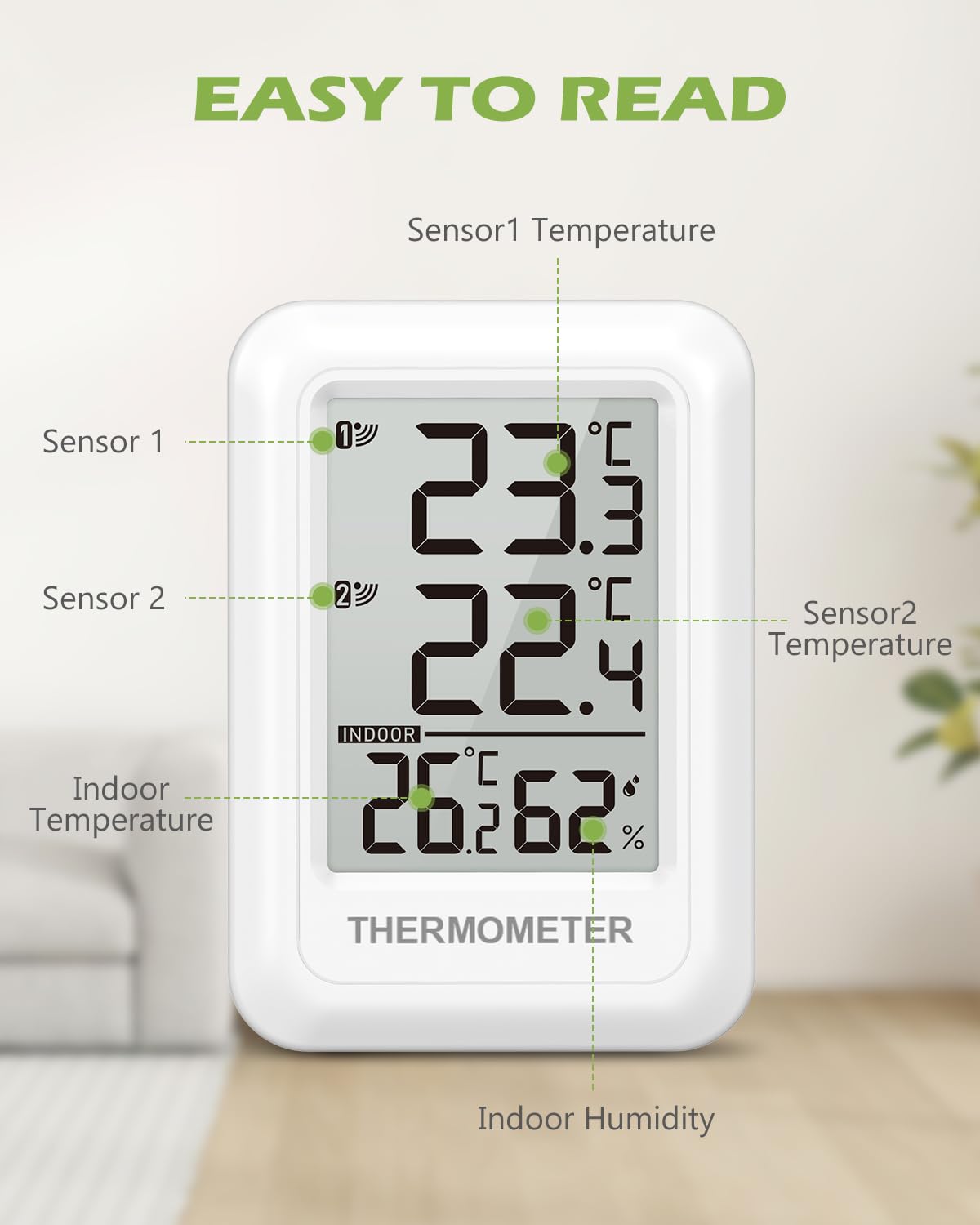
Image: Close-up of the main unit's LCD display, indicating Sensor 1 Temperature, Sensor 2 Temperature, Indoor Temperature, and Indoor Humidity.
The main unit features a clear LCD display that simultaneously shows the indoor temperature and humidity, along with the temperatures from the two remote sensors. This allows for easy monitoring of multiple locations at a glance.
Main Unit Back Panel and Controls

Imagem: A parte traseira view of the main unit, highlighting the battery compartment, a foldable bracket for desktop use, a hanging hole for wall mounting, and two control buttons: RF/°C/°F and MEM.
- RF/°C/°F Button: Used to switch between Celsius and Fahrenheit temperature units and to initiate sensor pairing.
- Botão MEM: Costumava ser view Registros de temperatura/umidade máxima e mínima.
- Compartimento da bateria: Requer 2 pilhas AAA (não incluídas).
- Suporte: Foldable stand for desktop placement.
- Furo para Suspensão: Para montagem na parede.
Sensores Remotos
The two compact remote sensors transmit temperature data wirelessly to the main unit. Each sensor requires 2 x AAA batteries (not included).

Image: Illustration of remote sensors in use, one placed outdoors on a wall and another indoors in a wine cellar, demonstrating their wireless transmission capability to the main unit.
Dimensões

Image: A visual comparison of the main unit and remote sensor dimensions against a credit card, showing the main unit is approximately 2.3 inches (59mm) wide by 3.3 inches (84mm) high, and the sensor is 2 inches (52mm) wide by 3 inches (75mm) high.
Instruções de configuração
- Instale as baterias: Open the battery compartment on the back of the main unit and each remote sensor. Insert 2 x AAA batteries into the main unit and 2 x AAA batteries into each sensor, ensuring correct polarity (+/-). Batteries are not included.
- Power On and Initial Sync: The main unit will power on automatically once batteries are installed. The sensors will also power on. The main unit will attempt to connect with the sensors. If sensors do not appear, press the "RF/°C/°F" button on the main unit to initiate a search for the sensors. Ensure sensors are within range.
- Colocação:
- Unidade principal: Place the main unit indoors using its foldable desktop stand or mount it on a wall using the hanging hole.
- Sensores Remotos: Place remote sensors in desired outdoor or indoor locations. For outdoor placement, choose a sheltered spot to protect the sensor from direct rain and sunlight to ensure accuracy and longevity. The wireless transmission range is up to 100 meters (328 feet) in open areas.

Image: The main unit demonstrating its versatility with both a desktop stand for surface placement and a keyhole slot for wall mounting.
Instruções de operação
- Alternar unidades de temperatura (°C/°F): Press the "RF/°C/°F" button on the back of the main unit to toggle between Celsius (°C) and Fahrenheit (°F) display modes.
- Viewing MAX/MIN Records: Press the "MEM" button on the back of the main unit to view the maximum and minimum temperature and humidity values recorded over the past 24 hours. The device automatically clears these records every 24 hours to provide updated readings.
- Indicador de bateria fraca: A low battery symbol will appear on the display for both the main unit and the sensors when their respective batteries need replacement.
Manutenção
- Substituição da bateria: When the low battery indicator appears, replace the AAA batteries in the main unit and/or sensors promptly to ensure continuous and accurate operation.
- Limpeza: Wipe the device and sensors with a soft, dry cloth. Avoid using abrasive cleaners or submerging the units in water.
- Proteção do sensor: For outdoor sensors, ensure they are placed in a location protected from direct exposure to heavy rain and extreme weather conditions.
Solução de problemas
| Emitir | Possível causa/solução |
|---|---|
| Display shows "LL.L" for indoor temperature | Indoor temperature is below -9.9℃ (14.18℉). |
| Display shows "HH.H" for indoor temperature | Indoor temperature is above 60℃ (140℉). |
| Display shows "LL.L" for outdoor temperature | Outdoor temperature is below -40℃ (-40℉). |
| Display shows "HH.H" for outdoor temperature | Outdoor temperature is above 60℃ (140℉). |
| No readings from remote sensors |
|
| MAX/MIN records do not update | MAX/MIN records are automatically cleared every 24 hours after power-on. This is normal operation. |
| Low battery symbol displayed | Replace the AAA batteries in the indicated unit (main unit or sensor). |
Especificações
| Recurso | Especificação |
|---|---|
| Faixa de temperatura interna | -9.9℃ a 60℃ (14.18℉ a 140℉) |
| Faixa de umidade interna | 10% a 99% UR |
| Faixa de temperatura externa | -40 ℃ a 60 ℃ (-40 140 a XNUMX ℉) |
| Precisão da temperatura | ±1℃ / ±1.8℉ |
| Precisão de umidade | ±5% UR |
| Distância de transmissão sem fio | Até 100 metros (328 pés) em áreas abertas. |
| Dimensões da unidade principal | Approx. 5.9 cm (W) x 1.9 cm (D) x 8.4 cm (H) / 2.3 in (W) x 3.3 in (H) |
| Peso da unidade principal | 50g |
| Tamanho da tela | 2.56 polegadas |
| Dimensões do sensor | Approx. 2.5 cm (W) x 2 cm (D) x 7.5 cm (H) / 2 in (W) x 3 in (H) |
| Peso do Sensor | 33g |
| Material do corpo | abdômen |
| Fonte de alimentação da unidade principal | 2 x pilhas AAA (não incluídas) |
| Fonte de alimentação do sensor | 2 x AAA Batteries per sensor (not included) |
Garantia e Suporte
KeeKit is committed to providing quality products and customer satisfaction. This product comes with the following support:
- Garantia de 1 anos: Cobre defeitos de fabricação e mau funcionamento em condições normais de uso.
- Garantia de devolução de 30 dias: Allows for returns within 30 days of purchase.
- 90-Day Replacement Guarantee: Provides for product replacement within 90 days of purchase for eligible issues.
- Suporte ao cliente online 24 horas por dia, 7 dias por semana: Assistência está disponível 24 horas por dia para quaisquer dúvidas ou problemas.
- Lifetime Technical Support Service: Assistência técnica contínua durante toda a vida útil do produto.
For support, please refer to the contact information provided with your purchase or visit the official KeeKit website.


