1. Produto acabadoview
The Sovol PLA Silk Tri-Color Filament is a premium 1.75mm 3D printer filament designed for creating prints with a unique multi-color, pearlescent, and shiny finish. This filament features a co-extrusion of three distinct colors (Gold, Green, and Rose Red) along its length, allowing for dynamic color shifts in your printed objects depending on the viewing angle and model geometry.
Principais características:
- Tri-Color Co-extrusion: Each segment of the filament is composed of Gold, Green, and Rose Red, providing a vibrant, color-blending effect even on small prints.
- High-Quality PLA Material: Manufactured from imported raw materials, ensuring a charming gloss, smooth extrusion, and consistent diameter.
- Optimized Printing Performance: Engineered to minimize common printing issues such as jamming, bubbles, tangling, and layer lines. Offers excellent first layer adhesion to reduce warping, shrinkage, and curlindo.
- Precise Diameter Tolerance: With a diameter tolerance of +/- 0.03mm, this filament promotes a smoother and more reliable 3D printing experience.
- Embalagem ecológica: Utilizes cardboard spools and packaging, reducing plastic waste. Filament is vacuum-packed with desiccant for optimal dryness.
- Compatibilidade Universal: Suitable for use with most FDM 3D printers and 3D pens that support 1.75mm PLA filament.

This image displays a spool of Sovol Silk Tri-Color PLA Filament (Gold, Green, Rose Red) alongside a complex 3D printed dragon model, showcasing the filament's unique color blend and shiny finish.

This image illustrates the variety of Sovol's triple-color co-extruded filaments, featuring spools in Gold/Green/Rose Red, Blue/Green/Orange, and Dark Red/Green/Blue, each accompanied by intricate 3D printed models that highlight the distinct color transitions.
2. Especificações
| Parâmetro | Valor |
|---|---|
| Material | Ácido Polilático (PLA) |
| Cor | Gold Green Rose (Tri-Color Co-Extrusion) |
| Diâmetro do item | 1.75 milímetros |
| Diameter Tolerance | +/- 0.03 mm |
| Peso líquido | 1 KG (2.2 lbs) |
| Recommended Print Temperature | 210-230°C |
| Recommended Print Speed | 40-100 mm/s |
| Ponto de fusão | 175-185°C |
| Recommended Hot Bed Temperature | 45-60°C |
| Retraction for Bowden Extruder | 4-6 milímetros |
| Retraction for Direct Drive Extruder | 0.5-1 milímetros |
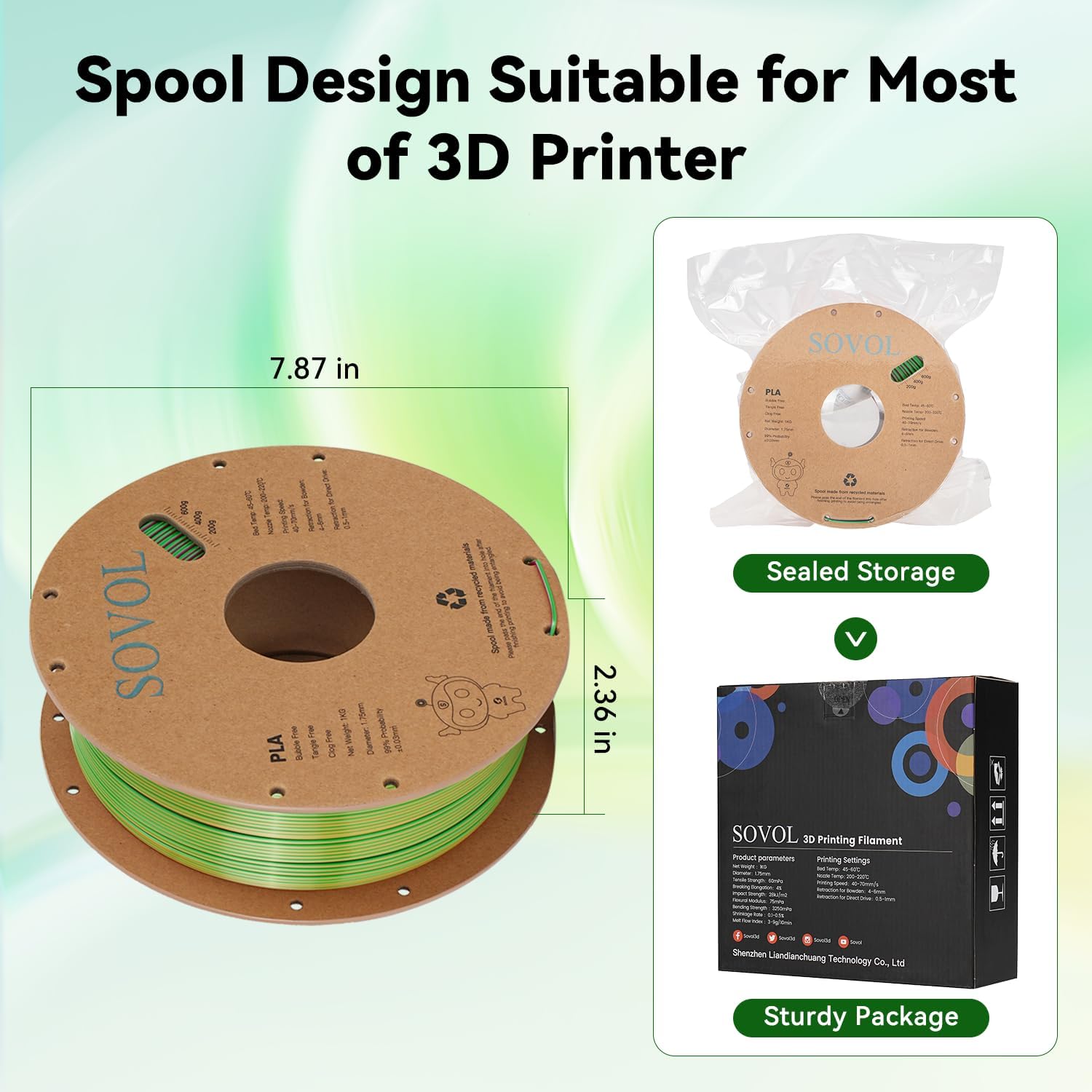
This image illustrates the dimensions of the Sovol filament spool and details its sturdy, vacuum-sealed packaging designed to maintain filament quality.
3. Configuração e carregamento
Unpacking the Filament:
- Carefully open the cardboard packaging.
- Remove the vacuum-sealed bag containing the filament spool.
- Open the vacuum-sealed bag and remove the desiccant packet. Keep the desiccant for future storage.
- Unwind the end of the filament from the spool, ensuring it is not tangled.
Loading Filament into Your 3D Printer:
- Mount the filament spool onto your 3D printer's spool holder. Ensure the spool can rotate freely.
- Feed the filament into the extruder mechanism according to your printer's specific instructions.
- Preheat your printer's hot end to the recommended PLA temperature (210-230°C).
- Once heated, manually extrude a small amount of filament to ensure it flows smoothly and is free of any clogs or air bubbles.

This image shows a spool of Sovol PLA filament correctly mounted on a 3D printer, emphasizing its precise winding which helps prevent tangles and ensures continuous, jam-free filament feeding during the printing process.
4. Instruções de operação
Parâmetros de impressão recomendados:
- Temperatura do bico: 210-230°C (Start at 215°C and adjust as needed for your specific printer and desired finish).
- Hot Bed Temperature: 45-60°C (A heated bed is recommended for optimal adhesion and to prevent warping).
- Velocidade de impressão: 40-100 mm/s (Adjust based on model complexity and printer capabilities. Slower speeds often yield better detail and surface finish).
- Retraction Settings:
- Bowden Extruder: 4-6 mm
- Direct Drive Extruder: 0.5-1 mm
- Adesão da primeira camada: Ensure proper bed leveling and use an adhesive (e.g., glue stick, hairspray) if necessary to prevent the first layer from detaching.
Achieving Optimal Prints:
The unique tri-color co-extrusion of this filament means the visible color of your print will change based on the orientation of the filament during extrusion. Experiment with model orientation and print settings to achieve desired color transitions and effects. The silk finish provides a pearlescent and glossy appearance, enhancing the visual appeal of your creations.

A detailed 3D printed phoenix model, exhibiting a smooth, shiny, and multi-colored surface, is shown on a 3D printer's build plate. This illustrates the filament's ability to produce high-quality prints free from common issues like nozzle clogging or warping.
5. Manutenção e armazenamento
Armazenamento adequado:
To maintain the quality and performance of your Sovol PLA Silk Tri-Color Filament, proper storage is crucial. PLA can absorb moisture from the air, which can lead to printing issues.
- Always store unused filament in a cool, dry place.
- Place the filament spool back into its original vacuum-sealed bag with the desiccant packet.
- If the original bag is damaged, use an airtight container or a resealable bag with fresh desiccant.
- Avoid exposing filament to direct sunlight or high humidity environments.
Drying Filament:
If your filament has absorbed moisture and exhibits signs like popping sounds during extrusion, stringing, or poor layer adhesion, it may need to be dried.
- Use a dedicated filament dryer set to a low temperature (e.g., 45-50°C for PLA) for several hours.
- Alternatively, a conventional oven can be used at a very low temperature (e.g., 40-45°C) for 4-6 hours, ensuring the temperature is stable and does not exceed the filament's glass transition temperature.
- Always monitor the filament during drying to prevent overheating or damage.

Um close-up view of the Sovol filament spool reveals practical features such as a weight scale to monitor remaining filament and a winding hole designed to secure the filament end, preventing tangles and simplifying storage.
6. Solução de problemas comuns
Below are common issues encountered during 3D printing with filament and potential solutions:
- Entupimento do bico:
- Ensure proper print temperature.
- Check for debris in the nozzle; perform a cold pull or clean the nozzle.
- Verify filament diameter consistency.
- Warping or Poor Bed Adhesion:
- Level the print bed correctly.
- Increase hot bed temperature within recommended range (45-60°C).
- Apply a bed adhesive (e.g., glue stick, hairspray).
- Ensure the printing environment is free from drafts.
- Formando filamentos ou escorrendo:
- Optimize retraction settings (distance and speed).
- Reduce print temperature slightly.
- Ensure filament is dry.
- Brittle Filament / Popping Sounds:
- These are strong indicators of moisture absorption. Refer to the "Drying Filament" section under Maintenance and Storage.
- Layer Separation / Weak Layers:
- Increase print temperature slightly to improve layer bonding.
- Reduce print speed.
- Check for partial clogs in the nozzle.
7. Suporte ao cliente
For any questions, concerns, or technical assistance regarding your Sovol PLA Silk Tri-Color Filament, please refer to the official Sovol support channels or contact your retailer. We are committed to providing support to ensure your satisfaction with our products.


