1. Introdução
The WAVLINK USB-C 5 Gigabit Ethernet Adapter (Model: WL-NWU341G) provides a high-speed wired network connection for devices equipped with a USB-C port. Designed for optimal performance, this adapter allows for data transfer speeds up to 5Gbps, significantly faster than standard Gigabit Ethernet. It is an ideal solution for laptops, tablets, and other compatible devices that lack a built-in Ethernet port or require enhanced network performance for demanding tasks such as large file transfers, online gaming, or 4K video streaming.
2. Características
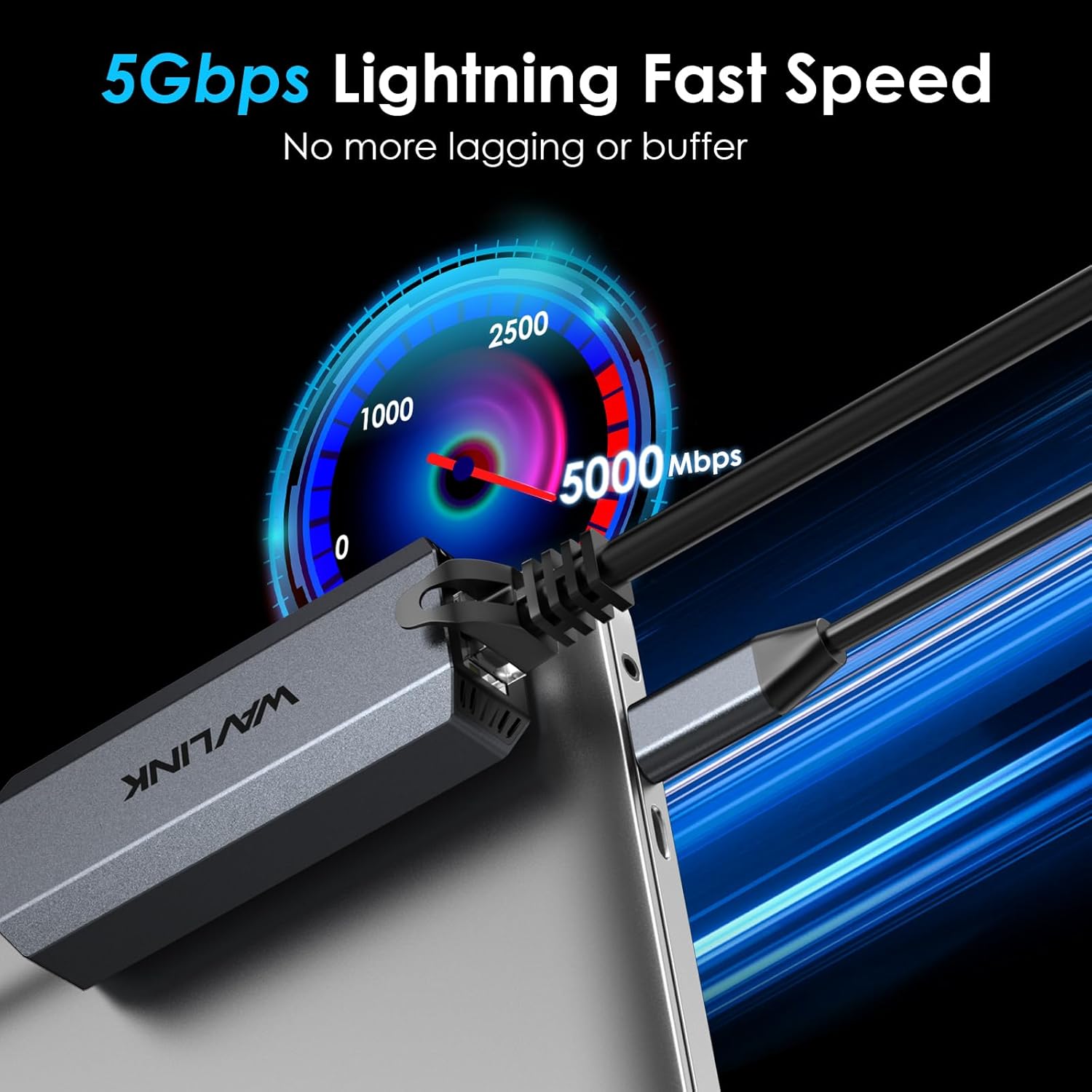
- Velocidade Ethernet de 5 Gbps: Increases data transfer speeds by up to 400% compared to Gigabit Ethernet, offering ultra-fast and stable wired connectivity.
- USB 3.1 Gen 2 Connectivity: Utilizes a USB 3.1 Gen 2 (10Gbps) Type-C connector for maximum compatibility and performance.
- Ampla compatibilidade: Supports Microsoft Windows 10/11, 8.x, 7, Vista, XP, MacOS 10.6 and above. Compatible with Apple devices powered by M3 or above chips.
- Design durável: Engineered with a premium aluminum alloy shell and internal heat dissipation design for durability and prolonged usage.
- Compacto e portátil: Measuring 3.1 x 1.2 x 0.7 inches and weighing 2.29 ounces, it is designed for easy portability.
- Funções avançadas: Supports Microsoft Wake Packet Detection (WPD), 'Wake-On-Lan', and 'RealWoW' for remote wake-up capabilities.
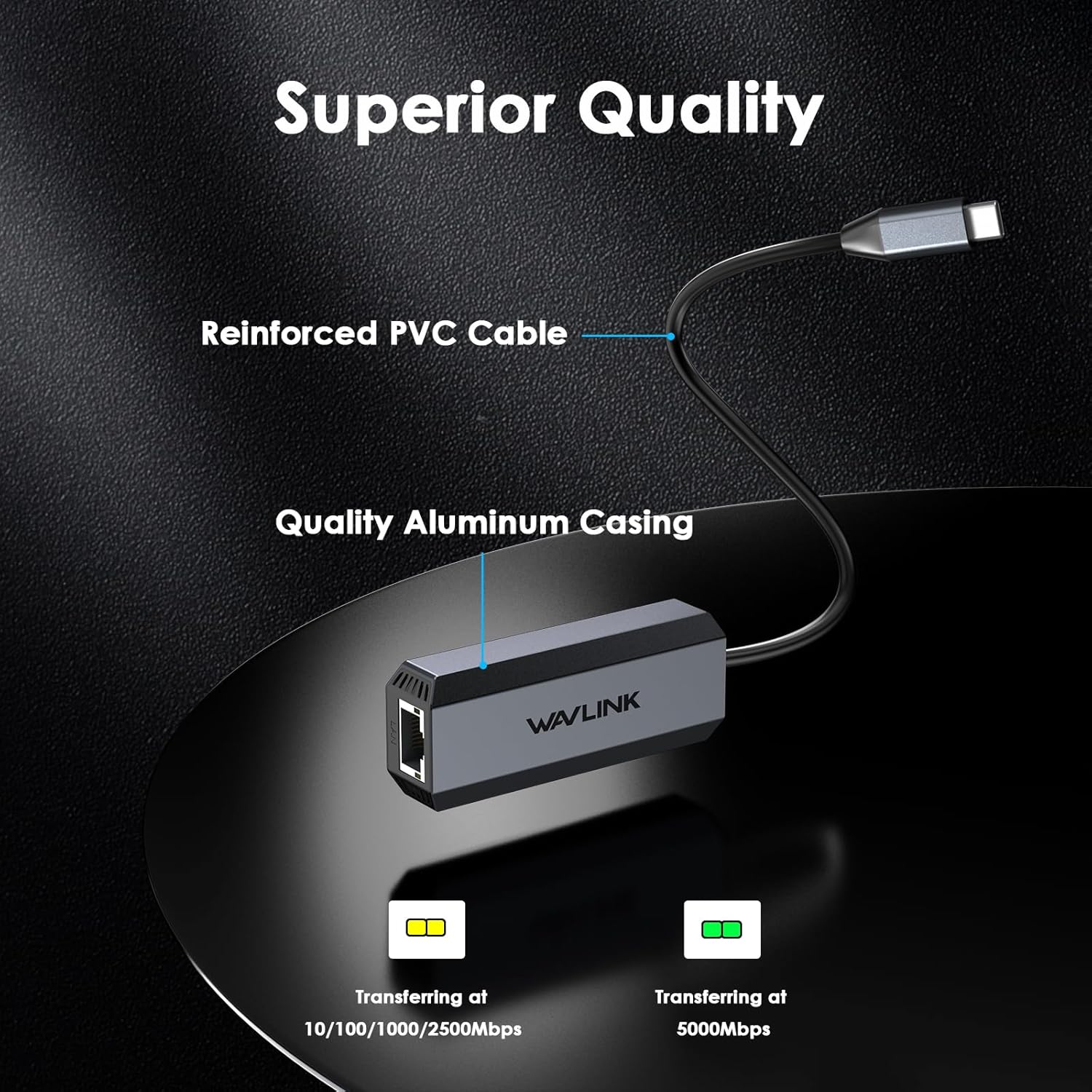
- Indicadores LED: Features blinking green LED for 5000Mbps speeds and blinking amber LED for 10/100/1000/2500Mbps speeds, providing visual status of the connection.
3. Conteúdo da embalagem
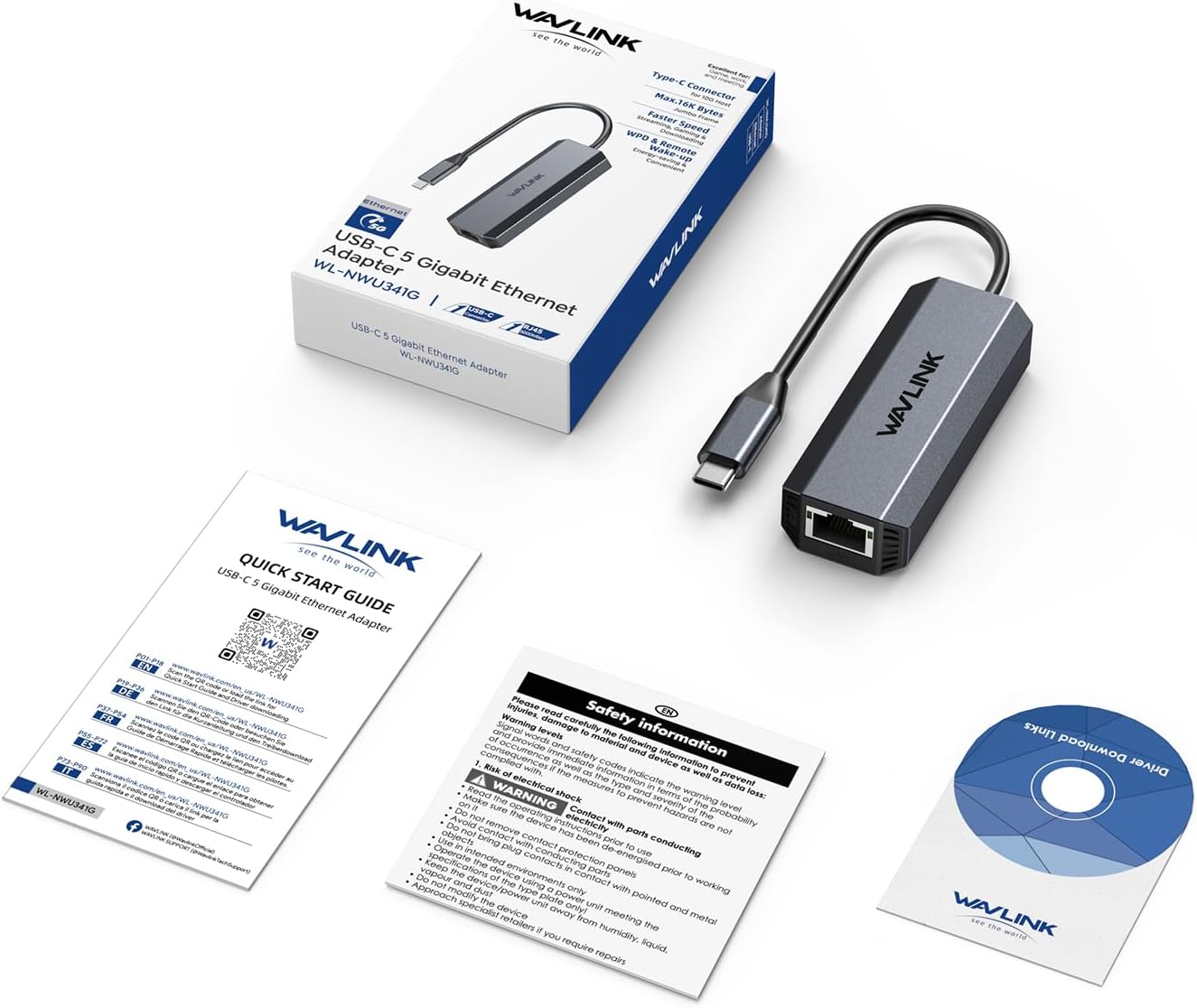
The WAVLINK USB-C 5 Gigabit Ethernet Adapter package includes the following items:
- 1 x USB-C 5 Gigabit Ethernet Adapter (WL-NWU341G)
- 1 x Guia de início rápido
- 1 x Driver Download Links Card
- 1 x Ficha de Informações de Segurança
4. Configuração e instalação
To set up your WAVLINK USB-C 5 Gigabit Ethernet Adapter, follow these steps:
- Conecte o cabo Ethernet: Plug a CAT6 or higher Ethernet cable into the RJ45 port of the WAVLINK adapter. Ensure your router, Ethernet switch, or server supports 5Gb Ethernet speeds.
- Conectar ao dispositivo: Plug the USB-C connector of the adapter into a compatible USB 3.1 Gen 2 (10Gbps) or higher port on your laptop, tablet, or other device.
- Instalação do driver:
- Windows: For Microsoft Windows 10/11, 8.x, 7, Vista, and XP, the necessary drivers (Realtek RTL8156) should install automatically upon connection.
- Mac OS: For MacOS 10.6 and above, especially for older systems or if automatic installation fails, you may need to manually download and install the Realtek RTL8156 driver from the WAVLINK official website. Only compatible with Apple devices powered by M3 or above chips.
- Other OS (ChromeOS, Linux, iPadOS): Drivers may install automatically. If not, refer to the WAVLINK support website for specific instructions or driver downloads.
- Verifique a conexão: Check the LED indicators on the adapter. A blinking green LED indicates 5000Mbps speed, while a blinking amber LED indicates 10/100/1000/2500Mbps speeds.

5. Instruções de operação
Once the WAVLINK USB-C 5 Gigabit Ethernet Adapter is properly installed and connected, it operates automatically, providing a stable and fast wired network connection.
- Indicadores LED:
- Verde piscando: Indicates auto-recognition and data transfer at 5000Mbps speeds.
- Âmbar piscando: Indicates auto-recognition and data transfer at 10/100/1000/2500Mbps speeds.
- Desligado: The adapter is not receiving electrical power or no Ethernet connection is detected.
- Wake-On-Lan (WOL) & RealWoW: The adapter supports these features, allowing your PC to be remotely woken up from a sleeping state via the network. Ensure these features are enabled in your device's BIOS/UEFI settings and operating system network adapter properties.


6. Compatibilidade
The WAVLINK USB-C 5 Gigabit Ethernet Adapter offers broad compatibility with various operating systems and devices:
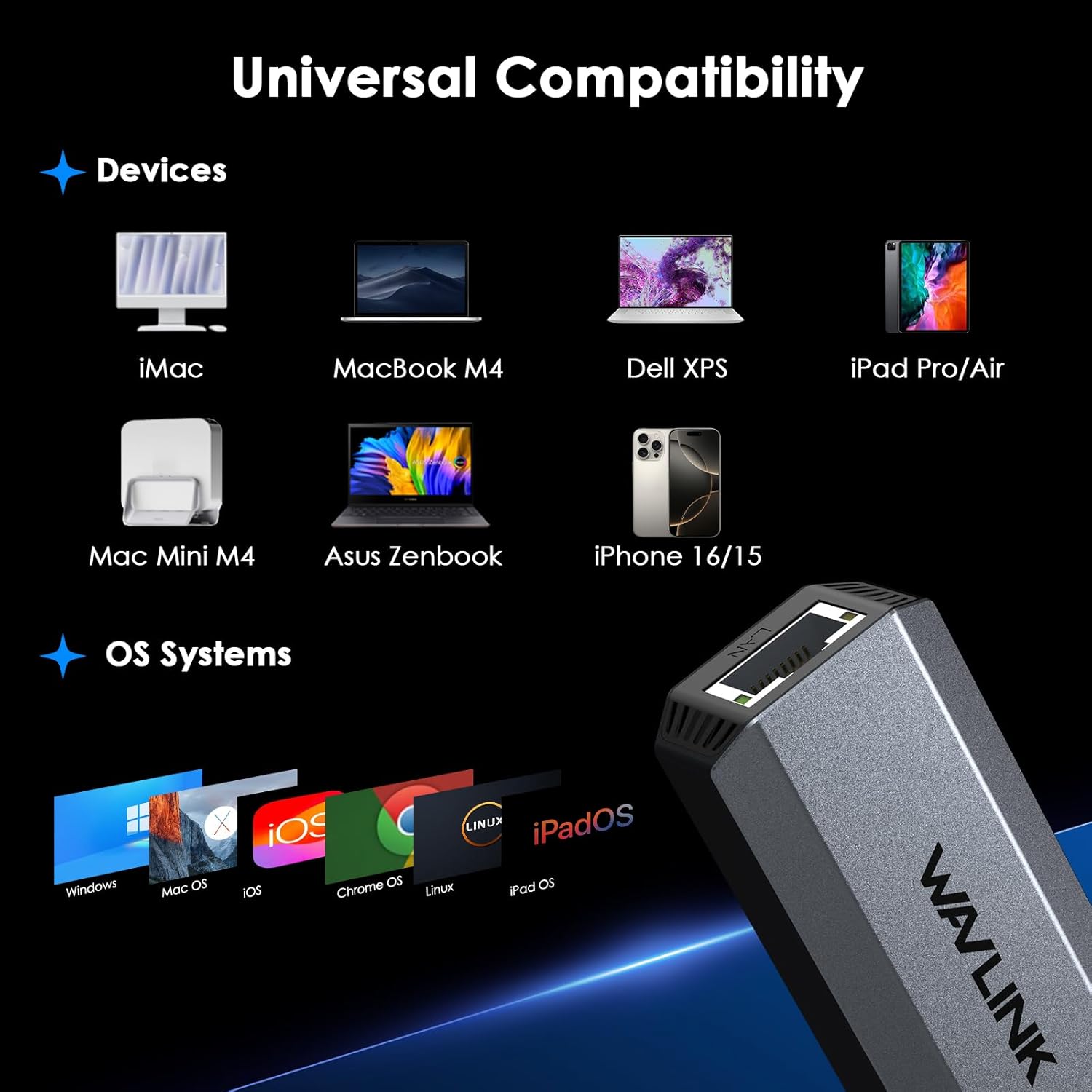
- Sistemas operacionais: Microsoft Windows 10/11, 8.x, 7, Vista, XP, MacOS 10.6 and above, ChromeOS, Linux, iPadOS.
- Dispositivos Apple: Fully compatible with Apple devices powered by M3 or above chips. For older MacOS versions, manual driver installation may be required.
- Tipos de dispositivos: Laptops, tablets (e.g., iPad Pro/Air), desktop PCs, and other devices with a USB-C port supporting USB 3.1 Gen 2 (10Gbps) or higher.
7. Solução De Problemas
- Velocidades lentas:
- Ensure you are using a CAT6 or higher Ethernet cable.
- Verify your router, Ethernet switch, or server supports 5Gb Ethernet.
- Confirm your device's USB-C port complies with USB 3.2 Gen2 (10Gbps) or higher standards.
- Frequent Disconnections (Windows):
- Go to Device Manager, find the network adapter, right-click and select 'Properties'.
- Navigate to the 'Power Management' tab and uncheck 'Allow the computer to turn off this device to save power'.
- Problemas com o driver:
- For older systems or if automatic driver installation fails, download the latest Realtek RTL8156 driver from the official WAVLINK support page: www.wavlink.com/en_us/WL-NWU341G.
- Sem conexão:
- Verifique todas as conexões de cabos para garantir que estejam seguras.
- Verify that the LED indicators on the adapter are active.
- Test the adapter with a different USB-C port or another compatible device if possible.
8. Especificações
| Atributo | Valor |
|---|---|
| Dimensões do produto | 3.1 x 1.2 x 0.7 polegadas (7.87 x 3.05 x 1.78 cm) |
| Peso do item | 2.29 onças (65 gramas) |
| Número do modelo do item | WL-NWU341G |
| Marca | WAVLINK |
| interface de hardware | USB 3.1 Tipo C |
| Cor | Cinza |
| Dispositivos compatíveis | Windows 10/11, 8.x, 7, Vista and XP, MacOS 10.6 and above |
| Taxa de transferência de dados | 5000 Megabits por Segundo (5 Gbps) |
| Família de sistemas operacionais compatíveis | ChromeOS, Linux, Windows |
| Versão mínima do sistema operacional necessária | Mac OS X 10.6 Snow Leopard, Windows 7 |

9. Manutenção
To ensure the longevity and optimal performance of your WAVLINK USB-C 5 Gigabit Ethernet Adapter, please follow these maintenance guidelines:
- Limpeza: Use a soft, dry cloth to clean the adapter. Avoid using liquid cleaners or aerosols, which may damage the device.
- Armazenar: Guarde o adaptador em local fresco e seco, longe da luz solar direta e de temperaturas extremas.
- Manuseio: Avoid dropping the device or subjecting it to strong impacts. Do not bend the cable excessively, as this may damage internal wiring.
- Ventilação: Ensure the adapter is not covered during use to allow for proper heat dissipation, especially during prolonged high-speed data transfers.
10. Garantia e suporte
WAVLINK products are designed for reliability and performance. For detailed warranty information, technical support, and customer service, please visit the official WAVLINK webou consulte as informações de contato fornecidas no Guia de Início Rápido do seu produto.
Suporte online: www.wavlink.com
E-mail de suporte técnico: suporte@wavlink.com


