Introdução
The PNI P16UV is a portable dual-band VHF/UHF radio station designed for reliable communication across various environments. It features 999 programmable channels, dual-band transmission, and 6-band reception, along with functions like VOX, scanning, FM radio, and weather channels. This manual provides detailed instructions for the proper setup, operation, and maintenance of your PNI P16UV radio.
Conteúdo da embalagem
Verifique se todos os itens listados abaixo estão incluídos em seu pacote:
- Portable UHF/VHF Radio (PNI P16UV)
- Antena
- Li-Ion Battery (2600mAh)
- Carregador de mesa
- Fone de ouvido com microfone
- Cordão
- Manual do usuário
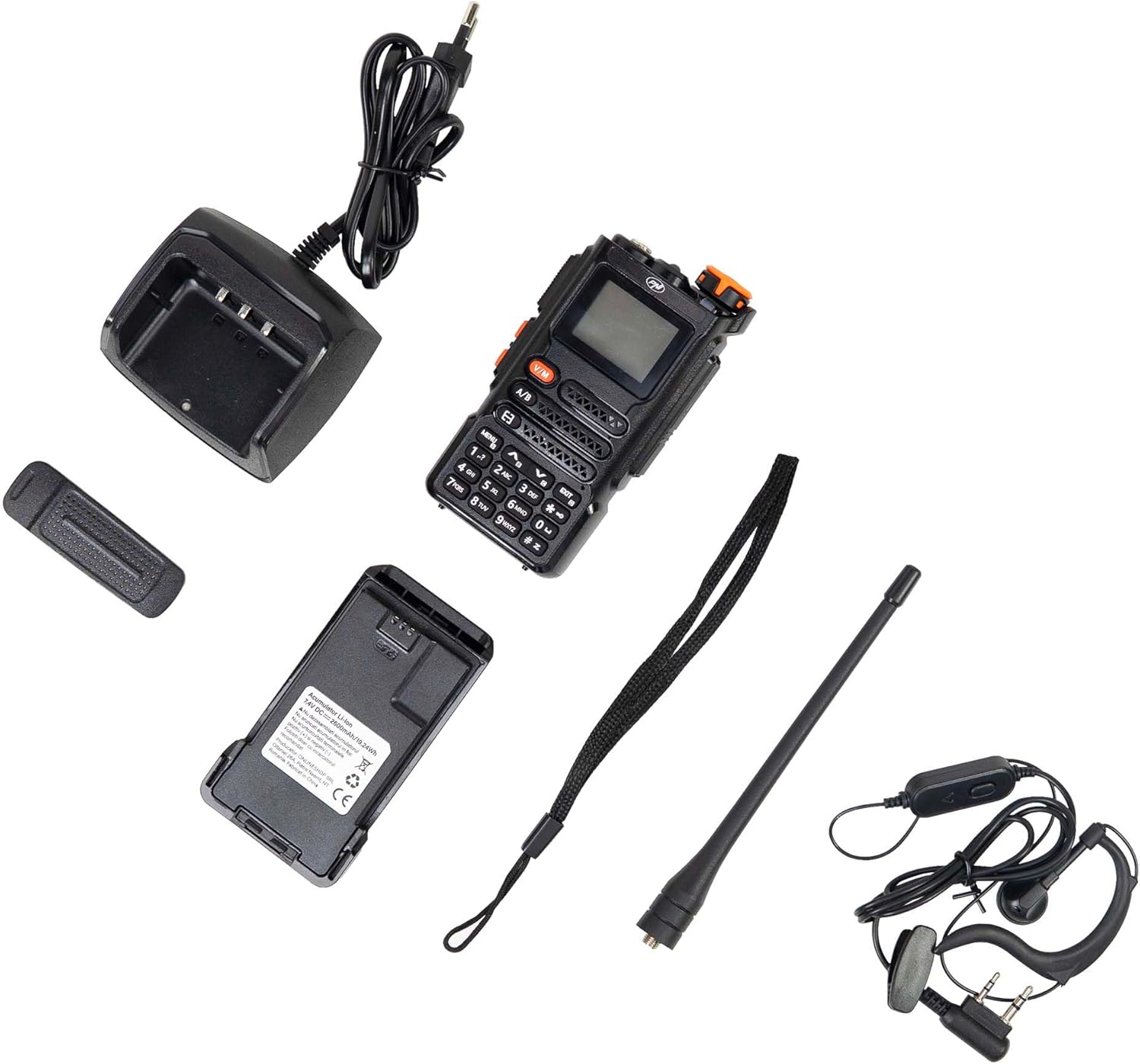
Figure 1: PNI P16UV Package Contents. This image displays the radio unit, antenna, 2600mAh Li-Ion battery, desk charger, headset with microphone, and lanyard, which are all included in the product package.
Produto acimaview
The PNI P16UV radio is equipped with a range of features to enhance your communication experience. Key features include:
- Transmissão de banda dupla: Operates on both VHF (136-174 MHz) and UHF (400-470 MHz) frequencies.
- Recepção de 6 bandas: Extends listening capabilities beyond standard transmission bands.
- 999 canais: AmpO armazenamento permite armazenar várias frequências e configurações.
- Potência ajustável: Selectable transmission power (5W High, 1W Low) for efficiency.
- Função VOX: Transmissão ativada por voz para operação viva-voz.
- Função de digitalização: Analisa automaticamente os canais em busca de atividade.
- Rádio FM: Built-in FM radio receiver (87.5-108 MHz).
- Canais meteorológicos: Access to weather information.
- Bateria de íon de lítio: High-capacity 2600mAh battery for extended use.
- Lanterna: Lanterna LED integrada para maior praticidade.
- Fechadura com chave: Impede acionamentos acidentais de botões.
- Ligação de emergência: Dedicated function for urgent situations.
- DTMF: Sinalização multifrequencial de tom duplo.
- Silenciador: Adjustable noise reduction.
- Relógio duplo: Monitors two channels simultaneously.
- BCL (Bloqueio de Canal Ocupado): Impede a transmissão em um canal ocupado.
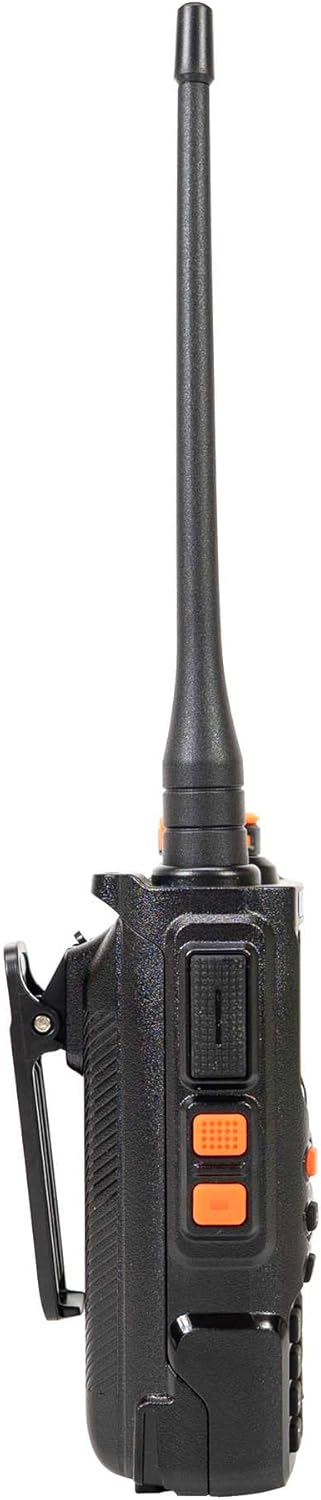
Figure 2: Main Features of PNI P16UV. This graphic highlights key functionalities such as FM Radio (87.5-108 MHz), 10 Preset Weather Channels, 1750Hz Tone Burst, Repeater Function, Type-C charging, VOX, DW (Dual Watch), TOT (Time Out Timer), CTCSS/DCS, BCL (Busy Channel Lockout), Keypad lock, SQ (Squelch), Scan, and DTMF.
Configurar
1. Instalação da bateria
To install the Li-Ion battery:
- Certifique-se de que o rádio esteja desligado.
- Alinhe o compartimento das pilhas com os sulcos na parte traseira do rádio.
- Slide the battery upwards until it clicks into place securely.
- Para remover, pressione a trava de liberação (se houver) e deslize a bateria para baixo.

Figure 3: Battery Installation. This image shows the radio and its battery pack separated, demonstrating how the battery slides into the back of the unit.
2. Fixação da antena
Enrosque a antena no conector na parte superior do rádio, girando-a no sentido horário, até que esteja firme o suficiente para apertar com os dedos. Não aperte demais.
3. Carregando a bateria
Before first use, fully charge the battery. Place the radio (with battery installed) into the desk charger. The charger indicator light will typically show red during charging and turn green when fully charged. A full charge can take several hours.

Figure 4: PNI P16UV Radio Ready for Use. This image shows the complete radio unit with the antenna attached and battery installed, displaying its front panel and screen.
Instruções de operação
1. Ligar/desligar e controle de volume
Rotate the top-right knob clockwise to power on the radio and increase volume. Rotate counter-clockwise to decrease volume and power off.
2. Seleção de canal
Use the up/down arrow buttons on the keypad to navigate through the 999 available channels. Alternatively, you can directly input channel numbers using the numeric keypad.
3. Dual-Band Operation (VHF/UHF)
The PNI P16UV supports both VHF and UHF bands. Use the Um/B button to switch between the primary (A) and secondary (B) frequency displays. The radio can transmit on one band while monitoring another (Dual Watch).
4. VOX Transmission
The Voice Operated Exchange (VOX) function allows for hands-free transmission. When VOX is enabled, the radio will automatically transmit when it detects your voice. Adjust VOX sensitivity in the menu to prevent accidental transmissions or missed voice activation.
5. Função de digitalização
Activate the scan function to automatically search for active signals across programmed channels. The radio will pause on an active channel and resume scanning after a set period of inactivity.
6. FM Radio and Weather Channels
The radio includes an FM broadcast receiver and dedicated weather channels. Consult the full user manual for specific instructions on accessing and tuning these features.
7. Bloqueio de tecla
To prevent accidental changes to settings or transmissions, activate the keypad lock function. Refer to the radio's on-screen menu or dedicated button for this feature.
8. Emergency Call
The emergency call function, typically activated by a dedicated button, transmits an alert signal on a pre-programmed emergency frequency. Familiarize yourself with its operation for critical situations.
Manutenção
1. Cuidados com a bateria
- Carregue a bateria totalmente antes do primeiro uso.
- Evite sobrecarregar ou descarregar completamente a bateria para prolongar sua vida útil.
- Guarde a bateria em local fresco e seco quando não for utilizá-la por longos períodos.
2. Limpeza
Limpe a parte externa do rádio com um pano macio e seco.amp pano. Não utilize produtos químicos agressivos ou abrasivos. Certifique-se de que o rádio esteja desligado e seco antes de usar.
3. Armazenamento
When storing the radio for a long time, remove the battery. Store the radio and battery in a dry, temperature-controlled environment, away from direct sunlight and extreme temperatures.
Solução de problemas
| Problema | Possível causa | Solução |
|---|---|---|
| O rádio não liga. | A bateria não está instalada corretamente ou está descarregada. | Certifique-se de que a bateria esteja instalada corretamente. Carregue a bateria completamente. |
| Não é possível transmitir nem receber. | Incorrect frequency/channel, antenna not attached, low battery, or squelch too high. | Verify frequency/channel. Attach antenna securely. Charge battery. Adjust squelch level. |
| Qualidade de áudio ruim. | Weak signal, antenna issue, or squelch setting. | Move to an area with better signal. Check antenna connection. Adjust squelch. |
| O teclado não responde. | Key lock function is active. | Deactivate the key lock function (refer to your radio's specific key lock combination). |
Especificações
| Recurso | Detalhe |
|---|---|
| Modelo | PNI-P16UV |
| Banda de frequência | VHF (136-174 MHz), UHF (400-470 MHz), Commercial FM |
| Canais | 999 canais |
| Potência de transmissão | 5W (Hi), 1W (Lo) |
| Bateria | Íon de lítio de 2600 mAh |
| Autonomia | Até 22 horas |
| Dimensões (com antena) | 60 x 40 x 110 mm (radio body), 265 mm (with antenna) |
| Peso | 250 gr (radio body), 439 g (packaged) |
| Temperatura de operação | -26°C ~ +80°C |
| conector de antena | SMA |
| Audio Accessory Pins | 2 PNI-K pins |
| Características especiais | VOX, Scan, FM Radio, Weather Channels, Flashlight, Key Lock, Emergency Call, DTMF, Dual Watch, Squelch, Time out Timer (TOT), Talk Around, BCL (Busy Channel Lockout) |
Garantia e Suporte
For warranty information, technical support, or service inquiries, please contact the manufacturer:
- Fabricante: ONLINESHOP SRL
- Endereço: Olteniei 26A, Piatra Neamt, Neamt, 610206, Romania
- E-mail: comenzi@pni.ro
- Website: www.pni.ro
Guarde o comprovante de compra para eventuais solicitações de garantia.

Figure 5: Manufacturer Information. This image displays the back of the product packaging, detailing the manufacturer (ONLINESHOP SRL), address, email (comenzi@pni.ro), and website (pni.ro).