PGST Home Security System User Manual
Model: PGST107F-US-F | Brand: PGST
Introdução
The PGST Home Security System is a comprehensive wireless alarm solution designed to provide real-time alerts and peace of mind for your property. This system integrates seamlessly with your home environment, offering advanced features such as APP control, voice assistant compatibility, and expandable sensor options. It operates without monthly subscription fees, making it a cost-effective security choice.
This manual provides detailed instructions for setting up, operating, and maintaining your PGST Home Security System to ensure optimal performance and security.
What's Included (24 Pack Kits)
- 1 x PGST A107F Alarm System Host (Main Control Panel)
- Multiple Door Sensors (Magnetic Contact Sensors)
- Multiple PIR Motion Detectors
- Controles remotos
- RFID Tags
- Power Adapter and USB Type C Cable
- Acessórios de montagem (parafusos, etc.)
- Manual do usuário

Figura 1: Overview of the PGST Home Security System components included in the 24-piece kit.
Configurar
1. Main Control Panel Installation
The PGST A107F Alarm System Host is designed for easy installation. Choose a central location in your home or office, preferably near a power outlet and within Wi-Fi range. The unit can be mounted on a wall using the provided hardware or placed on a flat surface.

Figure 2: The 4.3-inch TFT colorful display screen of the main control panel, showing its user-friendly interface.

Figure 3: The anti-demolition alarm feature on the back of the main unit. If removed, an alarm will sound and a notification will be sent.
2. Power Connection and SIM Card Installation
Connect the main control panel to a power source using the provided USB Type C cable and power adapter. For 4G connectivity and phone call alerts, install a compatible SIM card into the designated slot on the back of the unit. Ensure the power switch is in the OFF position before inserting or removing the SIM card.
3. App Download and Network Configuration
Download the "Smart Life" or "Tuya Smart" application from your smartphone's app store. Follow the in-app instructions to add your PGST A107F Alarm System Host. The system supports both Wi-Fi (2.4GHz) and 4G connectivity for remote control and alerts.

Figure 4: Network configuration steps for connecting the alarm system to your Wi-Fi network via the Smart Life/Tuya app.
4. Instalação e emparelhamento do sensor
Install the door sensors on doors and windows, ensuring the two parts are aligned and close to each other. Place motion detectors in strategic areas to cover entry points or valuable spaces. Follow the system's pairing instructions to connect each sensor wirelessly to the main control panel. The system is highly customizable, allowing you to add more sensors as needed.

Figure 5: Door/Window Sensor installation. These sensors detect the opening and closing of doors and windows.

Figure 6: PIR Motion Detector placement. These detectors precisely identify intruder movement within their wide-angle range.
Instruções de operação
Armar e Desarmar
The system offers multiple arming modes:
- Braço: Activates all sensors for full protection when you leave the property.
- Desarmar: Deactivates the alarm system, allowing free movement within the property.
- Fique Braço: Activates perimeter sensors (e.g., door/window sensors) while allowing movement within the interior, ideal for when you are home.
You can arm/disarm the system using the main control panel, remote controls, or through the Smart Life/Tuya APP. Scheduled arming and disarming can also be configured via the app.

Figura 7: Example of scheduled arming and disarming to save time and effort.
Função SOS
In an emergency, activate the SOS button on the main panel or remote. The system will immediately send a distress signal to pre-designated emergency contacts (family, neighbors, local authorities) via phone calls and app notifications, ensuring rapid response.

Figure 8: The system's ability to make 5 preset alarm calls to ensure no alert is missed.

Figure 9: App alert message push for immediate notifications when sensors are activated.
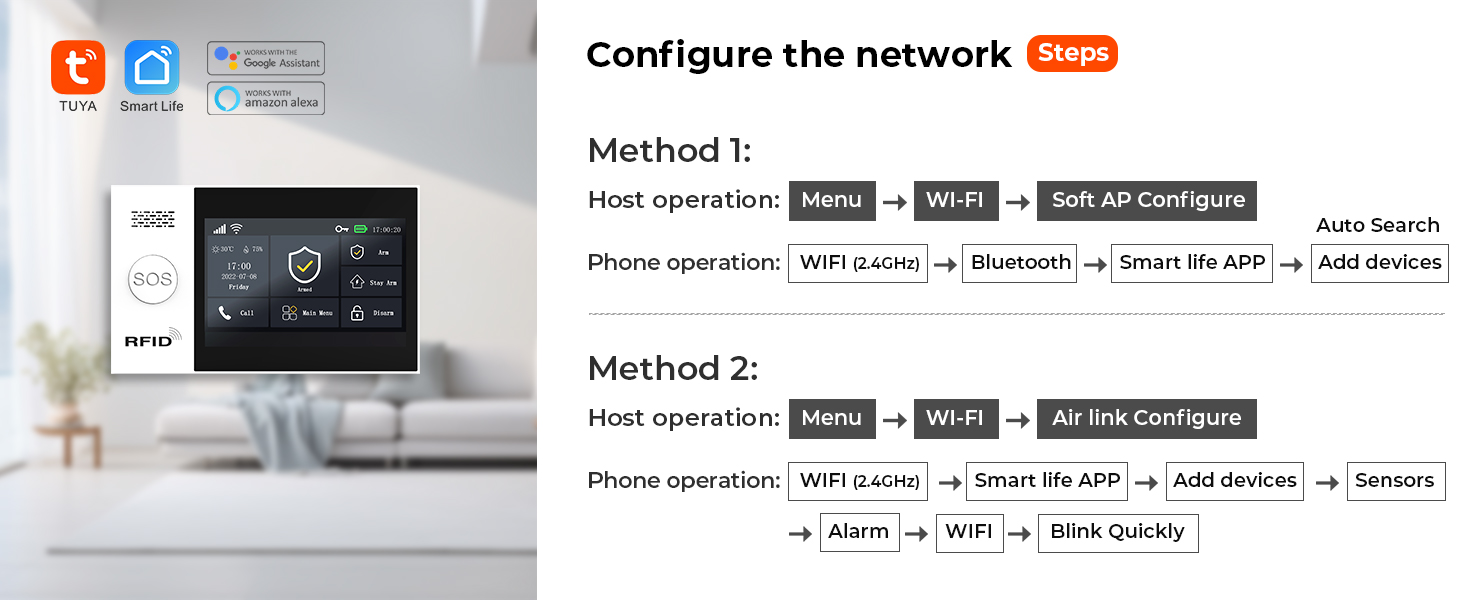
Figure 10: Voice control functionality with Alexa and Google Assistant for convenient system management.
Voice Intercom (with compatible cameras)
If integrated with compatible cameras, the system supports voice intercom functionality, allowing you to speak through the camera to deter intruders or communicate with family members.
Video 1: Demonstrates the voice intercom feature, showing how linked cameras can be used to communicate or deter intruders.
Suporte multilíngue
The system supports 10 languages for menu display, voice operation prompts, and alarm SMS settings, allowing users to select their preferred language for ease of use.

Figure 11: The multi-language support feature of the alarm system, offering 10 language options.
Manutenção
Battery Replacement for Wireless Sensors
The wireless sensors (door magnets, PIR detectors) are battery-powered. The system will send low voltage signals to the host, and the host will push information to your APP when batteries need replacement. Refer to the individual sensor manuals for specific battery types and replacement procedures.

Figure 12: Visual representation of low battery alerts for wireless sensors, notifying users via the app.
Cuidados Gerais
Keep the main control panel and sensors clean by wiping them with a soft, dry cloth. Avoid using abrasive cleaners or solvents. Ensure sensors are free from obstructions that might interfere with their operation.
Solução de problemas
| Problema | Possível causa | Solução |
|---|---|---|
| Sem notificações do aplicativo | Poor Wi-Fi/4G connection; App permissions; Incorrect settings. | Check network connection; Ensure app has notification permissions; Verify alert settings in the app. |
| Sensor Not Triggering | Low battery; Incorrect installation/alignment; Out of range. | Replace sensor battery; Re-align sensor parts; Move sensor closer to host; Re-pair sensor. |
| Controle de voz não funciona | Incorrect voice assistant setup; Network issues. | Ensure proper linking with Alexa/Google Assistant; Check network stability. |
For further assistance, please refer to the detailed troubleshooting section in the full user manual or contact PGST customer support.
Especificações
| Recurso | Detalhe |
|---|---|
| Marca | PGST |
| Número do modelo | PGST107F-US-F |
| Fonte de energia | Elétrico com fio |
| Dispositivos compatíveis | Tablet, Smartphone |
| Dimensões do item (C x L x A) | 8.6 x 5.9 x 3.9 polegadas |
| Tecnologia de Conectividade | Wireless (WIFI/4G) |
| Tipo de instalação | Faça você mesmo sem fio |
| Tipo de alerta | Áudio e Movimento |
| Método de controle | App, remoto, voz |
| Composição da célula da bateria | Alcalino |
| Componentes incluídos | 1 SET PGST A107F Alarm System |
| Contagem de unidades | 24.0 Count (for this kit) |
| Sensor Technology | Sensor de movimento |
| Tipo de conector | USB Tipo C |
| Peso do item | 2.83 libras |
| País de origem | China |
Garantia e Suporte
The PGST Home Security System comes with a Garantia de 1 anos a partir da data da compra. Esta garantia cobre defeitos em materiais e mão de obra sob uso normal.
For any questions regarding installation, operation, troubleshooting, or warranty claims, please feel free to contact PGST customer support. Refer to the contact information provided in your product packaging or on the official PGST website.


