1. Produto acabadoview
The Macap MI40 Touch Instant Burr Coffee Grinder is a high-performance appliance designed for precise and consistent coffee grinding. Featuring 65mm flat burrs, a responsive 3.5-inch touchscreen, and multiple operating modes, it is suitable for various brewing methods from espresso to cold brew. Its robust construction ensures quiet operation and stability.
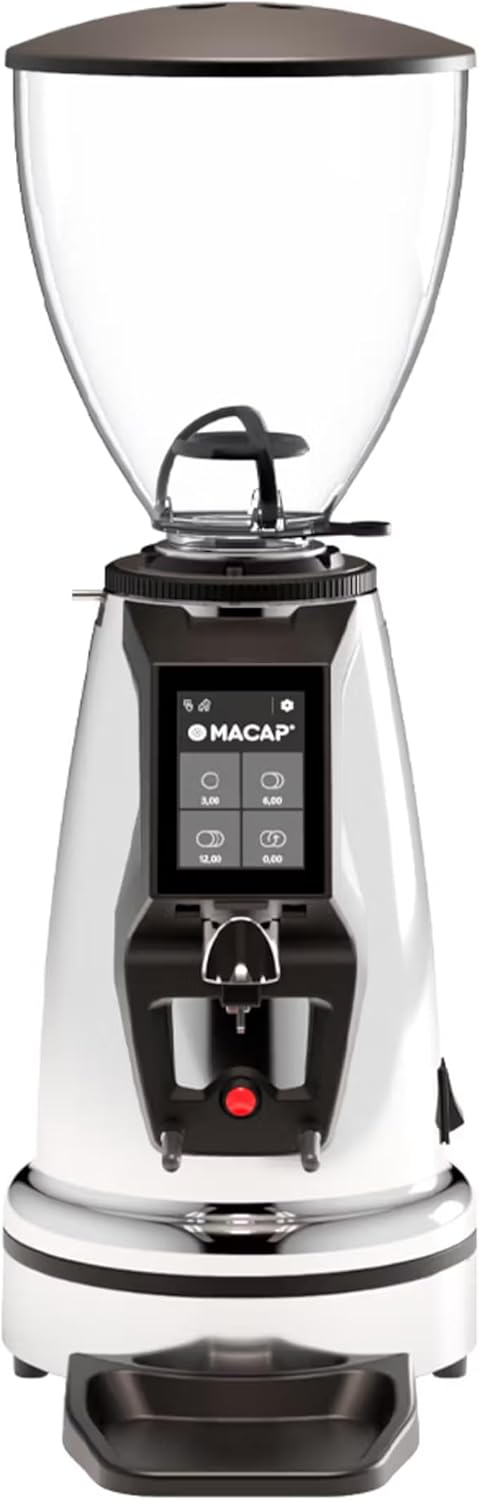
Frente view of the Macap MI40 Touch Instant Burr Coffee Grinder, showcasing its sleek chrome finish and integrated touchscreen display.
2. Informações de segurança
Please read all safety instructions carefully before operating the grinder to prevent injury or damage.
- Always unplug the grinder from the power outlet before cleaning, maintenance, or if it will be left unattended.
- Do not immerse the grinder, power cord, or plug in water or any other liquid.
- Keep hands and utensils out of the bean hopper and grind chute during operation.
- Ensure the bean hopper lid is securely in place before grinding.
- This appliance is intended for grinding whole roasted coffee beans only. Do not grind other substances.
- Do not operate the grinder with a damaged cord or plug, or if the appliance malfunctions or has been damaged in any manner.
- Mantenha o aparelho fora do alcance das crianças.
3. Componentes
Familiarize yourself with the main components of your MI40 Touch coffee grinder:
Funil de feijão: Transparent container for holding whole coffee beans. Capacity: 1.2 Kilograms.

3.5'' Touchscreen Display: Intuitive interface for controlling grind settings, dose programming, and operating modes.

Grind Adjustment Collar: Stepless micrometric adjustment for precise control over grind particle size.

Portafilter Fork & Drip Tray: Adjustable fork to hold your portafilter for hands-free grinding, with a removable drip tray for easy cleaning.
4. Configuração
Follow these steps to set up your Macap MI40 Touch grinder:
- Desembalagem: Carefully remove the grinder and all accessories from the packaging. Retain the packaging for future transport or storage.
- Colocação: Coloque o moedor em uma superfície estável, plana e seca. Certifique-se de que haja ventilação adequada ao redor do aparelho.
- Instalação da tremonha: Place the bean hopper onto the grinder body, aligning the tabs. Rotate the hopper clockwise until it locks securely into place.
- Instalação da bandeja coletora: Slide the removable drip tray into its designated slot at the base of the grinder.
- Conexão de energia: Conecte o cabo de alimentação a uma tomada elétrica aterrada.
- Limpeza Inicial: Antes da primeira utilização, limpe a parte externa com um pano umedecido.amp cloth. Ensure the burrs and grind chute are free of any packing debris.

Lado view of the Macap MI40 Touch grinder, illustrating its compact design and the placement of the bean hopper and drip tray.
5. Instruções de operação
5.1. Ajuste de moagem
The MI40 Touch features stepless micrometric grind adjustment, allowing for precise control over particle size. To adjust the grind:
- Ensure the grinder is off or not actively grinding.
- Rotate the grind adjustment collar located below the bean hopper.
- Girar sentido horário for a finer grind (e.g., for espresso).
- Girar sentido anti-horário for a coarser grind (e.g., for drip, French press, or cold brew).
- Make small adjustments and test the grind to achieve the desired consistency for your brewing method.
Fechar-se view of the grind adjustment collar, showing the numerical markings for reference.
5.2. Interface de tela sensível ao toque
The 3.5-inch touchscreen allows for intuitive control and customization of your grinding experience. It features four programmable dose buttons and various settings.
The 3.5-inch touchscreen display showing the main interface with programmable dose buttons.
For a detailed demonstration of the touchscreen interface and its functionalities, please refer to the official video below:
This video demonstrates the various features and customization options of the 3.5-inch touchscreen interface on the Macap MI Series coffee grinders, including dose programming, color customization, and different operating modes.
5.3. Modos de operação
The MI40 Touch offers three primary operating modes:
- Modo Padrão: Allows you to select a pre-programmed dose by pressing the corresponding button on the touchscreen. The grinder will dispense the set amount of coffee.
- Modo Empurrar e Moer: Grinding starts when the portafilter activates the button on the fork and stops when the portafilter is removed. This mode is ideal for manual control.
- Barista Hands-Free Mode: Similar to Push and Grind, but designed for continuous grinding as long as the portafilter is in place, allowing baristas to multitask.
6. Manutenção e Limpeza
Regular cleaning and maintenance will ensure optimal performance and longevity of your grinder.
6.1. Limpeza Diária
- Calha de moagem: Use a brush or vacuum to clear any residual coffee grounds from the grind chute after each use.
- Bandeja de gotejamento: Remove and empty the drip tray regularly. Wipe it clean with a damp pano e seque bem.
- Exterior: Limpe a parte externa do moedor com um pano macio e seco.amp pano. Não use produtos de limpeza abrasivos ou solventes.

The removable drip tray and portafilter fork area, designed for easy cleaning.
6.2. Limpeza profunda (semanal/quinzenal)
- Desligue o moedor.
- Remova o funil de feijão: Empty any remaining beans. Rotate the hopper counter-clockwise to unlock and remove it.
- Limpar rebarbas: Use a stiff brush or a specialized grinder brush to remove accumulated coffee oils and grounds from the burrs. You may need to remove the upper burr for thorough cleaning (refer to specific instructions in the full manual for burr removal).
- Clean Grind Chamber: Use a vacuum cleaner with a narrow attachment to remove grounds from the grind chamber.
- Remontar: Reinstall the burrs (if removed) and the bean hopper securely.
7. Solução De Problemas
If you encounter issues with your MI40 Touch grinder, refer to the table below for common problems and solutions.
| Problema | Possível causa | Solução |
|---|---|---|
| O moedor não liga. | Não está conectado à tomada; interruptor de energia desligado; disjuntor desarmado. | Check power connection; ensure power switch is on; reset circuit breaker. |
| Não há máquinas de café. | Hopper empty; grind chute clogged; burrs jammed. | Fill hopper; clean grind chute; clear any foreign objects from burrs (unplug first). |
| Moagem inconsistente. | Burrs dirty or worn; grind setting too coarse/fine. | Clean burrs thoroughly; adjust grind setting incrementally. Consider burr replacement if worn. |
| Grinder is excessively noisy. | Objeto estranho em rebarbas; componentes soltos. | Unplug and inspect burrs for foreign objects; check for loose parts. If noise persists, contact support. |
| Tela sensível ao toque sem resposta. | Problema temporário de software; problema de energia. | Unplug the grinder for 30 seconds, then plug back in. If issue persists, contact support. |
8. Especificações
Key technical specifications for the Macap MI40 Touch Instant Burr Coffee Grinder:
| Recurso | Especificação |
|---|---|
| Modelo | MI40 Touch |
| Tipo de rebarba | Flat Burrs |
| Diâmetro da rebarba | 65 mm |
| Potência do motor | 480 W |
| Capacidade do funil | 1.2 quilos |
| Ajuste de moagem | Micrométrico sem degraus |
| Mostrar | 3.5'' Touchscreen |
| Dimensões do produto (C x L x A) | 12" x 7.63" x 22" |
| Peso do item | 19.58 libras |
| País de origem | Itália |
9. Garantia e Suporte
Macap products are manufactured to high standards and undergo rigorous quality control. For warranty information, technical support, or service inquiries, please refer to the warranty card included with your product or visit the official Macap website. Please have your model number (MI40 Touch) and purchase date available when contacting support.


